
How CRM Workflows Improve Email Campaigns
Use CRM workflows to automate segmented, personalized emails, improve open/click rates, and reduce manual work for higher conversions.
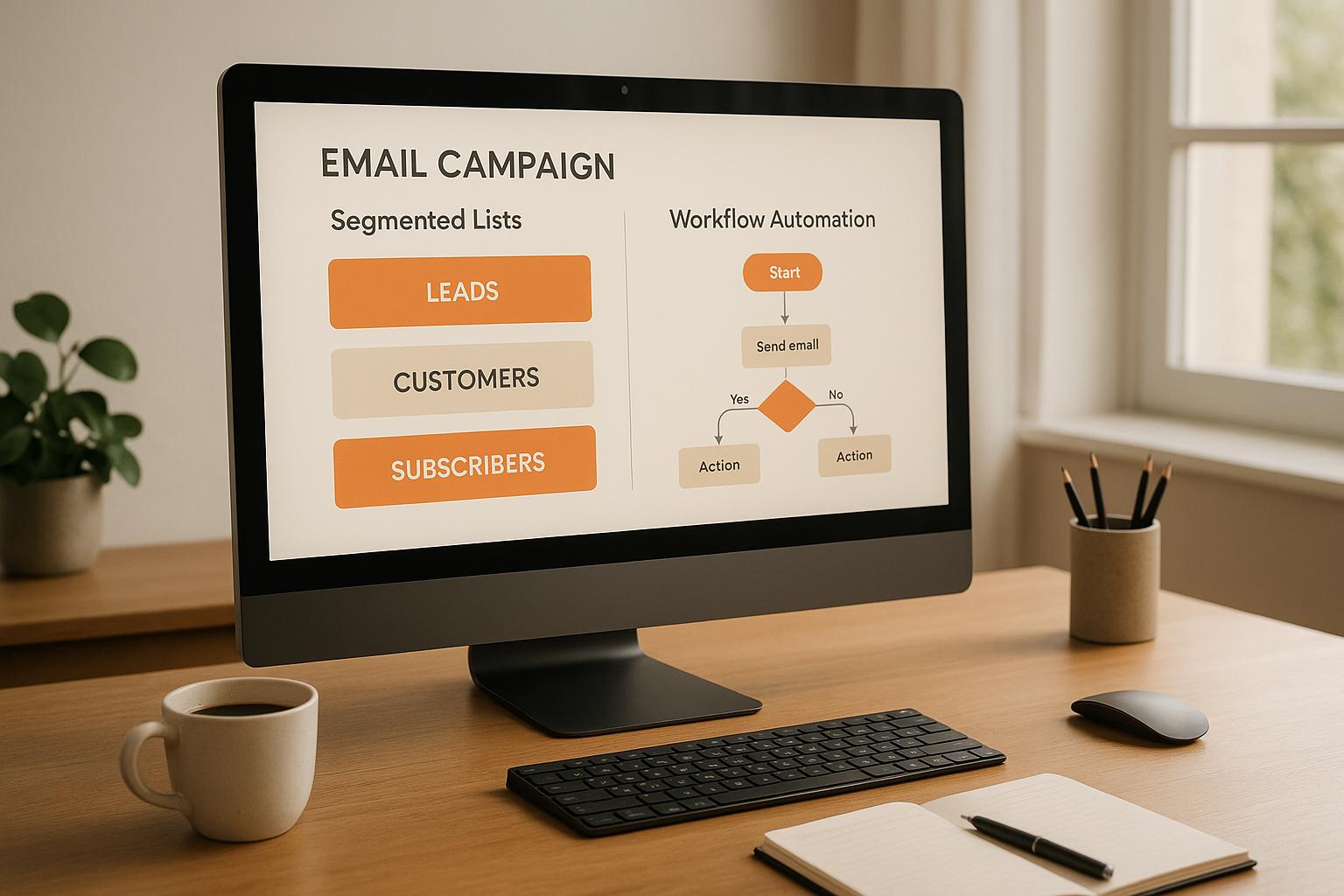
CRM workflows automate email campaigns by using triggers, actions, and conditions to send personalized messages at the right time. This approach improves open rates by up to 26%, boosts click rates by 20–40%, and increases lead conversions by 10–25%. Workflows save time by reducing manual tasks by 30–50%, making them especially useful for complex B2B sales cycles.
Key Benefits:
- Segmentation: Tailor emails based on lifecycle stage, engagement, firmographics, or behavior.
- Personalization: Use CRM data (e.g., purchase history, preferences) to craft relevant messages.
- Timing: Trigger emails based on user actions or optimal send times.
Example Use Cases:
- Welcome Series: Automate follow-ups for new subscribers.
- Lead Nurturing: Guide prospects through the sales funnel.
- Re-engagement: Reconnect with inactive contacts using targeted sequences.
By combining CRM workflows with tools like Breaker, businesses can streamline email marketing, nurture leads efficiently, and drive measurable results like higher engagement and revenue growth.
What Is CRM Integration For Email Workflow Automation? - TheEmailToolbox.com
What Are CRM Workflows and How Do They Work?
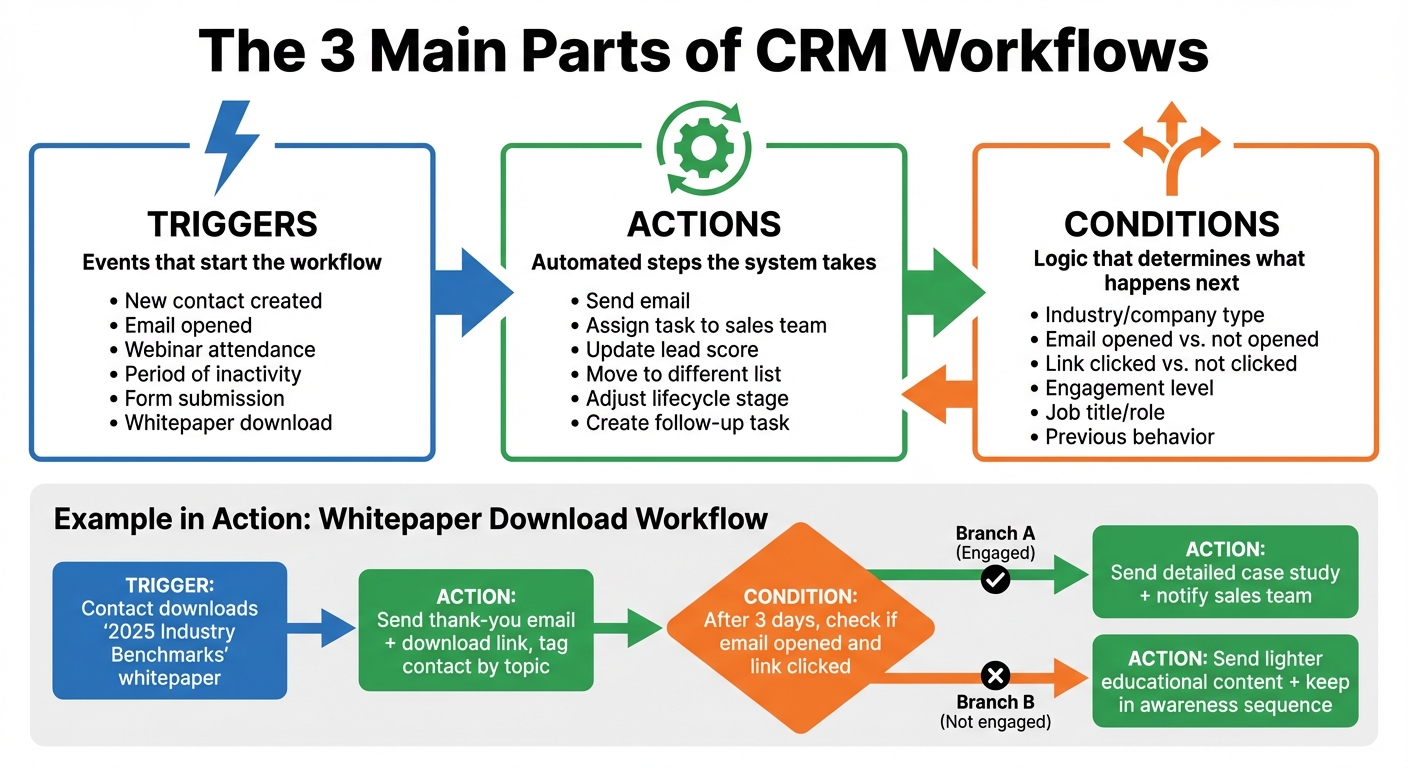
How CRM Workflow Components Work Together: Triggers, Actions, and Conditions
CRM Workflows Defined
Let's break down how automated CRM workflows operate and why they’re so effective.
A CRM workflow is essentially an automated series of emails and tasks managed within your CRM system. Unlike one-size-fits-all email blasts, these workflows continuously track your contacts and send personalized, timely emails based on where each person is in their customer journey. For instance, if someone subscribes to your newsletter, the CRM can automatically kick off a welcome email series. Or, if a contract renewal is approaching in 90 days, it can trigger a retention-focused sequence. All of this happens without you lifting a finger, turning static email campaigns into dynamic, data-driven interactions.
The 3 Main Parts of CRM Workflows
Every CRM workflow relies on three essential components to guide contacts through personalized email journeys: triggers, actions, and conditions.
- Triggers
Triggers are the events or changes in your CRM that set a workflow in motion. These could include creating a new contact, an email being opened, webinar attendance, or even periods of inactivity. For example, if someone downloads a whitepaper or registers for a webinar, the system can instantly enroll them in a nurture sequence.
- Actions
Actions are the automated steps the system takes once a trigger occurs. While sending an email is the most common action, workflows can also assign follow-up tasks to sales teams, update lead scores, move contacts to different lists, or adjust lifecycle stages. For instance, if a lead clicks on a pricing page link, the workflow might send a product-focused email and also create a task for a sales rep to follow up.
- Conditions
Conditions use branching logic to determine what happens next based on a contact’s behavior or attributes. For instance, a contact working in SaaS might receive one version of an email, while someone in manufacturing gets another. Similarly, if a contact opens an email but doesn’t click, they might get an educational follow-up, whereas a click could lead to a product-focused email. This logic ensures that every message is tailored to the recipient’s segment and stage in the journey.
Here’s how these pieces come together in action: Imagine a contact fills out a form to download a "2025 Industry Benchmarks" whitepaper. That form submission acts as the trigger. The workflow immediately sends a thank-you email with the download link and tags the contact by topic. A few days later, the system checks whether the email was opened and the link clicked. If the contact engaged, the workflow might send a detailed case study and notify the sales team. If not, it could send a lighter educational piece while keeping the contact in a general awareness sequence.
This organized system allows for precise segmentation and targeting, helping your email campaigns resonate more effectively with your audience.
How CRM Workflows Improve Email Campaign Results
CRM workflows take email campaigns to the next level by enabling smarter segmentation, more personalized messaging, and precise timing. These elements build on the benefits of CRM systems, creating real-time, tailored engagement that resonates with your audience.
Segment Leads Using CRM Data
The success of an email campaign often hinges on delivering the right message to the right audience. CRM workflows make this possible by allowing you to segment your contacts based on various factors like lifecycle stage (e.g., lead, marketing-qualified lead, sales-qualified lead, or customer), engagement level (recent activity versus inactivity), firmographics (industry, company size, job title, revenue), and behaviors (such as downloading a whitepaper, attending a webinar, or visiting specific product pages).
For example, if a contact opened your last email but didn’t respond, they could automatically receive a follow-up message a few days later. Meanwhile, someone who clicked on your pricing page might be added to a product-focused email sequence. This targeted approach significantly boosts open and click rates by ensuring your emails are relevant to each recipient.
Personalize Emails with CRM Information
Personalization goes far beyond just adding a recipient’s first name or company name. With CRM workflows, you can leverage detailed data like purchase history, browsing activity, support interactions, and content preferences to craft emails that feel genuinely tailored. For instance, you could reference a contact’s last interaction - “Following up on your demo from October 15…” - or recommend products based on their previous purchases. You can even customize your value proposition to align with their industry or role.
Dynamic content blocks take personalization a step further by allowing entire sections of your email - such as the hero image, call-to-action, or customer testimonial - to change based on the recipient’s segment. For B2B newsletters, tools like Breaker integrate seamlessly with CRMs to analyze subscriber engagement and performance data, enabling you to fine-tune your workflows for maximum impact. This level of personalization makes each email feel thoughtfully crafted, driving higher engagement and conversion rates.
Send Emails at the Right Time Using CRM Analytics
Even the best email content can fall flat if it lands in a recipient’s inbox at the wrong time. This is where CRM analytics shine, providing insights into when your contacts are most likely to open and click emails. For instance, B2B audiences might respond better to emails sent early on weekday mornings, while retail customers might be more active during evenings or weekends.
CRM workflows can also trigger emails based on specific behaviors. If a lead downloads a whitepaper, a follow-up email can be sent immediately. Similarly, reminders can be scheduled for when a trial period is about to end. Features like frequency caps prevent email fatigue by limiting the number of messages a contact receives in a given timeframe, while pause rules automatically suppress emails to contacts who have bounced or marked messages as spam. Regular A/B testing of send times, combined with CRM reporting, ensures your strategy stays effective and adaptable.
How to Build Automated Email Sequences with CRM Workflows
Using CRM workflows, you can design automated email sequences that keep your audience engaged and your processes efficient.
Start by organizing your CRM data: eliminate duplicates, standardize fields, and clearly define lifecycle stages. Map out the customer journey from their initial sign-up to the final purchase, identifying key moments where automated emails can make a difference. Configure your automation settings by aligning with U.S. time zones, connecting your sending domain, and enabling safeguards to ensure email deliverability.
Set Up a Welcome Email Series
Kick off your email automation with a welcome series. Create a workflow triggered by specific actions, such as when a contact is added to a list like "Newsletter Subscribers".
- Email 1: Send immediately upon sign-up to confirm their subscription and provide essential resources.
- Email 2: Follow up 1–3 days later to introduce your brand story and share top content tailored to their industry or company size.
- Email 3: After 3–7 days, offer a soft conversion opportunity, such as a demo or free trial.
Set up exit rules so that contacts who convert early are removed from the sequence, ensuring they don’t receive irrelevant follow-ups. Also, schedule emails to be sent in the recipient's local time zone for better engagement. For B2B newsletters, tools like Breaker can automatically feed new, high-intent subscribers into your CRM, triggering the welcome series as soon as they join.
Create Lead Nurture Campaigns
Lead nurture campaigns are essential for guiding prospects through the sales funnel. Start by defining a clear goal, such as converting leads to sales-qualified status or increasing demo bookings. Use behavior-based triggers in your CRM to enroll contacts into relevant sequences. For example:
- "Downloaded whitepaper X → enroll in nurture sequence A."
- "Visited pricing page twice in 7 days → switch to high-intent sequence".
Structure your emails to guide leads from awareness to solution, ending each with a clear call-to-action. Your CRM can dynamically adjust the path - engaged leads who frequently open and click emails can be fast-tracked to sales-ready sequences, while less active contacts can stay in lighter educational flows. For B2B audiences in the U.S., space emails 3–7 days apart. Use engagement data from your CRM to fine-tune the timing and avoid overwhelming your audience.
Once your lead nurture campaigns are in place, you can focus on re-engaging inactive contacts.
Bring Back Inactive Leads
To re-engage inactive contacts, start by defining inactivity - for instance, no email engagement in 90 days or no site visits in six months. Build a workflow with entry conditions based on these inactivity markers.
Send a short sequence of 2–3 emails over 2–4 weeks:
- Acknowledge their inactivity and share valuable content to regain interest.
- Offer a limited-time incentive to encourage re-engagement.
- Request feedback on their subscription preferences.
This concise approach helps protect your deliverability rates. For programs powered by tools like Breaker, these re-engagement workflows ensure your list remains full of engaged, high-quality B2B subscribers, which helps maintain strong open and click rates.
How to Measure CRM Workflow Performance
Once your workflows are set up, the next step is figuring out how well they’re working. By analyzing performance metrics through your CRM's dashboard, you can quickly spot areas that need improvement and fine-tune your strategy.
Track Key Metrics with CRM Reports
To measure audience engagement, start with these essential metrics:
- Open rate: The percentage of recipients who open your emails.
- Click-through rate (CTR): The number of people who click a link in your email.
- Click-to-open rate (CTOR): This shows how many clicks you got compared to the number of opens, giving you insight into how engaging your content is.
- Conversion rate: Tracks the percentage of contacts who take the action you want, like signing up or making a purchase.
Most CRM platforms, like HubSpot and Salesforce, make it easy to track these metrics with detailed dashboards. You can filter data by lifecycle stage, industry, or behavior to see which segments perform best. For instance, you might find that contacts who downloaded a whitepaper convert 35% more often than those who only visit the pricing page. Tools like Breaker offer real-time analytics for B2B newsletters, reporting average open rates of 60% and click-through rates of 40%, helping you refine your email strategy.
Don’t overlook bounce and unsubscribe rates - they directly impact your sender reputation. Keep unsubscribe rates under 0.5%, and configure your CRM to suppress contacts after hard bounces or spam complaints. Additionally, linking your email platform to multi-touch attribution tools can help you track pipeline influenced and revenue generated by each workflow, providing a fuller picture beyond engagement stats.
These metrics provide a strong foundation for comparing automated workflows with manual campaigns.
Manual Campaigns vs. Workflow-Driven Campaigns
Automated workflows often outperform manual campaigns, and analyzing the data can prove their value. Metrics like engagement and conversion rates will show whether your workflows are delivering the results you expect.
Here’s a quick comparison of typical performance metrics:
Metric
Manual Results
Workflow Results
Improvement %
Open Rate
15%
25%
67%
Click-Through Rate
2%
4%
100%
Conversion Rate
1%
1.5%
50%
Setup Time
Baseline
30–50% reduction
30–50%
To validate these improvements, use your CRM reports to track performance over a 3–6 month period. Export the data to compare results before and after implementing workflows, focusing on revenue impact to highlight the ROI of automation. Run A/B tests on subject lines, CTAs, and send times to fine-tune your approach. Even small gains, like a 15% boost in CTR, can make a big difference over time.
Conclusion
CRM workflows have reshaped email campaigns by automating key elements like segmentation, personalization, and timing. These workflows allow you to send targeted messages tailored to where each contact is in your funnel, what resources they've interacted with, and when they're most likely to respond. The results? A boost in open and click rates by 20–40%, a 10–25% increase in conversions, and a reduction in manual setup time by 30–50%.
By removing repetitive tasks like list building and manual follow-ups, automated workflows let your team focus on strategy. Once you’ve established essential sequences - such as welcome, nurture, and re-engagement - they operate continuously and scale with ease. This kind of flexibility is particularly valuable for navigating complex B2B sales cycles.
To fully leverage this advantage, start by defining your lifecycle stages, outlining critical workflows, and linking them to measurable CRM performance metrics. Monitor which sequences drive key outcomes, like booked meetings or revenue growth in USD, for clear ROI insights. Experiment with A/B testing for elements like subject lines and send times, and refine your strategy based on the data.
For teams leaning heavily on newsletter-driven funnels, tools like Breaker can enhance your CRM workflows. Breaker offers access to highly engaged, precise B2B subscribers and real-time analytics. By syncing this data with your CRM, you can create personalized follow-ups based on how subscribers engage with your newsletters, seamlessly converting them into qualified leads. This integration underscores the continuous, data-driven improvement emphasized throughout this guide.
Shifting to CRM-driven automation delivers more than just better engagement and conversion rates - it provides scalable, efficient processes that align with the promise of smarter, data-informed marketing.
FAQs
How do CRM workflows improve email personalization?
CRM workflows take email personalization to the next level by automating the process of delivering tailored messages. By analyzing subscriber behavior, preferences, and past interactions, they ensure your audience gets the right message at just the right moment.
This kind of personalization strengthens your connection with subscribers, boosts engagement, and enhances the chances of turning interactions into conversions. Plus, by simplifying the process, CRM workflows not only save you time but also create a more individualized experience for your audience.
What events can trigger a CRM email workflow?
CRM email workflows kick into action based on specific triggers. For example, they can start when a new lead is added to your system, someone submits a form, or a visitor browses your website. Other popular triggers include key dates, like anniversaries or renewals, and interactions with previous emails or content.
These triggers ensure your emails are sent at just the right time, making your campaigns more personalized and impactful.
How do CRM analytics help determine the best time to send emails?
CRM analytics can determine the ideal time to send emails by examining real-time engagement metrics, such as open rates and click-through rates. By understanding when your audience is most active and likely to respond, you can strategically time your emails for maximum impact.
This method ensures your messages land in inboxes when subscribers are most engaged, helping to enhance campaign performance and drive better results.
Related Blog Posts
Keep reading
All articlesGDPR Consent Requirements for Purchased Email Lists
Purchased email lists rarely meet GDPR's consent bar. Learn the legal basis rules, PECR overlap, and safer alternatives before you hit send.
7 Email Platforms With Inbox Placement Testing & Suppression
Compare 7 email platforms that combine inbox placement testing with suppression management, scored on features, pricing, and best-fit sender size.
Email Automation Workflow & Drip Campaign Data Structure
Learn the database schema behind email drip campaigns—tables, workflow states, and event logs that power reliable marketing automation.