
Ultimate Guide to B2B Subject Line Personalization
Craft personalized B2B email subject lines that increase open and reply rates—practical strategies, examples, and tools to scale personalization effectively.
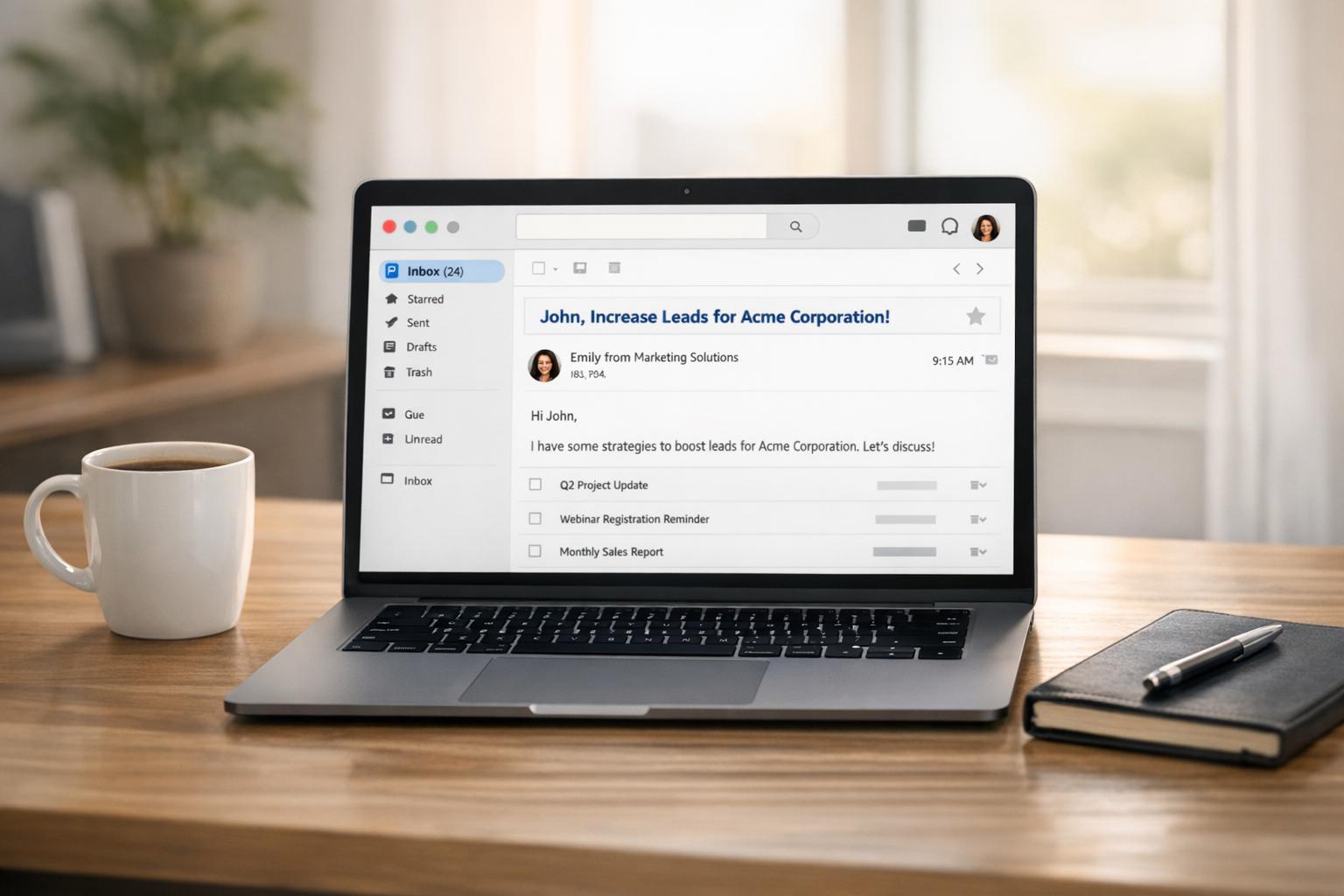
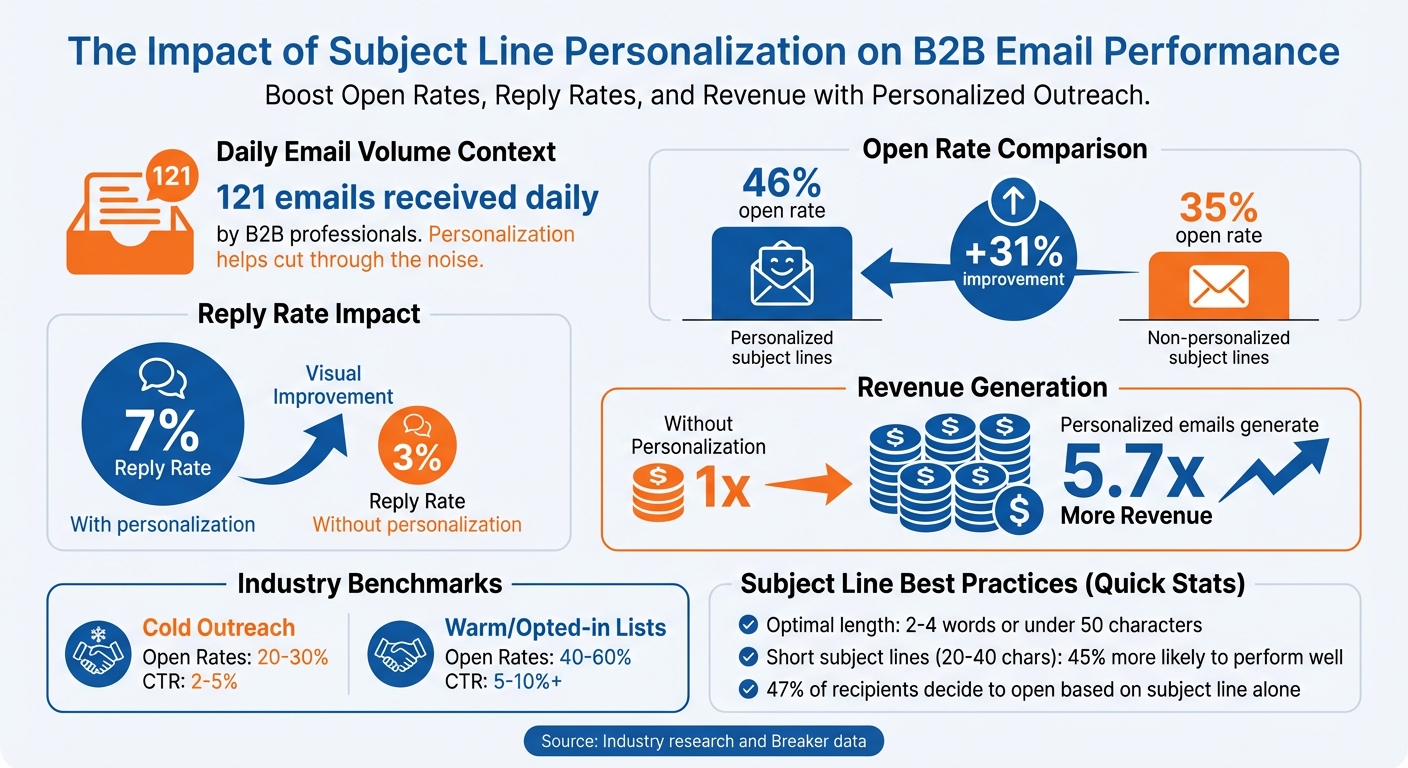
Want your B2B emails to stand out? Start with your subject line. Personalized subject lines can boost open rates by 46% compared to generic ones. In B2B, where inboxes are crowded with 121 emails daily, personalization isn’t just a nice-to-have - it’s crucial for engagement.
Here’s what works:
- Use recipient data: Include names, job titles, or company info. Example: "Sarah, see what's new at Acme Corp."
- Address pain points: Highlight challenges like "Reduce churn by 15% this quarter."
- Add urgency and value: Use clear, time-sensitive benefits like "Boost sales 15% by March 31."
- Leverage tools: Platforms like Breaker automate personalization and track performance.
Short, relevant, and personalized subject lines not only improve open rates but also drive higher reply rates and revenue. Let’s dive into the strategies that make it happen.
B2B Email Personalization Statistics: Open Rates, Reply Rates & Revenue Impact
B2B Subject Lines Review: Best to Worst
Proven Strategies for B2B Subject Line Personalization
When it comes to crafting subject lines that resonate, the best strategies go beyond adding a recipient's first name. They tap into specific data, address real challenges, and clearly highlight value to create a genuine connection.
Personalizing with Recipient Data
The easiest way to start personalizing your subject lines is by using the information you already have. Including first names, company names, or job titles adds a touch of familiarity. For instance, swap out a generic line like "New features you'll love" for something like "Sarah, see what's new at Acme Corp." This small tweak can make a big difference, as seen in campaigns achieving a 46% open rate.
For a deeper level of personalization, consider using behavioral and event-based data. Mention a product the recipient recently viewed, an abandoned cart, or even a specific page they visited on your site. You can also tie your subject line to external milestones, like a recent promotion, funding announcement, or an article they authored. By leveraging custom variables (e.g., {{painPoint}}, {{competitor}}, {{Objective}}), you can pull data directly from your CRM to personalize at scale.
Kirill Potapkin, Head of Content at Belkins, emphasizes the importance of this approach:
"Investing in personalization isn't just an option. It's non-negotiable. Personalized subject lines don't just entice opens. They make recipients far more inclined to engage, respond, and take the next step."
Keep your subject lines concise - ideally 2–4 words - to maintain high open rates. Since mobile devices often truncate longer lines, aim for under 35–50 characters (or 7–8 words). This ensures your message is clear and impactful, even at a glance.
Highlighting Specific Pain Points and Challenges
Calling out a specific challenge can make your subject line feel instantly relevant. When recipients see a problem they face, the email feels tailored to them. Be precise. For example, instead of "Struggling with sales?" try "Reduce churn by 15% this quarter" or "Is manual reporting eating 20 hours a week?" Subject lines like these can achieve open rates as high as 46%.
Adding hard numbers can amplify the impact. For instance, "175 Hrs/Month Back" outperforms generic lines, with a 45% higher open rate. Taisia Mendel, Senior Content Strategist at Belkins, explains why this works:
"Personalized subject lines that pose a question seem to spark interest and invite interaction, likely because they are authentic and suggest the email contains an answer or insight the reader may find valuable."
To avoid sounding generic, research your prospect’s industry or role. Pair your subject line with preview text that hints at a solution - this combination keeps recipients curious and engaged. Remember, while the subject line highlights the problem, your email body must deliver the solution. Avoid overpromising or using high-pressure phrases like "Act Now", which can trigger spam filters and damage trust.
Adding Urgency and Clear Value
Creating urgency and showcasing value can drive immediate action, but it’s important to avoid gimmicks like fake scarcity.
Lead with the most important benefit in the first five words so it’s visible on mobile devices. For example, instead of "We have an exciting opportunity for you", try "Boost sales 15% by March 31" - a direct, time-sensitive, and quantifiable statement.
Tie urgency to real events, such as webinar dates, registration deadlines, or limited consultation slots. A subject line like "3 spots left for Feb. 15 workshop" feels genuine, unlike "Limited time offer!" which can come across as manipulative. Morgan Mulloy, Associate Director of Retention Marketing at Avex Designs, advises:
"Make sure your email subject line is relevant to your target audience. The terminology you use should appeal to that specific audience."
Incorporate power words like "discover", "unlock", "boost", and "proven", and combine them with numbers for added impact. For example, "Unlock 3 proven tactics to cut costs 20%" is far more engaging than vague alternatives.
Finally, create curiosity by hinting at valuable details without giving everything away. For example, "How 47 SaaS companies reduced CAC by 30%" leverages social proof while sparking interest. Ensure your email delivers on the promise to maintain trust. Avoid all caps, which can feel aggressive and trigger spam filters, and opt for sentence case for a more conversational tone. Replace high-pressure words like "Free" with alternatives like "Complimentary" or "Proven results" for a more professional appeal. And always keep subject lines under 50 characters to avoid truncation on mobile devices.
Tools and Technology for Subject Line Personalization
Personalizing subject lines at scale requires the right technology. Modern tools integrate with CRMs, use dynamic data insertion, and leverage real-time analytics to automate the process. These technologies pull valuable customer insights - like lifecycle data, behavioral triggers, and demographic details - directly into your email campaigns. This ensures you can deliver personalized experiences without compromising on quality. Breaker’s solutions are built on this foundation to make personalization seamless and effective.
How Breaker Enables Personalized Subject Lines
Breaker simplifies subject line personalization by connecting to your existing systems to access customer data - such as names, company details, or recent actions - and automatically inserting this information into subject lines using dynamic tags. For instance, a template like "{{firstName}}, reduce churn at {{companyName}}" becomes unique for each recipient, reinforcing the effectiveness of personalization. Tailored subject lines have been shown to increase open rates by up to 46%.
Breaker also offers a free Email Subject Line Generator to help you craft compelling, personalized subject lines quickly. Considering that 47% of recipients decide whether to open an email based solely on its subject line, having a tool to generate variations efficiently can save time and improve results. Breaker emphasizes clarity and relevance, steering clear of overused, hype-filled phrases that can lower open rates below 36%.
Using Breaker's Performance Analytics
Crafting the perfect subject line is just the beginning - tracking its performance is equally critical. Breaker’s real-time analytics dashboard monitors over 40 metrics, including open rates, clicks, and deliverability, while supporting A/B testing for variables like subject line length, tone, emojis, and benefit-focused statements. For example, you could compare "Sarah, see what's new at Acme Corp" with "3 ways Acme Corp can cut costs 20%" to determine which drives better engagement. Since subject lines between 20 and 40 characters are 45% more likely to perform well, Breaker’s analytics help you pinpoint what works best for your audience.
Additionally, the Newsletter Engagement Score tool provides instant insights into performance, helping you understand not only what happened but also why. These analytics enable you to fine-tune your campaigns and scale personalization efforts effectively.
Scaling Personalization with Breaker's Plans
As your campaigns grow, you’ll need a platform that can keep up. Breaker offers two plans tailored to different stages of growth.
- Starter Plan: At $200/month, this plan supports up to 50,000 email sends and adds 100 new engaged subscribers each month. It’s ideal for small to mid-sized B2B teams experimenting with personalization strategies.
- Custom Plan: Priced at $1,750/month, this plan scales to 250,000 email sends and 1,000 engaged subscribers monthly. It includes advanced features like behavioral triggers and full CRM workflow automation, making it perfect for enterprise teams.
Both plans include unlimited email validations to ensure your data stays clean and accurate. Given that personalized subject lines can boost open rates by 50%, investing in a reliable platform like Breaker can deliver a strong return on investment. With white-glove support and unlimited user access, Breaker ensures your entire team can collaborate effectively on personalization efforts without limitations.
Measuring and Improving Personalization Results
Key Metrics to Track
Once you've implemented personalized strategies, tracking specific metrics is essential to gauge their effectiveness and ensure your efforts drive engagement.
One key indicator is the open rate, which reflects initial interest. For B2B cold outreach, open rates typically range from 20% to 30%. For warm or opted-in lists, this number jumps to 40% to 60%. Personalized subject lines often perform better, achieving a 46% open rate compared to 35% for non-personalized ones - a 31% increase in visibility.
Another critical metric is the click-through rate (CTR), which measures how many recipients clicked a link after opening your email. While the email body plays a significant role in driving clicks, the subject line sets the tone and influences whether readers take action. Cold outreach campaigns generally see a CTR between 2% and 5%, whereas warm nurture campaigns can reach 5% to 10% or more. For B2B outbound efforts, the reply rate is particularly important. It reflects genuine engagement, with personalization often boosting reply rates from 3% to 7%. Tracking conversions from replies can also provide a direct link to revenue impact.
It's equally important to monitor your bounce rate and spam complaint rate. High bounce rates can harm your sender reputation, and even a small spam complaint rate - such as 0.1% - can negatively affect deliverability on platforms like Gmail and Outlook. By analyzing these metrics together, you get a clearer picture of how well your personalized subject lines are performing.
These metrics lay the groundwork for improving your personalization efforts systematically.
Using Analytics to Improve Performance
To refine your campaigns, compare your results against industry benchmarks - like a 20% to 30% open rate for cold outreach - and use A/B testing to identify what resonates with your audience. For large-scale campaigns, start by testing multiple variants on 10% of your audience. Once you've identified the top-performing version, validate it on another 20% before rolling it out to the remaining 70%.
Keep a record of underperforming elements. For example, if subject lines with all-caps or excessive punctuation consistently fail, add these to a "do not use" list for future campaigns. When analyzing reply rates, categorize responses into positive, neutral, and negative to assess whether your personalization efforts are attracting the right kind of engagement. Back in October 2014, CoSchedule leveraged Campaign Monitor to A/B test their newsletter over two months. They found that shorter subject lines (40 to 50 characters) worked best for their mobile-heavy audience, and surprisingly, questions in subject lines reduced open rates.
For more accurate metrics, exclude opens from Apple Mail Privacy Protection (MPP) users. Additionally, for critical campaigns, try resending the same email with a different subject line to recipients who didn’t open it initially - this approach can increase total opens by as much as 45%. Regularly clean your email list by removing subscribers who haven’t engaged in 6 to 18 months. This not only improves the accuracy of your open rate data but also enhances deliverability.
Conclusion: Increase Engagement with Personalized Subject Lines
Personalization can make or break your email campaigns - it’s what separates emails that get opened from those that get ignored. Research backs this up: personalized subject lines achieve a 46% open rate compared to 35% for generic ones, and reply rates jump from 3% to 7% when personalization is used. Even more compelling, emails with personalized elements generate 5.7 times more revenue. The numbers make it clear - this is a strategy you can’t afford to overlook.
This guide has outlined actionable strategies to help you craft subject lines that resonate. From leveraging variables like {{painPoint}} and {{competitor}} to using question-based formats and optimizing for mobile, these techniques provide a solid framework you can start using today. Keep subject lines short - ideally 2–4 words - steer clear of spammy language, and test consistently to discover what works best with your audience.
To take it further, Breaker's platform simplifies the process by automating lead generation while keeping your audience targeting precise. With tools to create personalized subject lines and real-time analytics to track open rates, click-through rates, and replies, you’re equipped to fine-tune your approach and scale your efforts effectively. These strategies, paired with the right tools, ensure that your emails land in front of the right people and drive meaningful engagement.
FAQs
How can I personalize B2B email subject lines to increase engagement?
To make B2B email subject lines more engaging, start by tapping into the data you already have about your prospects. Use firmographic information (like the size of their company or the industry they’re in), technographic data (such as the software they use or recent product launches), and behavioral insights (like pages they’ve visited on your website or content they’ve downloaded) to build a clear picture of your audience.
Once your data is organized, use tools like dynamic tags or AI to create subject lines that feel personalized. For example, you might write, “Congrats on your new product launch, {first_name}!” or “How {company} can cut 20% off cloud costs.” These small, specific touches make emails feel more relevant while still being scalable for larger campaigns.
Don’t forget to test and tweak your subject lines. A/B testing is a great way to see which versions get more opens - personalized subject lines, for instance, can increase open rates by about 26%. Keep analyzing the results to fine-tune your segmentation and messaging, turning your subject lines into key drivers of engagement and conversions.
What metrics should I track to evaluate the performance of personalized subject lines?
To evaluate how well your personalized subject lines are performing, keep an eye on a few key metrics. Start with the open rate, which tells you how many recipients are actually opening your emails - a direct indicator of how engaging your subject lines are. Next, look at the click-through rate to see how well your email content is driving readers to take action.
You’ll also want to check the conversion rate, as it reveals how effectively your subject lines are contributing to your broader business objectives. Don’t overlook subscriber growth or churn rates either; these metrics offer insight into how well you’re retaining your audience. For a deeper understanding of your campaign's financial success, track revenue per email to see the monetary value each email delivers.
How does adding urgency to subject lines affect email open rates?
Using urgent language in subject lines - like “Last chance,” “Important,” or “Reminder” - can noticeably increase email open rates. These words create a sense of immediacy, grabbing attention and prompting recipients to act without delay.
Studies reveal that urgency taps into the fear of missing out (FOMO), a powerful motivator. By emphasizing time sensitivity or exclusivity, such phrases make emails feel more pressing, encouraging readers to engage right away.
Related Blog Posts
Keep reading
All articlesPost-Webinar Survey Questions Template (2026)
30+ post-webinar survey questions with NPS, CSAT, and CES templates, plus timing and length tips to boost completion and qualify leads faster.
GDPR Consent Requirements for Purchased Email Lists
Purchased email lists rarely meet GDPR's consent bar. Learn the legal basis rules, PECR overlap, and safer alternatives before you hit send.
7 Email Platforms With Inbox Placement Testing & Suppression
Compare 7 email platforms that combine inbox placement testing with suppression management, scored on features, pricing, and best-fit sender size.