
How To Calculate ROI for Newsletter Automation
Measure the ROI of newsletter automation by tracking attributed revenue, tallying platform and labor costs, and applying (Revenue – Costs) ÷ Costs.
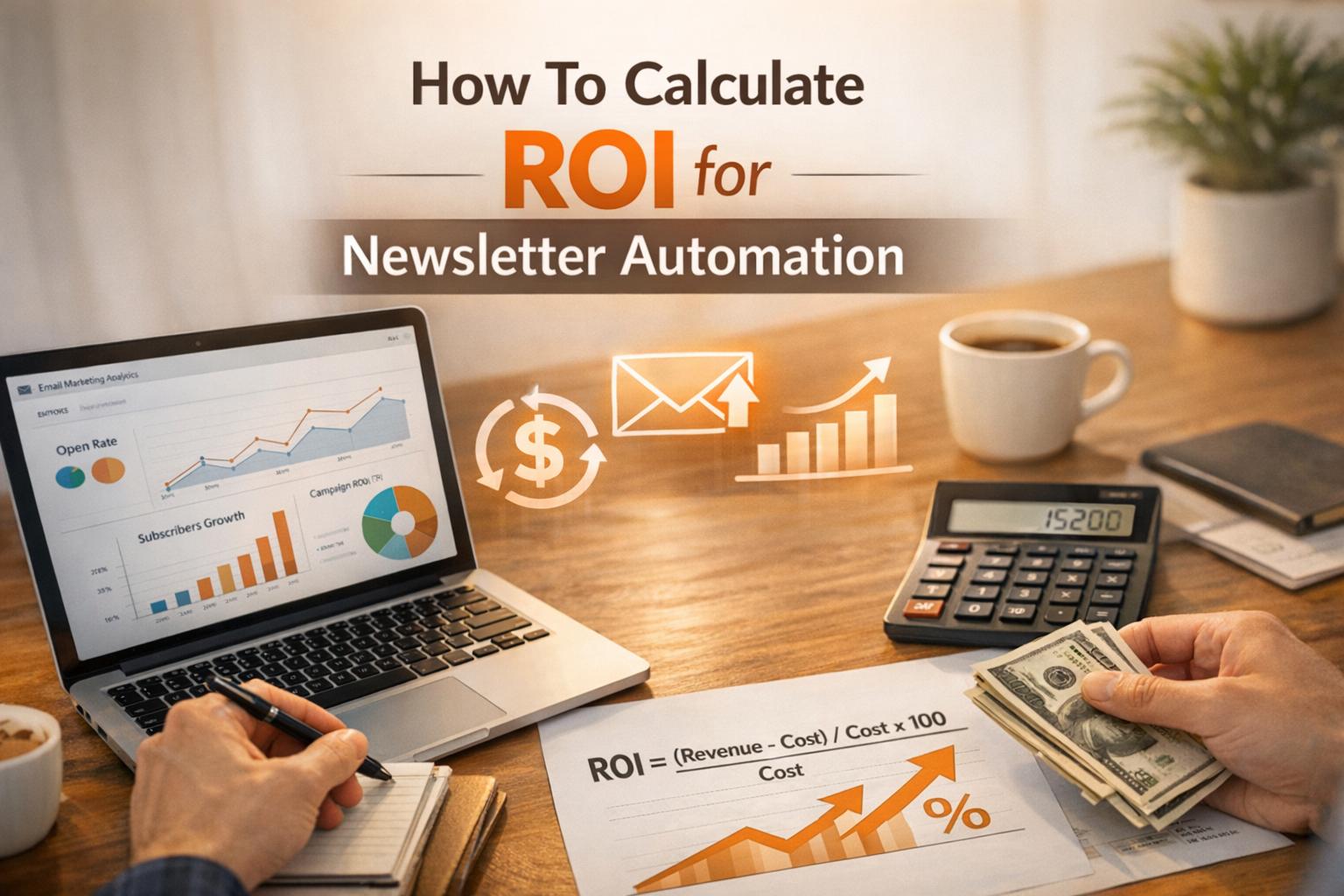
Want to know if your newsletter automation is worth the investment? Calculating ROI is the key. Here's the formula:
ROI = (Revenue – Costs) ÷ Costs × 100
For example, if you spend $1,000 and generate $5,000 in revenue, your ROI is 400% - you’re earning $4 for every $1 spent.
Key Takeaways:
- Revenue Sources: Include direct sales, lead generation, sponsorships, and affiliate earnings.
- Costs to Track: Platform fees, labor, content creation, and maintenance.
- Typical ROI Benchmarks: Email marketing averages $36–$44 per $1 spent, with automation driving 320% more revenue per email compared to manual campaigns.
By tracking revenue, calculating costs, and applying the ROI formula, you can measure the success of your email efforts and identify areas for improvement.
Pro Tip: Tools like Breaker and Google Analytics simplify revenue tracking and attribution, helping you refine campaigns for better results.
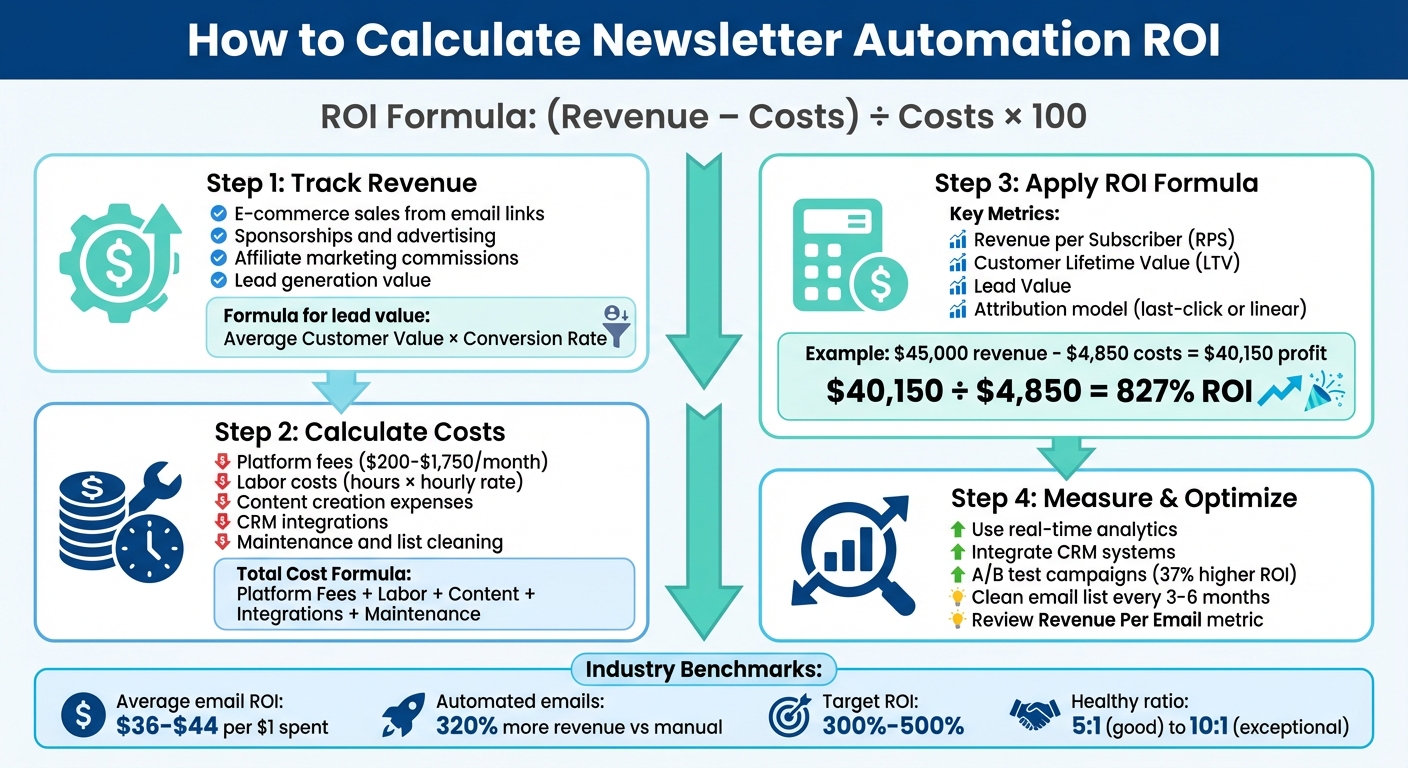
4-Step Process to Calculate Newsletter Automation ROI
What Is ROI and Why It Matters for Newsletter Automation
ROI, or Return on Investment, measures the profit earned compared to the money spent. When it comes to newsletter automation, ROI helps determine if your campaigns are boosting revenue or simply burning through your budget.
The formula is simple: ROI = (Revenue – Costs) / Costs × 100. For example, if you spend $1,000 on a campaign and generate $5,000 in revenue, your ROI is 400%. That means you’re earning $4 for every dollar invested.
"Return on investment (ROI) is a measure used to evaluate the efficiency and profitability of an investment. In this case, it is a measure of the profitability of email marketing." - Campaign Monitor
Email marketing can deliver impressive results, with ROI reaching as high as 4,400%. A 5:1 ratio is considered solid, while 10:1 is exceptional.
Key Components of ROI
To understand ROI, you need to break it down into three essential parts: revenue, costs, and net gain. Each plays a crucial role in evaluating the performance of your newsletter automation.
- Revenue: This includes direct sales from email campaigns, the value of leads (calculated using the number of leads, your lead-to-customer conversion rate, and your average sales price), and even intangible benefits like increased brand awareness.
- Costs: These are your expenses, such as Email Service Provider (ESP) fees, automation software costs, and employee wages. For instance, if your ESP costs $200 monthly and your team spends 20 hours at $50 per hour, your total monthly cost would be $1,200.
- Net Gain: This is the difference between your revenue and costs. It reveals whether your automation efforts are profitable or need adjustments.
Breaking these elements down provides a clear picture of how your investment is performing and where you might need to reallocate resources.
How ROI Reflects Newsletter Automation Performance
Once you understand the components, ROI becomes a powerful tool for measuring the success of your newsletter automation.
A strong ROI eliminates the need for guesswork, showing whether your campaigns are profitable. If your ROI falls below a 2:1 ratio, it’s a sign that you need to rethink aspects like targeting, content, or sending frequency. On the flip side, a healthy ROI for email marketing typically falls between 300% and 500%.
A negative ROI is a clear warning that your strategy isn’t working - either your costs are too high, or your revenue generation needs improvement.
For well-established email programs, 30% to 50% of total email revenue should ideally come from automated flows rather than manual campaigns. This balance ensures your automation efforts are driving consistent and measurable results.
Step 1: Track Revenue Generated by Newsletter Automation
To calculate the ROI of your automated newsletters, you first need to determine how much revenue they generate. This includes tracking both the direct income - like sales from email links - and the indirect contributions, such as the influence newsletters have on eventual purchases.
Identify Revenue Sources
Newsletter automation can drive revenue in several ways. E-commerce sales are the most straightforward: a customer clicks on a link in an abandoned cart email and completes their purchase. But don’t stop there. Sponsorships and advertising can bring in revenue through partnerships with third-party advertisers. Affiliate marketing is another stream, where commissions are earned from affiliate links embedded in your emails. For B2B companies, lead generation often takes center stage, as newsletters help capture prospects for high-value products or services.
However, attributing revenue isn’t always straightforward. A customer may engage with several newsletters before making a purchase. To address this, use attribution models like Last Click, Linear, or Time Decay to distribute credit across multiple touchpoints.
"Email is almost never the first click. But it is spectacular at nurturing and converting leads when used well." - Mailjet
For non-cash actions, such as free trial signups, assign a dollar value using this formula: Average Customer Value × Conversion Rate. For instance, if your average customer spends $1,000 and 5% of leads convert, each lead is worth $50.
Use Tracking Tools and Analytics
Integrating Google Analytics with your email campaigns is a must. Most email platforms can sync with Google Analytics, allowing you to track revenue or goal completions - like free trial signups - directly tied to your newsletters. Tools like Breaker provide real-time analytics, offering instant insights into which automated sequences are performing best.
To refine your tracking, add UTM parameters to every link in your newsletters. These tags help your analytics tools identify which campaign, email, or specific link led a visitor to your site. Combined with effective attribution modeling, businesses using these methods see a 37% higher email ROI than those relying on basic metrics alone.
Once you’ve nailed down your revenue metrics, the next step is to calculate the total costs of your automation in Step 2.
Step 2: Calculate Total Costs of Newsletter Automation
After figuring out your revenue, the next step in determining ROI is understanding your expenses. Newsletter automation involves multiple costs, including platform fees, labor, content creation, integrations, and ongoing maintenance.
Breaking Down Automation Costs
One of the most obvious expenses is platform fees. For instance, Breaker's Starter Plan costs $200 per month, covering 100 new engaged subscribers and up to 50,000 email sends. On the higher end, their Custom Plan is priced at $1,750 per month for businesses with larger needs. If you opt for annual billing, these fees range from $2,400 to $21,000 depending on your chosen plan.
Labor costs, often overlooked, can add up quickly. To calculate an employee's hourly rate, divide their annual salary by 2,080 hours (the standard for a full-time work year). For example, a marketer earning $49,000 annually has an hourly rate of $23.56. If they dedicate two hours weekly to managing automated campaigns - tasks like reviewing analytics, tweaking email sequences, and updating content - that's about $188 per month in labor costs.
Content creation is another key factor. Whether you're handling it in-house or outsourcing to freelancers, this expense is unavoidable. Many B2B companies also collaborate with third-party content providers to handle newsletter writing, which becomes a separate line item.
Don’t forget technical costs such as CRM integrations, data migration, and staff training. Maintenance tasks - like fixing broken links, updating templates, and cleaning your email list - also require ongoing attention.
"If all your email marketing expenditure goes to your ESP and your email marketer's time, your total spend is ESP + team bandwidth." - Campaign Monitor
To calculate your total monthly cost, use this formula:
Total Cost = Platform Fees + (Labor Hours × Hourly Rate) + Content Creation + Integrations + Maintenance.
Comparing Automation Costs to Manual Methods
Automation shifts much of the workload from labor to software, which might seem costly at first but offers long-term savings. On the other hand, manual newsletter management may appear cheaper upfront, with basic email tools costing as little as $20 to $50 per month. However, manual processes - like formatting emails, cleaning lists, and running campaigns - can take 10 to 15 hours per week. For a fuller picture of platform fees, hidden costs, and budget benchmarks, see our guide to email marketing cost.
Here’s a cost comparison for a B2B marketer earning $23.56 per hour, highlighting the efficiency of automation:
Cost Component
Manual Method
Automation with Breaker (Starter)
Platform Fee
$20 - $50/month
$200/month
Labor Time
10-15 hours/week
~2 hours/week
Monthly Labor Cost
$942 - $1,413
$188
List Growth & Hygiene
Manual outreach and cleaning
Automated lead generation included
Deliverability Management
Manual monitoring required
Done-for-you back-end management
Total Estimated Monthly Cost
$962 - $1,463
$388
The numbers speak for themselves. Automation not only saves time but also reduces errors - no more sending the wrong email to the wrong audience. Plus, automated systems work 24/7, unlike manual processes that are limited by working hours. These cost figures will come in handy as you move on to calculate your ROI in Step 3.
Step 3: Apply the ROI Formula with Newsletter Metrics
Once you've tracked your revenue and calculated your costs, it's time to bring those numbers together to determine your ROI. The formula is straightforward: (Revenue – Costs) ÷ Costs. Express the result as a percentage to see how much profit you're making for every dollar invested.
Key Metrics for ROI Calculation
To ensure accurate ROI calculations, focus on these key metrics:
- Revenue per Subscriber (RPS): This metric divides your total revenue by the number of subscribers, giving you an idea of how much each subscriber contributes on average.
- Customer Lifetime Value (LTV): This measures the total revenue a subscriber generates over their relationship with your brand. It's especially valuable for businesses that rely on repeat purchases or subscriptions.
- Lead Value: This estimates the potential worth of a lead before they convert. For example, if you sell a $49 product with a 3% conversion rate, each lead is worth $1.47.
- Attribution: This determines how much credit your newsletter deserves in the sales process. With last-click attribution, the final email gets all the credit. Linear attribution, on the other hand, splits credit equally across all touchpoints. Your attribution model will influence your ROI, so choose one that aligns with your sales cycle.
Example ROI Calculation
Let’s break it down with a real-world example. Imagine you're using Breaker's Starter Plan, which costs $200 per month, or $2,400 annually. On top of that, your marketing manager dedicates 2 hours each week to managing campaigns, earning $23.56 per hour. Over the course of the year, this adds up to about $2,450. In total, your annual spend is $4,850.
Now, let’s look at the revenue. Your automated newsletters result in 150 conversions over the year, with each customer having a lifetime value of $300. This brings your total revenue to $45,000.
Using the ROI formula: ($45,000 - $4,850) ÷ $4,850 ≈ 8.27, or an 827% ROI. In simpler terms, for every dollar spent on newsletter automation, you’re earning approximately $8.27 in profit.
"Email ROI tells you how much you earn back for every dollar spent on your email marketing." - Mailchimp
According to the Data and Marketing Association, email marketing campaigns typically generate between $35 and $40 for every $1 spent, with some campaigns even reaching $44. Your results will depend on factors like your industry, the quality of your audience, and how well you optimize your automated sequences. These calculations can help you identify areas to refine and improve your campaigns.
Now that you’ve nailed down your ROI, the next step is to explore tools and strategies to fine-tune your automated campaigns. Stay tuned for that in the following section.
Step 4: Tools and Best Practices for Measuring ROI
Calculating ROI is one thing - keeping it on an upward trajectory is another. The right tools can transform your newsletter automation into a steady revenue driver.
Leverage Breaker's Real-Time Analytics
Real-time analytics are a game-changer for improving newsletter automation.
Breaker’s real-time analytics give you instant access to key metrics like open rates, click-through rates, and conversions. This visibility allows you to identify issues and adjust your strategy quickly. Plus, Breaker tracks the entire conversion funnel - from the moment an email is opened to the final purchase. When integrated with your CRM, Breaker pushes leads further down the sales funnel, giving you a clear picture of how newsletter engagement translates into revenue. With this end-to-end tracking, your decisions are no longer based on guesswork but backed by solid data.
Integrate CRM Systems for Deeper Insights
Your newsletter platform should work hand-in-hand with your CRM. By integrating Breaker with tools like Salesforce or HubSpot, you can track the entire journey from subscriber to customer in one unified system. These integrations automate data sharing, helping you pinpoint which emails drive marketing-qualified leads (MQLs) and sales-qualified leads (SQLs).
"Marketing automation is supposed to make everything easier... But once a drip campaign is launched, it often becomes a black box. Is it working? ... Without clear reporting, you're guessing. And guessing is expensive." - Jack Browning, Northbeam
This level of transparency allows for more accurate revenue attribution. Instead of crediting every sale to the last email clicked, you can use attribution models like linear or time decay to better understand the broader impact of your email sequences. Interestingly, only about 10% of marketers feel confident in their ability to measure the effectiveness of automation programs.
With these insights in hand, you can continuously refine your campaigns for better results.
Regularly Review and Optimize Campaigns
To keep your ROI strong, make it a habit to review campaign performance. Whether monthly or quarterly, analyze key metrics to see what’s working and what isn’t. One effective benchmark is Revenue Per Email - total revenue divided by the number of emails sent. This metric allows you to quickly assess the success of different campaigns. If a specific email has a high drop-off rate, consider tweaking the subject line, repositioning the CTA, or trimming the content.
A/B testing is essential for improvement. Marketers who consistently test their campaigns report a 37% higher ROI compared to those who don’t. Test one variable at a time to clearly identify what drives better performance. Additionally, clean your email list every 3–6 months to remove inactive subscribers. This helps protect your sender reputation and ensures high deliverability.
For a more precise measurement of your automation’s impact, use control groups. Keep a small group of subscribers out of your automated sequences and compare their behavior to those who receive the emails. This approach reveals the true lift your automation provides, beyond simple correlation. Breaker’s dashboards make it easy to spot underperforming emails and address them quickly.
Conclusion
Maximizing ROI in newsletter automation isn’t just possible - it’s entirely measurable with the right approach. It starts with tracking revenue sources, accounting for all costs, and applying the formula: (Revenue – Costs) ÷ Costs. As discussed earlier, consistent tracking, smart cost management, and strategic adjustments are key to driving results.
On average, email marketing delivers an ROI of $36 to $45 for every $1 spent, and automated sequences outperform manual campaigns by generating 320% more revenue per email. Hitting these benchmarks requires clear performance insights and the ability to adapt quickly.
Breaker’s real-time analytics takes the guesswork out of the equation by offering instant data on conversions - right from the first engagement to the final purchase. The platform also automates deliverability and audience targeting, freeing you up to focus on fine-tuning your strategy instead of troubleshooting.
To keep your ROI climbing, make it a habit to clean your email list every 3–6 months, test subject lines and CTAs with A/B tests, and segment your audience based on behaviors and firmographics. Regular testing pays off - marketers who test consistently report a 37% higher ROI compared to those who don’t.
With precise tracking, reduced hidden costs, and the powerful tools provided by Breaker, newsletter automation transforms into a reliable and scalable revenue generator. From acquiring subscribers to driving conversions, every step becomes streamlined and efficient.
FAQs
How can I accurately measure the revenue generated by my newsletter automation?
To figure out how much revenue your newsletter automation is bringing in, start by tagging every link in your newsletter with unique UTM parameters. This helps track clicks and pinpoint their sources. Next, connect your newsletter platform to your CRM or sales tools. This integration lets you trace those clicks back to revenue-driving actions, like purchases or closed deals. Assign a dollar value to each conversion and select an attribution model - whether it’s first-touch, last-touch, or linear - that aligns with your business goals.
With the data in hand, calculate your ROI using this formula: (Total Attributed Revenue – Total Costs) ÷ Total Costs × 100%. Be sure to factor in all relevant costs, like newsletter platform subscriptions and marketing expenses. To keep your newsletter as profitable as possible, regularly review your tracking methods and fine-tune them for better accuracy.
What mistakes should I avoid when calculating ROI for newsletter automation?
When evaluating ROI for newsletter automation, there are a few pitfalls that can throw off your calculations:
- Skipping proper performance tracking. If you’re not tagging links with UTM parameters or integrating your email platform with tools like your CRM, it becomes nearly impossible to tie clicks to actual conversions. This oversight can lead to inaccurate ROI assessments.
- Ignoring hidden expenses. While software subscriptions are often accounted for, other costs - like ad spend, content creation, staff hours, or list-cleaning - are sometimes overlooked. Forgetting these can inflate ROI and mess up your budgeting.
- Over-relying on engagement metrics. Open rates and click rates are useful for gauging engagement but don’t tell the full story. They don’t reflect actual revenue, subscriber lifetime value (LTV), or ad performance. Relying solely on these metrics can distort your ROI.
To get a clearer picture of your ROI, make sure to track all costs and revenue sources, compare data over consistent timeframes, and factor in things like subscriber churn. Tools like Breaker can help by automating tracking and delivering real-time insights into revenue and performance per subscriber.
How can I improve the ROI of my newsletter automation campaigns?
To get the most out of your newsletter automation, start by defining clear, revenue-focused goals. Think in terms of specific financial outcomes, like aiming for $5,000 in leads or $12,000 in sales. Then, calculate your ROI using this formula: (Earned - Spent) ÷ Spent = ROI %. Don’t forget to factor in all expenses, including software fees, content creation, and labor costs.
Pay close attention to performance metrics such as open rates, click-through rates, and conversions. Boost engagement by using segmentation and personalization to deliver content tailored to specific audience groups. Regular A/B testing is also a game-changer - experiment with subject lines, send times, and content to figure out what resonates most. Fine-tune your approach every few weeks based on these insights.
Keep your subscriber list in top shape by removing inactive users and hard bounces. A clean list not only improves deliverability but also helps you cut unnecessary costs. After each campaign, review your ROI and tweak your strategies to improve results. By consistently measuring, testing, and refining, you’ll maximize the effectiveness of your newsletter campaigns.
Related Blog Posts
Keep reading
All articlesPost-Webinar Survey Questions Template (2026)
30+ post-webinar survey questions with NPS, CSAT, and CES templates, plus timing and length tips to boost completion and qualify leads faster.
GDPR Consent Requirements for Purchased Email Lists
Purchased email lists rarely meet GDPR's consent bar. Learn the legal basis rules, PECR overlap, and safer alternatives before you hit send.
7 Email Platforms With Inbox Placement Testing & Suppression
Compare 7 email platforms that combine inbox placement testing with suppression management, scored on features, pricing, and best-fit sender size.