
How to Create Content Upgrades for Lead Growth
Convert top blog posts into email subscribers with targeted content upgrades—checklists, templates, and two-step opt-ins that lift conversions and lead quality.
Content upgrades are a simple yet effective way to convert blog readers into email subscribers. Instead of generic "Subscribe" forms, offer a resource specifically tied to the blog post your reader is already engaged with. For example, if someone is reading about email marketing, you could provide a "Deliverability Checklist" as a downloadable resource. This targeted approach can boost conversion rates significantly - by up to 785% in some cases.
Why Content Upgrades Work
- Timely Engagement: Readers are more likely to act when their interest is at its peak.
- Higher Conversion Rates: Content upgrades often achieve 6–10% conversion rates, compared to less than 1% for generic CTAs.
- Better Lead Quality: Subscribers are more likely to be interested in your specific offering.
How to Create Effective Content Upgrades
- Identify High-Traffic Posts: Use analytics to find your top-performing content.
- Solve a Specific Problem: Create resources like checklists, templates, or cheat sheets that help readers take immediate action.
- Keep It Simple: Focus on practical, actionable tools rather than lengthy guides.
- Use Strategic CTAs: Place calls-to-action at multiple points in your post for maximum visibility.
Key Statistics
- Posts with content upgrades convert 575% better than those without.
- Opt-in rates for upgrades can reach 20–30% on well-targeted posts.
By offering relevant, actionable resources, you not only grow your email list but also attract leads who are genuinely interested in your expertise. Tools like two-step opt-ins or interactive elements can further enhance engagement and conversions.
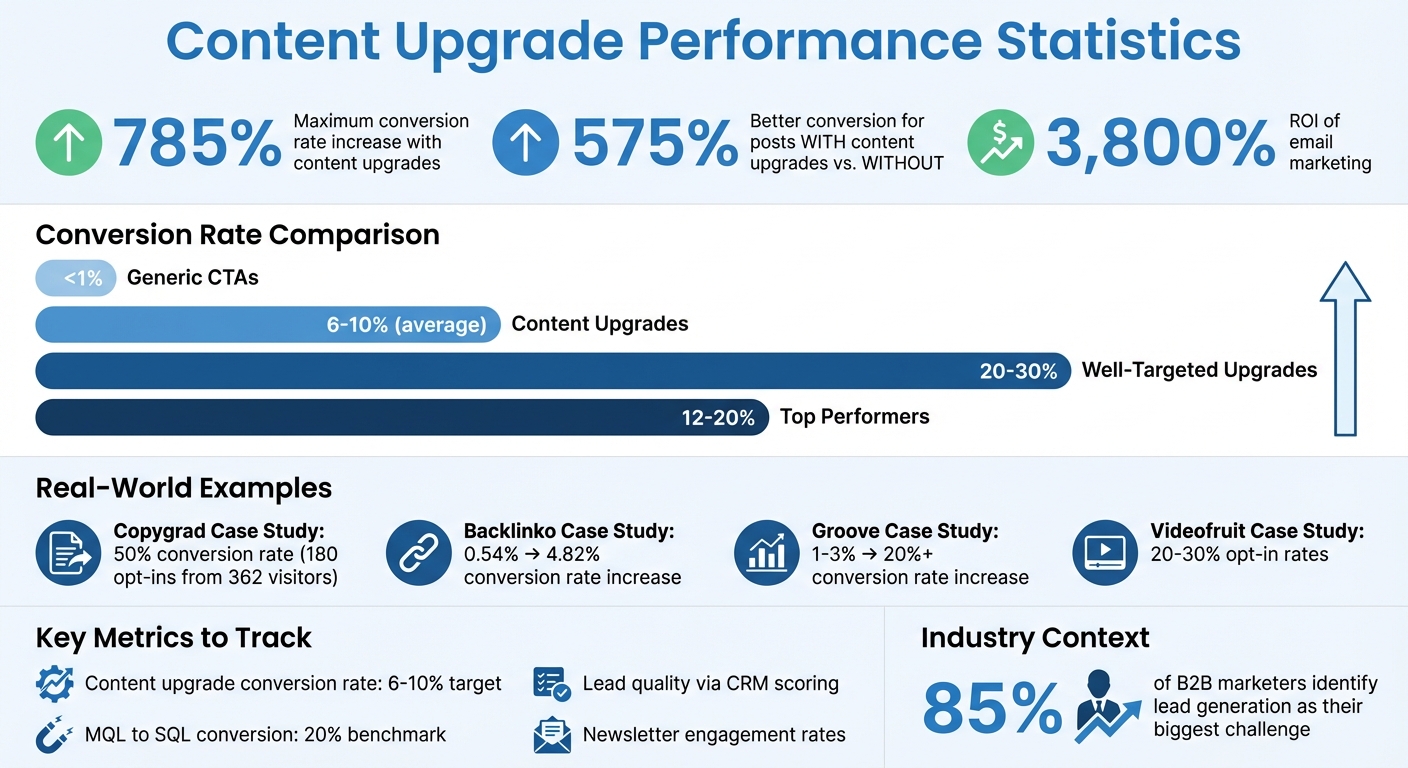
Content Upgrade Statistics: Conversion Rates and ROI Impact
7 Ways to Create Lead Magnets That Actually Convert
Finding Opportunities for Content Upgrades
Not every post deserves a content upgrade. Focus on the ones with the most potential for impact. By analyzing your top-performing posts, understanding audience needs, and leveraging data, you can identify where upgrades will drive the most newsletter signups.
Reviewing Your Existing Content
Start by looking at your best-performing posts. Use analytics to find the 5–10 posts with the highest traffic over the past 3–6 months.
"I recommend only adding content upgrades to your best content – meaning highest traffic, time on site and engagement." - Sujan Patel, Marketer
The type of content matters, too. Tutorials, how-to guides, and listicles are perfect candidates for upgrades like checklists, templates, or cheat sheets. For example, in early 2016, Sujan Patel tested this by turning his top-performing posts into simple PDFs. Using tools like Snappa and OptinMonster, he achieved an 8% conversion rate by focusing on posts with high traffic and engagement.
Look for the "knowledge gap" in your content - what's missing that readers would find helpful? For instance, if your article is about "20 ways to generate leads", a logical upgrade could be a "Lead Gen Checklist" to simplify those steps. Will Hoekenga of Copygrad used this strategy with a post titled "The 17,000-Word Beast Ramit Sethi Used to Launch His New Course." He offered readers a "Beastly Email Launch Blueprint" PDF. Out of 362 visitors who clicked, 180 opted in - a 50% conversion rate.
Once you’ve identified the gap, tailor your upgrade to meet the specific needs of your audience.
Understanding Your Target Audience
A good content upgrade solves a specific problem for a specific audience. Think about the reader’s goal after they finish your content. The most effective upgrades help them save time, save money, or take action immediately.
"The best content upgrades are always tied to the action the visitor needs to take to get exactly what they desire." - Ivan Kreimer, Freelance Content Marketer
Consider the buyer’s journey when creating upgrades. Someone in the awareness stage might benefit from a beginner’s guide, while a reader in the decision stage could use a comparison template or ROI calculator. By aligning your upgrade with where the reader is in their journey, you ensure it’s practical and actionable - not just extra information.
Using Data to Prioritize Opportunities
Engagement matters as much as traffic. A post with 10,000 monthly visitors but an average time on site of 10 seconds isn’t as valuable as one with 2,000 visitors who spend five minutes reading. High engagement signals that readers find your content useful and are more likely to convert.
Look for conversion gaps in your analytics. If a high-traffic post has a conversion rate below 1–2% with a standard call-to-action (CTA), it’s a great candidate for a targeted content upgrade. Generic site-wide CTAs, like newsletter banners, often convert at less than 1%, while content upgrades frequently hit double-digit conversion rates.
Start small with a simple PDF upgrade to gauge interest before investing in more complex tools. This lets you test the waters and scale up based on what resonates with your audience.
Creating High-Value Content Upgrades
Once you've identified the right opportunities and have a clear understanding of your audience's needs, it's time to create upgrades that bring immediate benefits. The goal? Provide resources your readers can use right away. By focusing on high-potential posts, you can deliver actionable tools and solutions that resonate with your audience.
Choosing the Right Formats
The format of your content upgrade should align with what your readers need to do next. For instance:
- Checklists work perfectly for how-to guides, turning steps into a concise task list.
- Templates and scripts simplify complex tasks, like drafting emails or creating spreadsheets.
- Cheat sheets condense detailed or technical information into a quick-reference, one-page guide.
Take Bryan Harris of Videofruit as an example. He shared a Keynote template and the source code for his opt-in box on a blog post about sidebar design. This practical upgrade led to opt-in rates of 20-30% because it gave readers exactly what they needed to act on his advice - no extra effort required.
Other effective formats include:
- Case studies that showcase real-world results, ideal for readers in the decision-making stage.
- Resource lists that gather tools, links, or experts relevant to your topic.
- Quick start guides that simplify complex processes.
- Worksheets to make your content interactive, helping readers apply what they've learned.
You can also repurpose existing content. For example, offer a PDF version of a blog post for offline reading or create an audio version for people on the go. These small changes can make a big difference in usability and engagement.
Best Practices for Creating Useful Content
The most effective content upgrades address a specific problem and help readers save time or take action. Alex Turnbull, CEO of Groove, sums it up well:
"The more personalized your offer - whether you're selling your product or newsletter subscription - the more likely the reader will see what you're offering as created just for them."
To make your upgrades stand out, start by identifying what extra value you can provide. What does your post teach, and what’s missing? Fill that gap with actionable tools, steps, or tutorials. For example, in October 2017, Groove offered downloadable email scripts that readers could copy and paste instead of just viewing as images. This tweak increased their conversion rate from 1-3% to over 20%.
Keep it simple. A one-page checklist that saves time can be far more effective than a lengthy ebook. Focus on creating upgrades that are action-oriented - something readers can use immediately. For instance, in February 2017, Brian Dean of Backlinko boosted a page’s conversion rate from 0.54% to 4.82% by adding a checklist summarizing 10 key Google ranking factors from a long blog post.
Adding Interactive and Personalized Elements
Incorporating interactive elements can make your content upgrades even more engaging. For instance, using a two-step opt-in process - where a button or link triggers a pop-up form instead of displaying it immediately - can increase conversions by an average of 30%. This approach feels less intrusive and more like a helpful offer.
Interactive tools like worksheets and workbooks encourage readers to actively engage with your content. Video screencasts, created with tools like Loom, are another excellent option. They provide step-by-step tutorials in real time, which can be especially effective for software-related topics. You might also consider offering multi-day email challenges, like a 5-day or 30-day program, to foster accountability and community engagement.
Personalization is key to success. The best upgrades are tailored to the specific article your reader is engaging with - not a generic offer plastered across your site. This approach not only increases download rates but also helps you segment leads based on their interests. Mention the upgrade early in your post to spark curiosity and create a psychological "gap" that readers will want to close by downloading the resource.
Promoting and Optimizing Content Upgrades
Designing Landing Pages That Convert
Keep your landing pages as simple as possible. If readers have made it to your post, they’re already interested. All you need is the article title and a clear download button. As freelance content writer Ivan Kreimer puts it:
"People are already sold to your content upgrade, so you don't have to overcomplicate this. Look at my landing page... It's uber-minimalistic. Just the name of the article, the download button, and nothing more."
For better conversions, try a two-step opt-in process with click-triggered pop-ups. After signup, automate delivery through your Thank You page, and consider offering an additional resource or prompting a social share right away [16,17].
Placing CTAs in the Right Locations
Limiting yourself to a single call-to-action (CTA) at the end of your post can mean missed opportunities. Instead, place CTAs strategically throughout your content - near the beginning, middle, and end. This way, even readers who skim or don’t finish the article have a chance to engage. Use bold visual elements to make your CTAs stand out.
For example, Brian Dean of Backlinko saw his conversion rate jump from 0.54% to 4.82% by strategically placing content upgrade CTAs. You can also experiment with exit-intent pop-ups, which appear as visitors are about to leave your page, or use content locking - blurring the last 25% of a popular post until readers provide their email. Slide-in boxes or static banners that appear as users scroll can also effectively grab attention.
Once you’ve placed your CTAs, test different formats and messaging to see what works best for capturing leads.
Testing and Improving Performance
After setting up your CTAs, the next step is testing and refining them for better results. Focus on your highest-traffic pages first. Tools like Google Analytics can help you identify your top 10 pages, allowing you to prioritize optimization efforts. Experiment with various CTA styles. In one case, a simple text-based "yellow box" outperformed a more elaborate download image.
Brian Dean highlighted the effectiveness of his yellow box CTA:
"The simple yellow box I added to my blog post grabbed A LOT of attention... people's eyes (and cursors) naturally gravitate to the yellow box."
To improve lead quality, try adding qualifying questions after capturing an email, rather than before, to reduce friction. Use features like "drop-off mode" in your form tools to collect partial data from visitors who don’t complete every question. Testing theme-based upgrades across related posts can also streamline your strategy.
Finally, integrate your content upgrade signups with Breaker campaigns. This lets you track engaged subscribers and refine your approach using real-time analytics to see which upgrades perform best. It’s a valuable way to optimize your lead generation efforts.
Measuring Success and Scaling Your Strategy
Metrics to Track for Content Upgrades
Once you've put your promotion and optimization efforts in motion, the next step is evaluating how well your content upgrades are performing. This helps you fine-tune and expand your strategy effectively.
Start by tracking your content upgrade conversion rate. A good starting point is aiming for a 6–10% conversion rate, while top-tier performers often hit 12–20%. But don’t stop at just counting signups - dig deeper into lead quality. Use your CRM’s lead scoring system to measure how many new subscribers align with your Ideal Customer Profile (ICP). Keep an eye on your MQL (Marketing Qualified Lead) to SQL (Sales Qualified Lead) conversion rate - a solid benchmark here is 20%.
It’s also important to calculate your Cost Per Lead (CPL). This is done by dividing your total marketing spend by the number of leads generated, ensuring your efforts are cost-efficient. Lastly, monitor newsletter engagement rates, such as open and click-through rates, to confirm that the subscribers you’re attracting are genuinely interested and engaged.
Using Data to Improve Future Upgrades
Data isn’t just for tracking - it’s your guide to making smarter decisions. Use tools like Google Analytics to identify your top 10 performing posts and target them for upgrades. If a page has high engagement but a low conversion rate, it’s a sign that the upgrade might not be hitting the mark. Readers are looking for something practical - something that saves them time, cuts costs, or helps them act immediately.
Test different formats for your upgrades. For example, a simple text-based call-to-action (like a "yellow box") often outperforms more visually elaborate designs. This kind of insight reveals what your audience is looking to do right after reading. If certain upgrades consistently deliver better results, consider replicating their format and style across similar pieces of content.
You can also refine follow-up campaigns by tagging subscribers based on the specific upgrades they download. For example, email copywriter Val Geisler segmented her audience using a content upgrade and successfully sold out a live workshop within 48 hours. This kind of targeted follow-up is a powerful way to make your upgrades work harder for you.
Scaling Your Content Upgrade Strategy
Once you’ve identified what works, scaling becomes the next logical step. A smart way to scale is by grouping related content into themes. Instead of creating separate upgrades for every post, develop one high-value resource that applies to multiple articles. This method keeps production time low while maintaining quality.
Take inspiration from the team at GetLeadForms. By creating a 25-point checklist for a high-traffic post, they managed to double their conversion rate from 0.55% to 1.1%. The kicker? They did it in about two hours using ChatGPT for drafting and Canva for design. Tools like these can help you quickly create polished, useful resources. For longer posts, you might even try content locking, where you gate the final 25% of the content instead of creating a separate downloadable PDF.
To make scaling seamless, integrate tools like Breaker. This platform automates delivery, triggers nurturing sequences, and tracks subscriber engagement in real time. It ensures your quality leads flow directly into your sales pipeline without extra manual effort. Plus, features like unlimited email validations and deliverability management let you scale without worrying about degrading list quality. With these tools handling the technical side, you can focus your energy on creating even more upgrades for your highest-performing pages.
Conclusion
Content upgrades can turn high-traffic posts into powerful lead-generation tools. Research indicates that posts with content upgrades convert visitors 575% better than those without, and email marketing boasts an impressive 3,800% ROI. Given that 85% of B2B marketers identify lead generation as their biggest challenge, incorporating a content upgrade strategy is a smart move.
At the heart of successful content upgrades lies one key factor: relevance. Ivan Kreimer emphasizes this point perfectly:
"The key to list building is relevance. The more relevant your lead offer... the easier it will be to get your visitors to sign up".
Tailored resources that directly align with the content your visitors are engaging with consistently outperform generic, site-wide lead magnets. Not only do they boost conversions, but they also enable precise lead segmentation, paving the way for personalized follow-up campaigns.
To get started, focus on a strategic approach. Pinpoint your top-performing posts and create upgrades that are action-oriented - like checklists, templates, or cheat sheets - for those pages first. Sometimes, a simple, one-page checklist can outperform a lengthy ebook if it delivers immediate, practical value.
As your strategy grows, tools like Breaker can streamline the process by automating delivery, triggering nurture sequences, and tracking engagement. This frees up your time to concentrate on crafting resources that resonate with your audience and attract high-quality leads tailored to your goals.
FAQs
What are the best types of content upgrades to boost newsletter signups?
The best content upgrades are straightforward, highly targeted resources that add extra value to your post while addressing a specific need for your audience. These upgrades are crafted to capture the attention of readers already engaged with your content, prompting them to subscribe to your email list or share their contact details.
Here are some examples of effective content upgrades:
- Checklists or cheat sheets: Quick summaries of the main steps or points from your article.
- Templates or swipe files: Ready-to-use resources like email scripts or social media calendars.
- Worksheets or fillable PDFs: Tools that help readers work through a process or create a plan.
- Mini-guides or eBooks: More in-depth resources that dive deeper into the topic.
Platforms like Breaker simplify the process of offering these upgrades. They allow you to deliver the content seamlessly, gather subscriber information, and track results in real time. This way, your high-traffic posts can become dependable tools for generating leads.
How do I choose the best blog posts for content upgrades?
To find the best blog posts for content upgrades, start by zeroing in on high-traffic, evergreen posts that address a specific problem. These posts are already pulling in readers, so they’re a great place to add extra value. Use tools like Google Analytics to identify articles with strong numbers - things like high page views, long time-on-page, and low bounce rates. These metrics show that readers are engaged, which makes them more likely to grab a related bonus.
Next, focus on popular or standout posts that consistently connect with your audience. These might be posts that rank well in search engines or bring in steady traffic over time. Their existing popularity makes adding an upgrade feel like a natural extension, not an afterthought.
Finally, make sure the post’s topic can be expanded into a useful, easy-to-digest resource. For instance, a detailed guide could be transformed into a checklist, a ready-to-use template, or even an audio summary. The goal is to create something that complements the original content and feels like a natural next step for your readers.
What are the best tools to simplify creating and managing content upgrades?
Creating and managing content upgrades doesn't have to be a headache - especially when you have the right tools in your corner. For instance, Gleam Capture makes it simple to design opt-in forms, link them to your email service, and automate the delivery of your upgrades - all without touching a single line of code.
If you're a WordPress user, OptinMonster is another solid choice. It features a visual campaign builder, content-locking options, and built-in analytics to help you design and track your upgrades effortlessly. Meanwhile, Leadpages offers pre-designed templates and an intuitive drag-and-drop editor, making it easy to create offers that convert while seamlessly syncing subscriber data with your email platform.
These tools take care of the heavy lifting, letting you focus on what really matters: growing your audience and generating leads effectively.
Related Blog Posts
Keep reading
All articlesGDPR Consent Requirements for Purchased Email Lists
Purchased email lists rarely meet GDPR's consent bar. Learn the legal basis rules, PECR overlap, and safer alternatives before you hit send.
7 Email Platforms With Inbox Placement Testing & Suppression
Compare 7 email platforms that combine inbox placement testing with suppression management, scored on features, pricing, and best-fit sender size.
Email Automation Workflow & Drip Campaign Data Structure
Learn the database schema behind email drip campaigns—tables, workflow states, and event logs that power reliable marketing automation.