
What Is Sender Reputation Scoring?
Sender reputation scoring impacts inbox placement — learn the key metrics, monitoring tools, and fixes (SPF/DKIM/DMARC, list hygiene).
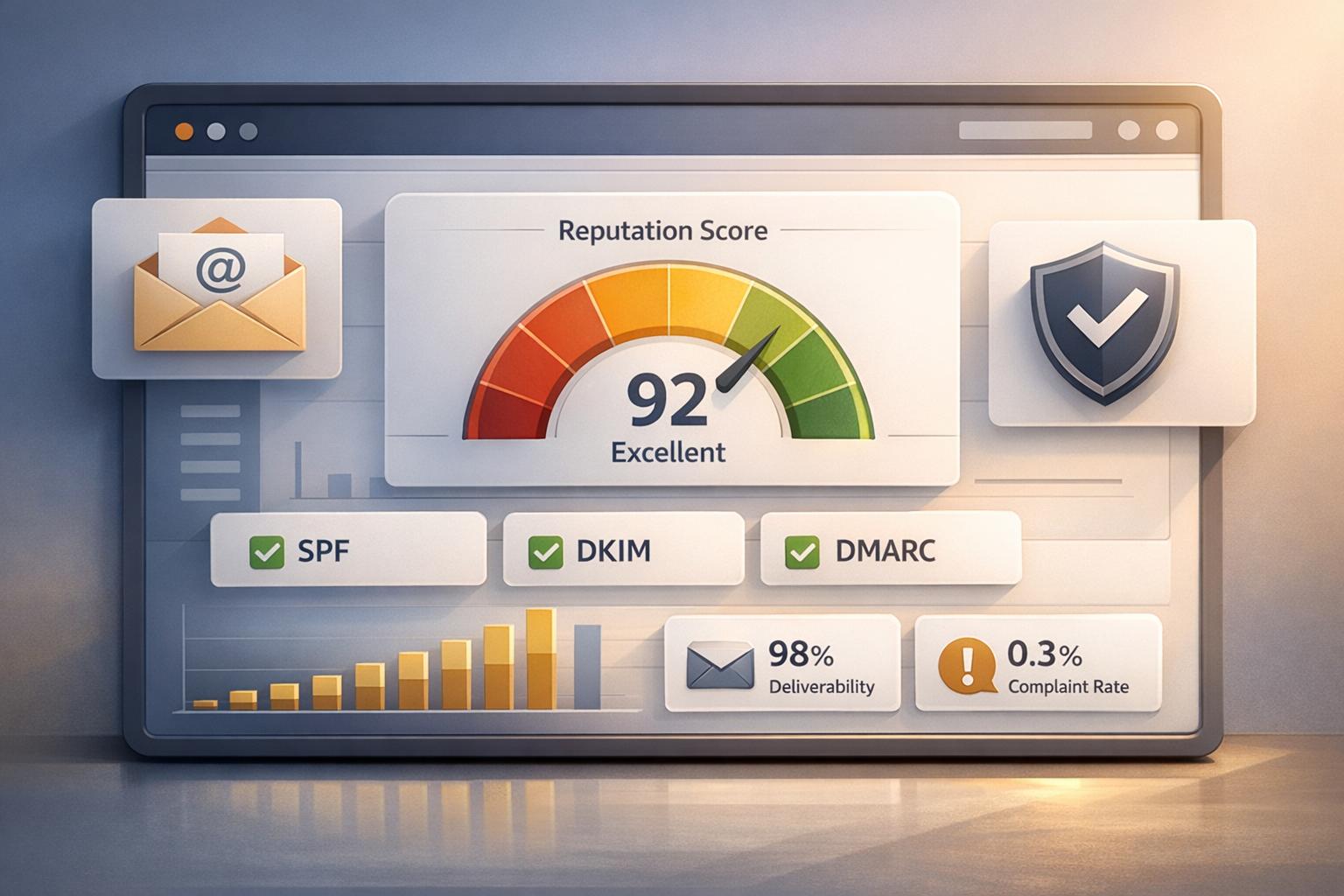
Sender reputation scoring determines how trustworthy your email-sending IP and domain are. Think of it like a credit score for email deliverability. Scores range from 0 to 100, and higher scores mean better chances of your emails landing in inboxes instead of spam folders.
Here’s what you need to know:
- Key Factors: ISPs evaluate sender reputation based on IP/domain history, email engagement (opens, clicks), bounce rates, and spam complaints.
- Importance: A poor sender reputation can cause up to 83% of emails to fail inbox delivery, reducing visibility and ROI.
- Benchmarks: Aim for a sender score of 80+ to avoid being flagged. Keep bounce rates under 1%, spam complaints below 0.1%, and maintain open rates above 20%.
- Best Practices: Use email authentication (SPF, DKIM, DMARC), regularly clean your email lists, and monitor your reputation using tools like Google Postmaster Tools or Sender Score by Validity.
Email marketing success starts with a strong sender reputation. Without it, even the best campaigns may never reach your audience.
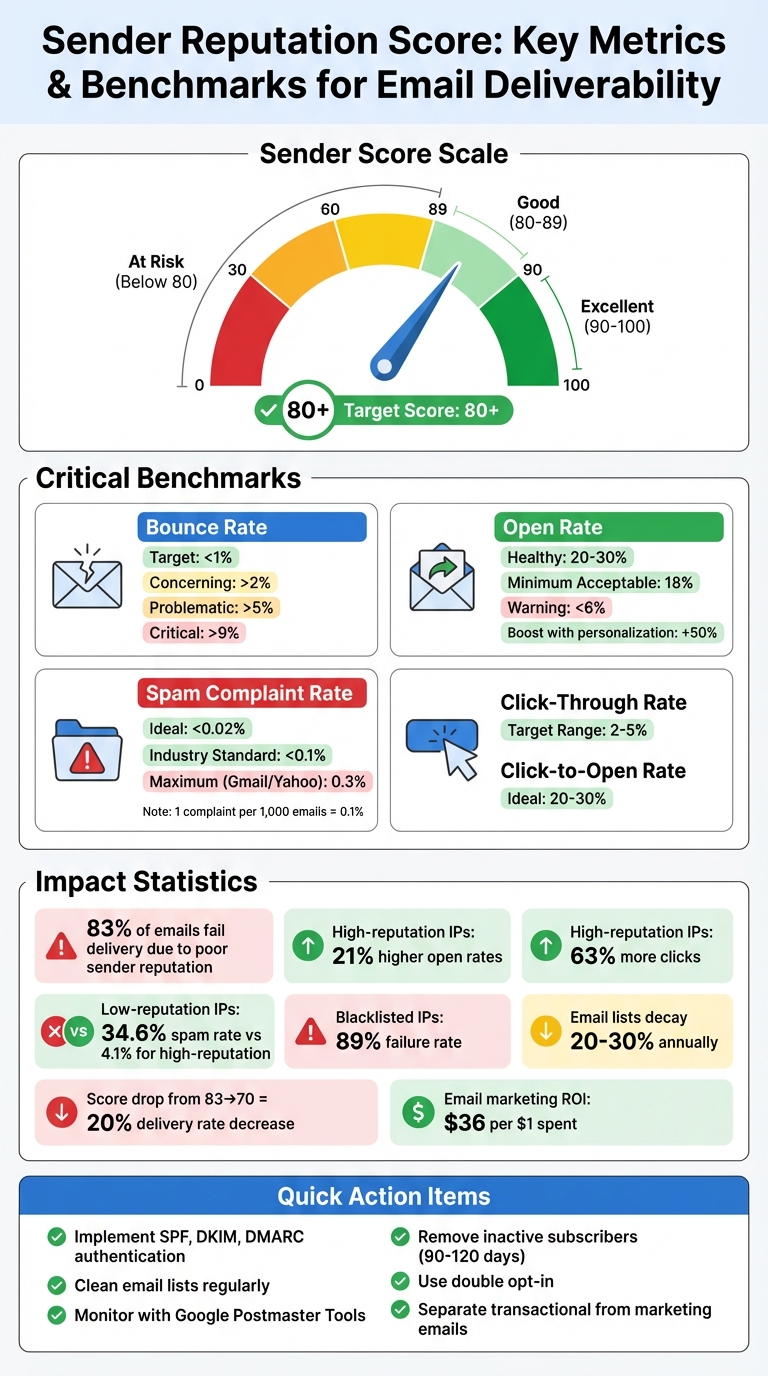
Sender Reputation Score Benchmarks and Key Metrics for Email Deliverability
Email Sender Reputation Audit - Tutorial by Mailtrap
Factors That Affect Sender Reputation
Your sender reputation depends on several factors that Internet Service Providers (ISPs) continuously evaluate. Understanding these elements can help you identify weaknesses in your email practices and make necessary adjustments. Here’s a closer look at the key factors shaping your sender reputation.
IP Address and Domain Reputation
Your IP reputation is like your server's digital fingerprint, tied to its infrastructure, while domain reputation reflects your brand’s overall email history across providers.
Here’s why this matters: Blacklisted IP addresses have an 89% failure rate, while high-reputation IPs experience a spam rate of just 4.1% compared to 34.6% for low-reputation IPs. High-reputation IPs also enjoy 21% higher open rates and generate 63% more clicks.
When starting with a new IP or domain, it’s crucial to warm them up gradually over several weeks rather than sending large volumes of emails immediately. Another helpful tactic is to separate transactional emails (like receipts and password resets) from marketing campaigns by using different IP addresses. This way, any missteps in marketing won’t disrupt critical communications.
Engagement Metrics
Engagement is a powerful indicator of your reputation. ISPs interpret actions like opening emails, clicking links, replying, or forwarding as signs that recipients find your content worthwhile.
"Engagement is your lifeline to reputation as a sender. It is extremely important." – Nick Schafer, Sr. Manager of Deliverability & Compliance at Sinch
Healthy engagement benchmarks include open rates between 20% and 30%, click-through rates ranging from 2% to 5%, and click-to-open rates ideally between 20% and 30%. Personalized emails can even boost open rates by up to 50%.
On the flip side, when recipients delete your emails without reading them, it signals to ISPs that your messages might be unwanted.
"If an ISP sees that nobody's interacting with your emails, they're going to say, 'Nobody wants this. Must be spam.'" – Carin Slater, Manager of Lifecycle Email Marketing at Litmus
To maintain engagement, consider implementing a sunset policy that removes subscribers who haven’t interacted in 90 to 120 days.
Bounce Rates and Spam Complaints
High bounce rates and spam complaints can severely harm your sender reputation. Ideally, your bounce rate should stay below 1%, with anything over 5% likely triggering blocks.
"A bounce rate above 2 percent is concerning, and over 5 percent is problematic." – Christy Saia-Owenby, Founder and CEO of MOXY Company
Spam complaints are even more critical. The industry standard is below 0.02%, but Gmail and Yahoo allow rates up to 0.3%. However, issues often arise when complaints hit 0.1%, or about one complaint per 1,000 emails.
"If you're a good sender your spam rates will be well below 0.3%. Internally, we look at much lower spam rates across the board." – Marcel Becker, Senior Director of Product at Yahoo
Email lists naturally decay by 20%–30% annually, so it’s essential to use strategies like double opt-ins and real-time email verification to reduce hard bounces. Real-time verification during sign-up can catch simple errors (like "gnail.com" instead of "gmail.com") before they enter your database.
Finally, avoid hitting spam traps - whether they’re "pure" traps set intentionally or recycled abandoned addresses. These traps signal poor list management and can cause significant damage to your reputation.
How Sender Reputation Affects Email Deliverability
Your sender reputation plays a critical role in determining whether your emails land in the inbox or get flagged as spam. Email providers like Gmail and Outlook treat it much like a credit score, using it to gauge your trustworthiness before deciding where to direct your messages. Key factors such as IP credibility and engagement metrics heavily influence these outcomes.
Email delivery happens in two key stages. First, a solid IP reputation ensures your messages are accepted. Second, a strong domain reputation determines if they make it to the inbox. A good acceptance rate is anything above 98%, while rates below 94% indicate a shaky reputation.
If your reputation starts to slip, problems arise quickly. For instance, Gmail advises keeping spam complaints under 0.1%; hitting 0.3% or higher means most of your emails will likely end up in spam. Similarly, bounce rates above 2% raise red flags, and anything over 9% is considered problematic. With these metrics in mind, let’s explore how sender reputation directly impacts email placement.
Inbox Placement vs. Spam Folder
Email providers rely on your sender reputation to make quick decisions about where your emails should go. Whether your message lands in the inbox or the spam folder often comes down to this single factor.
The metrics that matter are straightforward. A spam rate under 0.02% is ideal, while rates above 0.05% are concerning. Open rates also provide insight - 18% or higher reflects healthy engagement, while anything below 6% signals potential problems with either reputation or audience interaction.
Surprisingly, nearly 70% of senders don’t use free monitoring tools like Google Postmaster Tools or Microsoft SNDS to keep tabs on their reputation. Without these insights, you might not realize there’s an issue until your emails stop reaching inboxes. To avoid this, managing your sending infrastructure effectively is crucial, as we’ll discuss next.
Separating IP Addresses and Domains
Using separate IPs or subdomains for transactional and marketing emails can safeguard your essential communications. If all your emails are sent from the same infrastructure, spam complaints from marketing campaigns could block critical messages like password resets or order confirmations.
The solution? Isolate your email streams. For example, use orders.company.com for transactional emails and news.company.com for marketing campaigns. This separation ensures that if promotional emails are marked as spam, the reputation of your transactional emails remains unaffected.
"If all your emails came from the root domain and people started marking promotions as spam, that can harm transactional email deliverability." – Sinch Mailgun
This practice is widely adopted among high-volume senders. In fact, 50% of businesses sending over one million emails per month use separate subdomains for transactional and promotional traffic. Transactional emails, which are often eagerly anticipated and rarely flagged as spam, naturally maintain strong reputation scores. By keeping these streams separate, you protect critical communications from the ups and downs of marketing campaigns.
Tools for Monitoring Sender Reputation
Keeping an eye on your sender reputation is crucial for maintaining strong email deliverability. Luckily, there are plenty of tools - many of them free - that can help you stay ahead of potential issues. Without these tools, senders often remain unaware of problems until deliverability takes a hit. Monitoring your reputation is the first step to staying proactive.
Google Postmaster Tools and Microsoft SNDS
Google Postmaster Tools (GPT) gives you insight into how Gmail perceives your emails. Once you verify your domain via DNS, you’ll gain access to dashboards that track spam rates, IP and domain reputation, authentication results, and delivery errors. Gmail uses a four-level reputation scale - Bad, Low, Medium, and High. If you’re sending at least 300 emails daily to Gmail users, you’ll start seeing data within 24 hours.
Microsoft Smart Network Data Services (SNDS) serves a similar purpose for Outlook and Hotmail. Unlike GPT, SNDS is IP-based rather than domain-based and provides color-coded reports on spam complaint rates and spam trap activity. Both tools also offer Feedback Loops (FBL), which notify you when recipients mark your emails as spam.
One standout feature of GPT is its ability to track subdomains separately. For instance, if you’re using marketing.company.com and orders.company.com, you can verify each subdomain individually to get detailed insights into how each stream performs. While these tools are excellent for ISP-specific data, third-party tools can give you a broader perspective on your overall reputation.
Third-Party Reputation Checkers
Third-party tools provide a more comprehensive look at your sender reputation. For example, Sender Score by Validity rates your IP address on a 0–100 scale. Scores of 80 or higher are considered strong, with 90+ being excellent. This score is calculated using a 30-day rolling average, factoring in metrics like complaint rates, attempts to reach unknown users, and blocklist activity.
"Sender Score is derived from a proprietary Validity algorithm and represents an IP address's overall performance against metrics important to both internet service providers (ISPs) and their customers." – Validity
Talos Intelligence by Cisco offers real-time reputation checks, categorizing your IP and domain as "Good", "Neutral", or "Poor" based on global threat intelligence. To monitor blocklist activity, tools like MxToolbox scan major databases to ensure your IP hasn’t been flagged. While basic lookups are free, MxToolbox also offers paid plans for automated monitoring and additional features.
To stay on top of your sender reputation, it’s a good idea to check these tools at least once a week. If you’re experiencing deliverability issues or running a major campaign, consider bumping up your checks to daily.
How to Improve and Maintain Sender Reputation
Keeping a strong sender reputation requires sticking to proven strategies. Here’s how you can improve and maintain your reputation as a sender.
Implement Email Authentication
Email authentication is key to building trust with receiving servers. Start with SPF (Sender Policy Framework), which specifies the IP addresses allowed to send emails for your domain. Add DKIM (DomainKeys Identified Mail) to ensure your email content remains unchanged during transit. Finally, use DMARC (Domain-based Message Authentication, Reporting, and Conformance) to guide servers on handling emails that fail authentication and to access reports for better insights.
"Authentication is foundational." – Amanda DeLuke, Email Expert
Providers like Gmail and Yahoo mandate SPF, DKIM, and DMARC for bulk senders. Begin your DMARC policy with p=none to monitor reports without affecting delivery. Once you're confident in your setup, move to p=quarantine and eventually p=reject for maximum protection. Using multiple authentication methods is crucial; for instance, if SPF fails during email forwarding, DKIM can step in to validate the message. Also, ensure your SPF record stays within the 10-DNS-lookup limit to avoid failures.
Once authentication is secure, the next priority is maintaining a healthy email list.
Maintain Clean Email Lists
A clean email list is essential for keeping bounce rates low and engagement high. Hard bounces - emails that fail permanently due to invalid addresses - can seriously hurt your sender reputation. Aim to keep your hard bounce rate below 1%. Additionally, avoid sending emails to spam traps, as this can severely damage your credibility.
"If your hard bounce rate is at 1% or higher, it is a signal that your emails are not reaching their intended audience, and your sender reputation may be suffering." – HubSpot
To minimize risks, use double opt-in to confirm that only valid, interested users join your list. Implement a sunset policy to remove inactive subscribers over time. Real-time validation at signup can also catch typos and prevent invalid addresses from entering your database.
Use Breaker's Deliverability Features
Breaker provides tools to protect and enhance your sender reputation. Their unlimited email validation feature helps you maintain a clean list by reducing hard bounces, which improves inbox placement. Precision audience targeting ensures higher engagement.
Breaker’s plans include deliverability management and expert support to address reputation challenges. Whether you choose the Starter plan at $200 per month (for up to 50,000 email sends) or opt for a Custom plan tailored to larger needs, Breaker’s tools are designed to keep your emails out of spam folders and in front of your audience.
Conclusion
Building a strong sender reputation is at the heart of successful email marketing for B2B professionals. With a staggering 83% of email delivery failures linked to poor sender reputation, maintaining a solid sender score isn’t just important - it’s essential. Consider this: a drop in sender score from 83 to 70 can slash delivery rates by nearly 20%. And when email marketing delivers an average return of $36 for every $1 spent, every missed opportunity can mean lost revenue. With the average business professional sifting through 121 emails daily, internet service providers (ISPs) rely on reputation scores to separate legitimate business emails from spam.
A strong sender reputation doesn’t happen by chance - it’s built through consistent practices. Proper authentication, maintaining clean email lists, and fostering engagement all show respect for your audience. Even minor missteps, like letting your spam complaint rate exceed 0.1% or failing to address hard bounces, can lead to a reputation setback that could take weeks to repair. These aren’t just best practices - they’re non-negotiable.
Fortunately, tools like Breaker make managing these challenges simple. With features like unlimited email validation, real-time performance tracking, and built-in deliverability management, Breaker ensures your emails end up where they belong - in your subscribers’ inboxes. Whether you’re growing your email program or fine-tuning an established strategy, Breaker helps protect your sender reputation and maximize your ROI for the long haul.
FAQs
What is a sender reputation score and how can I improve it?
A sender reputation score is like your email trust rating. It’s what email service providers use to decide if your emails deserve a spot in the inbox or if they should be banished to the spam folder. The higher your score, the better your chances of reaching your audience.
Here are some ways to boost your sender reputation:
- Authenticate your domain with protocols like SPF, DKIM, and DMARC. These help prove your emails are legit.
- Clean up your email list regularly by removing invalid or inactive addresses. A tidy list means fewer bounces.
- Send content people actually want to read. Relevant, engaging emails keep your audience happy and reduce complaints.
- Keep an eye on key metrics like bounce rates and spam complaints. Spotting and fixing problems early is crucial.
- Stick to a consistent sending schedule and use a reliable IP address to avoid looking suspicious.
By sticking to these habits, you’ll strengthen your sender reputation and improve your email deliverability.
How can I monitor my sender reputation?
Monitoring your sender reputation plays a key role in ensuring your emails land in inboxes rather than spam folders. There are several tools available to help you keep an eye on and assess your sender reputation. Some widely-used options include Sender Score, Google Postmaster Tools, Talos Intelligence, and SendForensics. These platforms offer valuable insights into critical areas like your IP and domain reputation, spam complaint rates, and overall email performance.
By using these tools regularly, you can pinpoint potential problems early and take steps to maintain a strong sender reputation, giving your emails the best chance of reaching your audience.
Why is email authentication crucial for maintaining a good sender reputation?
Email authentication methods, such as SPF, DKIM, and DMARC, are essential tools for confirming that emails sent from your domain are legitimate. These protocols act as safeguards against email spoofing and phishing, helping to protect your domain and maintain trust with Internet Service Providers (ISPs).
When ISPs identify your domain as reliable, it boosts your sender reputation. This, in turn, increases the chances that your emails will reach recipients' inboxes instead of getting flagged as spam. Implementing strong email authentication is a critical step in maintaining high deliverability rates and safeguarding your brand's reputation.
Related Blog Posts
Keep reading
All articlesGDPR Consent Requirements for Purchased Email Lists
Purchased email lists rarely meet GDPR's consent bar. Learn the legal basis rules, PECR overlap, and safer alternatives before you hit send.
7 Email Platforms With Inbox Placement Testing & Suppression
Compare 7 email platforms that combine inbox placement testing with suppression management, scored on features, pricing, and best-fit sender size.
Email Automation Workflow & Drip Campaign Data Structure
Learn the database schema behind email drip campaigns—tables, workflow states, and event logs that power reliable marketing automation.