
Ultimate Guide to CRM Email Integration
Integrate your CRM with email to automate data sync, enable real-time personalization and analytics, and boost conversions with practical setup steps.
CRM email integration is the process of connecting your Customer Relationship Management (CRM) system with your email platform. This allows for automatic syncing of contact details, email engagement data, and behavioral insights in real time. The result? A streamlined workflow that eliminates manual data entry, ensures accurate records, and enables highly personalized email campaigns.
Here’s why it matters:
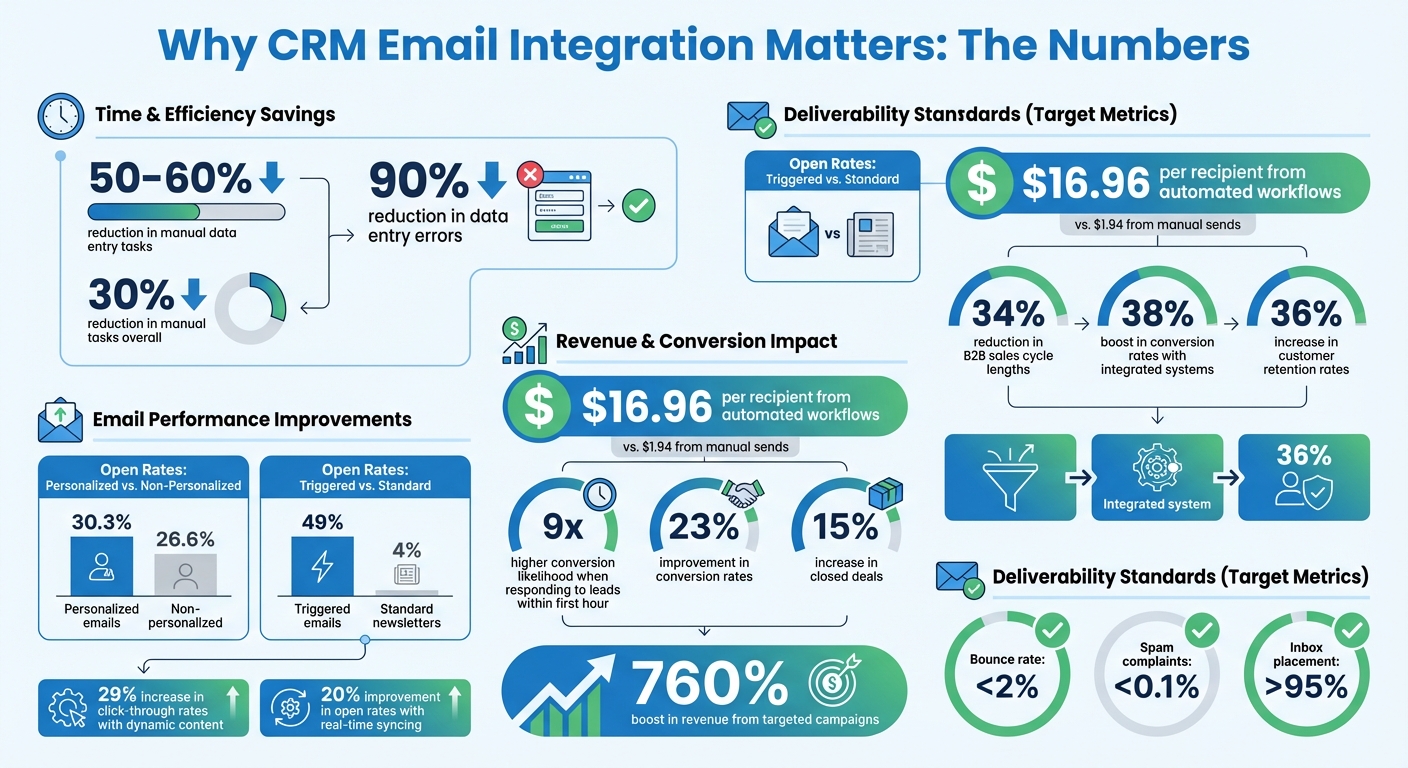
- Save time: Automate data syncing and reduce manual tasks by up to 50–60%.
- Boost engagement: Personalized emails using CRM data see a 30.3% open rate, outperforming generic messages.
- Improve lead conversion: Responding to leads within the first hour increases conversion likelihood by 9x. Following a B2B lead generation checklist can help ensure your CRM is optimized for these high-conversion moments.
- Drive revenue: Automated workflows generate an average of $16.96 per recipient, compared to $1.94 for standard bulk emails.
How to get started:
- Choose an integration method: Native connectors, middleware tools (e.g., Zapier), or custom API solutions.
- Map data fields carefully to avoid syncing unnecessary or mismatched information.
- Test and monitor your integration to ensure smooth performance and real-time updates.
CRM Email Integration Benefits: Key Statistics and ROI Metrics
CRM email integration
How to Set Up CRM Email Integration
Getting your CRM and email systems to work together takes some thoughtful preparation. Before diving in, take a moment to evaluate your current setup - look at your existing email campaigns, monthly email volume, and the tools you're already using. Check if your CRM uses webhooks for real-time updates or if it relies on polling-based synchronization, which can cause delays. Make sure you have the necessary permissions, including Admin-level access to your CRM, mailbox access for syncing email threads, and calendar permissions if you'll be scheduling meetings. Here's a step-by-step guide to help you integrate your CRM and email platforms smoothly.
Step 1: Choose Your Integration Method
There are three main ways to connect your CRM and email platform:
- Native Connectors: Many CRMs, such as HubSpot and Zoho, come with built-in integrations. These are often available through marketplaces like Salesforce AppExchange or the HubSpot App Marketplace. They typically use OAuth 2.0 to connect with Gmail or Outlook and are straightforward to set up.
- Middleware Platforms: If native integrations aren't an option, middleware tools like Zapier or Make can act as a bridge. These no-code platforms are user-friendly and cost between $20 and $100 per month, making them a great choice for teams without technical expertise.
- API-Based Custom Solutions: For businesses with unique requirements, custom API integrations offer the most control and enable real-time data exchange. However, these require programming skills and are better suited for enterprise-level teams.
Integration Method
Best For
Pros/Cons
Native Connectors
Standard users of popular CRMs
Easy setup; may lack advanced customization
Middleware (Zapier/Make)
Non-technical teams needing flexibility
No coding required; subscription costs apply
API/Custom Solutions
Enterprise teams with specific needs
Full control and real-time syncing; coding required
Step 2: Map Your Data Fields
Before syncing data, create a detailed data dictionary. This document should include all fields, their API names, data types (like Boolean, Date, or String), and access levels (Read-Only or Read-Write). This step can save you from syncing unnecessary fields, which can complicate your setup. As Adobe Marketo Engage advises:
it is much easier to add new fields to the sync later than it is to remove fields that were unintentionally synced.
Next, align your CRM entities (like Leads, Contacts, and Accounts) with their equivalents in your email platform (such as Audience Members or Segments). Use email addresses as your primary matching key to merge duplicate records automatically. Standardize field names across systems to avoid mismatches (e.g., "CEO" versus "Chief Executive Officer"), which can cause sync errors. Decide on a "source of truth" - usually the CRM - for each data element to avoid conflicts during synchronization.
Step 3: Test and Monitor Your Integration
Begin with internal tests using sample data to ensure everything works as expected, from formatting to link functionality to subject lines. Set up automated alerts for integration issues, like hitting API rate limits or failed syncs, so you can fix problems quickly. Keep an eye on your sync lag time - critical data should ideally sync within seconds or minutes.
Track key email performance metrics to ensure your campaigns are effective. Aim for a bounce rate below 2%, spam complaints under 0.1%, and inbox placement above 95%. Use error queues and sync logs to handle opt-outs and compliance updates systematically. For example, make sure that when someone unsubscribes via your email platform, the "Do Not Email" flag in your CRM is updated automatically.
With a well-planned setup, your CRM and email integration can deliver real-time, accurate data. This enables personalized email campaigns and helps you manage leads more effectively, ensuring your efforts translate into meaningful customer engagement.
Benefits of CRM Email Integration
When your CRM and email platform work together, the results go beyond just convenience. You’ll notice improved team efficiency, stronger campaign performance, and faster lead conversions.
Automated Workflows That Save Time
By integrating your CRM with your email platform, you can say goodbye to tedious manual work. The automated syncing of data between the two systems eliminates the need for manual updates. Companies using integrated systems report a 30% reduction in manual tasks and a 15% increase in closed deals. Integration can cut manual data entry by 50–60% and reduce errors by up to 90%.
The financial benefits are clear too. Automated workflows generate an average of $16.96 per recipient, compared to just $1.94 from manual email sends. Tim Savage, CEO of Net New Solutions, shared his experience:
Once I had it set up and was sending, I saw excellent open rates with high deliverability. But when I saw the high number of opened emails, I was able to hone in on my calling campaigns even further.
Triggered emails - those sent based on specific customer actions - are especially effective, achieving an average open rate of 49%, compared to just 4% for standard newsletters. For example, UniteSync used triggered emails to onboard 4–5 new music creators daily, achieving an 85.26% positive reply rate and a customer acquisition cost of only $2.86.
This level of efficiency paves the way for more personalized and impactful campaigns.
Better Personalization for Your Campaigns
CRM-email integration allows you to create highly personalized campaigns by enriching customer profiles. Instead of just a name and email address, you get a full view of each customer, including their purchase history, support interactions, content downloads, and website activity. This detailed insight enables you to craft personalized subject lines, visuals, and calls-to-action. Emails personalized using CRM data achieve an average 30.3% open rate, compared to 26.6% for non-personalized messages. Businesses using these tools see a 23% improvement in conversion rates and a 34% reduction in B2B sales cycle lengths. Adding dynamic, personalized content can boost click-through rates by 29% and increase transaction rates up to sixfold.
For B2B marketers, where sales cycles often involve 8–12 email interactions over several months, integration ensures every email is relevant to the lead’s current stage. For instance, ContactMonkey used behavior-triggered email sequences based on real-time CRM data, which significantly increased both app usage and user retention.
Real-Time Analytics and Performance Tracking
Integration also brings the power of real-time analytics, allowing you to adapt your campaigns as they unfold. By linking email engagement data directly to business outcomes, you can see which emails are driving results, track the touchpoints that close deals, and measure the pipeline value of specific campaigns. Real-time syncing improves open rates by 20% and updates lead scores instantly based on engagement. For example, when a lead progresses to a "demo completed" stage in your CRM, the integration can automatically trigger the next email sequence.
Real-time tracking also safeguards your sender reputation. Alerts for spikes in bounce rates or spam complaints help you address email deliverability issues before they harm your performance. To keep performance on track, aim for bounce rates under 2% and spam complaints below 0.1%. Setting your sync schedule to update every 5–10 minutes ensures your sales team always has the most current engagement data.
Advanced Strategies for CRM Email Integration
Once you've nailed the basics, it's time to take your CRM-email integration to the next level. Advanced strategies allow for more precise targeting and automation, helping you create campaigns that feel tailor-made for your audience. These approaches move beyond generic messaging, focusing on personalized experiences driven by real-world behavior.
Behavioral Segmentation and Targeting
Behavioral segmentation uses real-time engagement data - like email opens, link clicks, and website visits - combined with CRM lifecycle stages to build highly specific audience segments. Dynamic lists play a key role here, automatically updating based on behavior. For instance, if a prospect visits your pricing page and spends over two minutes on product pages within the past week, they can be added to a "high-intent" segment. These lists can also include exit conditions, stopping campaigns once a prospect takes a desired action, reducing unnecessary messaging and keeping communications relevant.
This level of precision can have a dramatic impact. For example, targeted campaigns have been linked to a 760% boost in revenue. On top of that, modern integrations increasingly feature AI-powered predictive scoring, which evaluates factors like churn risk and purchase likelihood to help you focus on converting the most promising leads.
Account-Based Marketing Campaigns
While behavioral segmentation hones in on individual actions, CRM integration is equally powerful for account-level strategies. Account-based marketing (ABM) is a game-changer for B2B teams targeting high-value accounts. By leveraging CRM data, you can segment accounts into tiers:
- Tier 1: One-to-one personalization for your biggest opportunities.
- Tier 2: One-to-few campaigns tailored to medium-priority accounts.
- Tier 3: Broader one-to-many initiatives for lower-priority accounts.
This segmentation isn't just about company size - it’s based on potential deal value. From there, your CRM becomes the hub for coordinating personalized messaging across channels like email, LinkedIn, digital ads, and even physical gifts. Tailor your content to resonate with technical evaluators, financial decision-makers, and end-users.
As Rhiannon Blackwell, ABM Leader at PwC, puts it:
The 'triangle' is dead... We need to be more flexible and responsive, moving beyond the layers of the triangle to adopt a dynamic, client-centric strategy that aligns with today's complex market.
For Tier 1 accounts, detailed research is essential. Build profiles that include strategic initiatives, recent news, and pain points. Track sales triggers - like executive hires, product launches, or funding rounds - to time your outreach perfectly. Using frameworks like SPICED (Situation, Pain, Impact, Critical Event, Decision) ensures your efforts align closely with sales goals.
Automated Lead Scoring and Qualification
Automated lead scoring takes the guesswork out of prioritizing prospects. By analyzing real-time email engagement data, your CRM can continuously update lead scores, helping your sales team focus on the most promising opportunities. Start by defining scoring criteria across three areas:
- Demographic data (e.g., job title, industry)
- Firmographic details (e.g., company size, revenue)
- Behavioral signals (e.g., email opens, link clicks, website visits)
Assign point values to key actions, such as +5 for opening an email or +10 for clicking a pricing link. Subtract points for negative actions, like unsubscribing (-20) or email bounces (-10). Leads can then be categorized into tiers: "Cold/Nurture" (0–30 points), "Warm/Marketing Qualified" (31–70 points), and "Hot/Sales Ready" (71+ points). Once a lead hits the "Hot" threshold, your CRM can automatically notify a sales rep for quick follow-up.
Timing is everything. Responding to a lead within an hour makes you seven times more likely to have a meaningful conversation with a decision-maker. And companies using AI-driven scoring have reported a 50% increase in leads and appointments. As Sean O'Connor from monday.com explains:
AI lead scoring changes this equation entirely. Instead of static point systems, machine learning algorithms analyze hundreds of data points simultaneously to predicts high-value leads in real time.
Real-time synchronization ensures that high-value actions immediately update lead scores and alert sales teams. Regularly review your scoring model against actual closed deals to keep it aligned with evolving buyer behavior.
Best Practices and Common Mistakes
Getting CRM-email integration right can save you from a lot of headaches down the road. Whether your system runs smoothly or becomes a source of constant frustration often comes down to following a few essential steps - and steering clear of common errors.
Best Practices for Data Sync and Management
Start with clean data. Before syncing, go through your database to correct inaccuracies and standardize field formats. Here's why: email data decays at a rate of about 2% per month. That means, in just a year, nearly a third of your CRM data could be outdated. Cleaning up beforehand helps keep bad data from spreading across your systems.
Standardize your fields. Use a shared data dictionary to define field names, purposes, and acceptable values for both platforms. For instance, decide whether you'll use "CEO" or "Chief Executive Officer", and stick with it. Even small inconsistencies like "California" vs. "CA" can lead to sync errors and unreliable reports.
Enable two-way real-time sync. Set up a two-way sync that updates critical data like opens and replies every 5–10 minutes. For less urgent updates, consider syncing daily or weekly.
Automate email verification. Use validation tools integrated into your CRM to check new leads as they come in. Also, schedule periodic re-verifications for existing contacts to keep your data accurate.
Handle unsubscribes and compliance automatically. Make sure unsubscribe requests, bounces, and consent changes instantly update fields like "Do Not Email" in your CRM. This is essential for staying compliant with laws like GDPR and CCPA while protecting your sender reputation. Top-performing teams aim for bounce rates under 2%, spam complaints below 0.1%, and inbox placement rates of 95% or higher.
Keep an eye on API limits. Monitor your API usage daily to avoid hitting platform caps, which can cause delays. If you're nearing your limits, try batching less critical updates during slower times. Documenting key details - like API keys, webhook URLs, and field mappings - can also make troubleshooting much easier.
Common Mistakes to Avoid
Even with the best intentions, certain missteps can derail your integration efforts.
Syncing too much data. Avoid syncing outdated or irrelevant records. Not only does this inflate your list sizes and increase costs, but it also clutters your reports. Focus on syncing contacts that are actively engaged or show potential value.
Overlooking data formats. Inconsistent formats - like mismatched dates, phone numbers, or naming conventions - can cause sync errors and personalization issues. Misaligned fields can result in emails with missing information or awkward formatting.
Skipping regular audits. Without periodic reviews, small errors can spiral into bigger problems. Schedule monthly or quarterly audits to catch duplicates, inaccuracies, or other issues that automated syncs might miss. Using email addresses or unique identifiers as primary keys can help prevent duplicate records.
Forgetting to filter internal data. If you don’t filter out internal company emails or test accounts, your engagement metrics and lead scoring could be skewed. Set up domain filters to exclude these from syncing.
Fragmented data can seriously hurt your performance. Businesses dealing with outdated information often see a 15% drop in lead conversion rates and closed deals. On the flip side, well-integrated systems can reduce manual tasks by 30% and boost email open rates by 29% through better personalization and CRM segmentation. Plus, automated workflows built on clean CRM data can earn $16.96 per recipient, compared to just $1.94 for non-integrated emails.
How Breaker Supports CRM Email Integration
Breaker takes your CRM-email strategy to the next level with features specifically designed to enhance B2B marketing efforts.
Breaker's CRM Integration Features
Breaker simplifies the connection between your CRM and email platform with automated bidirectional syncing. Every time a subscriber opens an email, clicks a link, or replies, that activity is instantly recorded in their CRM profile. Similarly, any updates made in your CRM are immediately reflected in Breaker.
The platform also converts newsletter subscribers into CRM leads automatically, smoothing the transition from marketing engagement to sales opportunities. With over 40 live metrics - like open rates, clicks, and deliverability stats - Breaker feeds performance data straight into your CRM. Using real-time webhooks and APIs, CRM records are updated as email events occur, eliminating the delays of manual updates or scheduled syncs.
This constant flow of data reduces manual tasks while providing actionable insights for sharper, more targeted B2B campaigns. Companies with integrated CRM and email systems often see a 38% boost in conversion rates and a 36% increase in customer retention rates.
Why Use Breaker for B2B Newsletters
With these integration tools, Breaker turns technical efficiency into tangible results for B2B newsletters. Designed specifically for B2B lead generation and nurturing, Breaker works alongside your CRM rather than replacing it. Its proprietary matching algorithm and AI enrichment identify the best-fit subscribers for your newsletters, ensuring you're not just growing your list but building one filled with engaged, high-quality leads that match your ideal customer profile.
Deliverability is a core focus of Breaker. This is critical since 53% of unauthenticated emails sent to Gmail end up in spam. Breaker automates list hygiene and mail stream management to protect your sender reputation and ensure your emails land in primary inboxes. Combined with real-time engagement tracking, this allows sales teams to zero in on the most responsive prospects.
Every Breaker plan includes unlimited email validations, helping to keep invalid addresses out of your CRM. Real-time analytics highlight which leads are actively engaging, enabling immediate CRM workflows - like assigning follow-up tasks to sales reps when a prospect clicks on pricing links multiple times. Personalized emails, powered by clean and synchronized CRM data, achieve a 30.3% open rate compared to 26.6% for non-personalized emails. With Breaker, your CRM integration supports the kind of precise personalization that drives real results.
Conclusion
Summary and Next Steps
Integrating CRM with email platforms can revolutionize B2B marketing by breaking down data silos and simplifying workflows. When these tools work together, they create a unified system that aligns sales and marketing, reduces manual tasks, and ensures data accuracy. The result? Automated email workflows powered by reliable CRM data lead to higher revenue per recipient, a 34% reduction in sales cycles, and a 15% increase in closed deals.
To make the most of these benefits, start with strong data governance. Before syncing tools, set clear guidelines for field mapping, data ownership, and quality standards. Clean up your contact lists - B2B email data deteriorates at a rate of 2% per month, meaning up to a third of your CRM data could be outdated within a year without regular upkeep. Create a shared data dictionary to ensure consistent definitions, like making sure "Lead Status" means the same thing across platforms, which will help avoid sync errors.
Begin with syncing essential fields, then move to bidirectional synchronization. This ensures email engagement data updates your CRM in real time, enabling automation like pausing email sequences when a prospect replies. While setup can be tricky, the rewards are worth it. Personalized emails based on CRM data achieve a 30.3% open rate compared to 26.6% for generic messages, and behavior-based triggers drive even higher engagement.
Plan for monthly data hygiene checks, monitor sync delays to ensure timely triggers, and train your team to navigate the new workflows effectively. It may take 30 to 60 days for your team to adjust, but the long-term improvements in efficiency and results will make the effort worthwhile.
Whether you're setting up integration for the first time or refining an existing system, treat it as an evolving process. With clean data, clear processes, and real-time syncing, your CRM and email platform can become a powerful engine that transforms marketing engagement into meaningful sales conversations and measurable revenue growth. Take these steps to turn your integration into a long-term driver of success.
FAQs
What are the key benefits of integrating email with your CRM?
Integrating email with your CRM can transform the way businesses manage customer relationships. By syncing contact details and interactions, it creates a centralized view of customer data, ensuring everything stays accurate and consistent. This means no more juggling spreadsheets or dealing with duplicate entries - saving time and cutting down on manual work.
Another big advantage? It boosts personalized communication. Since email activity is tied directly to customer records, businesses can easily craft targeted campaigns that resonate with their audience. Plus, features like real-time tracking give you a window into customer behavior and campaign performance, helping refine strategies and improve follow-ups.
In short, CRM email integration simplifies workflows, improves data accuracy, and empowers marketing and sales teams to work smarter, not harder. It’s a game changer for businesses looking to grow and connect with their customers more effectively.
What’s the best way to integrate my CRM with my email platform?
The right way to connect your CRM with your email platform depends on what your business needs, your technical know-how, and how much you're willing to spend. A good starting point is to see if your CRM offers native integration with your email tool. Native integrations are usually the simplest and most dependable choice. They allow your contacts, emails, and activities to sync automatically, cutting down on manual work and minimizing errors.
If your CRM doesn’t support native integration, you can explore automation tools like Zapier or other third-party services. These can provide more flexibility but might require extra setup and could lead to occasional syncing delays. To make the best choice, assess how well your current systems work together, the level of automation you’re aiming for, and how comfortable your team is with technical configurations. This will help you land on the solution that fits your business best.
What are the common pitfalls to avoid when integrating CRM with email marketing?
Integrating your CRM with email marketing can be a game-changer, but there are a few missteps that can throw your efforts off track. Here’s what to watch out for:
- Messy or Outdated Data: If your CRM is cluttered with duplicate or outdated records, it can lead to inaccurate insights and poor campaign performance. Always clean and organize your data before starting the integration.
- Skipping Proper Planning: Diving in without clear goals or workflows can create chaos. Without a solid plan, it’s tough to measure success or refine your campaigns effectively.
- Lack of Team Training: If your team doesn’t know how to use the integrated system, you risk underutilization and avoidable mistakes. Training is key to getting everyone on the same page.
- Partial Integrations: Make sure all tools are fully synced in real time. Partial setups can create data silos, leading to inefficiencies and a fragmented view of your audience.
- Ignoring Segmentation and Personalization: Sending generic emails is a missed opportunity. Without proper segmentation and personalization, your campaigns are less likely to resonate with your audience.
By addressing these challenges early, you’ll pave the way for smoother integration and more impactful email marketing results.
Related Blog Posts
Keep reading
All articlesGDPR Consent Requirements for Purchased Email Lists
Purchased email lists rarely meet GDPR's consent bar. Learn the legal basis rules, PECR overlap, and safer alternatives before you hit send.
7 Email Platforms With Inbox Placement Testing & Suppression
Compare 7 email platforms that combine inbox placement testing with suppression management, scored on features, pricing, and best-fit sender size.
Email Automation Workflow & Drip Campaign Data Structure
Learn the database schema behind email drip campaigns—tables, workflow states, and event logs that power reliable marketing automation.