
Ultimate Guide to Inbox Placement Monitoring
How to monitor and improve B2B email inbox placement: metrics, seed testing, engagement signals, authentication, and tools to ensure messages reach the primary inbox.

Inbox placement matters more than delivery rates. Just because an email is delivered doesn’t mean it’s seen. Many emails land in spam or promotions folders, leading to missed opportunities. This guide breaks down how inbox placement works, why it’s critical for B2B marketers, and how to monitor and improve it. If you would rather have testing built into your sending platform, our comparison of platforms with inbox placement testing and suppression scores seven options.
Key Takeaways:
- Inbox placement vs. delivery rates: Delivery only confirms the email reached the server; placement determines if it’s seen.
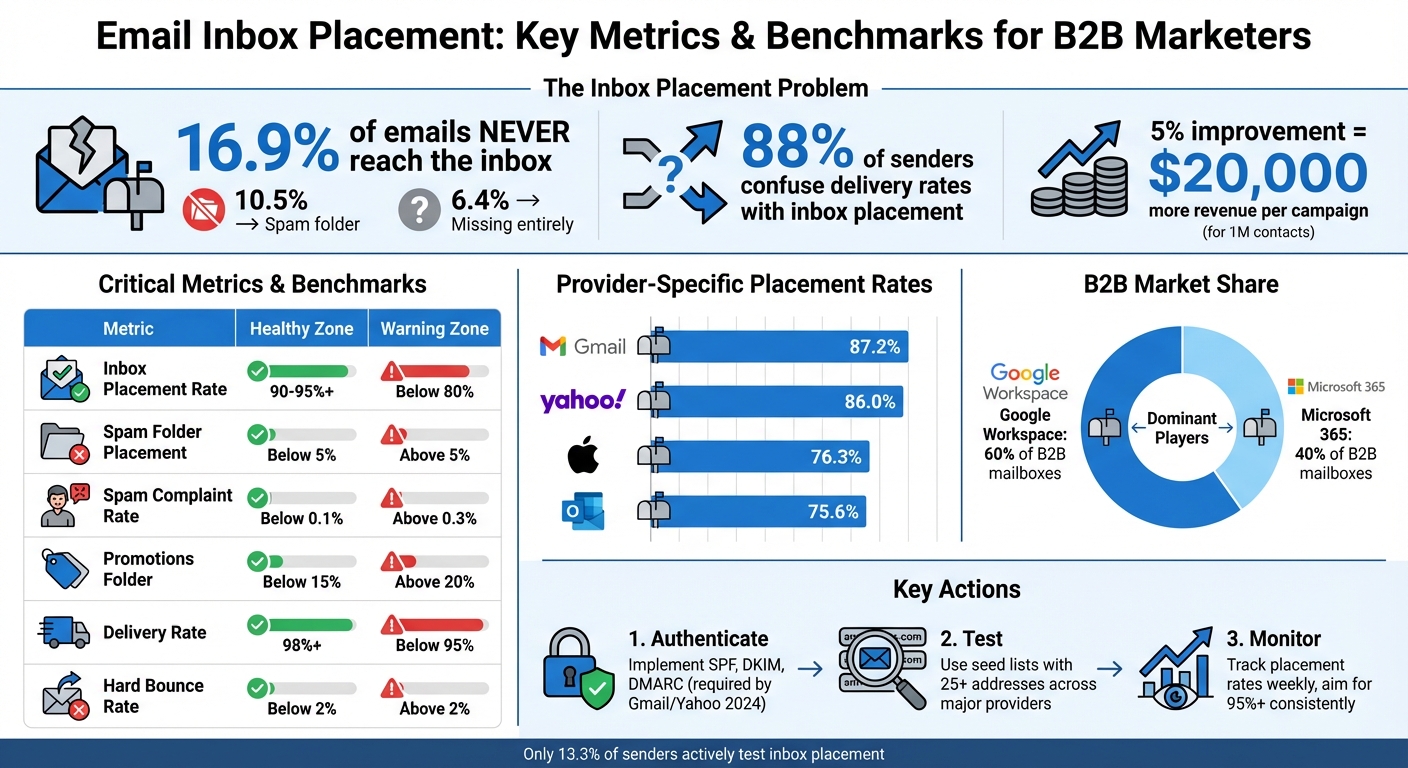
- Impact: A 5% boost in placement for 1M contacts can generate $20,000 more revenue per campaign.
- Common issues: 16.9% of emails don’t reach the inbox - 10.5% go to spam, 6.4% vanish entirely.
- Metrics to track: Inbox Placement Rate (IPR), spam folder placement, complaint rates, and engagement signals like replies.
- Tools and strategies: Use seed list testing, real-time engagement monitoring, and advanced reporting tools to diagnose and fix issues.
- B2B challenges: Corporate email systems like Google Workspace and Microsoft 365 have stricter filters, making inbox placement harder.
Start here to ensure your emails land where they need to be: the primary inbox.
Email Inbox Placement Metrics and Benchmarks for B2B Marketers
How Do Email Deliverability Tools Check Inbox Placement? - TheEmailToolbox.com
Key Metrics for Monitoring Inbox Placement
Focusing on the right metrics can make or break your B2B email campaigns. While many marketers stick to basic delivery rates, these don’t tell the full story. To truly understand where your emails land and how recipients interact with them, you need to dig deeper. Let’s explore the key metrics that provide a clearer picture of your email performance, starting with the Inbox Placement Rate.
Inbox Placement Rate (IPR)
The Inbox Placement Rate (IPR) measures how many of your delivered emails actually make it to the primary inbox rather than getting stuck in spam or promotions folders. You can calculate it using this formula:
(Number of emails reaching the primary inbox / Total emails delivered) × 100.
A strong IPR should be 95% or higher. If your rate drops below 80%, it’s a red flag signaling significant issues. Placement rates can vary widely depending on the provider - Gmail averages 87.2%, Yahoo 86.0%, Apple Mail 76.3%, and Outlook 75.6%.
Why does this matter? The financial stakes are huge. For example, improving your IPR by just 5% for a list of 1 million contacts means 50,000 more emails reaching inboxes. That could translate to an additional $20,000 per campaign. Despite its importance, about 88% of senders confuse delivery rates with inbox placement, overlooking this critical metric.
Spam and Promotions Folder Metrics
It’s not enough to know how many emails hit the inbox - you also need to track where the rest are going.
- Spam folder placement should stay under 5%. Anything higher suggests reputation problems.
- Spam complaint rate is another vital metric. Keep it below 0.1%, as most providers impose strict filtering once complaints exceed 0.3%.
Kate Nowrouzi, VP of Deliverability and Product Strategy at Sinch, highlights the risks of neglecting these metrics:
"Landing on a blocklist can impact your bottom line as well as your future sending. By proactively monitoring and addressing blocklist issues as they arise, you can safeguard your reputation."
And don’t overlook the promotions folder - especially in B2B email marketing. While some see it as a negative, ISPs actually consider it part of the inbox. Aim to keep the promotions folder rate under 15% for marketing emails. However, if transactional or relationship-building emails end up there, that’s cause for concern.
Lastly, pay attention to the "missing" emails metric - emails that vanish without landing in any folder. This often points to severe ISP-level blocking.
Metric
Healthy Benchmark
Warning Zone
Inbox Placement Rate
90%–95%+
Below 80%
Spam Folder Placement
Below 5%
Above 5%
Spam Complaint Rate
Below 0.1%
Above 0.3%
Promotions Folder Rate
Below 15%
Above 20%
Delivery Rate
98%+
Below 95%
How Engagement Metrics Connect to Inbox Placement
Metrics like open and click-through rates offer valuable clues about your inbox placement. Providers like Gmail and Outlook factor in user behavior - opens, clicks, forwards, and replies - to determine if your emails are relevant. High engagement signals quality content, which boosts your chances of landing in the primary inbox.
However, relying solely on these metrics can be misleading. Tools like Apple Mail Privacy Protection, VPNs, and corporate security scanners often trigger "false opens" by preloading content before a recipient even sees the email. This means you could have a 99% delivery rate but a 0% inbox placement rate if all your emails are flagged as spam.
To avoid this pitfall, connect your engagement data with direct inbox placement testing. If your open or click rates suddenly drop while delivery rates remain stable, it’s a sign your emails aren’t reaching the primary inbox.
For B2B cold outreach, one standout metric is the reply-to-open ratio. Replies are the strongest indicator of recipient interest and a powerful signal to ISPs that your emails are wanted. Segmenting engagement data by provider (e.g., Gmail vs. Outlook) can also help pinpoint whether placement issues are widespread or tied to specific filtering rules.
Bob Stocks, an Email Deliverability Consultant at Inbox Monster, underscores the importance of taking a broad approach:
"Seed lists are just one tool in a much larger portfolio that marketers can use to track and monitor their email deliverability. Looking at spam traps, complaints and DMARC delivery reports in combination with inbox placement reports solidifies the deliverability status of a sending domain."
Methods for Monitoring Inbox Placement
Making sure your emails end up in the right place takes more than just checking delivery rates. To truly understand where your messages land - whether in the primary inbox, a secondary folder, or lost altogether - you need reliable testing and monitoring techniques. These methods go beyond basic metrics, providing insights that help fine-tune your email strategy.
Seed List Testing
Seed list testing involves sending your emails to a controlled group of test addresses across major providers like Gmail, Outlook, and Yahoo. By embedding tracking identifiers in these emails, you can see exactly where they land: the primary inbox, a promotions tab, the spam folder, or nowhere at all.
To get accurate results, your seed list should reflect your audience. For example, professional environments like Google Workspace and Microsoft 365 make up a significant share of B2B email users - around 60% and 40%, respectively. Using a seed list skewed toward consumer accounts could give you results that don’t match your real-world audience.
For reliable testing, replicate the conditions of your actual campaign. Use the same content, headers, tracking links, and sending domain as you would in a live send. It’s also a good idea to test before launching a new campaign to catch potential issues early. Including seed addresses in your live sends can help validate placement in real time. For consistent results, use at least 25 seed addresses across major providers. If you’re testing multiple addresses in a single email, limit the group to no more than 25 to avoid triggering reputation-based blocks.
While seed list testing shows where emails land, real-time engagement data reveals how subscribers interact with your messages.
Real-Time Engagement Monitoring
Engagement metrics provide a window into how your subscribers are interacting with your emails. If you notice a sudden drop in open rates - especially when broken down by provider - it could confirm placement issues flagged during testing.
Certain actions, like replies, can be particularly helpful. When recipients reply to your emails, it sends a positive signal to providers like Gmail and Outlook, increasing the likelihood of future emails landing in the inbox. Other helpful signals include forwarding emails, adding your address to a contact list, or marking a message as "Not Junk."
However, engagement metrics aren’t foolproof. Tools like Apple Mail Privacy Protection, VPNs, and security scanners can generate false opens, skewing the data. That’s why it’s important to cross-check engagement metrics with placement tests. Monitoring engagement for specific providers, such as Gmail or Outlook, can also help identify filtering issues. To act quickly on potential problems, you can set up automated alerts through platforms like Slack or APIs.
For deeper insights, advanced tools can help diagnose deliverability challenges more thoroughly.
Advanced Reporting Tools
Advanced reporting tools go beyond basic placement metrics, offering detailed diagnostics to identify and resolve deliverability issues. These platforms can analyze email headers, check for spam triggers in your content, and verify authentication protocols like SPF, DKIM, and DMARC. They can also track "missing" emails - those that don’t land in any folder - often an indicator of severe blocking at the ISP level.
Reputation management tools, such as Gmail Postmaster Tools and Microsoft SNDS, allow you to monitor your domain and IP health directly with email providers. Combining these tools with paid testing platforms gives you a comprehensive view of your deliverability status. By addressing technical issues uncovered through these diagnostics, you can maintain strong inbox placement rates.
For ongoing monitoring, consider running inbox placement tests monthly for active campaigns or whenever you make significant changes to your sending setup. Programs with top performance often achieve placement rates above 95%, while rates below 90% typically indicate serious deliverability challenges.
Testing Method
Best For
Key Limitation
Seed List Testing
Pre-campaign validation; provider-specific diagnosis
Requires a B2B-weighted seed list for accuracy
Real-Time Engagement
Detecting sudden placement drops; measuring recipient interest
Can be distorted by privacy tools and security scanners
Advanced Reporting
Deep technical diagnostics; authentication verification
Often requires paid tools for comprehensive data
Strategies to Improve Inbox Placement
If you're aiming to consistently land emails in the primary inbox, these strategies will help establish a solid foundation for better deliverability.
Building a Strong Sender Reputation
Your sender reputation is like the credit score of your email program - it determines whether Internet Service Providers (ISPs) trust your emails enough to deliver them to the inbox. Once damaged, rebuilding it requires time and consistent effort.
Start by implementing SPF, DKIM, and DMARC to authenticate your sending domain. In fact, Gmail and Yahoo now require bulk senders to have these protocols in place (at least p=none for DMARC) as of 2024. These measures validate your legitimacy and ensure your emails remain intact during transit.
For new IPs, take a gradual approach. Begin by sending 5–10 emails daily for five days, then slowly increase the volume over 14 to 30 days. This phased process helps establish a positive trust history with providers.
Keep your bounce rate below 2% by immediately removing hard bounces. To maintain list quality, use double opt-in methods and sunset policies. It's worth noting that 21% of opt-in emails fail to reach their intended inbox.
Spam complaint rates should stay under 0.1%. While Google and Yahoo allow up to 0.3%, high-performing senders aim for much lower rates. Make unsubscribing as easy as possible by including one-click unsubscribe links (RFC 8058) and steering clear of "no-reply" email addresses, which discourage engagement and are frowned upon by ISPs.
"Landing on a blocklist can impact your bottom line as well as your future sending. By proactively monitoring and addressing blocklist issues as they arise, you can safeguard your reputation, maintain customer trust, and ensure your messages aren't automatically flagged as spam." - Kate Nowrouzi, VP of Deliverability and Product Strategy, Sinch
If you manage multiple email types, consider infrastructure sharding, where you use separate subdomains for transactional and promotional emails. This way, a spike in marketing complaints won’t affect critical notifications.
Here’s a quick look at key benchmarks to monitor:
Metric
Target Benchmark
Impact on Reputation
Inbox Placement Rate
> 95%
High
Spam Complaint Rate
< 0.1%
Critical
Hard Bounce Rate
< 2%
High
Open Rate
> 20%
Medium/High
Unsubscribe Rate
< 0.5%
Medium
Optimizing Email Content and Targeting
Once your sender reputation is secure, turn your attention to crafting emails that engage and resonate with your audience. ISPs like Gmail and Outlook rely on engagement signals - such as opens, clicks, forwards, and replies - to determine whether your emails deserve a spot in the primary inbox.
Encourage responses by designing emails that invite direct replies. Asking questions or requesting feedback can foster two-way conversations, which are especially effective in B2B communication.
Keep your formatting simple. Avoid overly complex layouts, excessive images, or large file sizes (over 102KB), as these can trigger spam filters. Stick to a 60/40 text-to-image ratio, and avoid using link shorteners like bit.ly, which are commonly associated with spam.
Be mindful of your language. Words like "Free", "Guaranteed", or "Act Now" in subject lines or body copy can hurt your placement. Additionally, mismatched "From" names or excessive use of red text can raise red flags.
Segmenting your audience is another powerful way to increase engagement. In fact, segmented B2B campaigns see 30% more opens and 50% more click-throughs compared to generic sends. For example, UN|HUSHED, an education-focused nonprofit, segmented its audience by educator type and engagement level, achieving a 99% deliverability rate. Also, encourage subscribers to add your "From" address to their contact list, which can help bypass automated filters.
Monitoring Placement Trends Over Time
Even after optimizing your emails, continuous monitoring is essential to adapt to ever-changing ISP algorithms. Inbox placement is not static - provider algorithms evolve, audience behavior shifts, and even minor technical issues can lead to sudden performance drops.
Regularly track key metrics, such as inbox placement rates, to ensure you're staying above 95%. Keep in mind that providers like Gmail and Outlook often have placement differences of 20% or more, so monitor each provider separately to avoid missing hidden issues. Tools like Google Postmaster Tools and Microsoft SNDS can help you track domain reputation and spam rates.
Keep an eye on the "missing" metric - emails that fail to land in any folder. A rise in this number could indicate severe filtering problems. For instance, 16.9% of opt-in emails fail to reach the inbox, with 10.5% going to spam and 6.4% disappearing entirely.
Review metrics weekly to catch subtle changes before they escalate. Pay close attention to reply rates and spam complaints, as shifts in these areas often signal larger issues. When analyzing engagement trends, exclude unreliable data, such as metrics affected by Apple Mail Privacy Protection, to get an accurate picture.
Run regular inbox placement tests to identify any reputation decay. Pre-campaign tests can provide predictive insights, while seed addresses in live sends can confirm real-time placement. Additionally, perform monthly audits of your technical setup to ensure SPF, DKIM, and DMARC records are correctly aligned and your tracking domains remain clean. Small errors can lead to significant issues, making early detection crucial.
Tools and Platforms for Inbox Placement Monitoring
Once you've got a handle on the key metrics and strategies, the next step is choosing the right tools to maintain strong inbox placement. This is where monitoring platforms come into play.
Overview of Monitoring Tools
The right tools can do more than confirm email delivery - they can pinpoint whether your emails land in the inbox, the spam folder, or get blocked entirely. Modern platforms are designed to provide this level of detail, making them essential for understanding and improving email performance.
For B2B email campaigns, tools that focus on professional providers like Google Workspace and Microsoft 365 are particularly valuable. These two providers dominate the professional email market, accounting for nearly all B2B mailboxes. When evaluating platforms, look for those that separate results into categories: inbox, spam, and blocked emails. Blocked emails, in particular, signal issues at the server level, preventing the email from reaching any folder. Using provider-specific seed lists ensures more accurate insights for B2B campaigns.
Key features to prioritize include:
- Authentication Checks: Verifying SPF, DKIM, DMARC, and BIMI to ensure your emails are properly authenticated.
- Content Analysis: Identifying spam trigger words, risky links, or other content issues that could harm deliverability.
- Reputation Monitoring: Tracking your sender reputation across major blocklists.
- Real-Time Alerts: Advanced tools integrate with platforms like Slack or APIs to notify your team immediately if placement rates drop.
"Seed lists are just one tool in a much larger portfolio that marketers can use to track and monitor their email deliverability. Looking at spam traps, complaints and DMARC delivery reports in combination with inbox placement reports solidifies the deliverability status of a sending domain." - Bob Stocks, Email Deliverability Consultant, Inbox Monster
To get the most accurate results, it's critical to test your email campaigns under real conditions. This means using the same content, headers, and tracking domains as your live emails. This approach ensures that the data you gather reflects actual performance.
How Breaker Supports Inbox Placement
Breaker takes these monitoring capabilities a step further by offering advanced tools and services tailored to B2B marketers. With Breaker, you don’t have to handle deliverability management on your own - its team of experts takes care of the technical details for you.
Breaker automates key deliverability tasks, such as monitoring mail streams, optimizing sending logic, and maintaining list hygiene. This hands-on approach removes the guesswork and technical challenges, allowing marketers to focus on strategy instead of troubleshooting.
For $200/month, Breaker provides unlimited email validations, ensuring your email lists are clean and optimized for deliverability. Their AI-powered lead generation system uses a matching algorithm and strict data hygiene practices to identify high-quality subscribers. This ensures that growing your email list doesn’t come at the expense of inbox placement.
"Our team of experts manage all mail streams on the back end for you. With a unique combination of sending logic, list hygiene, and reputation monitoring, we ensure your emails land in the inbox." - Breaker
Top-performing email programs consistently achieve placement rates above 95%. Breaker helps B2B marketers hit these benchmarks with features like white-glove migration support and expert deliverability guidance, eliminating the need for marketers to become deliverability experts themselves.
Key Takeaways for B2B Marketers
When it comes to B2B email marketing, keeping an eye on inbox placement is absolutely crucial. Surprisingly, nearly 88% of senders confuse delivery rates with inbox placement, which can lead to major issues. For example, 16.9% of emails fail to reach the intended inbox, going completely unnoticed.
The financial impact of this is hard to ignore. Improving inbox placement by just 5% for a list of 1 million contacts could mean 50,000 more visible emails - and potentially an extra $20,000 per campaign. Despite these numbers, only 13.3% of senders actively use inbox placement testing to identify filtering problems.
To achieve better results, aim for inbox placement rates above 95% and keep spam complaint rates under 0.1%. Focus on meaningful engagement metrics, like replies, rather than just open rates. For B2B campaigns, testing against Google Workspace and Microsoft 365 is essential, as they dominate the market with roughly 60% and 40% shares, respectively.
Here are some practical steps to improve performance:
- Ensure full SPF, DKIM, and DMARC authentication.
- Use seed list testing before launching campaigns.
- Monitor emails that completely disappear, as these could signal ISP-level filtering issues.
FAQs
What are the best strategies to improve Inbox Placement Rate (IPR) for B2B emails?
Improving your Inbox Placement Rate (IPR) starts with getting your email authentication right. Make sure your domain is equipped with SPF, DKIM, and DMARC protocols. These tools help prevent your emails from being flagged by spam filters. If you're using new IP addresses, warm them up gradually over a period of 30–90 days, and keep your sending volumes steady to build trust with mailbox providers. It's also essential to clean your email list regularly - remove invalid addresses, hard bounces, and disengaged contacts to keep spam complaints to a minimum and maintain a good sender reputation.
Engagement plays a huge role in improving inbox placement. Segment your audience and personalize your emails, from subject lines to content, to encourage higher open and click rates. These engagement signals tell providers like Gmail and Outlook that your emails are worth delivering to the inbox. Stay away from spammy language, excessive punctuation, or all-caps, and opt for a clean, simple email design with well-structured HTML. Consistency is also important - sending emails at regular times and maintaining a predictable frequency helps build trust and keeps your emails out of the spam folder.
For a more efficient approach, a platform like Breaker can make a big difference. With tools for real-time performance tracking, audience targeting, and deliverability monitoring, Breaker helps ensure your campaigns drive engagement and consistently land in your recipients' inboxes.
What’s the difference between email delivery rates and inbox placement?
Email delivery rate and inbox placement are two distinct steps in an email's journey. The delivery rate confirms that the recipient’s mail server has accepted the email. However, it doesn’t reveal where the email ends up. Inbox placement, on the other hand, determines whether the email lands in the primary inbox, promotions tab, spam folder, or if it’s completely out of sight.
While delivery rates are relatively simple to measure, inbox placement is more complex and requires deeper analysis. Marketers often rely on tools like seed testing, panel data, or engagement metrics (such as opens and clicks) to get a better sense of placement. In essence, a high delivery rate shows your email made it to the server, but a strong inbox placement rate ensures it’s actually visible where it matters most - right in front of the recipient.
Why is monitoring engagement important for keeping emails in the inbox?
Monitoring how recipients interact with your emails is key to keeping them in the primary inbox instead of being shuffled into spam or promotions folders. Services like Gmail and Outlook assess engagement signals - things like opens, clicks, replies, and even how long someone spends reading your message - to judge whether you're a trustworthy sender. If engagement drops, your sender reputation can take a hit, and even legitimate emails might end up flagged.
Keeping an eye on metrics such as open rates, click-through rates, and bounce rates in real time helps you spot problems early. This gives you a chance to make quick adjustments, like tweaking subject lines, experimenting with different send times, or cleaning up your email list. These steps can reignite engagement and improve where your emails land.
Tools like Breaker simplify this process by offering automated analytics and actionable insights. With these features, B2B marketers can respond swiftly and fine-tune their email strategies to maximize performance.
Related Blog Posts
Keep reading
All articlesPost-Webinar Survey Questions Template (2026)
30+ post-webinar survey questions with NPS, CSAT, and CES templates, plus timing and length tips to boost completion and qualify leads faster.
GDPR Consent Requirements for Purchased Email Lists
Purchased email lists rarely meet GDPR's consent bar. Learn the legal basis rules, PECR overlap, and safer alternatives before you hit send.
7 Email Platforms With Inbox Placement Testing & Suppression
Compare 7 email platforms that combine inbox placement testing with suppression management, scored on features, pricing, and best-fit sender size.