
Lead Scoring Automation: Step-by-Step Guide
Automate lead scoring to prioritize high-value prospects: sync CRMs and analytics, define fit vs behavior, assign point values, set thresholds and decay.
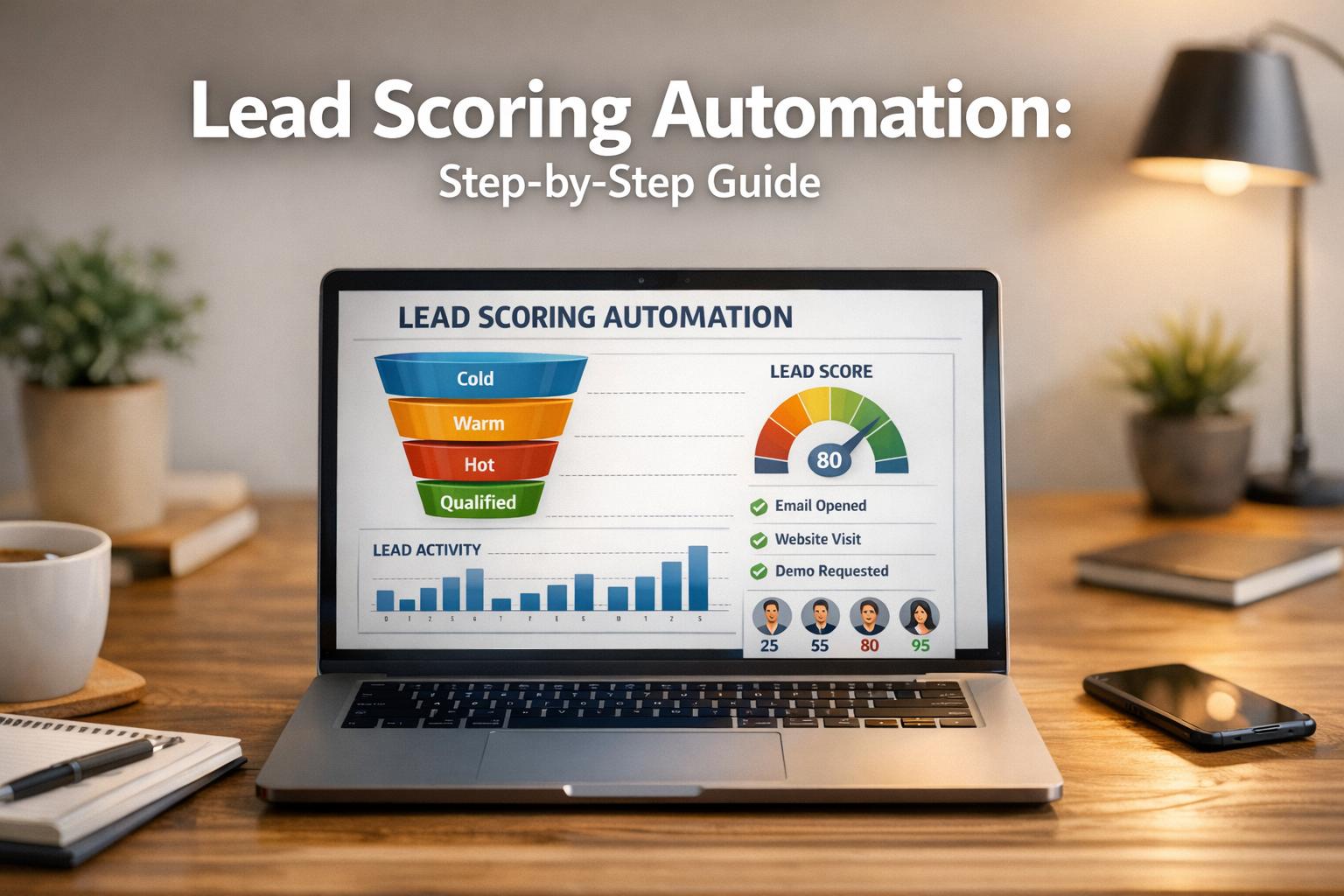
Lead scoring automation helps sales teams prioritize the best leads while saving time and reducing manual effort. By assigning scores based on behaviors (like visiting a pricing page) and attributes (like job title), businesses can identify which prospects are most likely to convert into customers. Automating this process ensures real-time updates, eliminates human error, and increases efficiency.
Key Takeaways:
- What is Lead Scoring? A system that ranks leads based on their likelihood to buy, using explicit (e.g., job title) and implicit (e.g., website activity) data.
- Why Automate? Manual scoring is slow and error-prone. Automation processes data instantly, improving lead conversion rates by up to 77%.
- How to Set It Up?
- Connect Data Sources: Sync tools like CRMs, marketing platforms, and analytics for real-time updates.
- Define Criteria: Use "fit" (who the lead is) and "behavior" (what the lead does) to determine scoring factors.
- Assign Points: Balance scores between fit and behavior, set thresholds for qualified leads, and apply score decay for inactive leads.
Example Tool: Breaker
Breaker simplifies lead scoring with CRM integrations, real-time analytics, and automated workflows. It also validates email quality to filter out unqualified leads.
Automating lead scoring not only saves time but also ensures sales teams focus on high-priority opportunities. With the right setup and tools, businesses can significantly improve their conversion rates.
The SIMPLEST Way To Build An AI Lead Scoring Assistant (AI Automation)
Setting Up Lead Scoring Automation
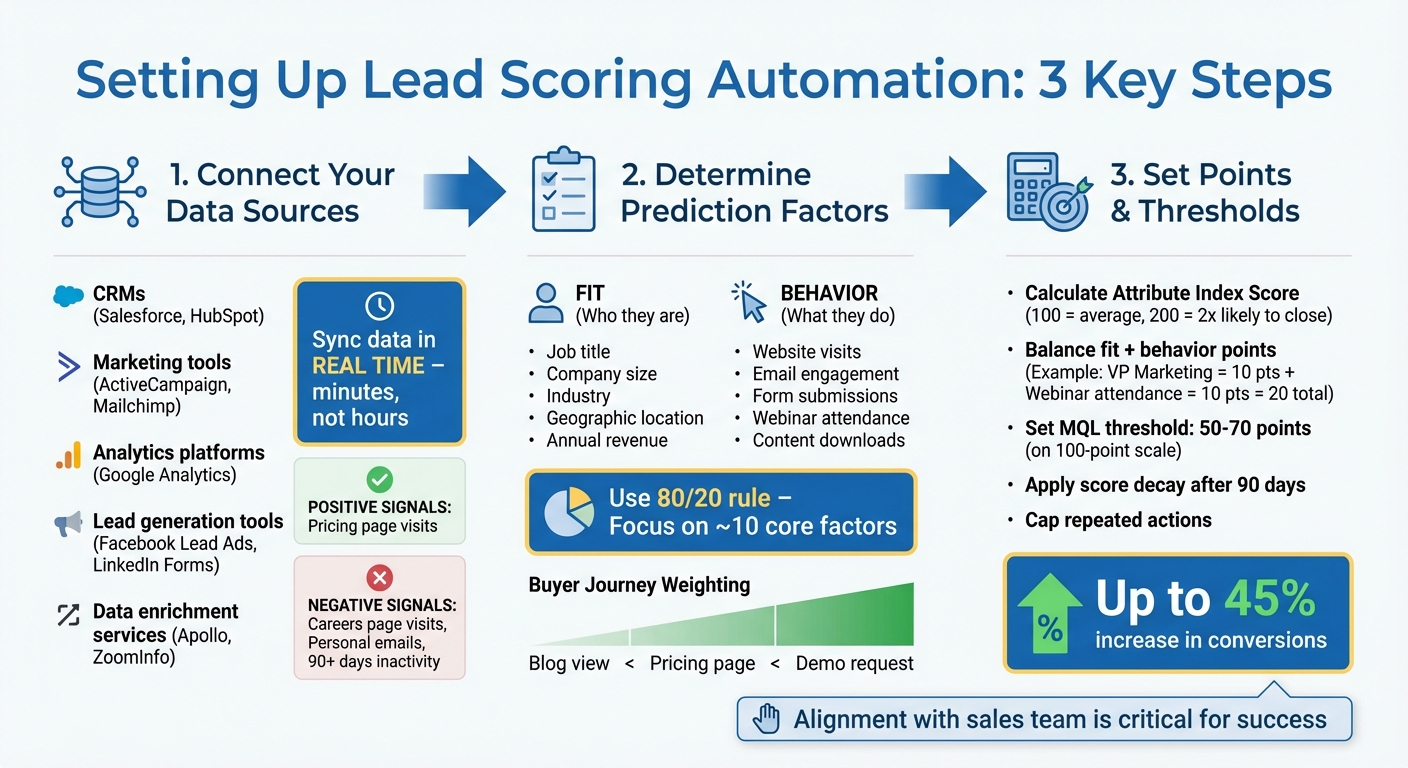
3-Step Lead Scoring Automation Setup Process
Automating lead scoring involves three key steps: connecting your data sources, defining scoring criteria, and assigning point values. Skipping or rushing through these steps can lead to misaligned priorities and wasted time for your sales team.
Step 1: Identify Data Sources
The quality of your lead scoring depends on the quality of your data. To capture both positive and negative signals, integrate data from various platforms like CRMs (e.g., Salesforce, HubSpot), marketing tools (ActiveCampaign, Mailchimp), analytics platforms (Google Analytics), lead generation tools (Facebook Lead Ads, LinkedIn Forms), and data enrichment services (Apollo, ZoomInfo).
The real game-changer is syncing this data in real time. Imagine a prospect downloads a whitepaper at 2:00 PM - your system should update their score within minutes, not hours or days. As Ryan Durling, Inbound Consultant at HubSpot, puts it:
"The biggest lift in lead scoring is not defining how many points something is worth, it's making sure everyone internally is aligned".
Before diving into integrations, collaborate with your sales team to identify behaviors that genuinely indicate buying intent. For example, visiting a pricing page might signal strong interest for some businesses but could simply reflect curiosity for others.
Don’t ignore negative signals. For instance, a prospect visiting your careers page is likely a job seeker, not a buyer. Similarly, leads using personal email domains like Gmail or Yahoo for B2B inquiries may lack purchasing authority. Long periods of inactivity - such as 90 days without engagement - can also indicate a lead has gone cold.
Once your data sources are synced in real time, focus on identifying the criteria that best predict conversions.
Step 2: Define Scoring Criteria
After connecting your data, the next step is to determine the factors that predict sales. The most effective scoring models differentiate between fit (who the lead is) and behavior (what the lead does).
- Fit criteria include attributes like job title, company size, industry, geographic location, and annual revenue. These are relatively stable over time.
- Behavior criteria track actions such as visiting your website, engaging with emails, submitting forms, attending webinars, or downloading content.
Align these criteria with your Ideal Customer Profile (ICP). For example, if your ICP focuses on mid-market SaaS companies with 50–200 employees, leads fitting this profile should receive the highest scores. Then, weigh behavioral signals based on the buyer's journey. A blog post view (awareness stage) should carry less weight than a pricing page visit (consideration stage), which is less important than a demo request (decision stage).
As Suzy Balk, Sr. Marketing Campaigns Manager at Act-On, explains:
"A one-time download of top-of-funnel content doesn't mean anything from a sales-readiness perspective. If it happens consistently, now that's a different story - and that's where lead scoring comes in".
Focus on patterns rather than isolated actions. Use the 80/20 rule - 80% of your lead scoring effectiveness often comes from 20% of the criteria. Limiting your model to about 10 core factors can help you avoid diluting the impact of high-value signals.
Once your criteria are clear, it’s time to translate them into actionable point values.
Step 3: Assign Point Values and Thresholds
Assigning point values transforms your lead scoring from guesswork to a data-driven system. Start by calculating an Attribute Index Score to measure how strongly each factor predicts a sale. For example, an index of 100 might represent the average likelihood of conversion, while 200 means a lead is twice as likely to close. Alternatively, compare close rates for specific behaviors against your overall benchmark. If demo requests close at 20% versus a 1% average, that action is 20 times more valuable.
Balance points between fit and behavior to ensure that high engagement doesn’t overshadow poor fit. For instance, a lead could earn 10 points for being a VP of Marketing (fit) and another 10 points for attending a webinar (behavior), bringing their total to 20 points. Use historical data to set your Marketing Qualified Lead (MQL) threshold - this might fall between 50–70 points on a 100-point scale, or you could simplify it to a smaller range, like 1–10.
Deduct points for poor fit indicators, and apply score decay (e.g., after 90 days) to reflect current interest. To prevent inflated scores, cap repeated actions - clicking the same link multiple times shouldn’t disproportionately boost a lead’s score. A structured scoring model like this can increase conversions by up to 45%.
Using Breaker for Lead Scoring Automation
Breaker simplifies lead scoring automation by combining multiple tools into one seamless platform. With its integrated features and real-time updates, you can manage everything from a single dashboard - syncing your CRM, tracking subscriber activity, and validating email quality without lifting a finger.
CRM Integrations in Breaker
Breaker comes equipped with over 25 native integrations, connecting directly to platforms like Salesforce, HubSpot, and ActiveCampaign. This eliminates the hassle of manual data entry and ensures lead scores are updated instantly as prospects interact with your content. Plus, its waterfall enrichment feature automatically verifies key contact details, helping you maintain clean and accurate lists.
But Breaker doesn’t stop at syncing data. Its AI-powered contact management system analyzes conversations, notes, and activity to score and organize leads automatically. For instance, if someone downloads a whitepaper and visits your pricing page on the same day, Breaker updates their score and flags them for follow-up by your sales team. Combined with its robust integrations, Breaker's automated workflows make lead scoring faster and more efficient.
Setting Up Automated Workflows
To get started, create a "SCORE" attribute as a Number type in Breaker's settings. From there, you can use the Vision Builder to set up automation rules with simple text prompts or even voice notes - no coding skills required.
Set triggers for score updates based on specific actions, like opening an email, clicking a link, or visiting high-value pages such as your demo request form. Within each workflow, include an "Update contact attribute" step to adjust scores based on these behaviors.
Breaker also enables dynamic segmentation, automatically adding contacts to targeted lists once they hit a specific score threshold. Before activating any workflows, use the "Test the workflow" feature to make sure logs and point adjustments work as intended. This extra step ensures that unqualified leads don’t accidentally make it to your sales team.
Once scores are flowing, an advanced email marketing automation workflow data structure lets the drip hand hot leads to sales automatically instead of sending the next email.
Real-Time Analytics and Email Validation
With Breaker’s real-time analytics, your lead scores stay up-to-date as prospect behavior changes. While 86% of B2B marketers now incorporate lead scoring into their demand generation strategies, many still rely on static models that quickly go stale. Breaker’s real-time tracking identifies high-priority actions - like visits to pricing pages or demo requests - and prioritizes them over less meaningful activities like email opens.
To further refine your lead pool, Breaker includes automated email validation. It filters out unqualified leads by flagging personal email domains (e.g., Gmail, Yahoo) and educational addresses (.edu), which often lack purchasing authority. Leads missing critical details, such as company names or phone numbers, are also marked as not ready for sales, ensuring only qualified prospects make it into your SQL pipeline.
The Best Way to Automate Lead Qualification, Scoring, and Intent Detection Before Booking Calls
A growing number of teams ask a sharper version of the lead scoring question: how do we automatically qualify a lead, detect real buying intent, and only then let them book a call? The answer is a pipeline with five stages, each automated by a different tool.
- 1. Fit scoring from enrichment. The moment a lead arrives, enrich the email or domain (see data enrichment services) and score firmographics against your ICP: company size, industry, region, and role. Disqualify hard misses here so nobody wastes a calendar slot on them.
- 2. Behavioral scoring. Add points for pricing-page visits, docs and integration pages, repeat sessions, and newsletter clicks on product content. Subtract for careers-page visits and generic content only.
- 3. Intent detection. Combine first-party intent (a demo request, a "compare plans" click, a reply to a nurture email) with third-party signals where budget allows (Bombora, G2 or Capterra category views, LinkedIn ad engagement). Weight first-party signals higher; they decay more slowly and cost less.
- 4. Qualification questions. Put two or three questions on the booking form instead of ten: team size, current tool, and timeline. Route on the answers rather than reading them later.
- 5. Conditional routing to the calendar. Only leads above both a fit threshold and an intent threshold see the instant-booking calendar. Everyone else enters a nurture track (our email drip campaign templates include one) and is re-scored as they engage.
Tooling by level
- Beginner: native CRM scoring (HubSpot, Pipedrive) plus a form with routing rules in Calendly or HubSpot Meetings. Breaker supplies the newsletter engagement signals and validates the addresses.
- Intermediate: a Clay or n8n workflow that enriches, scores, and writes a "qualified" flag back to the CRM, with Chili Piper or RevenueHero routing hot leads to the right rep's calendar.
- Advanced: predictive scoring (HubSpot Predictive, MadKudu, or a warehouse model) trained on closed-won deals, intent data feeds, and account-level scoring so a second person from a hot account skips the queue.
What actually matters
Most teams over-gate. If your calendar is empty, lower the thresholds and let more leads book. Recalibrate monthly against which booked calls turned into pipeline, and let intent signals expire after 14 to 30 days so a stale visit does not keep a lead marked hot.
Optimizing Your Lead Scoring Model
Keeping your lead scoring model sharp and effective requires ongoing attention. As markets evolve and customer behaviors shift, regular updates ensure your scoring system stays relevant. Companies that actively refine their models report a 77% boost in lead conversion rates. On the flip side, neglecting these updates can leave sales teams chasing unqualified leads. Tools like Breaker's real-time automation provide the critical data needed to make these adjustments.
Running A/B Tests
One way to fine-tune your scoring model is through A/B testing. For example, you could test different point values for specific actions, like assigning 50 versus 70 points for a demo request, and then track how these changes impact conversion rates. Similarly, you might compare the weight of attending a webinar versus downloading a whitepaper to see which action correlates more strongly with conversions.
Make sure your decisions are backed by data. Focus on statistically significant results, and document everything for future reference. The insights gained from these tests should guide the metrics you prioritize and the adjustments you make.
Tracking Performance Metrics
Regularly analyzing performance metrics is key to understanding your model's effectiveness. For instance, if low-scoring leads are converting as often as high-scoring ones, it’s a clear sign that your scoring system needs work.
Pay close attention to these metrics:
- Sales cycle length: High-scoring leads should move through your pipeline faster.
- Lead-to-opportunity ratio: This measures whether your sales team agrees with your scoring by accepting leads as viable opportunities.
- False positive rate: This is the percentage of high-scoring leads that sales ultimately rejects. If this number rises, you might be overvaluing certain actions or overlooking disqualifying behaviors.
Real-world examples highlight the impact of refining your model. ZoomInfo achieved a 45% increase in sales conversions by focusing only on the highest-scoring leads. Similarly, LearnUpon improved its MQL to SQL conversion rate by 30% after adjusting its scoring thresholds.
Use these insights to make real-time adjustments, keeping your model in sync with what’s working.
Refining Based on Results
It’s also essential to review your model periodically to catch and address any blind spots. Schedule quarterly sessions with your sales team to identify false positives or unexpected conversions from low-scoring leads. These anomalies can reveal overlooked behaviors or the need for new scoring criteria. For example, you might discover the importance of adding negative scores for disqualifying actions, like visiting career pages or researching competitors.
Another useful tactic is integrating score decay. This feature lowers the priority of inactive leads based on feedback from your team. As industry expert Aishwarya Agarwal puts it:
"Keep it simple and agile. Create models which are easy to optimize and refine. Complexity is the enemy of execution".
During the initial setup, review your model every 30 days to iron out any issues. Once it stabilizes, shift to quarterly evaluations to keep it running smoothly.
Conclusion
Switching to automated lead scoring doesn’t have to be complicated. It starts with pinpointing your data sources, setting clear scoring criteria, and assigning point values that reflect both a lead's fit and intent. Once that’s in place, automation takes over the repetitive tasks, freeing you up to focus on refining your process through data-driven testing. The result? Greater efficiency and measurable outcomes.
Automating lead scoring not only simplifies workflows but also helps your sales team zero in on the most promising opportunities. In fact, 68% of top marketers rank lead scoring as a key driver of revenue. Companies also report higher conversion rates when they prioritize high-scoring leads, proving the value of a well-tuned scoring system.
Breaker makes this process even easier with its integrated CRM data, automated workflows, and real-time analytics. Its email validation feature ensures clean, reliable data from the start, while automated lead generation brings in engaged prospects who align with your ideal customer profile. This means you’re not just scoring leads - you’re scoring the right leads.
For this system to work seamlessly, alignment between sales and marketing is crucial. Teams need to agree on what defines a marketing-qualified lead (MQL), key behaviors to track, and how quickly leads should be contacted. Without this collaboration, even the best automation tools can fall short. Regular check-ins with your sales team to review conversion trends and tweak scoring thresholds can make a big difference.
Keep it simple at first, track your results, and refine as you go. With Breaker’s suite of tools, you can elevate your lead prioritization process and close deals faster than ever.
FAQs
How can I make sure my lead scoring matches my Ideal Customer Profile (ICP)?
To fine-tune your lead scoring so it aligns perfectly with your Ideal Customer Profile (ICP), the first step is to clearly define who fits that profile. Pin down key attributes like company size, industry, revenue, geographic location, and buyer roles - think job titles and decision-making authority. Work closely with your sales and marketing teams to make sure these criteria reflect the characteristics of your most promising customers.
Once you’ve nailed down the ICP, translate those attributes into specific scoring rules. For example, award positive points for traits like being in a target industry or holding a decision-making role. On the flip side, assign negative points for attributes that indicate a poor fit. Layer in engagement metrics - such as email opens, website visits, or content downloads - to measure how aligned a lead is with your buyer’s journey. Assign weights to each criterion based on how much it matters to your sales process, and establish clear thresholds for what qualifies as a Marketing-Qualified Lead (MQL) versus a Sales-Qualified Lead (SQL).
To keep things efficient, use tools like Breaker to automate the scoring process. This ensures your scoring system is applied consistently and updated in real time, allowing for timely follow-ups or sales outreach when a lead hits the right score. Don’t forget to revisit and tweak your scoring model regularly to keep up with shifts in your ICP or market dynamics.
What mistakes should I avoid when automating lead scoring?
When setting up lead scoring automation, it's easy to fall into a few common traps. One big mistake? Relying on gut feelings or outdated methods instead of solid data. For example, assigning scores based on hunches or surface-level activity, like email opens, can lead to inflated scores for leads that don’t actually show real buying intent. Instead, focus on behavioral and firmographic signals that give a clearer picture of a lead’s potential.
Another issue is putting too much emphasis on the sheer number of scored leads instead of their quality. A high-conversion pipeline depends on more than just volume - it’s about identifying the right leads. To do this, include negative scoring for behaviors that show disengagement, like unsubscribing or inactivity. Also, weigh interactions based on intent. For instance, requesting a product demo should carry significantly more weight than simply clicking a link.
Lastly, your lead scoring model shouldn’t be static. It needs to evolve over time and stay aligned with both your sales and marketing teams. If thresholds don’t adapt or communication breaks down, you risk missing valuable opportunities and creating frustration. Tools like Breaker can simplify this process by providing data-driven insights, real-time updates, and intent-focused scoring, helping you keep your pipeline running smoothly.
How often should I review and update my lead scoring model?
To keep your lead scoring model working effectively, make it a habit to review and update it every quarter or whenever you spot noticeable shifts in buyer behavior or data quality. Regular adjustments help ensure your model stays relevant and accurately prioritizes leads.
Keep an eye on things like evolving customer preferences, updates to your sales process, or fresh insights from new data. Tweaking your model to reflect these changes can boost lead conversion rates and enhance your overall marketing results.
Related Blog Posts
Keep reading
All articlesPost-Webinar Survey Questions Template (2026)
30+ post-webinar survey questions with NPS, CSAT, and CES templates, plus timing and length tips to boost completion and qualify leads faster.
GDPR Consent Requirements for Purchased Email Lists
Purchased email lists rarely meet GDPR's consent bar. Learn the legal basis rules, PECR overlap, and safer alternatives before you hit send.
7 Email Platforms With Inbox Placement Testing & Suppression
Compare 7 email platforms that combine inbox placement testing with suppression management, scored on features, pricing, and best-fit sender size.