
Best Practices for Behavior-Triggered Emails
Guide to behavior-triggered emails: pick high-intent triggers, centralize event data, personalize by firmographics, and optimize timing, cadence, and workflows.

Behavior-triggered emails are automated messages sent based on specific user actions, like signing up, visiting a pricing page, or disengaging. These emails outperform standard newsletters by being timely and relevant, achieving 2–3x higher open rates and up to 10x ROI when personalized. However, common challenges like fragmented data, poor timing, and generic targeting can hurt their effectiveness.
Key Takeaways:
- Focus on meaningful triggers (e.g., demo requests, pricing page visits) and avoid vanity actions like generic page views.
- Standardize and centralize data across systems to ensure accurate, real-time triggers.
- Tailor emails using firmographic data (e.g., company size, industry) and lifecycle stage for better engagement.
- Use cooldown periods and localized send times to avoid overwhelming recipients.
- Monitor performance metrics like open rates, click-through rates, and conversions to refine workflows.
Tools like Breaker help streamline workflows, manage triggers, and improve targeting, ensuring your campaigns are timely and effective.
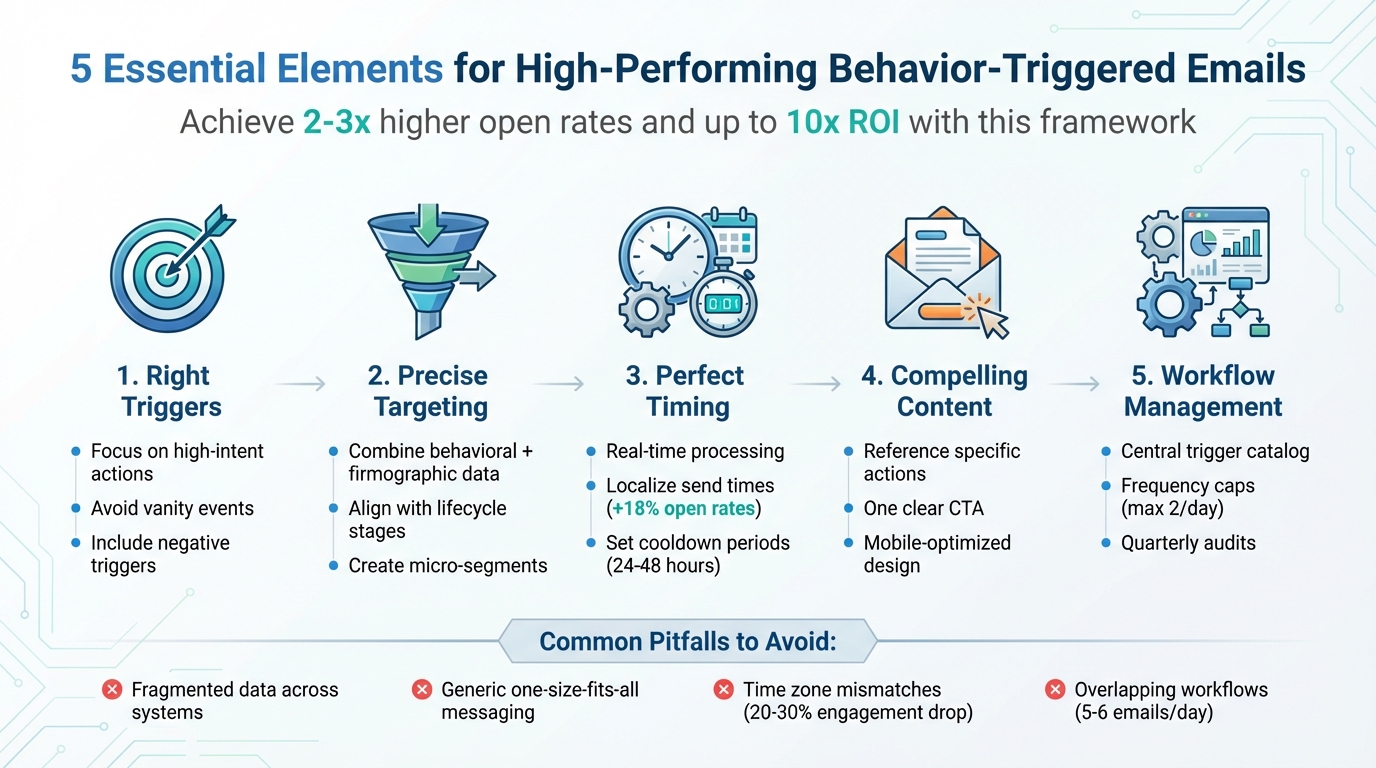
5-Step Framework for Effective Behavior-Triggered Email Campaigns
Identifying the Right Triggers and Fixing Data Fragmentation
Common Problems with Email Triggers
One of the biggest mistakes B2B teams make is relying too much on vanity events - things like generic page views, newsletter opens, or any random link click. While these actions might hint at mild interest, they don’t necessarily show genuine buying intent. The outcome? Irrelevant follow-ups that end up hurting engagement. For example, sending a sales email just because someone read a blog post can come across as overly pushy.
Another common issue is duplicate triggers across systems. If multiple platforms send emails based on the same action, your contacts might get bombarded with repetitive messages. This not only frustrates recipients but also increases unsubscribe rates and spam complaints. Then there’s the problem of ignoring negative triggers - signals like “hasn’t used a key feature in 14 days” or “invited teammates but never created a project.” Missing these moments means you’re overlooking opportunities to address churn risks or re-engage users when it’s most critical.
How to Fix Data Fragmentation
To tackle data fragmentation, start by mapping out your entire user journey - from the first interaction all the way to expansion. Think of it like this: ad click → site visit → content download → signup → onboarding → activation → regular use → renewal. Pinpoint specific behaviors that indicate progress, like “visited the pricing page twice within a week,” “invited three or more teammates,” or “completed onboarding tasks.” Use your CRM and product analytics to rank these behaviors by their intent level and business impact. Then, focus your triggers on the most meaningful signals: high-intent actions (like demo requests or pricing page visits), key activation milestones, and early signs of churn (such as a drop in usage).
Next, standardize your event taxonomy across all systems. Bring your marketing, product, sales, and RevOps teams together to create a unified naming convention, such as Object_Action (e.g., Account_Created, User_Invited, Project_Created). Be sure to include essential properties like account_id, user_id, plan, and ARR for every event. Document these standards in a shared resource and enforce them consistently across the board.
For triggers that depend on time-sensitive actions - like trial starts, demo requests, or payment issues - set up real-time event streaming. This means capturing events as they happen using webhooks from your product, website, or CRM, and sending them directly to your marketing automation system. Use an intermediary data service to handle tasks like normalizing events, deduplicating them, and routing them to your email platform in near real-time. To avoid missed opportunities, set fallback triggers - for instance, sending a follow-up email after 24 hours if no event is captured. By normalizing and streamlining your data, you’ll ensure your email campaigns are precise and timely.
Once your data is standardized and real-time, you can centralize your workflows for even better results.
Using Breaker for Centralized Workflows
Breaker simplifies this entire process by centralizing engagement data from websites, products, and CRMs through its robust APIs. It creates a unified profile for each contact or account, resolving identities and aligning event history with audience details. This allows you to set up precise triggers and suppression rules. For instance, you can create segments for “high-intent ICP accounts that viewed the pricing page three times and started a trial within the last week.”
Breaker prioritizes high-intent subscribers and strong deliverability, ensuring your behavior-triggered emails are sent based on accurate, real-time data - not outdated or incomplete information. Its workflow builder makes it easy to create multi-step journeys that adapt to user behavior. For example, you can set up branching paths based on actions like “clicked the onboarding guide,” “attended a webinar,” or “used a feature within three days.” These paths can trigger personalized emails or updates in your CRM.
With built-in real-time analytics, Breaker also lets you monitor which triggers are driving pipeline growth and revenue. You can tweak conditions and content on the fly without having to rewrite code or reconfigure integrations. By addressing these trigger challenges, you’ll see a direct improvement in the performance of your B2B email campaigns.
Improving Targeting and Relevance for Triggered Emails
Problems with Over-Broad Targeting
Sending the same triggered email to everyone who performs a specific action - without considering factors like company size, industry, or role - often leads to missed opportunities. This one-size-fits-all approach drastically lowers engagement rates. For example, open rates for B2B teams can drop below 15–20% when generic messages are sent to diverse audiences. Think about it: a solo founder at a small startup and a VP at a Fortune 500 company might both visit your pricing page, but their needs, proof points, and next steps are worlds apart.
The impact of irrelevant emails doesn’t stop at low open rates. They can damage your sender reputation and hurt future engagement. Worse, you’re wasting chances to move leads through the pipeline. Imagine sending a generic "thanks for downloading our ebook" email to every downloader. That email won’t resonate with a marketing VP at a mid-sized SaaS company or an intern at a nonprofit. Without tailoring the follow-up, you lose the opportunity to offer actionable next steps that truly matter.
How to Target More Precisely
To improve targeting, start by combining behavioral triggers with firmographic data. This means identifying key actions - like pricing page visits, webinar attendance, or trial expansions - and then segmenting those actions by company size, industry, and job role. For example, instead of lumping everyone together, you can create micro-segments like "Marketing Directors at SaaS companies with 50–200 employees who attended a webinar" or "RevOps leaders at enterprise accounts who requested a trial." Each group gets tailored messaging, relevant case studies, and calls-to-action that align with their specific context.
Next, align these segments with stages in the buying journey. Early-stage behaviors, like visiting your site for the first time or downloading top-of-funnel content, should trigger educational emails to build awareness. Mid-funnel actions - such as viewing pricing pages or researching competitors - call for comparison guides, ROI calculators, or demo invitations. For late-stage signals, like trial expirations or repeated visits to the pricing page, consider sending highly personalized outreach, such as custom proposals or one-on-one consultations. To maintain deliverability, set frequency caps (e.g., no more than three emails per recipient per week) and prioritize high-intent triggers. If someone books a demo, pause all other automated emails for that contact immediately. Finally, watch engagement trends: if a segment shows rising unsubscribe rates or hasn’t opened recent emails, suppress them from future workflows.
Using Breaker for Precise Audience Targeting
Breaker’s tools make this process much easier. Instead of relying on guesswork or broad lists, you can define your Ideal Customer Profile (ICP) upfront, and Breaker’s algorithms will find B2B subscribers that match your criteria. The platform combines behavioral signals with firmographic filters - like industry, company size, and role - to automatically build precise segments. For example, you can create a segment like "high-intent ICP accounts that viewed the pricing page three times and started a trial in the past week", ensuring only the most relevant contacts enter your workflows.
With Breaker’s workflow builder, you can create branching paths based on these combined signals. For instance, mid-market leads might get direct conversion-focused CTAs, while less-engaged contacts receive educational content. Breaker prioritizes high deliverability and audience quality, with campaigns often achieving open rates between 67–74%. This means you’re sending fewer emails, but each one is more relevant. Real-time analytics help you identify which micro-segments drive the most pipeline, allowing you to refine your targeting strategy continuously. By ensuring every message reaches the right person, Breaker helps your campaigns align with your broader B2B marketing goals. This level of precision sets the stage for optimizing timing, cadence, and workflow logic across your entire strategy.
Getting Timing, Cadence, and Workflow Logic Right
Common Timing Problems in Triggered Emails
When it comes to behavior-triggered emails, timing can make or break your campaign. Even with centralized workflows and precise targeting, poor timing can derail engagement.
Delayed sends are a common issue. For example, cart abandonment emails should ideally go out within an hour of the event. Wait too long, and you risk losing the recipient's interest. Similarly, welcome emails sent too late miss the critical window when new subscribers are most engaged.
Time zone mismatches are another stumbling block. A U.S.-focused campaign that sends emails at 2:00 AM EST might hit East Coast inboxes at an inconvenient time and arrive even later for West Coast recipients at 11:00 PM PST. Emails sent outside of normal business hours (9:00 AM to 5:00 PM local time) often see a 20–30% drop in engagement. Aligning email sends with local time zones can significantly improve results.
Overlapping workflows can overwhelm recipients. Imagine this: a prospect downloads an ebook, visits your pricing page, and starts a trial - all within a single day. If each action triggers its own email, the recipient could end up receiving five or six emails in 24 hours. This flood of messages not only frustrates users but also increases the likelihood of unsubscribes and deliverability issues.
How to Improve Workflow Logic
To avoid these pitfalls, focus on improving the timing and logic behind your workflows.
- Real-time processing: Integrate your CRM to detect high-intent actions - like form submissions or pricing page visits - in real time. This ensures that critical emails, such as welcome messages or cart abandonment reminders, are sent within seconds. Aim to send the first cart abandonment email within one hour, followed by a second email after 24 hours if needed.
- Localize send times: Use location data to schedule emails during recipients' local business hours. This adjustment can increase open rates by roughly 18% compared to generic, one-size-fits-all timing.
- Cooldown periods: To prevent email overload, set minimum intervals - such as 24 to 48 hours - between triggered emails. Prioritize high-value triggers and suppress lower-priority emails. For instance, if a contact books a demo, pause all other automated emails immediately. Similarly, after sending a re-engagement email to someone inactive for 30 days, hold off on further emails for at least seven days. These cooldown periods and frequency caps help maintain a balanced communication flow.
These steps ensure your emails are well-timed, relevant, and less likely to overwhelm recipients.
Tracking Performance with Breaker
Breaker’s real-time analytics make it easy to see how timing impacts your triggered workflows. You can monitor key metrics like open rates, click-through rates, and deliverability as emails go out. This instant feedback helps you identify issues such as poorly timed sends or overlapping triggers. For example, you can track hourly engagement trends to determine when your U.S. audience is most active - often between 9:00 AM and 12:00 PM local time. By fine-tuning your timing and logic, you can maximize engagement and keep your email campaigns running smoothly.
Writing Better Content and Measuring Results
Content Best Practices
When crafting behavior-triggered emails, clarity and relevance should be your top priorities. Start by explicitly mentioning the action that prompted the email - like "You viewed our pricing page yesterday" or "You started but didn’t finish onboarding step 3." This approach immediately establishes context and grabs attention.
Personalization goes a long way. Include specific details such as "You explored our Advanced Analytics add-on but didn’t complete the upgrade." Mentioning page names, product features, or plan tiers makes the email feel tailored. Even the subject line can reflect the trigger, such as "Still considering our Pro plan?" to encourage higher open rates.
Stick to one clear and direct call-to-action (CTA), such as "Book a demo", "Resume setup", or "Upgrade to Pro." Place the primary CTA prominently - ideally above the fold - and use a secondary link only if necessary. Keep the CTA aligned with the email’s purpose, whether it’s guiding users toward activation, highlighting an upgrade, or re-engaging them with minimal effort.
Design with mobile users in mind. Use responsive email templates, keep paragraphs short, and rely on bullet points to make information digestible. Use clear hierarchies and large, tappable buttons. Place the most important content and your primary CTA at the top, with links to additional details further down.
Take personalization to the next level by leveraging behavioral, firmographic, and lifecycle data. Reference specific actions, like attending a webinar or downloading a whitepaper, and use dynamic content blocks to create messaging that resonates with different industries, roles, or company sizes.
Defining and Tracking Success Metrics
Every trigger type should have its own key performance indicators (KPIs). For activation triggers, track metrics like feature adoption, time-to-activation, onboarding completion, and trial-to-paid conversion rates. For upsell triggers, focus on click-throughs, upgrade conversions, and revenue growth. Re-engagement triggers should prioritize open rates, click-through rates, session starts, and reactivation metrics. Use consistent UTM parameters to tag emails and link email performance data with your CRM for a complete view of campaign results.
Define a standard funnel - such as email click → product action → qualified lead → opportunity → closed-won - and create reports that break down performance by trigger type, audience segment, and lifecycle stage. For sales-assisted workflows, set up CRM alerts or tasks when high-intent actions occur, and later attribute revenue and opportunities back to the original email.
When optimizing workflows, start with clear hypotheses and test one key element at a time. Focus on a single primary metric for each test and log the outcomes to guide future improvements. Tools like Breaker can provide the real-time insights you need to fine-tune your campaigns and improve results.
Using Breaker for Performance Analytics
Breaker’s real-time analytics make it easy to adjust your email workflows on the fly. For instance, active campaigns on Breaker typically achieve an average open rate of 60% and a click-through rate of 14%, offering strong benchmarks to evaluate your own performance.
Use Breaker’s dashboard to track subscriber growth and engagement in real time, allowing you to tweak campaigns based on current data. Features like automated email validation and list hygiene ensure your messages reach active and relevant inboxes, safeguarding deliverability and maintaining your sender reputation.
Managing and Maintaining Triggered Workflows
Problems with Workflow Proliferation
As your B2B email program expands, it’s common to introduce more triggered workflows - like follow-ups for webinars, demo requests, trial activations, visits to pricing pages, or product usage nudges. However, without proper oversight, these triggers can quickly spiral out of control. The result? Prospects might face email overload, conflicting messages, broken logic in workflows, or even compliance issues. In some cases, recipients could receive three to five emails in a single day from different triggers .
Even if each workflow works fine on its own, the cumulative effect can harm your key metrics. Open rates, click-through rates, and reply rates might drop, while spam complaints and unsubscribes rise. At some point, many teams find themselves unable to confidently answer a basic question: “What emails are sent when a lead takes a specific action?”
Best Practices for Workflow Management
To keep triggered workflows under control, start by building a central trigger catalog. This catalog should act as your single source of truth, capturing critical details like:
- Workflow name and business objective
- Primary triggers and conditions
- Entry and exit rules
- Audience and geographic details
- Connected systems
- Workflow owners
- Last audit date
- Current KPIs
- Compliance notes
This documentation helps you spot duplicate workflows (e.g., several "inactive trial" sequences) and plan updates safely when you change lead scoring models or lifecycle definitions.
Another key step is implementing global frequency caps. For example, limit triggered marketing emails to no more than two per contact per day. Set priority rules so that high-intent workflows - like demo requests or trial activations - are prioritized over general nurture emails. Conduct quarterly audits to ensure triggers remain accurate, content stays relevant, and KPIs are on track. Focus on high-volume or high-intent workflows, and address any that show a sudden drop in performance or an increase in spam complaints.
It’s also crucial to document the specific events and data fields powering each trigger. Fragmented or outdated data sources can break automations. Perform regular quality checks on new workflows, monitor alerts, and verify frequency caps daily to ensure smooth operations.
For better governance and collaboration, consider using tools that streamline these processes and make oversight easier.
Using Breaker for Team Collaboration
Managing multiple workflows requires strong team collaboration. Breaker simplifies this by allowing unlimited users to work together without additional per-seat costs. With Breaker, marketing, sales, RevOps, and leadership can collaborate in a shared environment, ensuring every workflow has a clear owner and that all changes are transparent to the team.
Breaker’s platform lets you standardize triggers, define precise audience segments, and monitor performance at the workflow level - all in one place. This eliminates the need for scattered spreadsheets and email chains. Plus, Breaker’s white-glove support can assist with setting up your trigger catalog, implementing governance practices, and troubleshooting any conflicts or performance issues as your program scales.
Beyond workflow management, Breaker also handles back-end tasks like mail stream management, list hygiene, and reputation monitoring. This ensures your triggered emails consistently reach inboxes while staying compliant with deliverability standards. With real-time analytics, you can quickly identify underperforming workflows and make adjustments to keep your email program running smoothly and effectively.
The Secret to 10X Conversions? Behavioral Triggers in Action! 🚀
Conclusion: Key Takeaways for Effective Behavior-Triggered Emails
Behavior-triggered emails stand out because they’re timely, personalized, and tailored to user intent, making them far more effective than traditional batch campaigns. These emails thrive on five essential elements: well-aligned triggers, accurate targeting, perfect timing, compelling content, and solid workflow management. Together, these elements form the backbone of any successful campaign.
One major hurdle is data fragmentation across tools. To overcome this, centralize workflows to ensure triggers are tied to high-intent actions, like visiting a pricing page or requesting a demo. For instance, segment users based on behaviors like cart abandonment or product browsing, and craft personalized messages such as, "You left [Product] in your cart - here’s 10% off!" This approach minimizes email fatigue while driving conversions.
Timing is everything. Send welcome emails immediately, follow up on abandoned carts within 24 hours, and implement frequency caps to avoid overwhelming recipients. Focus on high-impact triggers rather than broad, generic campaigns. Use A/B testing to fine-tune subject lines, send times, and content - this can increase click-through rates by 20–30%. Always include clear calls to action like "Proceed to Checkout," and ensure emails are mobile-friendly.
As your campaigns grow, maintaining workflow governance becomes essential. Map out user journeys to uncover valuable triggers, create a central catalog to manage them, and conduct regular audits to keep workflows streamlined. Tools like Breaker simplify this process with features like automated lead generation, precise audience targeting, real-time performance analytics, and seamless team collaboration. It also handles deliverability, list hygiene, and reputation monitoring, allowing you to focus on crafting a winning strategy.
FAQs
How can I make sure my behavior-triggered emails are sent at the right time?
To make sure your behavior-triggered emails hit the mark, set up automation to send messages right after key user actions - like signing up for an account or completing a purchase. Timing is everything, and these immediate emails feel more relevant and personal to your audience.
Dive into your audience's engagement habits. Look at patterns like when they tend to open emails or click on links. By tracking metrics such as open rates and click-through rates, you'll get a clearer picture of the best times to send your emails and can adjust your strategy accordingly.
When you combine real-time triggers with insights from your data, you’ll create emails that grab attention and keep your audience connected. It’s all about making every message count.
How can I avoid overwhelming subscribers with too many emails?
To keep your subscribers engaged without overwhelming them, start by using audience segmentation. This approach ensures that each group gets content tailored to their interests, making your emails more relevant and appreciated. Be mindful of how often you reach out - strike a balance between staying in touch and respecting their time. Set clear limits on email frequency to avoid becoming a nuisance.
Leverage real-time analytics to monitor engagement metrics like open rates and unsubscribe trends. If you notice signs of email fatigue, such as fewer opens or more people opting out, adjust your strategy accordingly. The key is to focus on providing value rather than bombarding your audience with emails. By doing so, you can build and maintain a strong, positive connection with your subscribers.
How can I better target my triggered emails for specific audience segments?
To sharpen your targeting strategy, consider breaking down your audience into segments based on demographics, behavior, and engagement trends. By using Breaker's advanced algorithm, you can pinpoint your ideal customer profiles and deliver content that truly connects with each group.
Track essential metrics like open rates and click-through rates to refine your strategy over time. Adding a personal touch - like dynamic content and customized calls-to-action - can make your emails more relevant and appealing, increasing their impact on your audience.
Related Blog Posts
Keep reading
All articlesGDPR Consent Requirements for Purchased Email Lists
Purchased email lists rarely meet GDPR's consent bar. Learn the legal basis rules, PECR overlap, and safer alternatives before you hit send.
7 Email Platforms With Inbox Placement Testing & Suppression
Compare 7 email platforms that combine inbox placement testing with suppression management, scored on features, pricing, and best-fit sender size.
Email Automation Workflow & Drip Campaign Data Structure
Learn the database schema behind email drip campaigns—tables, workflow states, and event logs that power reliable marketing automation.