
Ultimate Guide to Post-Purchase Email Automation
Automate post-purchase emails—order confirmations, shipping, onboarding, reviews and upsells—to reduce support, raise retention, and drive repeat revenue.
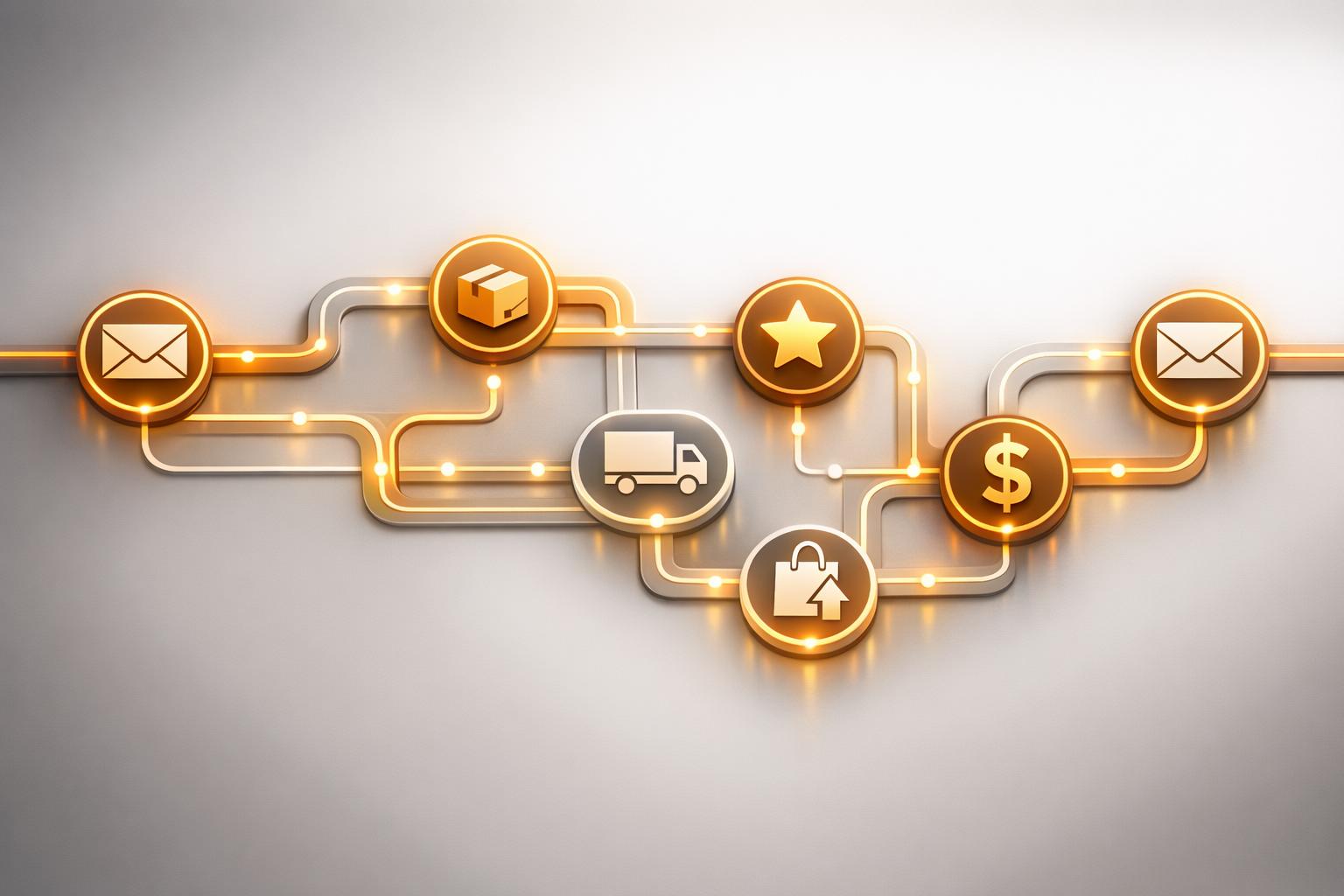
Post-purchase email automation is key to turning one-time buyers into loyal customers. It’s all about sending timely, automated emails after a purchase to build trust, provide value, and encourage repeat business. These emails can include order confirmations, shipping updates, onboarding guides, feedback requests, and personalized upsell offers. For B2B companies, this strategy is especially impactful, as existing customers drive 65% of revenue and are 9x more likely to repurchase.
Key Takeaways:
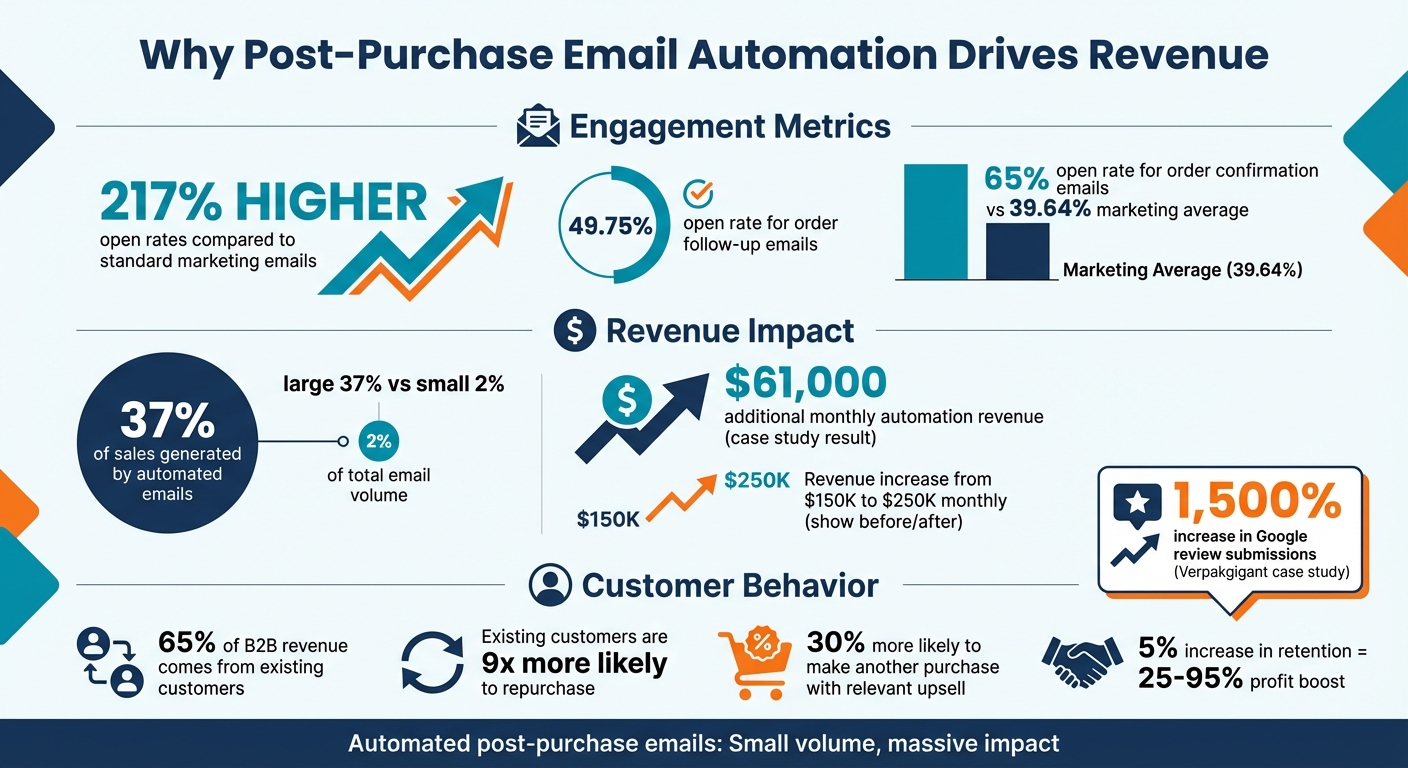
- Higher Engagement: Post-purchase emails have open rates up to 217% higher than standard marketing emails.
- Revenue Growth: Automated emails account for 37% of sales, despite being just 2% of total email volume.
- Retention Benefits: A 5% increase in customer retention can boost profits by 25%-95%.
- Scalability: Platforms like Breaker make it easy to set up workflows, segment audiences, and track performance.
By automating follow-ups like thank-you emails, delivery updates, and review requests, you can reduce support tickets, improve customer satisfaction, and increase lifetime value. Tools like Breaker also allow for advanced segmentation and personalization, ensuring every email feels relevant to the recipient.
If you want to build long-term customer relationships and boost revenue, post-purchase email automation is a must.
Post-Purchase Email Automation Statistics and Impact on Revenue
The Post-Purchase Flow That Boosts Sales & Customer Loyalty! (Must-Watch Email Strategy)
Benefits of Post-Purchase Email Automation
Automating your post-purchase emails takes the guesswork out of follow-ups, ensuring customers get the right message at just the right time. Why does this matter? Because post-purchase emails boast open rates nearly 17% higher than the average email automation. Even more impressive, order follow-up emails hit a 49.75% open rate.
Automated Customer Communication
As your business grows, manually following up with customers quickly becomes unmanageable. Automation steps in to guarantee that every buyer receives timely updates, no matter how many orders you’re handling. For example, automated emails can proactively address "Where is my order?" (WISMO) inquiries, which are among the most common customer service tickets. By sending tracking updates and delivery notifications automatically, you not only ease the workload on your support team but also build trust with your customers.
"A smart post-purchase flow shows your customer you're with them every step of the way. That transparency isn't solely operational, but what ultimately builds that Amazon-level trust, even for emerging brands." - Zac Fromson, Co-founder, Lilo Social
Beyond tracking updates, automated educational emails - like tutorials or product guides - help customers get the most out of their purchases. This reduces post-sale questions and minimizes returns. For B2B businesses, these emails can strengthen professional connections, boosting the chances of getting reviews and referrals.
Better Customer Retention and Repeat Sales
Post-purchase automation isn’t just about convenience - it’s also a major revenue driver. These emails hit customers when their interest is at its peak: right after they’ve made a purchase. In fact, automated emails generate 37% of sales while accounting for just 2% of total email volume.
Take Verpakgigant, a packaging supplier, as an example. In May 2025, they automated their review request process using segmentation tools, which led to a 1,500% increase in Google review submissions. Similarly, marketing agency Enflow helped an e-commerce client implement automated post-purchase flows. The result? An additional $61,000 in monthly automation revenue, which helped boost the client’s total monthly revenue from $150,000 to $250,000.
The numbers speak for themselves: customers are 30% more likely to make another purchase when presented with a relevant upsell right after their initial order. Automation ensures this opportunity isn’t missed, delivering these offers consistently across your customer base.
Analytics and Scalability
Scaling personalized communication manually isn’t feasible, but automation makes it effortless. Tools like Breaker allow you to track individual customer behavior - like browsing habits, email engagement, and purchase history - and use that data to create customized email flows for thousands of customers at once.
Analytics also help you pinpoint your "hero customers" - the top 20% of your audience that typically drives 80% of your revenue. By segmenting your audience based on behavior, you can send targeted purchase-focused emails to your most engaged customers while using win-back campaigns to re-engage less active ones. Breaker’s real-time analytics provide insights into critical metrics like open rates, click-through rates, and revenue per recipient, helping you refine your strategy continuously.
As your business expands, automation ensures your communication stays sharp and tailored, reducing subscriber churn. It’s not just about sending more emails - it’s about sending smarter ones. This scalability opens the door to even more advanced post-purchase strategies.
Types of Post-Purchase Emails
Post-purchase emails are a powerful tool for building customer loyalty and driving revenue. These messages are carefully designed to address key moments in the customer journey, helping you maintain strong relationships and encouraging repeat business. Let’s dive into the main types of post-purchase emails and how they can enhance your strategy.
Order Confirmation and Thank-You Emails
Order confirmation emails are the first touchpoint after a successful transaction, offering reassurance that everything went smoothly. With an impressive 65% open rate - far exceeding the marketing average of 39.64% - these emails are a high-impact communication channel. For annotated examples, see these confirmation email samples.
For B2B marketers, this is a chance to set a professional tone for the relationship. Include essential details like transaction summaries, next steps, and support contacts. You can also use this moment to introduce related products or services. For instance, GoDaddy includes cross-sell offers for additional domain names in their order confirmation emails, leveraging the customer’s buying momentum.
Shipping and Delivery Updates
Shipping updates do more than just inform - they ease customer concerns and reduce "Where is my order?" (WISMO) inquiries, which often flood support teams. By providing automated tracking details and delivery notifications, you not only improve transparency but also free up your customer service resources.
For B2B purchases involving longer delivery times or complex logistics, regular updates are even more crucial. Adding personal touches, such as naming the team member preparing the order, can humanize the experience and strengthen trust. Once delivery is confirmed, you can guide customers toward the next steps in their journey.
Onboarding and Educational Emails
Educational emails help customers get the most out of their purchase, which can directly reduce support requests and product returns. For B2B and SaaS companies, onboarding emails are especially valuable. They guide users through setup, highlight key features, and encourage product adoption.
These emails should include tutorials, product guides, and tips that address common questions before they arise. By helping customers quickly transition from purchase to effective use, you increase the likelihood of repeat business and long-term satisfaction.
Feedback and Review Requests
Requesting feedback serves two purposes: it shows customers that their opinions matter and generates social proof to influence future buyers. Timing is key - wait 7 to 30 days after delivery to allow customers enough time to evaluate the product.
Using tools like Net Promoter Score (NPS) surveys can help you segment responses. Promoters can be encouraged to leave public reviews, Passives can suggest areas for improvement, and Detractors can be directed to customer support for personalized assistance.
Upselling, Cross-Selling, and Loyalty Emails
After a customer’s first purchase, they’re 30% more likely to buy again when offered a relevant upsell. These emails use purchase history to recommend complementary products, upgrades, or subscription plans that enhance the original purchase.
For SaaS companies, upgrade emails can encourage users to move from basic plans to premium tiers. Slack, for example, targeted users on limited plans in 2025 with emails warning that messages would soon be deleted, offering a 50% discount to upgrade to Slack Pro. For businesses selling consumables, timely replenishment reminders ensure your brand stays top-of-mind for restocking.
Email Type
Primary B2B Goal
Recommended Timing
Order Confirmation + Upsell
Increase average order value
Immediately after purchase
Educational/Onboarding
Reduce churn and build trust
2-3 days after delivery/setup
Subscription Upgrade
Increase customer lifetime value
10 days after initial activation
Replenishment Reminder
Drive repeat sales
5-7 days before product depletion
Referral/Loyalty Invite
Turn customers into advocates
After 2nd or 3rd successful purchase
"Post-purchase emails and SMS are a great time to get the flywheel going, re-engaging existing customers to queue up their next purchase." - Sharon Goldstein, CEO, LimeSpot
How to Set Up Post-Purchase Automation with Breaker
Getting post-purchase automation up and running in Breaker can transform how you engage with customers. By connecting your e-commerce store to Breaker, you can trigger automated email workflows whenever a purchase is made. This seamless integration ensures your system takes over immediately, keeping customers engaged without manual intervention.
Setting Up Triggers and Workflow Goals
Head to Breaker's Automation section to create a workflow. Use "A product is purchased" as your trigger. If you sell a variety of products or services, you can fine-tune these triggers with specific product codes (SKUs). For example, someone buying a basic software license could receive onboarding tutorials, while premium buyers might get advanced feature guides.
Design your workflow to include an immediate thank-you email, followed by a delay block. Then, send a feedback request and finish with an upsell or cross-sell offer. You can even integrate SMS steps to add another layer of interaction.
Once your triggers are set, use Breaker's built-in newsletter builder to create your email content.
Using Breaker's Newsletter Builder
Breaker's drag-and-drop newsletter builder makes it easy to create polished email templates. You can add interactive features like countdown timers, RSS feeds, and customizable CTAs to match your branding. To manage timing, insert "Delay" blocks, and then add "Email" or "SMS" steps for each part of your sequence.
For instance, you could create a multi-email onboarding series that delivers product tutorials over two weeks. Or, set up a replenishment reminder to go out 5–7 days before a subscription renewal. The builder's flexibility also allows you to test different layouts and messaging without starting from scratch.
When your sequence is live, Breaker's analytics tools can help you refine your campaigns.
Using Analytics to Improve Performance
Breaker’s real-time analytics dashboard tracks key metrics like open rates, click-through rates, and revenue generated. The newsletter heatmap shows exactly where subscribers are clicking in your emails, giving you insight into which CTAs and content blocks are working best. If a CTA isn’t performing well, you can adjust its position, color, or wording to improve engagement.
Beyond individual emails, Breaker lets you evaluate entire workflows to understand their impact on customer retention and sales. You’ll see data like total revenue generated, number of orders placed, and revenue per customer for each campaign. The platform also identifies when subscribers are most likely to open and click, allowing you to schedule emails for maximum engagement.
"The ability to customize email templates and analytics helps improve campaigns constantly and effectively." - Ganesh P., Startup Marketer.
For B2B marketers, Breaker’s web tracking and subscriber profiles add even more value. The system can distinguish between casual browsers and high-intent leads - like those who frequently visit product pages or knowledge centers. Use this data to segment your post-purchase workflows. For example, customers with high engagement might be ready for an upgrade offer sooner than others still exploring the basics. A/B testing subject lines, sender names, email content, and CTAs can further optimize your efforts.
"If you can't measure it, you can't improve it. Anchor every subject line, CTA, and piece of copy to that one, clear objective." - Nazgul Kemelbek, Director of Product Marketing at Insider.
Best Practices for Post-Purchase Emails
Segmentation and Personalization
To make your post-purchase emails effective, start by segmenting your audience. For example, treat first-time buyers and repeat customers differently. New customers often need emails that build trust and provide helpful information about their purchase, while returning customers prefer loyalty perks and a warm "thanks for coming back."
You can also segment by value. Identify your "Hero Customers" - the top 20% who generate 80% of your revenue - and offer them perks like VIP access, premium support, or early product launches. Other useful segments include purchase frequency, spending habits, and product categories. This ensures your cross-sell and upsell efforts feel relevant and useful.
Personalization should go beyond just using someone’s name. Include details like product images, how-to guides, or reminders for replenishing consumables. Analytics can help you refine these segments and tailor content to match customer behavior in real-time.
Lastly, separate "warm" subscribers (those actively engaging) from "cold" ones. Warm customers can receive purchase-focused emails, while campaigns with added incentives can help re-engage inactive users. Once you've nailed segmentation and personalization, the next step is perfecting your timing and frequency.
Timing and Frequency
Timing can make or break your post-purchase emails. Start with an order confirmation email sent immediately after purchase - this reassures customers and usually gets high open rates. Follow up with shipping updates within 24–48 hours after processing.
For review requests, timing depends on the product. Give customers enough time to use it before asking for feedback. For instance, wait about 21 days for appliances but only 14 days for clothing, as the latter is often used right away. A great example comes from Room & Board, which boosted review conversions by 80% by optimizing the timing of their emails.
Keep your post-purchase sequence short - ideally 2–4 emails. For consumable products, send replenishment reminders just before they’re likely to run out. For instance, if a product lasts 20 days, a reminder around day 13 works well.
Email Type
Ideal Timing
Primary Goal
Order Confirmation
Immediate (within minutes)
Trust & Reassurance
Shipping/Delivery
24–48 hours post-processing
Transparency
Educational/How-to
Day of delivery
Product Success
Review Request
7–30 days (product-dependent)
Social Proof
Cross-sell/Upsell
10 days post-delivery
Increased Lifetime Value
Replenishment
Just before depletion
Repeat Sales
"Most brands see the biggest drop-off from first to second purchase, normally because they bombard the user with such a high frequency of emails that they churn before you're able to convey value to them."
– Adam Kitchen, CEO, Magnet Monster
Testing and Continuous Improvement
Testing is essential to keep your post-purchase emails effective. Experiment with subject lines, CTAs, and email design to find what resonates most with your audience. For example, Breaker successfully refined their email workflow through ongoing testing and adjustments.
Short subject lines (5–7 words) tend to perform better, especially on mobile devices. Personalized subject lines can increase open rates by up to 26%. When it comes to CTAs, stick to one clear action per email, like "Leave a Review" or "Shop Related Items." Test colors like blue, green, or orange for buttons to see which drives more clicks.
Incentives for reviews, such as a 10% discount or loyalty points, can also be tested to determine what motivates your audience best.
Keep an eye on performance metrics. For instance, Enflow, an ecommerce agency, implemented automated loyalty and post-purchase email flows for a client, boosting monthly revenue from $150,000 to $250,000. Of that, $61,000 came directly from these automated sequences.
"We can initially build it, set it, and forget it... then Power Digital continues to track automations month over month to determine areas of opportunity and optimization. It's an iterative process."
– Sean Donahue, Director of Email Marketing, Power Digital
Conclusion and Next Steps
Post-purchase email automation is a powerful tool for building lasting customer relationships and encouraging repeat purchases. The numbers speak for themselves: automated emails account for just 2% of email volume but drive an impressive 37% of total sales. Additionally, customers who make a second purchase are likely to buy three more times over their lifetime. Clearly, post-purchase automation can have a significant impact on your bottom line.
When crafting your post-purchase emails, focus on creating a positive customer experience and building trust. Adam Kitchen, CEO of Magnet Monster, advises:
"Focus on optimizing the customer experience, here - don't focus on driving additional sales. Most brands see the biggest drop-off from first to second purchase, normally because they bombard the user with such a high frequency of emails."
Your strategy should emphasize education, transparency, and trust-building, particularly during the first 30 days after a purchase. This is a critical window, as only 30% of first-time buyers typically return during this period.
Key Takeaways
Here’s a quick recap of the key principles to guide your post-purchase email strategy:
- Start with transactional emails like order confirmations, shipping updates, and educational content. These emails boast high open rates - ranging from 60% to 114% - making them an excellent opportunity to engage customers.
- Gradually introduce additional touchpoints, such as review requests (timed 7–30 days after delivery), replenishment reminders for consumables, and personalized cross-sells based on purchase history.
- Segment your audience to ensure first-time buyers receive nurturing content that builds trust, while repeat customers are presented with tailored offers and incentives.
Getting Started with Breaker
Ready to put these strategies into action? Breaker’s platform is designed to help you create effective, automated post-purchase workflows with ease. Start by mapping out your workflow, including branching logic like "if email is opened, send path A." From there, use Breaker’s tools to set up automatic triggers (e.g., "buys any product") and define clear goals, such as collecting reviews or encouraging a second purchase.
Breaker’s real-time analytics and dynamic content blocks allow you to track subscriber behavior and customize product recommendations to keep your emails relevant and engaging. Plus, with a 7-day trial on the Starter plan ($200/month for 100 engaged subscribers), you can test your first automated sequence risk-free and see results quickly.
FAQs
How does post-purchase email automation help improve customer retention?
Post-purchase email automation is a smart way to keep the conversation going with your customers after a sale. Emails like order confirmations, shipping updates, delivery notifications, and thank-you messages let your buyers know their purchase is being handled smoothly. This kind of communication builds trust and helps reduce the chances of customers walking away.
But these emails don’t have to stop at updates. You can use them to add a personal touch - think product care tips, review requests, or even tailored recommendations for complementary products. These extras not only help customers get the most out of their purchase but also open the door for future sales. By segmenting emails based on purchase history, you can make your messages feel relevant and engaging rather than just another sales pitch.
What’s more, automation makes this process cost-effective. It’s far cheaper to nurture your current customers than to go hunting for new ones. Simple follow-ups, like "we miss you" messages or reminders about related products, can re-engage past buyers, encourage repeat purchases, and boost the overall value of your customer relationships. For B2B marketers, tools like Breaker offer automated workflows and real-time analytics to deliver personalized follow-ups that not only build loyalty but also drive revenue growth.
What emails should be included in a post-purchase automation sequence?
A carefully crafted post-purchase email sequence can transform a one-time buyer into a loyal supporter of your brand. Here are the key types of emails you should include:
- Order confirmation: This email reassures customers by confirming their purchase. It should include order details, payment information, and a summary of the items they bought.
- Shipping updates: Keep customers in the loop with tracking information and estimated delivery dates, so they know exactly when to expect their order.
- Delivery confirmation: Let customers know when their package has arrived. This is also a great opportunity to share tips or guides for using the product.
- Thank you: A simple thank-you email goes a long way. You can also include a small perk, like a discount code for their next purchase, to show appreciation.
- Feedback request: Ask customers to leave a review or rating. Not only does this help you improve, but it also builds trust with future buyers.
- Upsell or cross-sell suggestions: Suggest products that complement their purchase or offer upgraded versions to add value.
- Referral invitation: Encourage customers to share your brand with friends by offering referral links or codes.
- Re-engagement email: Reach out to customers who haven’t shopped with you in a while. A personalized offer can be a great way to bring them back.
Tools like Breaker make it simple for B2B marketers to set up and automate these sequences. You can segment your audience for more tailored recommendations and track performance to refine your strategy. This ensures your customers stay informed, feel valued, and are more likely to return, building a lasting connection with your brand.
How does customer segmentation improve post-purchase email performance?
Segmentation lets you craft personalized post-purchase emails by grouping customers based on factors like their buying habits, order value, or purchase history. Instead of sending out one-size-fits-all messages, you can deliver content that truly connects with each group. For instance, you could send a how-to guide for a more complex product, a reminder to reorder consumables, or even a cross-sell suggestion that pairs perfectly with their recent purchase. This tailored approach can significantly boost open rates, click-through rates, and overall engagement.
Automation tools make this process even easier and more scalable. By leveraging customer data, you can automatically sort shoppers into the right email workflows, ensuring they receive timely and relevant messages. Not only does this save time, but it also strengthens customer relationships and encourages repeat purchases. Segmented emails go a long way in turning one-time buyers into loyal, long-term customers by making them feel recognized and valued.
Related Blog Posts
Keep reading
All articlesPost-Webinar Survey Questions Template (2026)
30+ post-webinar survey questions with NPS, CSAT, and CES templates, plus timing and length tips to boost completion and qualify leads faster.
GDPR Consent Requirements for Purchased Email Lists
Purchased email lists rarely meet GDPR's consent bar. Learn the legal basis rules, PECR overlap, and safer alternatives before you hit send.
7 Email Platforms With Inbox Placement Testing & Suppression
Compare 7 email platforms that combine inbox placement testing with suppression management, scored on features, pricing, and best-fit sender size.