
How to Use Segmentation for Email Personalization
Segment contacts, clean and unify data, and use dynamic content and workflows to improve open rates, clicks, and revenue.
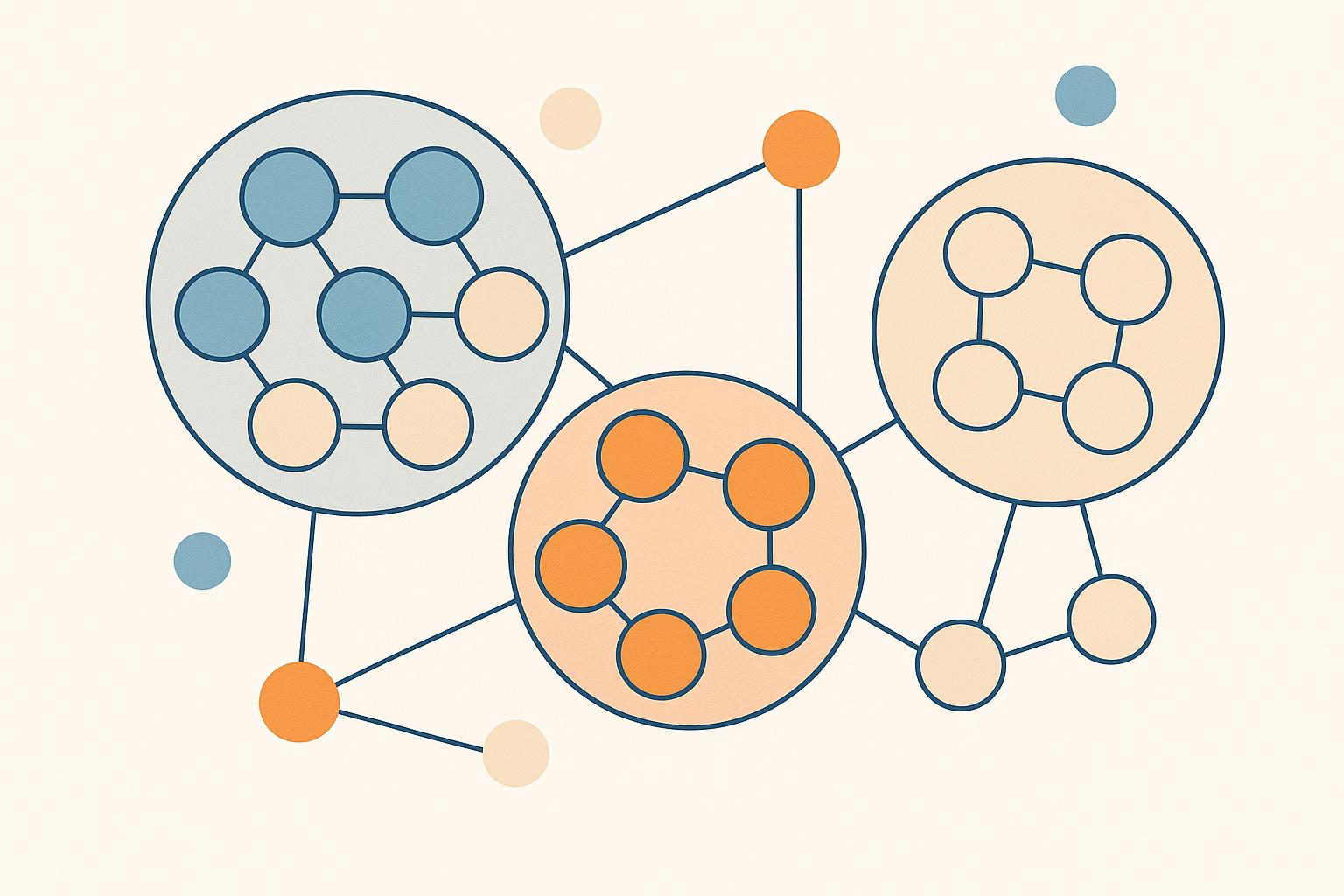
Segmentation makes your emails more effective by targeting specific groups within your audience instead of sending generic messages. By breaking your list into smaller groups based on shared traits like job role, industry, or engagement level, you can send content that resonates with each group’s unique needs. This approach improves open rates by 14.31% and click-through rates by 101%, and can boost email revenue by up to 760%.
Here’s a quick guide to getting started:
- Set Clear Goals: Define what you want to achieve, like increasing open rates or reducing churn.
- Organize Your Data: Ensure your CRM and email tools have clean, accurate data.
- Segment Your Audience: Use criteria like lifecycle stage, job role, or behavior to create targeted groups.
- Personalize Content: Match each segment with tailored messages and dynamic content.
- Automate and Track: Use workflows to send timely emails and analyze performance to refine your strategy.
Segmentation isn’t just about better engagement - it’s a way to connect with your audience meaningfully while driving measurable business results.
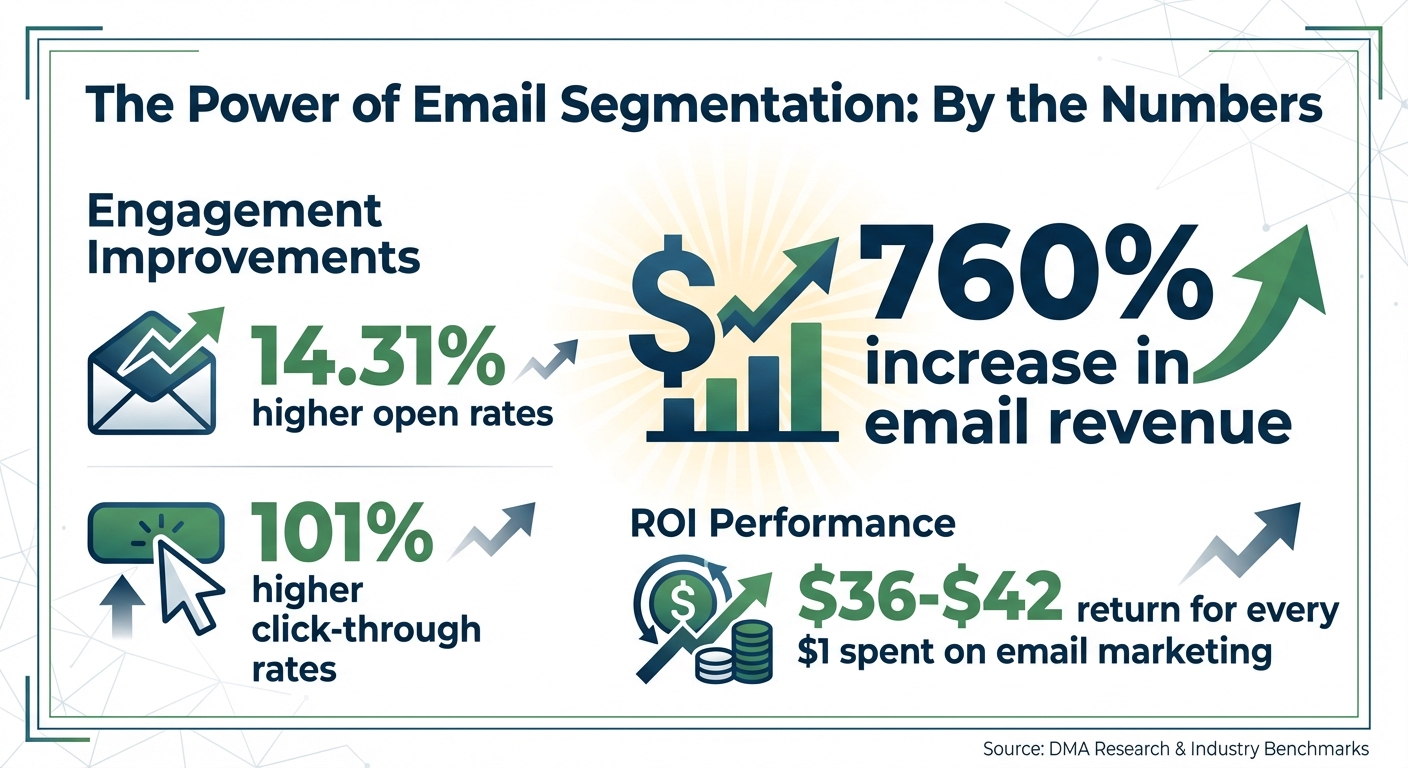
Email Segmentation Impact: Key Statistics and Performance Metrics
Step 1: Plan Your Segmentation Strategy
Set Clear Goals for Segmentation
Before diving into segmentation, get specific about what you're trying to achieve. Vague goals like "improve email engagement" won't cut it. Instead, link your segmentation efforts to measurable business outcomes. Think along the lines of generating new leads, improving conversion rates from MQLs to SQLs, speeding up your pipeline, expanding existing accounts, or reducing churn.
Here’s an example of a well-defined goal: "Increase open rates from 22% to 28% for director-level prospects in SaaS companies with 200–1,000 employees over the next quarter by creating three lifecycle-based segments and tailored content tracks." Or consider this: "Reduce 90-day churn from 15% to 10% for SMB customers by segmenting by product usage level and sending targeted education and success-story emails." These goals are clear, actionable, and give you a roadmap for which segments to create and what success looks like.
To get started, ask yourself a few key questions: Are you aiming for more opens, clicks, MQLs, opportunities, or renewals? Which audience groups are your current priorities (like ICP accounts, event leads, or users of a specific product)? What’s your baseline performance for these groups? And do you have enough data to support more granular segmentation? Answering these questions will help you stay focused on what matters. From there, move on to organizing your data to back up your strategy.
Identify and Organize Data Sources
The quality of your segments depends entirely on the quality of your data. Start by identifying all the systems where your contact data lives. For B2B marketers, this often includes your CRM (like Salesforce or HubSpot), which holds key firmographic details such as industry, company size, revenue, account status, and renewal dates. Your email platform is another goldmine, offering engagement data like opens, clicks, bounces, and tags.
Don’t overlook website and product analytics. These tools reveal behavioral patterns like page views, content categories visited, feature usage, login frequency, and trial events. For instance, you can create segments based on actions like "visited the pricing page three times in a week" or "trial users who invited teammates." Running paid campaigns? Ad platforms and lead-gen tools can show which campaigns brought in specific leads, helping you align your messaging with how they were acquired. Lastly, customer success and support tools provide insights like ticket volume, NPS/CSAT scores, and onboarding progress, which are perfect for identifying at-risk customers, power users, or upsell opportunities.
Since your data likely exists in silos, take time to clean and standardize it. Deduplicate records, validate email addresses, and audit key fields. For example, if you want to segment by company size and job role, make sure most of your records actually include this information. If not, consider adding progressive profiling to forms or using enrichment tools. Platforms like Breaker make it easier to unify lead generation, targeting, and engagement analytics in one place, giving you a single, reliable dataset. With clean data, you’re ready to define the criteria that align with your business priorities.
Choose Your Segmentation Criteria
With your data in order, it’s time to decide how to segment your audience. Firmographics and job roles are often the most effective starting points, as they align closely with your ideal customer profile (ICP) and deal potential. For instance, a SaaS prospect might receive content about ARR growth and product-led strategies, while a healthcare prospect might see messaging focused on compliance and patient care. Similarly, SMBs might get emails emphasizing pricing flexibility, while enterprise accounts could receive details on security features, integrations, and dedicated support.
Segmenting by job role also allows you to fine-tune your messaging. Economic buyers, for example, care about ROI and strategic impact, so subject lines like "Unlock $500,000 in incremental pipeline this quarter" can grab their attention. Functional leaders, such as a VP of Marketing or Head of Sales, focus on KPIs like pipeline contribution or win rates. Meanwhile, practitioners (like Marketing Managers or RevOps Specialists) prefer hands-on resources like how-to guides, templates, and implementation tips.
You can take it a step further by layering in lifecycle stages (new subscribers, MQLs, SQLs, opportunities, customers, churn-risk, or lapsed) and engagement levels (hot, warm, or cold based on recent activity). Behavioral data - like "visited pricing page", "requested a demo", or "trial active" - adds even more precision. A good starting point is five core segments: ICP status, prospects vs. customers, role clusters, engagement levels, and lifecycle stage. As your campaigns progress, you can refine these segments with additional behavior-based insights.
Step 2: Build Your Segments
Define Core Segment Types
Once your strategy is nailed down, it’s time to decide which segment types will form the backbone of your personalization efforts. For most B2B marketers, starting with three key segment types - firmographic, lifecycle stage, and engagement level - sets a strong foundation. Each segment type enables tailored messaging that resonates with your audience.
Firmographic segments group contacts based on company characteristics like industry, size, revenue, or location. For example, a cybersecurity company might create separate segments for healthcare organizations and financial services firms, tailoring case studies and ROI examples to each. Similarly, pricing messages can vary: SMB buyers might appreciate affordability and ease of use, while enterprise accounts tend to focus on security, integrations, and dedicated support. If financial services is one of your key verticals, our guide to email marketing for financial services covers the compliance and content rules that segment needs.
Lifecycle segments categorize contacts based on their position in the sales funnel - like new lead, marketing qualified lead (MQL), sales qualified lead (SQL), opportunity, active customer, or churn-risk customer. This segmentation ensures your content matches their intent. For instance:
- New leads receive educational resources.
- MQLs might get product comparisons or success stories.
- Active customers could see onboarding guides and feature updates.
- Churn-risk customers benefit from win-back campaigns or support-focused outreach.
Engagement-level segments focus on interaction history. For example:
- Highly engaged: Opened or clicked within the last 30 days.
- Moderately engaged: 31–90 days.
- Inactive: 91–180 days.
- Dormant: 180+ days.
Segmented campaigns are powerful - delivering 14.31% higher open rates and 101% higher click-through rates compared to non-segmented ones. Highly engaged groups can receive frequent updates, early access invites, or beta announcements. Meanwhile, inactive segments may need re-engagement campaigns, including preference center links or, eventually, suppression if they remain unresponsive.
You can also experiment with behavioral segments based on user actions, such as visiting your pricing page, downloading a whitepaper, attending a webinar, or starting a trial. For example, someone who visited your pricing page within the last week could receive a follow-up email with an ROI calculator or a limited-time discount.
Create Segments in Your Email Platform
To implement these segments, you’ll need to translate your criteria into filters and logic rules within your email platform. Tools like Breaker allow for flexible segmentation using AND/OR logic. For instance, to create a segment targeting U.S. mid-market SaaS companies, you might set filters like:
- Industry = "Software"
- Employee count = 51–200
- Country = "United States"
If you want to include multiple decision-maker roles, use OR logic, like: Job Role contains "Founder" OR "CEO" OR "VP."
Understanding the difference between static and dynamic segments is crucial. Static segments are fixed snapshots, ideal for one-off campaigns like event invites or A/B test groups. Dynamic segments (or smart lists), on the other hand, update automatically as contact data changes. These are essential for scalable personalization. For example, a prospect who clicks multiple emails in a week could automatically move into a "Hot Prospects" segment, triggering a high-touch nurture sequence or alerting sales.
Breaker’s real-time analytics make it easy to build segments based on firmographics, engagement, and behavior. As interactions like clicks and opens are tracked, subscribers automatically shift between engagement tiers. You can even compare performance across segments - like "U.S. mid-market manufacturing" versus "U.S. enterprise tech" - and tweak your rules or content accordingly.
When starting out, keep it simple. Consider defining these foundational groups:
- ICP status (in-ICP vs. out-of-ICP)
- Prospects vs. customers
- Role clusters (economic buyers, functional leaders, practitioners)
- Engagement levels (hot, warm, cold)
- Lifecycle stage
As you collect performance data, refine your segments with additional behavioral filters. Document each segment clearly, including its name, criteria, purpose, and use case. For example:
"Segment: US Enterprise Tech CMOs – Criteria: Country = United States AND Industry in {Software, IT Services} AND Employee count ≥ 1,000 AND Job Role contains 'CMO' – Use case: Executive-level thought leadership newsletter."
Before launching campaigns, validate your segments. Spot-check a random sample of records to ensure they meet the criteria. Test sends to internal lists can confirm that personalization fields populate correctly and that the content resonates with the intended audience.
Maintain Data Accuracy
Your segments are only as good as the data they rely on. Outdated job titles, inconsistent industry labels, or invalid email addresses can derail your efforts. Keeping your data clean and standardized is essential.
- Validate emails regularly: For most senders, quarterly validation is sufficient, but high-volume lists may require monthly checks. Remove invalid, bounced, or spam-trap addresses to maintain deliverability. Breaker simplifies this with unlimited email validations across all plans.
- Standardize key fields: Avoid fragmented segments by normalizing data. For example, if your industry field includes variations like "SaaS", "Software", and "Software-as-a-Service", standardize them into a single term. Use picklists or controlled vocabularies for fields like industry, role seniority, and lifecycle stage. Similarly, group job titles into broader categories (e.g., "Founder", "C-Suite", "VP/Head", etc.) to prevent unnecessary splintering.
- Set up bi-directional CRM integrations: Sync updates to lead status, opportunity stage, and firmographic data between your CRM and email platform. Breaker integrates with popular CRMs, ensuring that when a lead becomes a customer, they automatically move from a prospect nurture segment to a customer onboarding segment - no manual uploads required.
- Establish data governance: Assign ownership for data fields, define naming conventions for new fields, and document your segmentation rules. A shared playbook ensures alignment across marketing, sales, and RevOps teams, keeping your strategy consistent and up to date.
Accurate, standardized data is the foundation of effective segmentation. Investing time in data management pays off by ensuring your campaigns reach the right people with the right message.
Step 3: Personalize Emails for Each Segment
Match Segments to Messaging Strategies
Once you've set up your segments, the next step is to align each one with a tailored messaging strategy.
For industry segments, craft messages that address the specific challenges of each industry. For instance, healthcare professionals might appreciate case studies highlighting HIPAA compliance and patient data security. Meanwhile, fintech audiences could find content on fraud prevention and regulatory reporting more relevant. Incorporating industry-specific benchmarks and examples helps establish credibility.
For role-based segments, focus on what matters most to different decision-makers. Executives (like CMOs, VPs, or Founders) tend to favor high-level messaging that emphasizes measurable outcomes. Use subject lines and CTAs such as "Calculate Your ROI Potential" to grab their attention. On the other hand, practitioners (Marketing Managers, Coordinators, Specialists) prefer actionable content, such as how-to guides, templates, and tool comparisons.
For lifecycle stage segments, adapt your messaging to where the contact is in their journey. New leads may need educational content and social proof, like welcome emails or getting-started guides with simple CTAs like "Learn More." Marketing-qualified leads (MQLs) benefit from resources such as product comparisons or ROI calculators, while sales-qualified leads (SQLs) are ready for demo invitations or pricing information. For active customers, focus on content that encourages adoption, showcases new features, or promotes upgrades. For example, HP achieved response rates 300–1,000% higher by combining job function, purchase history, and simplified messaging.
For engagement-level segments, treat your audience based on how engaged they are. Highly engaged subscribers might enjoy VIP perks like early access to beta features or exclusive webinars. Moderately engaged contacts should receive consistent, value-packed updates, while inactive subscribers may need re-engagement campaigns asking for feedback or offering to update their preferences.
Each email should have a single, clear goal. Your CTA should align with the recipient's stage and needs. For example, avoid pushing a new lead to book a demo if they still need introductory information, or offering advanced content to someone just starting out.
With these tailored strategies in place, the next step is to bring in dynamic personalization that adjusts in real-time.
Apply Personalization Techniques
Dynamic content blocks take email personalization to another level. By using these, you can swap out entire sections of an email based on specific segment rules. For example, the hero section could feature a SaaS case study for software companies and a manufacturing case study for industrial contacts. Likewise, CTAs can be customized: high-intent segments might see "Book Your 30-Minute Custom Walkthrough", while early-stage leads might get "See 3 Examples From Companies Like Yours."
This approach allows you to build one email template that adapts into countless variations using conditional logic. Tools like Breaker make this process simple with drag-and-drop blocks and real-time analytics. For instance, if the recipient's industry is "SaaS" and their role is "CMO", the email could display executive-level messaging. If the segment is "New User", onboarding content would appear instead.
Fashion retailer Intermix saw a 10× increase in conversion rates (to 8%) and a 15% boost in annual revenue by using value-based segmentation and tailored messaging.
Behavior-triggered personalization ensures your emails reach subscribers when they're most likely to engage. For example, if someone in your "Demand Gen Manager" segment frequently clicks on attribution-related content, you could trigger a sequence featuring an advanced attribution guide, an on-demand webinar, and a personalized ROI calculator with a CTA like "Review Your Model With Our Team." Similarly, if a target account visits your pricing page twice in one week, send a tailored email with a subject line like "Want Pricing for Your 20-Person Team?" and include pricing examples in U.S. dollars.
For product behavior, if a customer in an onboarding segment hasn’t used a key feature within a week, send a tutorial email with a short walkthrough video and a CTA like "Book a 15-Minute Setup Session." Adjust the frequency of these triggers based on engagement - highly engaged users can handle more frequent nudges, while early-stage leads might benefit from lighter, educational content.
Breaker’s newsletter builder simplifies dynamic content implementation. For instance, you could display an ABM playbook exclusively to Marketing Directors at U.S.-based SaaS companies with 50–500 employees. Breaker’s precise targeting and real-time analytics make it easy to see which content resonates with each segment. You can track open rates (averaging 67% across campaigns) and click-through rates (averaging 47%) to fine-tune your approach.
Timing also plays a big role in personalization. Send emails during local business hours - typically between 9:00 a.m. and 11:00 a.m. in the recipient's time zone - to increase open rates. Adjust the frequency of emails based on engagement: highly engaged users might receive 2–3 emails per week, while less engaged contacts could get one. Use behavior-based timing, like follow-ups 24–48 hours after a whitepaper download or 1–2 hours after a webinar ends.
Incorporate location-based elements when relevant, such as U.S. holidays, time zones (Eastern or Pacific), references to regulations, or market data in dollars. At the very least, ensure you have accurate data fields for first name, company, job title, industry, last interaction type, and lifecycle stage. As your program grows, add richer details like use cases or content preferences.
Add Segments to Automated Workflows
Segmentation becomes even more powerful when paired with automated workflows, ensuring timely and relevant messages. For example, in an onboarding workflow, you could segment new users by role or use case (e.g., "I'm a Marketing Leader", "I'm a Founder", "I'm an Operator"). Leaders might receive a series of 3–5 emails focused on measurable outcomes and case studies, while operators get setup checklists, playbooks, and detailed tutorials.
You can also tailor onboarding based on company size or plan type. SMBs or trial accounts might need short, low-friction steps, while enterprise clients could benefit from comprehensive sequences covering security, governance, and stakeholder alignment. Use early behavior to trigger different paths: if a user completes onboarding steps quickly, move them to an advanced path highlighting premium features. If they lag, shift them to a support-focused path with clear CTAs.
For nurture campaigns, create streams based on personas. A CMO might receive quarterly reports, executive insights, and roundtable invites, while a Marketing Manager gets practical guides, templates, and tool tutorials. Add industry-specific or problem-focused content as needed.
Retention and expansion workflows also benefit from segmentation. For instance, create a "power users" segment for customers who’ve adopted multiple features or exceeded usage thresholds. Trigger campaigns promoting premium features, integrations, or seat upgrades. For a "churn-risk" segment - customers with low product usage or declining engagement - send an educational sequence with tips, feature spotlights, and a CTA to schedule a success call.
These workflows build on your segmentation strategy, ensuring your personalized approach scales effectively. Breaker integrates seamlessly with popular CRMs, helping you push segmented leads further down your sales funnel.
Step 4: Measure and Optimize Segmentation Performance
Track Performance by Segment
Once your segmentation is up and running, the next step is to measure how well it’s working. Instead of just looking at overall campaign performance, dive deeper into how each segment is performing. This means tracking metrics like open rates, click-through rates (CTR), click-to-open rates (CTOR), conversion rates, as well as unsubscribe and spam rates. Don't forget to monitor revenue per send or per subscriber for each segment - this helps you see the return on investment (ROI) of your segmentation efforts.
To make this easier, set up a performance dashboard that tracks these metrics consistently over a specific time frame, like the last 30 or 90 days. Most email platforms let you filter by segment name and campaign type (such as newsletters, nurture campaigns, or re-engagement emails) so you can compare performance fairly. Tools like Breaker also offer real-time analytics, allowing you to see how different segments respond as emails are delivered. For example, if you send a campaign at 10:00 a.m. ET, you can quickly compare engagement rates between decision-makers and practitioners within the first few hours. If one group has lower open rates or higher bounce rates, you can pause delivery and tweak the subject line or content.
It’s also important to monitor engagement-based segments - such as those active in the last 0–30 days, 31–60 days, 61–90 days, or 90+ days. Many email providers suggest focusing about 70% of your campaigns on the most recently engaged subscribers. Limiting emails to less active groups helps protect your sender reputation and ensures better deliverability.
Analyze and Adjust Segments
Segmentation isn’t a one-and-done process. Use performance data to refine your segments and make them even more effective. Start by ranking your segments based on conversion rates and revenue per 1,000 emails. Pair these numbers with engagement metrics like open and click rates, as well as negative signals like unsubscribes or spam complaints. High-performing segments with strong revenue and engagement can often be fine-tuned further by breaking them into smaller groups based on factors like intent, product interest, or lifecycle stage. Research from DMA shows that campaigns using RFM (recency, frequency, monetary value) segmentation can boost email revenue by as much as 760% compared to non-segmented campaigns.
On the flip side, low-performing segments deserve closer scrutiny. Issues like outdated criteria, poor list quality, or mismatched messaging could be holding them back. You might need to adjust the segmentation rules, update the data, or shift these groups into re-engagement or win-back campaigns. Segments that repeatedly show low engagement and high complaint rates - even after re-engagement attempts - should be suppressed to maintain deliverability, especially when managing large U.S.-based B2B email lists.
Regularly analyze segments by factors like industry, company size, job role, and user behavior. Look for patterns that correlate with higher conversion rates or revenue, such as visits to pricing pages, frequent email opens, or white paper downloads. Use these insights to refine your segmentation strategy. For example, instead of a broad "leads – manufacturing" segment, you could create more targeted groups like "manufacturing – pricing-page visitors in the last 14 days" or "manufacturing – content-only visitors" and tailor your messaging accordingly.
Don’t overlook qualitative feedback. Pay attention to email replies, especially from senior decision-makers, for comments like "this content isn’t relevant to my role" or "you’re emailing too often." Map this feedback to the affected segments and adjust your strategy. Insights from sales or customer success teams can also help identify segments that might need alternative messaging or revised criteria.
Test and Iterate on Segmentation Strategies
Testing isn’t just for subject lines. Use A/B testing to experiment with different segmentation rules or segment-based experiences. For instance, compare a segmentation rule based solely on industry versus one that combines industry and behavior filters. Run these tests over a 7- to 30-day period and focus on downstream metrics, like demo requests or sales-qualified leads (SQLs), rather than just open rates.
Within each segment, test elements like the value proposition, subject line, preview text, send time, cadence, and content format. For example, when targeting a U.S. C-suite audience, you might test short, ROI-focused copy with clear financial outcomes (like "Cut acquisition costs by 20%") against more detailed, feature-driven content aimed at operational managers. Similarly, behavioral segments like "high-intent visitors" or "inactive for 90 days" could benefit from testing different calls-to-action, such as a low-commitment content download versus a direct demo request.
Make optimization a regular habit. Review segment performance dashboards monthly to spot trends, merge or prune underperforming segments, and plan future A/B tests. Every quarter, take a deeper look at your segmentation model to ensure it aligns with current business goals, such as entering new U.S. markets, refining your ideal customer profile, or adjusting pricing tiers. Incorporate new data sources as needed to keep your strategy fresh. Tools like Breaker can help by automatically adding engaged, high-quality leads to your most valuable segments, ensuring your segmentation evolves alongside your business while maintaining strong deliverability and engagement metrics.
Conclusion
Key Takeaways
Segmentation is at the heart of successful email personalization. To make it work, start with clear goals, ensure your contact data is accurate and centralized, and use meaningful criteria like industry, job role, company size, lifecycle stage, and engagement behavior to define your segments. Build dynamic segments that update as your audience changes, align each segment with tailored messaging and offers, automate your campaigns, and consistently track performance.
The numbers speak for themselves: segmented email campaigns deliver 14.31% higher open rates, 101% higher click-through rates, and can increase email revenue by as much as 760%. With email marketing offering an average ROI of $36–$42 for every $1 spent, segmentation ensures your messages reach the right people at the right time. It also helps safeguard deliverability and reduces unsubscribes. These insights provide a clear roadmap for taking action.
Next Steps for B2B Marketers
With these insights in mind, here’s how you can start applying segmentation to see immediate results. Begin by testing small, targeted campaigns. Choose an upcoming campaign - whether it’s a product update, a monthly newsletter, or a nurture sequence - and create two or three segments. For instance, you might separate prospects from existing customers or decision-makers from practitioners. Run that segmented campaign over the next 30 days and compare the open rates, click-throughs, and conversions to your previous one-size-fits-all approach.
Take time to clean up your email list by removing duplicates and outdated contacts. Then, define three to five key segments, such as new leads, active opportunities, customers, and dormant accounts, using data from your CRM. Introduce engagement windows (e.g., 30-day active, 60-day warm, 90+ day cold) and adjust your email frequency and content based on these categories. As your data improves, you can incorporate advanced metrics like product usage, intent signals, or RFM (Recency, Frequency, Monetary) analysis.
For a faster implementation, consider using a B2B-focused platform like Breaker to simplify the process. Breaker offers precise audience targeting, real-time analytics, and automated lead generation to keep your segments engaged with the right subscribers. Its intuitive newsletter builder makes it easy to craft customized content for each audience segment week after week. With an average open rate of 60% and a click-through rate of 40% on active campaigns, Breaker users are already seeing the benefits of segmentation. Whether you try it out with a 7-day trial or opt for a custom plan, the key is to start now and refine your approach as you learn what works best for each segment.
How Can I Personalize Emails With Segmentation?
FAQs
What’s the best way to segment my audience for email personalization?
To segment your audience effectively, begin by diving into key data points like demographics, job roles, industries, location, and purchase behavior. Pay attention to how your audience engages with your emails - look for patterns in their interactions and interests to uncover meaningful groupings.
The goal is to create segments that match your campaign objectives and allow for more targeted and personalized messaging. When your emails speak directly to the needs and preferences of these groups, you’re more likely to see higher engagement and improved outcomes.
What challenges can arise when ensuring accurate data for segmentation?
Maintaining accurate data for segmentation can be a challenge, thanks to a few common pitfalls. Outdated or incomplete information often results in missed opportunities or poorly targeted campaigns. Similarly, inconsistent data entry can introduce hard-to-detect errors, throwing off your efforts. Plus, when data comes from multiple sources, the absence of standardized collection methods can make things even messier.
The solution? Regularly clean and update your data to keep it current. Establish clear, consistent input standards to minimize errors. And ensure your systems are well-integrated to reduce discrepancies and maintain accuracy across the board.
What’s the best way to measure the success of my email segmentation strategy?
To gauge how effective your email segmentation strategy is, keep an eye on important metrics such as open rates, click-through rates, subscriber engagement, and list growth. These numbers give you a clear picture of how well your segmented groups are responding and highlight areas that might need tweaking.
Leverage analytics tools to monitor performance as it happens. This helps you pinpoint which audience segments are delivering the strongest results. With this insight, you can fine-tune your strategy and craft campaigns that feel more tailored and impactful over time.
Related Blog Posts
Keep reading
All articlesPost-Webinar Survey Questions Template (2026)
30+ post-webinar survey questions with NPS, CSAT, and CES templates, plus timing and length tips to boost completion and qualify leads faster.
GDPR Consent Requirements for Purchased Email Lists
Purchased email lists rarely meet GDPR's consent bar. Learn the legal basis rules, PECR overlap, and safer alternatives before you hit send.
7 Email Platforms With Inbox Placement Testing & Suppression
Compare 7 email platforms that combine inbox placement testing with suppression management, scored on features, pricing, and best-fit sender size.