
Top Platforms for Historical Email Reputation Data
Compare tools for tracking historical email, domain, and IP reputation — Gmail metrics, SenderScore, blacklist history, and security insights.

Email reputation directly impacts how mailbox providers treat your emails. Metrics like spam complaints, bounce rates, and blacklist incidents are tracked over time to determine whether your emails land in inboxes or get flagged as spam. For B2B marketers, maintaining a strong reputation ensures higher inbox placement rates, directly influencing campaign success and revenue.
Best Platforms for Email Reputation Data
Here are the top tools for tracking and managing your email reputation:
- Google Postmaster Tools: Offers Gmail-specific metrics like spam complaint rates and authentication results. Free for high-volume senders (5,000+ emails/day).
- SenderScore.org by Validity: Provides a reputation score (0–100), blacklist checks, and deliverability benchmarks. Free basic access; advanced features start at ~$20/month.
- Talos Intelligence by Cisco: Focuses on global threat history, analyzing domains and IPs for security risks. Free access but technical expertise may be needed.
- MxToolbox: Specializes in blacklist monitoring and domain health checks. Operates on a freemium model with paid tiers.
- Breaker: Combines automated list hygiene, engagement metrics, and expert-managed reputation monitoring. Plans start at $200/month.
Quick Comparison
Platform
Key Features
Cost
Best For
Google Postmaster Tools
Gmail-specific data, free for high-volume senders
Free
Gmail-focused insights
SenderScore.org
Reputation score, blacklist checks
Free/basic; $20+ for advanced
Broad ISP reputation view
Talos Intelligence
Security-focused threat analysis
Free
Security insights
MxToolbox
Blacklist checks, domain health
Freemium
Blacklist monitoring
Breaker
Engagement-based deliverability tools
$200+/month
Key Takeaways
- Combine tools for a complete view of your reputation (e.g., Google Postmaster Tools for Gmail, SenderScore for overall reputation).
- Track metrics weekly and address issues like high bounce rates or spam complaints promptly.
- Use historical data to identify long-term trends and improve list hygiene, authentication, and engagement strategies.
A strong email reputation ensures more emails land in inboxes, driving better engagement and revenue for your campaigns.
How Can I Check My Email Server Reputation? - TheEmailToolbox.com
Platforms for Historical Email Reputation Data
Several platforms provide tools to analyze historical domain and IP reputation. These tools offer varied features to help you monitor and manage email reputation effectively.
Google Postmaster Tools
Google Postmaster Tools focuses on Gmail-specific insights, offering data on spam complaint rates, authentication results (SPF, DKIM, DMARC), and delivery errors. These metrics help diagnose and resolve deliverability issues.
SenderScore.org by Validity
SenderScore.org assigns a reputation score (ranging from 0 to 100) based on historical email-sending behavior. It also offers blocklist lookups, list quality assessments, and deliverability benchmarks through global comparisons. Features like a complaint monitor and blocklist removal tools help identify and resolve issues quickly.
Talos Intelligence by Cisco
Talos Intelligence uses Cisco's network data to evaluate reputation, analyzing IP addresses and domains for any historical links to spam, malware, or other malicious activity. This data helps B2B senders understand how their practices are perceived by ISPs and security systems, aiding in better reputation management.
MxToolbox
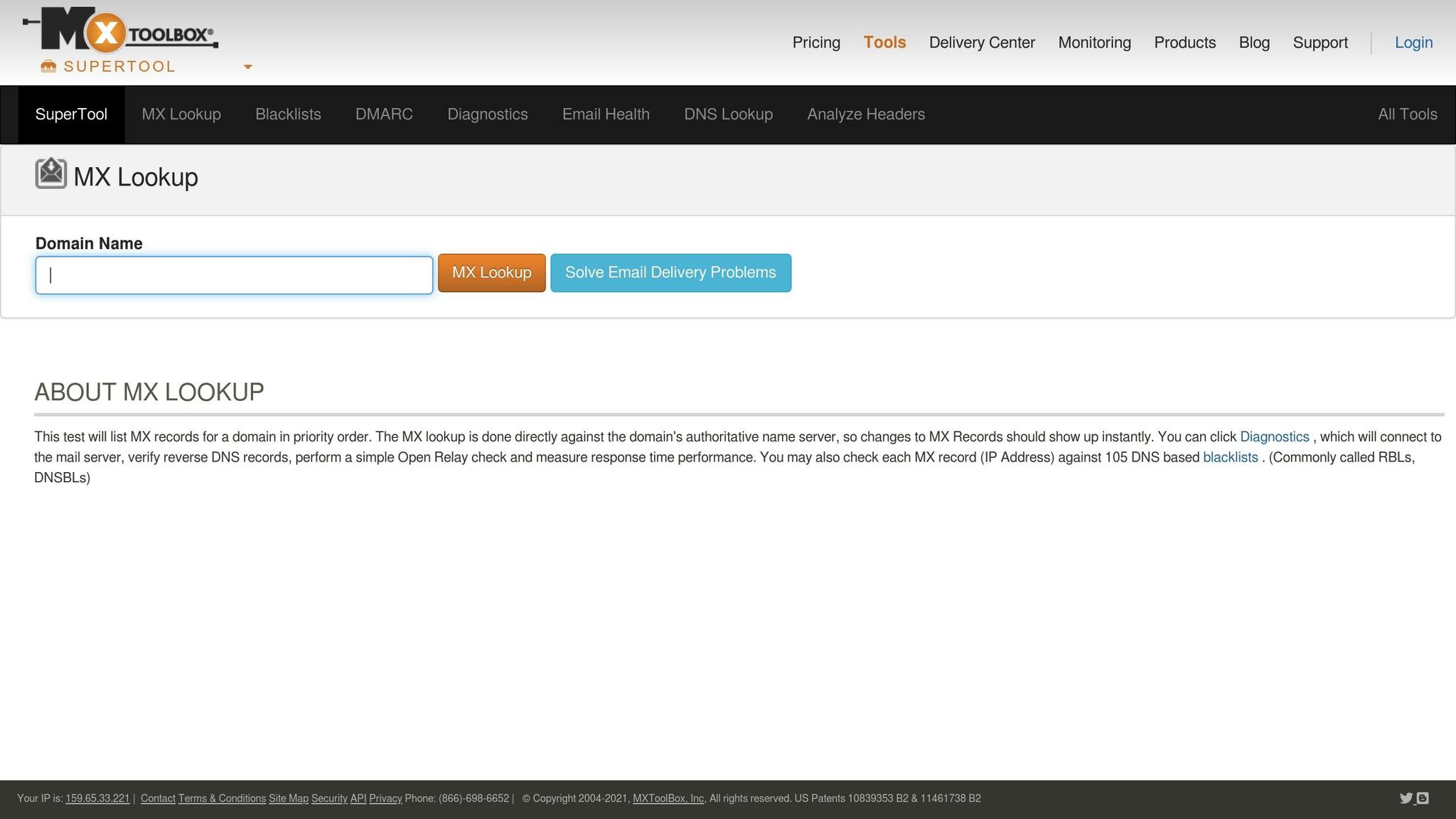
MxToolbox specializes in historical blacklist checks and domain health monitoring. It scans domains and IPs against multiple blacklists, performs DNS health checks, and validates SPF/DKIM records. These insights help inform strategies for maintaining a solid email reputation.
Breaker
Breaker offers a mix of deliverability tools, including automated list hygiene, continuous reputation monitoring, and unlimited email validations. Its AI-powered lead generation targets engaged, B2B subscribers, while real-time analytics track key metrics like open rates and click-throughs. A dedicated team manages the infrastructure and sending logic behind the scenes.
Peter Lohmann, CEO of RL Property Management, shared: "We tripled our sponsor revenue and doubled our community memberships with Breaker. Well over a 10X ROI".
Breaker’s pricing starts at $200/month for the Starter plan (100 new engaged subscribers monthly, up to 50,000 emails) and goes up to $1,750/month for the Custom plan.
Next, we’ll summarize the key features of these platforms in a comparison table.
Feature Comparison Across Platforms
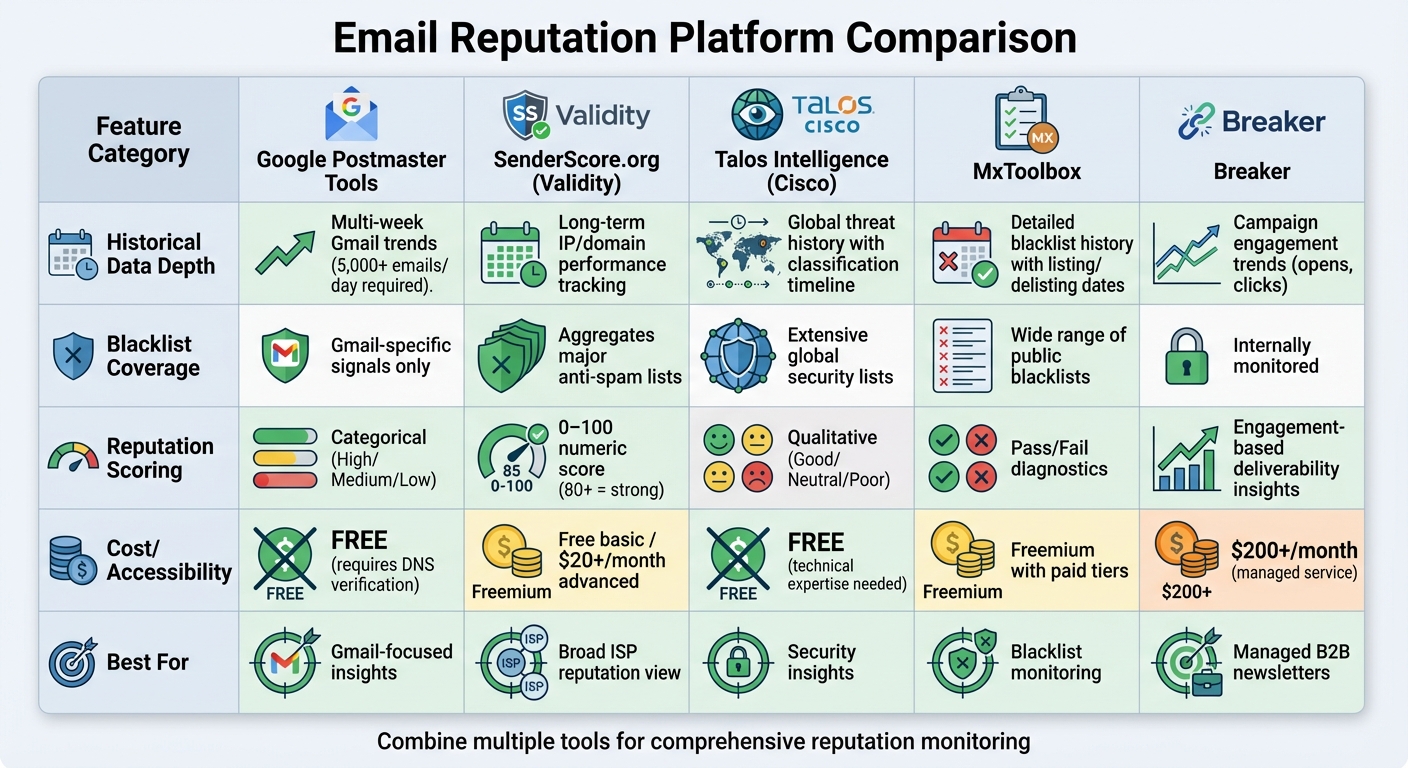
Email Reputation Tracking Platforms Comparison Chart
Different platforms approach email reputation tracking in unique ways, offering varied features like historical data, blacklist monitoring, reputation scoring, and accessibility. Here's a closer look at how these tools stack up, helping you decide which is best for your needs.
When it comes to historical data depth, platforms vary significantly. Google Postmaster Tools provides multi-week Gmail trends but only for verified, high-volume senders (5,000+ emails per day). SenderScore by Validity tracks long-term performance for IPs and domains, offering a rolling 0–100 score to help identify gradual changes in reputation. Talos Intelligence focuses on global threat history, detailing when domains or IPs first encountered issues and how their classifications have shifted over time. MxToolbox excels in showing detailed blacklist history, including when domains or IPs were listed or delisted. Meanwhile, Breaker translates campaign engagement data, such as open and click-through rates, into actionable insights for overall reputation tracking.
For blacklist coverage, the focus differs by platform. MxToolbox scans a wide range of public blacklists to identify potential issues quickly. Talos Intelligence monitors global threat lists with an emphasis on security and abuse patterns. SenderScore incorporates data from major anti-spam vendors into its reputation assessments. In contrast, Google Postmaster Tools focuses on Gmail-specific signals, such as authentication failures and spam complaints, providing narrower but Gmail-relevant insights.
Reputation scoring methods also vary widely. SenderScore uses a numeric scale from 0–100, with scores above 80 indicating strong reputation, making it easy to benchmark progress. Google Postmaster Tools categorizes reputation into "high", "medium", or "low" specifically for Gmail. Talos Intelligence takes a security-focused approach, using qualitative classifications like "good", "neutral", or "poor." MxToolbox provides pass/fail diagnostics rather than composite scores, while Breaker focuses on engagement metrics, turning campaign performance data into actionable deliverability insights.
Accessibility is another key factor. Google Postmaster Tools is free but requires DNS verification and a high email-sending volume to access its features. SenderScore offers free basic IP lookups, with advanced features starting at around $20/month. Talos Intelligence provides free access to its threat portal, though interpreting the data may require some technical expertise. MxToolbox operates on a freemium model, with optional paid tiers for continuous monitoring. Finally, Breaker is a managed B2B newsletter platform, starting at $200/month, offering expert-managed reputation monitoring to reduce the technical burden on users.
Comparison Table
Platform
Historical Data Depth
Blacklist Coverage
Reputation Scoring
Accessibility
Gmail/Outlook Insights
Google Postmaster Tools
Multi-week Gmail trends for high-volume senders
Limited (Gmail-specific signals)
Categorical ratings (high/medium/low)
Free (5,000+ emails/day required)
Gmail-specific data
SenderScore.org (Validity)
Long-term IP/domain performance
Aggregates major anti-spam lists
0–100 numeric score with benchmarking
Free basic; advanced from ~$20/month
Broad ISP reputation view
Talos Intelligence (Cisco)
Global threat history
Extensive security lists
Threat-based qualitative ratings
Free public access
Multi-ISP threat classification
MxToolbox
Detailed blacklist history
Extensive public blacklists
Pass/fail diagnostics
Freemium model with paid tiers
General mailbox provider health checks
Breaker
Campaign engagement trends
Internally monitored
Engagement-based deliverability insights
Paid plans starting at $200/month
Provider-specific campaign performance insights
How to Use Historical Reputation Data
Combining Multiple Tools
No single platform can give you a complete overview of your email reputation. Each tool offers a unique perspective. For instance, Google Postmaster Tools provides insights into how Gmail handles your emails, while SenderScore evaluates your IP reputation. Talos Intelligence highlights potential security threats, and MxToolbox helps identify blocklist events.
Think of these tools as different lenses focused on the same sender identity. To get the most accurate picture, gather data from Postmaster Tools, SenderScore, MxToolbox, and Talos on a weekly basis. Then, align these metrics with your campaign performance - like opens, clicks, and bounces - using a unified dashboard. If multiple tools flag issues simultaneously (e.g., SenderScore dropping below 70, MxToolbox detecting blocklists, and Talos identifying threat categories), you can confidently address the problem immediately.
For B2B marketers using newsletter platforms, combining provider-specific data with performance metrics sharpens the picture further. For example, if your SenderScore looks fine but Gmail spam rates are climbing while engagement drops, it’s a sign to zero in on Gmail-specific issues like send frequency or authentication practices.
Tracking Trends Over Time
Once you’ve combined data from multiple tools, the next step is tracking long-term trends. Short-term fluctuations in reputation metrics are common and don’t always point to serious problems. What really matters are patterns over 6–12 months. Focus on metrics like spam complaint rates, spam trap hits, bounce rates, and overall reputation scores. Reviewing these quarterly can help you spot recurring issues tied to certain campaign types or list expansions.
Keep a consistent system for tracking weekly metrics and mark key campaign events to identify trends over time. For example, you might notice recurring spikes in complaints during aggressive sales pushes or persistent issues with specific mailbox providers (e.g., strong performance on Gmail but consistent challenges with Microsoft). These patterns can help you pinpoint where to focus your efforts. If actions like list cleaning or adjusting send frequency lead to gradual improvements over 60–90 days, you’ll know your strategy is on the right track.
Once you’ve established clear trends, take a structured approach to address any issues.
Fixing Poor Reputation Scores
If your historical data reveals a damaged reputation, a systematic recovery plan is essential. Start by reducing the sending volume from problematic IPs, then gradually reintroduce traffic through IP warming. Focus on sending to highly engaged subscribers and monitor key metrics as you go.
Next, strengthen your technical setup. Review and fix authentication protocols like SPF, DKIM, and DMARC. Also, separate your transactional and bulk email traffic to avoid cross-contamination. Clean your email lists regularly to keep bounce rates under 2% and complaint rates below 0.1%. Using platforms that offer unlimited email validations and expert-managed list hygiene can save time and effort.
"Our team of experts manage all mail streams on the back end for you. With a unique combination of sending logic, list hygiene, and reputation monitoring, we ensure your emails land in the inbox." – Breaker
Refocus your targeting on high-intent, explicit opt-in segments. For B2B newsletters, smaller, well-targeted lists often yield better engagement and reputation compared to larger, less-specific ones. Make sure to include clear preference centers and easy one-click unsubscribe options. Recipients marking your emails as spam can damage your reputation far more than those who simply unsubscribe.
Conclusion
Understanding and leveraging historical reputation data is crucial for ensuring your emails consistently land in inboxes and maintain a steady pipeline. Major mailbox providers evaluate your domain and IP reputation based on patterns of behavior over weeks and months, not just individual email sends. If your reputation takes a hit, it can result in 20–40% of your emails being flagged as spam - cutting off valuable opportunities before you even notice.
The tools we’ve explored - Google Postmaster Tools, SenderScore by Validity, Talos Intelligence, MxToolbox, and Breaker - each bring unique strengths to reputation management. For example, Google Postmaster Tools focuses on Gmail-specific metrics, while SenderScore provides a 0–100 rating with historical insights. Talos Intelligence adds a layer of security-focused reputation analysis, MxToolbox checks DNS and blocklists, and Breaker connects reputation trends to campaign engagement and audience quality. Together, these tools give you a well-rounded understanding of your sender health.
By using this data proactively, you can address deliverability issues before they start affecting revenue. Regularly reviewing these tools - ideally on a weekly basis - helps you tie reputation improvements directly to business outcomes. For instance, tracking how a 10-point boost in SenderScore or a 10–15% increase in inbox placement translates to more opportunities and closed deals in dollar terms can shift deliverability from a technical concern to a measurable revenue driver. Historical insights also allow you to pinpoint what’s working; for example, removing low-quality email lists or fixing authentication issues can restore inbox placement and improve reply rates for high-value accounts, ultimately protecting your marketing investment.
Make sender reputation a key performance indicator (KPI). Monitor trends weekly, align them with campaign performance and list quality, and use these insights to adjust segmentation, content, and sending strategies. The tools discussed provide the transparency and diagnostics needed to maintain strong sender health over time. By combining historical reputation data with campaign metrics, you can turn potential deliverability challenges into opportunities that directly impact your bottom line.
FAQs
What should I look for in a platform to monitor email reputation?
When selecting a tool to monitor email reputation, focus on platforms that provide detailed historical data for domains and IPs, real-time tracking, and features that are easy to navigate. It's important to choose a solution that fits smoothly into your workflow and delivers insights you can act on to keep your deliverability rates high and improve campaign performance.
Some tools excel at connecting you with engaged audiences while offering precise performance metrics to safeguard your email reputation. Ensure the platform aligns with your long-term marketing objectives and addresses your unique needs as a professional.
What are the benefits of analyzing historical email reputation data?
Examining historical email reputation data provides a window into trends that can directly impact email deliverability and audience engagement. By reviewing past performance, you can pinpoint potential spam-related issues, fine-tune your targeting strategies, and safeguard your sender reputation.
Taking these steps helps boost the effectiveness of your email campaigns while ensuring steady, reliable communication with your audience - building trust and encouraging lasting connections.
What steps can I take to improve my email reputation?
To strengthen your email reputation, start by keeping your email list in top shape - remove invalid or inactive addresses regularly. Focus on sending content that your audience finds relevant and engaging, and stick to a consistent sending schedule to build trust over time. Steer clear of spammy language or misleading subject lines, as these can damage your credibility and hurt your reputation.
Keep an eye on key engagement metrics like open rates and click-through rates. These can help you spot inactive subscribers and give you a chance to re-engage them effectively. By concentrating on delivering value and prioritizing quality over sheer volume, you’ll not only boost your email reputation but also improve your overall deliverability.
Related Blog Posts
Keep reading
All articlesGDPR Consent Requirements for Purchased Email Lists
Purchased email lists rarely meet GDPR's consent bar. Learn the legal basis rules, PECR overlap, and safer alternatives before you hit send.
7 Email Platforms With Inbox Placement Testing & Suppression
Compare 7 email platforms that combine inbox placement testing with suppression management, scored on features, pricing, and best-fit sender size.
Email Automation Workflow & Drip Campaign Data Structure
Learn the database schema behind email drip campaigns—tables, workflow states, and event logs that power reliable marketing automation.