
How to Calculate ROI for Lead Generation Emails
Step-by-step guide to measure ROI from lead-generation emails — track all costs, assign lead value or CLV, pick an attribution model, and calculate percent and dollar returns.

Calculating ROI for lead generation emails boils down to a simple formula:
ROI = [(Revenue - Costs) / Costs] × 100
Here’s what you need to know upfront:
- Track all costs: Include email service fees, labor, design, tools, and list management.
- Measure revenue: Use direct sales, lead value, or Customer Lifetime Value (CLV) for long-term campaigns.
- Set clear goals: Define what success looks like (e.g., demo sign-ups, downloads, or purchases).
- Use attribution models: Decide how to credit revenue across multiple touchpoints (e.g., Time Decay or Linear models).
- Monitor over time: Evaluate ROI over months to align with B2B sales cycles.
For example, if your campaign costs $2,000 and generates $10,000 in revenue, the ROI is:
($10,000 - $2,000) / $2,000 = 400% ROI
Key Tip: Use tools like UTM parameters and analytics to track performance accurately. Always align your tracking period with your sales cycle for meaningful results.
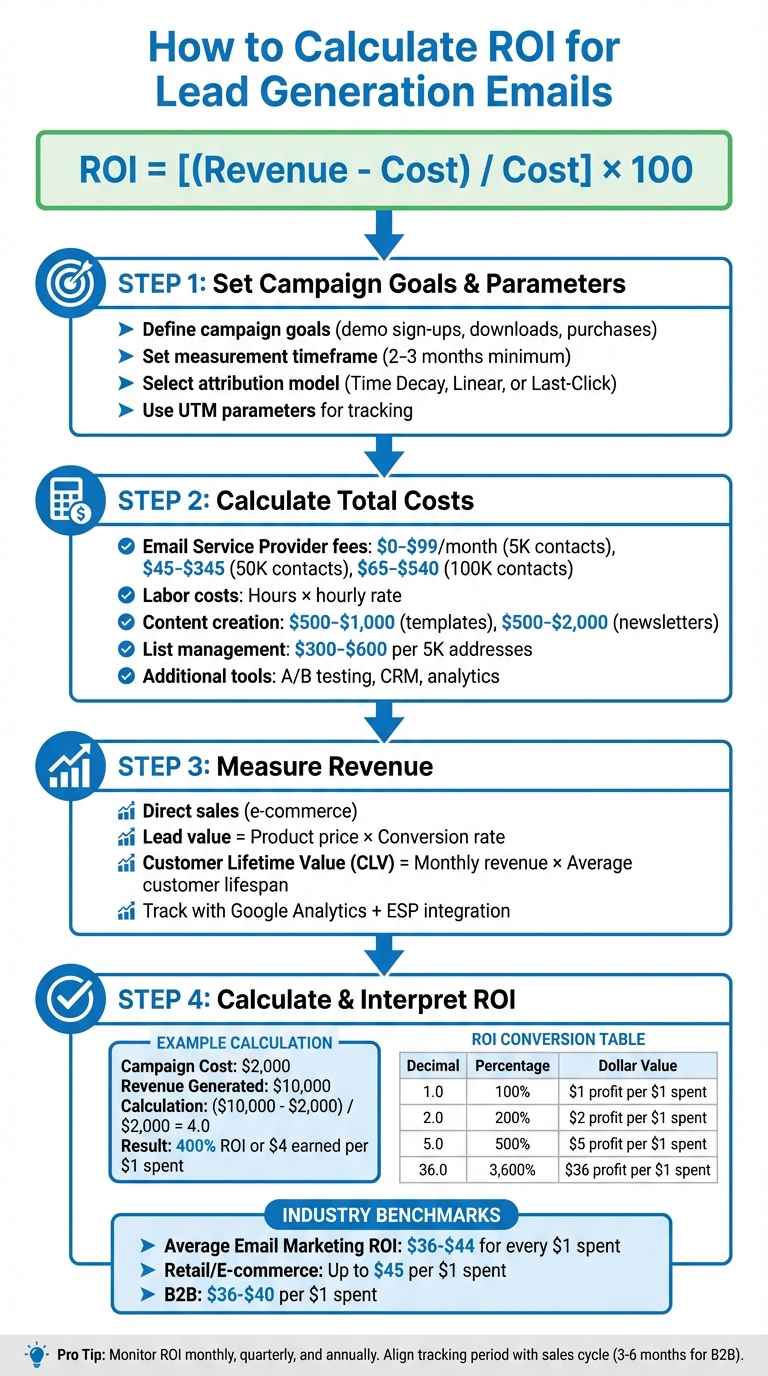
How to Calculate Email Marketing ROI: 4-Step Process with Formula and Examples
How Do You Calculate Email Marketing ROI?
Set Campaign Goals and Measurement Parameters
Before diving into ROI calculations, it's essential to define clear goals and establish how you'll measure success. Without these, your ROI analysis will lack the necessary context.
Define Your Campaign Goals
Once you've determined your broader ROI expectations, focus on the specific objectives of your campaign. For example, lead generation emails can drive actions like demo sign-ups, whitepaper downloads, or free trial initiations. While these actions might not generate immediate revenue, they still hold measurable value. To calculate ROI effectively, you’ll need to assign a monetary value to these non-sales conversions.
Here’s a simple way to do it: multiply the value of your product or service by its conversion rate. For instance, if you sell a $50 product with a 2% conversion rate, each lead is worth $1.00. This calculation gives you a baseline for estimating revenue from campaigns focused on nurturing rather than direct sales.
Your goals should tie directly to measurable outcomes. For nurturing campaigns, track how many leads progress through your sales funnel. For sales-focused efforts, measure completed purchases. The bottom line? Define what success looks like before you spend a dime, so you know which metrics to prioritize when calculating ROI.
Set Your Measurement Timeframe
Patience is key. While you might see immediate metrics like opens and clicks within the first week, the real ROI often takes months to materialize - typically within 2 to 3 months. To evaluate ROI properly, your tracking period should align with your sales cycle, which often ranges from 3 to 6 months.
For example, if you’re selling enterprise software with a 90-day decision-making process, assessing ROI after just 30 days will give you an incomplete picture. To avoid skewed results, track costs and returns over the same timeframe. As Nutshell aptly puts it:
Long-term success requires consistent effort - think marathon, not sprint. Plan for at least 3-6 months of strategic campaigns before evaluating overall performance.
Monitor ROI on monthly, quarterly, and annual intervals to identify seasonal trends and long-term growth. Shorter timeframes are useful for testing and tweaking specific elements, like subject lines or CTAs, through A/B testing. Longer periods provide a clearer view of overall profitability.
Once you’ve established your timeframe and synced your costs and returns, the next step is to determine how to allocate revenue credit accurately.
Select an Attribution Model
In today’s multi-channel world, prospects often interact with several touchpoints - like a Google ad, a LinkedIn post, and your email - before converting. So, how do you decide which channel gets the credit? Attribution models distribute revenue credit across these touchpoints, and your choice of model will directly influence your ROI calculations.
Here are three common attribution models to consider:
- Time Decay Attribution: Assigns more credit to interactions that happen closer to the conversion. This works well for lead nurturing campaigns where email plays a key role near the end of the sales process.
- Linear Attribution: Distributes credit equally across all touchpoints. This is ideal if your strategy involves a mix of channels, like TV ads, social media, and direct mail, alongside email.
- Last-Click Attribution: Gives 100% of the credit to the final touchpoint before conversion. While simple to calculate, it overlooks the contributions of earlier touchpoints.
For B2B campaigns with longer sales cycles, Time Decay Attribution often provides the most accurate representation of email’s impact. As Mailjet points out:
Email is almost never the first click. But it is spectacular at nurturing and converting leads when used well.
To ensure accurate tracking, use UTM parameters on all email links. Tagging details like Campaign Source, Medium, and Name allows analytics tools to pinpoint which emails are driving conversions. Without proper tracking, you’re left guessing instead of making data-driven decisions.
Gather Cost and Revenue Data
To calculate an accurate ROI for your email campaigns, you need to track every dollar spent and earned. With your framework in place, it’s time to dive into the numbers - both costs and revenues.
Calculate Total Campaign Costs
Start by breaking down all the expenses tied to your email campaign. The most obvious cost is your Email Service Provider (ESP) fee, which typically ranges from $0 to $99 per month for 5,000 contacts, $45 to $345 for 50,000 contacts, and $65 to $540 for 100,000 contacts. But that’s just the beginning.
You’ll also need to account for labor costs. Multiply the hours each team member spends on the campaign by their hourly rate. For example, if a marketer earning $60,000 annually (about $30 per hour) spends 10 hours on a campaign, that’s $300 in labor costs. As Jacob Thomas from Nutshell puts it:
Unless your employees work for you for free, they represent a cost that must be factored in.
Don’t forget content creation costs. Custom email templates can cost anywhere from $500 to $1,000, while newsletter designs range from $500 to $2,000 depending on complexity. Freelancers or agencies typically charge $100 to $200 per hour for email marketing services, with full-service management averaging $2,500 per month.
List acquisition and maintenance is another key expense. Renting a B2B email list costs around $300 to $600 for 5,000 addresses, while email verification services charge approximately $0.006 to $0.01 per email verified. The Editorial Team at Email Vendor Selection highlights an often-overlooked factor:
One overlooked cost of email marketing is time. Time is money. Factor it in when calculating the email marketing costs.
Finally, consider additional costs such as A/B testing tools, CRM integrations, deliverability audits, and landing page builders. Add up all these elements - platform fees, labor, content creation, list management, and technical tools - to calculate your total campaign cost. These figures form the foundation of your ROI calculation.
Measure Revenue from Email Leads
Once you’ve tallied your total costs, it’s time to align your revenue data with these figures to determine your ROI.
For e-commerce businesses, tracking revenue is relatively straightforward: integrate your online store with your ESP to match email metrics with actual sales. For B2B campaigns or lead generation efforts, the process requires a little more effort.
If your campaign focuses on generating demo requests or whitepaper downloads rather than direct sales, multiply the number of conversions by the lead value you set in your campaign goals.
For subscription-based businesses, Customer Lifetime Value (CLV) is a better metric to gauge revenue. To calculate CLV, multiply your average monthly revenue per customer by the average number of months they remain a customer. For instance, if customers pay $100 per month and stay for 18 months on average, each new customer from your email campaign contributes $1,800 in revenue.
Use tools like Google Analytics integrated with your ESP dashboard to track every sale back to specific email campaigns. Make sure to include UTM parameters in all email links for precise tracking. For campaigns with longer sales cycles, monitor both immediate conversions and pipeline value - the total potential revenue from opportunities generated by email leads.
The retail and e-commerce sector often sees the highest ROI from email campaigns, with returns reaching up to $45 for every $1 spent. Meanwhile, B2B companies typically achieve ROIs in the range of $36 to $40. With your cost and revenue data in hand, you’re ready to plug the numbers into your ROI formula and assess your campaign’s performance.
Calculate Your Email Campaign ROI
Once you’ve gathered your cost and revenue data, you can calculate your email campaign's ROI. Here's how to break it down step by step.
Use the Standard ROI Formula
The go-to formula for calculating ROI is:
[(Revenue - Cost) / Cost] × 100.
Start by subtracting the total cost of your campaign from the revenue it generated. This gives you the net profit. Next, divide that profit by the total campaign cost. For instance, if your email campaign brought in $10,000 in revenue and cost $2,000 to execute, the calculation would look like this:
($10,000 - $2,000) / $2,000 = 4.0.
Finally, multiply by 100 to express the result as a percentage: 400%.
As Mailchimp explains:
Email ROI tells you how much you earn back for every dollar spent on your email marketing.
In this example, the decimal result (4.0) translates to earning $4.00 for every $1.00 spent. The Benchmark Team underscores the importance of this metric:
Tracking your email marketing ROI... ensures that you aren't wasting time, money, and other resources on tools and tactics that aren't delivering results.
Estimate ROI with Projected Data
If you can’t directly track ROI - like when leads haven’t converted yet - you can estimate it using lead value. To calculate lead value, multiply your average sale price by your historical lead-to-customer conversion rate. For example, if your product costs $49 and your conversion rate is 3%, each lead is worth $1.47.
For businesses with subscription models or longer sales cycles, use Customer Lifetime Value (CLV) instead of single-purchase values. CLV is determined by multiplying the average yearly revenue per customer by the number of years they typically stay with you. To estimate total ROI, add your actual revenue to the projected value of new leads (calculated by multiplying the number of leads by their estimated value). This approach helps assess campaign performance even before all sales are finalized.
Convert ROI to Percentage and Dollar Values
Expressing ROI in both percentage and dollar terms can make your results more digestible for different audiences. The percentage (e.g., 3,600% ROI) highlights the proportional return, while the dollar value (e.g., $36 for every $1 spent) provides a more tangible context.
ROI Decimal Result
Percentage Equivalent
Dollar Value Interpretation
1.0
100%
$1.00 profit for every $1.00 spent
2.0
200%
$2.00 profit for every $1.00 spent
5.0
500%
$5.00 profit for every $1.00 spent
36.0
3,600%
$36.00 profit for every $1.00 spent
Email marketing generally delivers impressive returns, with studies showing an ROI of $36–$42 for every $1 spent. In some cases, returns can reach as high as $44. Finance teams often prefer the dollar format for making budget decisions. You can also calculate revenue per email by dividing the total revenue by the number of emails sent.
Review and Improve Your Email ROI
Understand Your ROI Results
Once you've calculated your ROI, the next step is to evaluate whether your campaign is delivering the desired outcomes. A positive ROI indicates that you're earning more than you're spending, while a negative ROI signals a need to rethink your strategy. Compare your results to industry benchmarks, which typically show a return of $36–$44 for every $1 spent. If your numbers don't measure up, take a closer look at secondary metrics. Issues like low open rates, poor click-through rates, high bounce rates, or an increase in unsubscribes could point to problems with your subject lines, timing, content, or even the quality of your email list.
You should also factor in the Customer Lifetime Value (CLV) to gauge the long-term impact of your campaigns. For example, if you're driving traffic but struggling to close leads, it might mean you're attracting the wrong audience or that there's a disconnect between your marketing message and your sales process.
Break Down ROI by Campaign Elements
To get a clearer picture of what's working, break down your ROI by different campaign elements. For instance, analyze performance across various audience segments - whether it's by industry type for B2B campaigns or by customer categories like VIPs versus enterprise clients. Segmenting your data allows for more precise targeting, which can significantly improve your ROI. A/B testing is another valuable tool to refine your emails and optimize their performance.
For even greater insight, track metrics for specific campaign elements by using UTM parameters in your email links. These parameters help you identify which campaigns, audience segments, and CTAs are driving conversions. Don’t overlook your attribution model, either. A "Linear" model can show the cumulative impact of multiple emails in a nurturing sequence, while a "Time Decay" model gives more credit to touchpoints closer to the actual conversion. These methods provide a deeper understanding of your campaign's performance and prepare you for leveraging advanced analytics for real-time tracking.
Use Analytics Tools for Better Tracking
To sharpen your efforts, turn to integrated analytics tools. Platforms like Breaker offer real-time analytics and automated lead generation, making it easier to track ROI. With a centralized dashboard, you can see which campaigns are generating the most revenue. Breaker also helps you target the right audience, ensuring you're reaching engaged, qualified subscribers and avoiding wasted spend on unproductive leads. Plus, features like unlimited email validations and deliverability management can reduce bounce rates and improve inbox placement, directly boosting your ROI.
Conclusion
To calculate ROI effectively, start by setting clear goals, tracking all costs and revenue, and using accurate measurement tools. Your objectives will dictate which metrics are most relevant. When tallying costs, go beyond your email service provider fees - factor in labor hours (converted into hourly rates) and any additional tools like testing platforms or deliverability software.
Once costs are outlined, shift your focus to revenue. To calculate revenue, multiply the number of leads by their value, which you can determine using your product's price and either the conversion rate or customer lifetime value (CLV). Then, use the standard ROI formula: (Total Revenue - Total Cost) / Total Cost. Express the result as a percentage to compare it against industry benchmarks, which typically show returns between $35 and $44 for every $1 spent. As Jacob Thomas aptly states:
Unless you're continually measuring ROI, your marketing team will be in the dark about whether their actions are bringing real value.
Select an attribution model - like Linear or Time-Decay - to capture the cumulative impact of your email campaigns. Dive deeper by breaking ROI down by campaign components. Experiment with subject lines, calls-to-action, and audience segments to uncover what truly drives performance. For instance, companies using A/B testing report an ROI of 42:1, significantly higher than the 23:1 seen by those who don’t. This methodical approach ensures every aspect of your campaign is fine-tuned for success.
To implement these strategies seamlessly, consider tools like Breaker. With real-time analytics, automated lead generation, and deliverability management, Breaker helps you track revenue, validate emails, and target qualified leads. Features like unlimited email validations and precise audience targeting reduce wasted spend on unqualified leads, ultimately boosting profitability.
FAQs
How can I assign a dollar value to non-sales actions in my email campaigns?
To figure out the dollar value of non-sales actions like sign-ups or downloads, you need to estimate how these actions tie into future revenue. Start by calculating the customer lifetime value (CLV). This involves multiplying the average purchase value by the purchase frequency and the average customer lifespan.
Next, assess the conversion probability for each action. For example, if 5% of people who sign up for your newsletter eventually become paying customers, your conversion rate is 0.05. To find the monetary value of that action, multiply the CLV by the conversion rate. Let’s say your CLV is $4,000 and your conversion rate is 5%; this means each sign-up is worth $200.
Finally, scale this by the total number of actions. For instance, if you get 300 sign-ups, that’s 300 × $200, or $60,000. You can then include this figure in your overall ROI calculations. This method allows you to assign a clear monetary value to non-sales conversions, giving you a more complete picture of your campaign’s performance.
What’s the difference between Time-Decay and Linear attribution models?
Time-Decay and Linear are two well-known multi-touch attribution models, each assigning credit for conversions in its own way.
Time-Decay places greater emphasis on interactions that occur closer to the point of conversion. Earlier actions in the customer journey are given progressively less weight. This model works well for analyzing the effectiveness of late-stage efforts, such as follow-up emails or last-minute promotions that help seal the deal.
Linear, on the other hand, spreads credit evenly across every touchpoint in the customer’s journey. It doesn’t matter when the interaction happened - each one is treated as equally important. This approach is particularly useful for gaining a balanced view of how all channels contribute to the conversion process.
Essentially, Time-Decay highlights recency, while Linear ensures every interaction gets equal recognition.
How do I track ROI for email campaigns with long sales cycles?
To measure the ROI of lead-generation emails, especially during long sales cycles, start by documenting all related expenses. This includes platform fees, list-building efforts, copywriting, and automation tools. Use UTM parameters or unique IDs to tag your emails, allowing you to track clicks and connect them to leads in your CRM. When a lead eventually converts, assign the revenue (or a portion of the customer’s lifetime value) back to the original email. The formula is simple: ROI = ((Revenue – Costs) / Costs) × 100. Be sure to update this calculation as new deals are finalized to reflect the overall return.
To enhance accuracy, consider using a multi-touch attribution model. This approach credits not only the initial email but also subsequent interactions that contribute to the conversion. Keep an eye on metrics like reply rates, meeting bookings, and revenue per email to gauge early performance indicators. Tools like Breaker can make this process easier by automating data tracking, offering real-time analytics, and ensuring precise attribution throughout the sales journey. Regularly analyze ROI trends - either monthly or quarterly - to fine-tune your strategy and get the most out of your campaigns.
Related Blog Posts
Keep reading
All articlesGDPR Consent Requirements for Purchased Email Lists
Purchased email lists rarely meet GDPR's consent bar. Learn the legal basis rules, PECR overlap, and safer alternatives before you hit send.
7 Email Platforms With Inbox Placement Testing & Suppression
Compare 7 email platforms that combine inbox placement testing with suppression management, scored on features, pricing, and best-fit sender size.
Email Automation Workflow & Drip Campaign Data Structure
Learn the database schema behind email drip campaigns—tables, workflow states, and event logs that power reliable marketing automation.