
Email Deliverability Monitoring: A B2B Growth Guide
Master email deliverability monitoring to ensure your B2B newsletter lands in the inbox. Learn key metrics, setup processes, and remediation workflows.
You send a campaign, watch the open rate come in, and think the program is healthy. Then pipeline barely moves. Sales says the leads were thin. Replies are down. The next send performs worse, even though the copy was stronger.
That pattern usually isn't a creative problem. It's a placement problem.
For B2B teams, email deliverability monitoring is what separates “sent successfully” from “seen by the right people.” If your messages land in spam, get filtered into low-visibility tabs, or disappear before they reach the mailbox at all, every downstream metric gets distorted. According to Landbase's deliverability analysis, the average global email deliverability rate is 83.1%, which means 16.9% of legitimate marketing emails fail to reach intended recipients' inboxes, and 6.4% go missing entirely between servers.
That's why deliverability can't sit in a technical corner of the business anymore. In 2026, the bigger issue for many B2B programs isn't broken authentication. It's engagement-based inbox placement decay. A sender can have the technical basics in place and still lose inbox placement because mailbox providers see weak engagement and lower trust over time. If the technical basics are still in flux, start with our email deliverability best practices before layering monitoring on top.
Why Your Open Rate Might Be Lying to You
A decent open rate can hide a bad email program.
This happens all the time in B2B. A team sends to a list that looks healthy on paper, sees opens from the most engaged segment, and assumes the campaign reached the broader audience. But the people most likely to open are often the only people who saw the message in a prominent place. Everyone else may have landed in spam, junk, or nowhere visible enough to matter.
That creates a false sense of performance. Marketing thinks the message resonated. Leadership expects similar results next month. Sales wonders why replies and demos don't match the reported engagement.
The real cost isn't just missed sends
When inbox placement slips, you lose more than immediate conversions:
- You waste campaign effort because copy, segmentation, and design never get a fair test.
- You train the team on bad data because your engagement metrics reflect only the visible slice of the audience.
- You damage sender reputation over time if poor list quality or weak engagement keeps compounding.
- You reduce lead generation efficiency because every send reaches fewer qualified buyers than the send volume suggests.
Practical rule: If campaign results feel weaker than the top-line email metrics suggest, assume visibility is part of the problem until proven otherwise.
The hard part is that deliverability failure rarely announces itself clearly. A total block is obvious. Slow inbox erosion isn't. The program can look “fine” while placement degrades unnoticed mailbox by mailbox.
Engagement now affects placement before obvious reputation problems show up
That's the nuance many teams miss. They focus on technical setup, domain authentication, and bounce handling, which all matter. But mailbox providers also evaluate whether recipients interact with what you send.
If your audience stops opening, clicking, replying, or moving messages into the inbox, providers can treat that as a sign that future emails deserve less visibility. In practice, that means poor engagement can become the trigger for future poor deliverability.
For a growth team, that changes how monitoring should work. You aren't just checking whether messages were accepted. You're watching for early signs that a list segment, a mailbox provider, or a sending pattern is losing trust before revenue impact shows up in your pipeline report.
Understanding Email Deliverability vs Delivery
A sales team can send 20,000 emails, see a 99% delivery rate in the ESP, and still miss pipeline targets because Gmail and Outlook are routing a growing share of those messages out of the primary inbox. That gap is the difference between delivery and deliverability.
Delivery measures whether the receiving server accepted the message. Deliverability measures whether the message earned inbox placement where a prospect can realistically see and act on it. Strong delivery numbers do not guarantee business results if placement is slipping at the mailbox-provider level. Platforms that bundle inbox placement testing and suppression make that slippage visible before it costs a campaign.
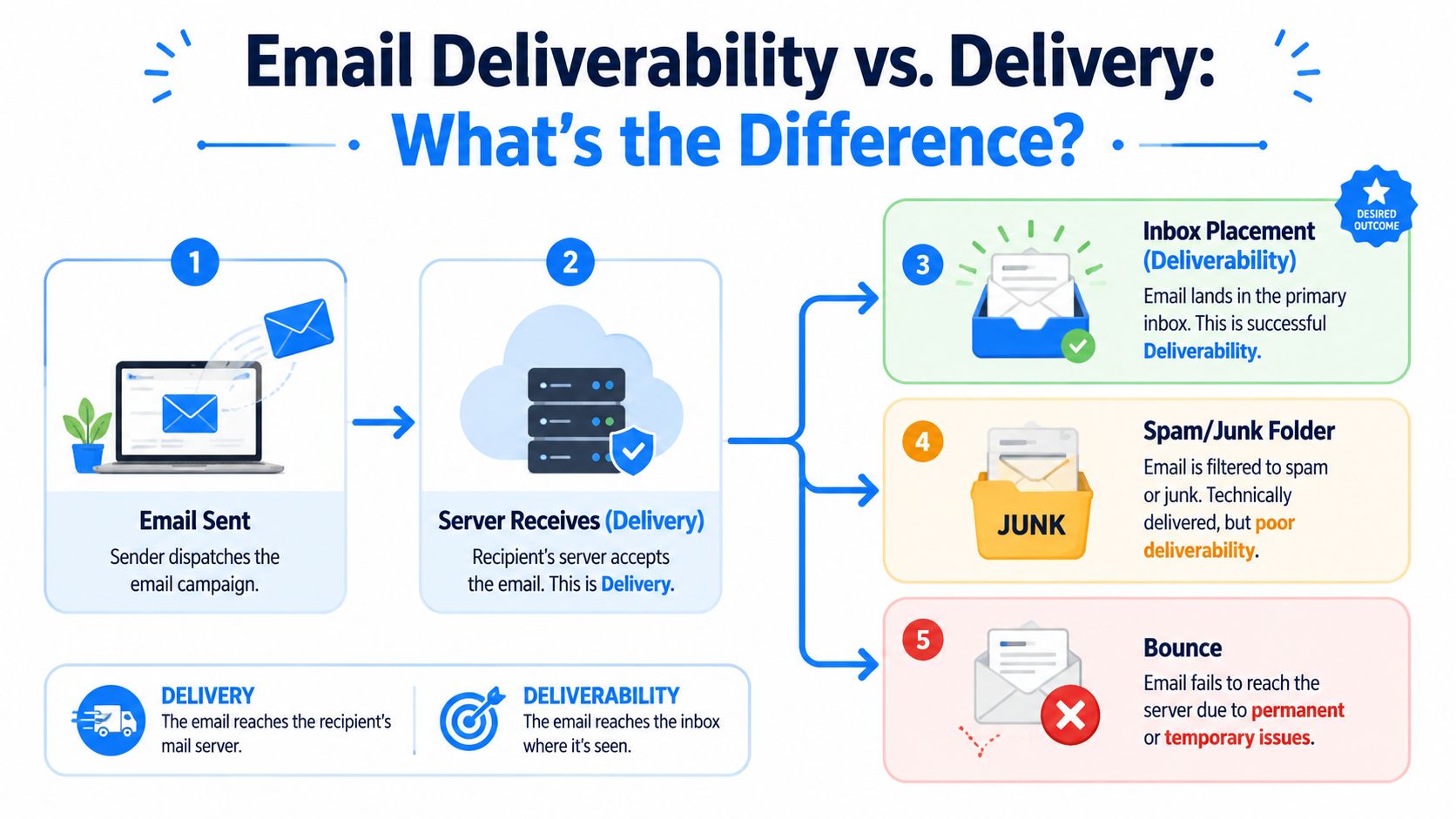
The process is similar to office mail. A package can be accepted by the front desk, logged by the building, and still never reach the person it was meant for. Email follows the same logic. Gmail, Outlook, Yahoo, and other providers accept the message first, then decide whether it belongs in the inbox, spam, promotions, a low-visibility tab, or nowhere at all.
That distinction matters more in 2026 because engagement-based inbox placement decay is now a real operating risk. Technical setup still matters. SPF, DKIM, DMARC, bounce control, and sending consistency are table stakes. But they no longer protect you if recipients stop engaging.
Mailbox providers increasingly use behavioral signals to decide future placement. According to Braze's 2024 guidance on Gmail and Yahoo updates, low engagement can drive a 30 to 45% decline in inbox placement within 12 months, even when authentication is configured correctly, and campaigns with sub-2% open rates can be penalized quickly.
That creates a pattern growth teams need to monitor closely:
- A segment stops opening, clicking, or replying
- The provider reduces inbox placement for that segment or domain
- Fewer people see the next send
- Engagement drops again, which weakens future placement
This is why accepted mail is a weak health check on its own. If the only question is “did the server take it,” the team misses the part that affects lead generation. Visibility. A delivered email that lands in spam has almost no pipeline value.
Open rate also becomes harder to interpret once inbox placement starts to erode. It reflects the behavior of the recipients who still saw the message, not the full audience you paid to reach. For a more grounded view of what email performance should measure, this guide to email campaign performance metrics that actually affect pipeline is a useful companion.
In practice, the best monitoring setup now relies less on traditional seed lists and more on ISP-native signals, mailbox-specific diagnostics, and engagement trends by segment. Seed data still has a place, but it often misses the slow decline that happens when real recipients stop interacting. Breaker is useful here because it helps teams watch placement and engagement patterns together, which makes it easier to catch decay before it turns into a quarter-long revenue problem.
For teams running multi-channel programs, a fallback channel can protect urgent outreach while inbox visibility is unstable. These practical email to SMS strategies are useful when a message cannot wait for deliverability remediation.
The Six Core Metrics Every Growth Team Must Monitor
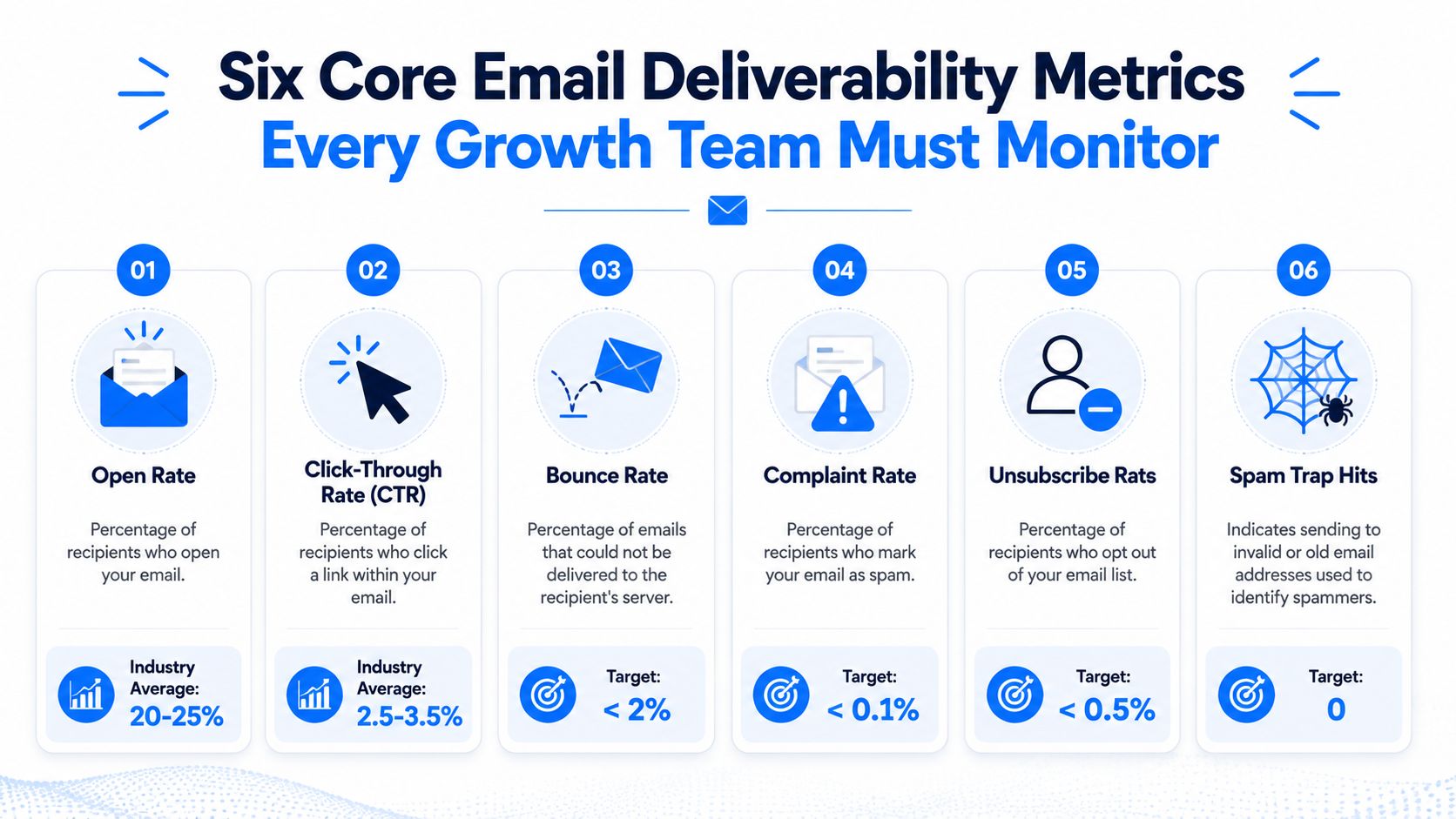
A campaign can hit the ESP as expected, show clean authentication, and still lose inbox visibility week by week. That pattern shows up more often now, especially at Gmail and Microsoft properties, because low engagement is no longer a soft warning. It is an active negative signal. For growth teams, that means deliverability monitoring has to catch inbox placement decay early, before lead volume drops and reply rates follow.
Inbox placement rate
Inbox placement is the operating metric that matters most because it measures visibility, not just acceptance. MessageFlow's deliverability guide uses three useful benchmarks here: inbox placement at 95% or higher, hard bounces below 2%, and authentication pass rates as close to 100% as possible for SPF, DKIM, and DMARC.
Track placement by provider and by audience segment. A blended average hides the underlying problem. Gmail may be slipping for low-engagement webinar leads while Microsoft remains stable for product-qualified prospects.
This is also where ISP-native signals beat seed-only testing. Seed lists can help with spot checks, but they often miss the slower engagement-driven decline that happens with real recipients. Breaker is useful for comparing placement patterns with engagement trends so teams can see whether the issue is technical, behavioral, or both.
Hard bounce rate and soft bounce patterns
Hard bounces usually point to list quality problems. Soft bounces usually point to temporary delivery issues, throttling, or reputation pressure at a specific provider.
The response should be operational, not theoretical:
- Suppress hard bounces immediately so invalid addresses never get retried.
- Review soft bounces by mailbox provider and campaign type to spot throttling patterns.
- Audit acquisition sources after any spike, especially if volume increased through webinars, partners, or older CRM imports.
Bounce monitoring matters because poor list hygiene hurts more than this week's send. It wastes budget, distorts performance reporting, and gives mailbox providers another reason to trust your mail less.
Spam complaint rate
Complaint rate is one of the fastest ways to damage sender trust. The acceptable margin is small, and broad averages can hide the source.
Monitor complaints by signup source, lifecycle stage, and mailbox provider. If one list segment complains at a higher rate, stop treating it as a creative problem alone. Often, the problem is mismatched expectations, weak targeting, stale records, or mailing people long after their buying intent faded.
For B2B teams, this often shows up in reactivation campaigns. A dormant segment may look like pipeline upside in Salesforce, but if recipients no longer recognize the sender, complaint risk rises fast.
Authentication status
SPF, DKIM, and DMARC are table stakes. They do not create inbox placement on their own, but failures here weaken every other signal.
Monitor pass rates continuously, especially after domain changes, ESP migrations, new sending tools, or routing updates from ops and IT. I have seen teams spend weeks diagnosing falling response rates only to find part of the traffic was signing incorrectly after a system change.
Keep this metric simple. If authentication slips, fix it first. Then assess whether placement and engagement recover or whether trust had already started to erode before the technical issue was found.
Sender reputation by provider
Sender reputation is provider-specific. Google, Microsoft, Yahoo, and enterprise filters do not all interpret risk the same way, and they do not recover on the same timeline either.
That is why provider-level monitoring matters more than a single internal health score. Google Postmaster Tools may show deterioration before campaign metrics fully reflect it. Microsoft signals may surface more through throttling and bounce behavior. Breaker helps teams line up those provider patterns with send volume, audience quality, and engagement changes, which makes root-cause analysis faster.
If your team also needs a cleaner reporting layer between inbox visibility and revenue impact, this guide to email campaign performance metrics that affect pipeline is a useful companion.
Subscriber engagement signals
Engagement is now a deliverability metric, not just a performance metric. That is the shift many teams still miss.
Track opens carefully, but do not stop there. Watch clicks, replies, positive inbox actions, and sustained engagement by cohort over time. A segment that stops interacting can pull down future placement even if DNS, authentication, and infrastructure are all configured correctly.
This is the 2026 problem in plain terms. Inbox placement decays because mailbox providers see indifference at scale and adjust trust downward. That decline usually starts before headline campaign metrics look broken.
The practical fix is to monitor engagement as an early warning system. If a segment has gone cold, reduce volume, tighten targeting, or suppress it before that disengagement spreads into a broader deliverability problem.
How to Set Up Your Monitoring System
A workable monitoring system doesn't need to be complex. It needs to answer three questions quickly: where placement is weakening, which signal changed first, and who on the team owns the response.

Start with ISP-native visibility
Many teams still lean too heavily on seed tests. Seed lists can be useful for directional checks, but they don't show the full reality of inbox behavior for real subscribers.
Recent data summarized by Mailgenius shows that 81% of enterprises using native ISP dashboards detected inbox placement issues 14 days earlier than teams relying only on third-party seed-based tools, and that seed-based tools simulate only about 40% of real ISP filtering behavior. For serious email deliverability monitoring, that makes native visibility the primary system, not the backup.
Use the mailbox providers' own tools where available. In practice, that means checking Google Postmaster Tools and Microsoft SNDS routinely, then comparing those signals against your internal campaign data.
Know what seed lists are good at and bad at
Seed lists still have a place. They're useful when you want a fast sanity check across mailbox environments or when you're validating changes after remediation.
They're weak at representing real user behavior. They don't fully reflect engagement history, recipient-level trust, or how mailbox providers treat your actual list over time. That matters because modern deliverability decisions are heavily behavioral.
A practical split looks like this:
- Use native ISP dashboards for ground truth on reputation and placement trends.
- Use seed tests for diagnostics when you need a controlled comparison after making changes.
- Never use seed-list success as proof that your audience is seeing the campaign.
For teams comparing tooling options, this roundup of tools for monitoring inbox placement can help frame what belongs in your stack.
Set alerts around operational thresholds
Dashboards don't help if nobody notices the change until the monthly review. Build alerts around your key thresholds and route them to the people who can act.
Useful alert categories include:
- Bounce threshold alerts when hard bounces move in the wrong direction
- Complaint alerts when a campaign or segment starts generating unusual negative feedback
- Authentication alerts when pass rates fall or alignment changes unexpectedly
- Provider-specific alerts when one mailbox ecosystem drops before others
- Engagement decay alerts when a segment weakens enough to threaten future placement
The best alerts are boring and specific. “Gmail inbox placement dropped for the inactive trial cohort” is actionable. “Email performance changed” isn't.
After you've seen a walkthrough, this setup gets easier to operationalize:
Build one reporting view for growth and one for operations
One mistake I see often is forcing everyone into the same dashboard. Growth leaders need a summary view. The person managing deliverability needs the diagnostic layer.
The growth view should answer:
- Did inbox placement stay healthy
- Which provider or segment changed
- Did the shift affect leads, replies, or conversions
The operational view should answer:
- What triggered the issue
- Was it isolated or cross-provider
- What changed in list source, cadence, content, or segmentation
That split keeps reporting useful. It also stops the common failure mode where deliverability issues get buried inside a giant campaign analytics board.
Remediation Playbooks for Common Deliverability Issues
Monitoring matters because it shortens the distance between detection and action. Without a playbook, teams either overreact and pause everything, or underreact and keep sending into a worsening problem.
The better approach is simple: match the signal to the likely cause, isolate the affected segment, and change the smallest number of variables needed to restore trust.
When spam complaints spike
Complaint spikes are usually a targeting or expectation problem before they're a copy problem. If recipients feel surprised by the message or don't recognize why they're getting it, they use the spam button.
The first response should be controlled, not panicked. Pause sends to the segment or source creating the issue. Check recent list additions, signup context, campaign frequency, and whether the unsubscribe path is easy to find. Then review whether the audience had shown recent engagement before the campaign.
Longer term, clean up acquisition standards and sunset inactive contacts sooner. If your team is reviewing vendors or processes for this, these notes on mailing list cleaning services are useful for comparing cleanup approaches.
When Gmail inbox placement drops
A Gmail-specific drop usually points to reputation or engagement decay inside that ecosystem rather than a universal sending failure. If Outlook is stable but Gmail weakens, don't apply a platform-wide fix before checking the Gmail segments first.
Reduce volume to low-engagement Gmail cohorts. Keep sending to the engaged core so you preserve positive signals. Review cadence changes, recent campaign spikes, and any content pattern that might have shifted user behavior. Native provider signals matter more here than generic campaign reports.
If only one provider drops, diagnose that provider first. Broad fixes often destroy the healthy part of the program.
Long term, mailbox-specific segmentation helps. So does consistency. Advanced monitoring practice also requires separating transactional and marketing email streams to prevent reputation cross-contamination and maintaining consistent sending frequency with engagement-based segmentation to support stable 95%+ inbox placement, according to Warmforge's deliverability monitoring guidance.
When hard bounce rate starts climbing
A rising hard bounce rate usually traces back to data quality. Something changed in list acquisition, enrichment, import handling, or suppression hygiene.
The immediate move is straightforward. Stop sending to the newest risky cohort, identify the source, and suppress invalid records fast. Then compare recent acquisition channels and imports against the previous clean baseline. If bounce growth followed a list expansion effort, that's where I'd look first.
Long term, this isn't solved by cleaning one file. It's solved by improving the system that allowed bad addresses in.
B2B Newsletter Alerting & Remediation Playbook
Alert Trigger
Immediate Action (First 60 Mins)
Long-Term Fix
Spam complaint rate spikes
Pause the affected segment or recent source, review campaign targeting, unsubscribe visibility, and signup context
Tighten list acquisition standards, reduce sends to weak-fit segments, enforce earlier sunset logic
Gmail inbox placement drops
Isolate Gmail audience performance, reduce volume to low-engagement cohorts, preserve sends to the most engaged users
Segment by provider, maintain steady cadence, separate transactional and marketing streams, rebuild engagement gradually
Hard bounce rate climbs
Suppress recent invalid records, inspect newest imports or acquisition channels, halt risky list additions
Improve source validation, enforce immediate hard-bounce suppression, audit enrichment and import workflows
Building a Culture of Proactive Deliverability
The teams that handle deliverability best don't treat it as a rescue function. They treat it as part of audience operations.
That means content, lifecycle, demand gen, ops, and whoever owns list growth all share responsibility. The copywriter affects engagement. The acquisition team affects list quality. The ops lead affects suppression, authentication, and monitoring discipline. If any one of those pieces slips, the inbox feels it.
Good teams stop asking only “Did it send?”
They ask better questions:
- Did the right audience see it
- Did this segment still want this message
- Did we protect sender trust while trying to grow faster
- Are we mailing people who have already gone cold
Those questions create better habits. They lead to tighter segmentation, cleaner lists, steadier cadence, and faster response when a provider starts filtering more aggressively.
Deliverability is part of revenue operations. If inbox placement is unstable, pipeline from email is unstable too.
Proactive monitoring makes ROI more predictable
When teams monitor early signals, they catch the actual problem sooner. They don't wait for lead volume to collapse before investigating. They notice weak engagement, provider-specific placement drops, rising complaints, or bounce issues while there's still room to correct course.
That changes the economics of the channel. Email becomes less volatile. Campaign tests become more reliable. Performance reporting gets closer to the truth because more of the intended audience saw the message.
For B2B growth teams, that's the key payoff. Better deliverability doesn't just improve an email metric. It protects lead generation efficiency, preserves sender reputation, and gives the business a more dependable path from newsletter to pipeline.
Breaker helps B2B teams turn deliverability from a recurring fire drill into a repeatable growth system. If you want a newsletter platform that combines sending, audience growth, analytics, list hygiene, and TruSend deliverability management in one place, take a look at Breaker.
Keep reading
All articles7 Email Platforms With Inbox Placement Testing & Suppression
Compare 7 email platforms that combine inbox placement testing with suppression management, scored on features, pricing, and best-fit sender size.
Email Automation Workflow & Drip Campaign Data Structure
Learn the database schema behind email drip campaigns—tables, workflow states, and event logs that power reliable marketing automation.
Breaker Review: AI-Native ESP for Newsletter Growth
An unbiased Breaker review: pricing, features, deliverability data, and who this AI-native email platform fits best for newsletter growth.