
How to Send a Follow Up Email That Actually Gets Replies
Learn how to send a follow up email that earns real replies with proven timing, subject lines, structure, and templates tailored for B2B teams.
You know the moment. You've sent the proposal, the pitch, or the post-meeting recap, and the inbox goes quiet. The temptation is to resend the same note with a softer subject line and hope the recipient finally notices. That usually wastes a touch.
A follow-up email works better when you treat it like a sequence with changing angles, not a single reminder. The goal isn't to sound more persistent than everyone else. It's to give the recipient a reason to respond now instead of later, and to know when the sequence has already done its job.
Why Your First Follow-Up Rarely Gets the Reply You Hoped For
The first follow-up often lands right after your original message, which means the recipient hasn't suddenly become more interested. They've just had another chance to decide whether your request matters enough to answer. If the second email says the same thing as the first, it usually feels like the same interruption twice.
That's why the first follow-up should be treated as the start of a planned cadence, not a polite afterthought. If you're wondering how to send a follow up email that earns attention, start by accepting that silence rarely means the conversation is dead. More often, it means the timing, the context, or the angle hasn't made replying easy enough.
A useful way to think about follow-up is this. The first message opens the door, the first follow-up clarifies why walking through it is worth the time, and later touches should change the ask or the proof. That structure matches the internal link between outreach and introduction, which is also why a strong first-message framework matters, as shown in this guide on business introduction email.
Practical rule: If the follow-up doesn't add a new reason to reply, it's just a reminder of something the recipient already ignored.
The Reply-Rate Curve Most Teams Miss
The data is clear that the earliest touches matter most. Research summarized in the follow-up email statistics shows that the first follow-up is the strongest, with reply rates about 40% higher than later follow-ups, and that response rates decline as the sequence continues. In one dataset, the initial email produced an 8.4% response rate, followed by 7.8% on the second follow-up, 6.8% on the third, 5.8% on the fourth, and 3.8% on the fifth, which shows the steady drop-off after the first few sends. That same source also notes that sequences with 4–7 emails generated 27% reply rates versus 9% for shorter sequences with 1–3 emails. See the full benchmark set in email follow-up statistics and sequence performance.
What the numbers mean in practice
The takeaway isn't to keep pushing forever. It's to concentrate your best thinking in the first few touches, because that's where the response curve is most forgiving. If you stop after one nudge, you're often quitting before the sequence has a fair shot.
The persistence benchmarks back that up. 80% of sales require at least five follow-up attempts, and 60% of customers refuse an offer up to four times before saying yes, according to sales follow-up statistics and persistence benchmarks. That doesn't mean every deal needs five extra emails. It does mean many teams give up while the buyer is still in the middle of their normal decision process.
Here's the clean operational rule I use:
Touch
Reply rate
Notes
Initial email
8.4%
Baseline response in the cited dataset
First follow-up
Higher than later follow-ups
Strongest follow-up touch, about 40% higher than later sends
Second follow-up
7.8%
Still productive if the angle changes
Third follow-up
6.8%
Diminishing returns begin to show
Fourth follow-up
5.8%
Use only if the message adds real value
Fifth follow-up
3.8%
Low-yield touch, useful mainly in longer sequences
That curve tells you when to stop chasing a dead thread. Once you've used the early high-impact touches and nothing changes, the problem usually isn't your phrasing. It's that the recipient doesn't have a reason to engage yet.
When to Send a Follow-Up Without Sounding Desperate
A follow-up sent too soon feels like pressure. One sent too late feels forgotten. The right timing sits between those two, and the better question is whether the next email adds a new reason to reply.
For meetings or interviews, a common working window is 24 to 48 hours after the conversation. For sales or proposal follow-ups, 3 to 5 business days is a more typical range, as described in Adobe's guidance on professional follow-up emails. Those windows work because they respect the recipient's memory without making you look impatient, but they still leave room for the buyer to finish whatever they were already doing.
Match the window to the context
If the conversation is warm, recent, or tied to something time-sensitive, move sooner. If the outreach is colder, speed alone rarely fixes the message, and a little space can help the next touch feel less forced. In a crowded inbox, context carries more weight than ritual timing.
That is why timing should be treated as part of the sequence, not a standalone trick. Guidance on the best time to send email points in the same direction, since the right moment depends on the relationship stage and the action you want the recipient to take. The clock matters less than whether this touch introduces something new enough to justify another look.
For reminder-based outreach, automated reminder email best practices makes the same point in a different setting. A reminder works better when it feels tied to the recipient's situation, not copied from the last send. If the wording and angle stay unchanged, the email feels like noise. If the reminder adds a useful detail, it feels relevant.
Here is a practical timing pattern I use:
- Warm follow-up: Send soon after the meeting while the conversation is still fresh.
- Proposal follow-up: Give the recipient a few business days to review before you send the next note.
- Cold outreach: Leave more breathing room, then rotate in a new angle instead of repeating the original ask.
- Cluttered inboxes: Test different send times if your usual schedule keeps getting buried.
The goal is not finding a magic hour. It is making each follow-up arrive with enough context and fresh value that it feels like a useful next step, not another push for the sake of pushing.
The Anatomy of a Follow-Up That Earns a Reply
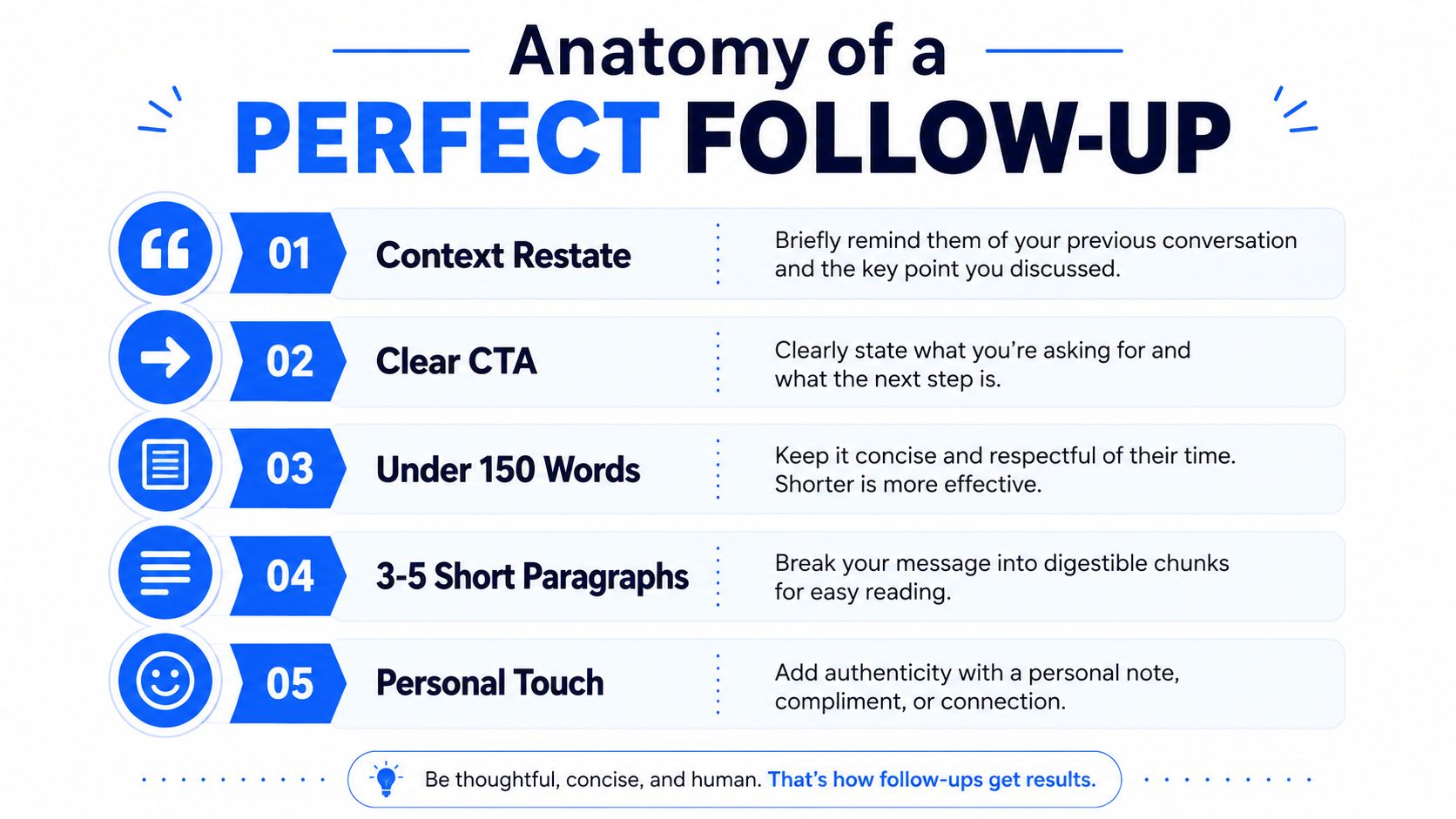
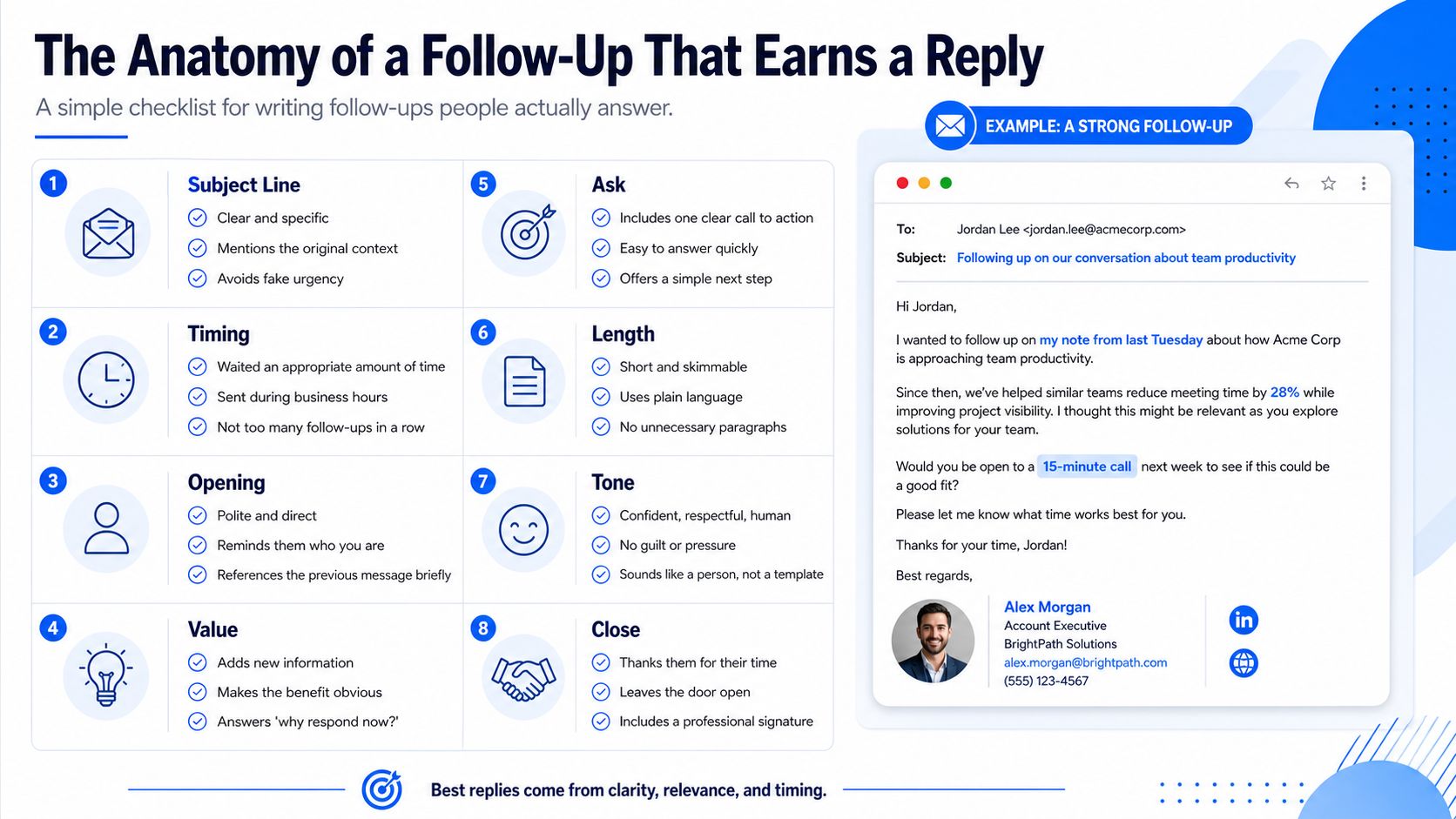
A follow-up earns a reply when it gives the recipient a clear reason to look again. In practice, that means a short message, a specific ask, and one new piece of value. A body under 100 to 150 words, 3 to 5 short paragraphs, and a single CTA usually gives busy readers enough structure to scan and respond without extra work.
The best teams treat follow-up as a sequencing problem, not a copy problem. Each touch should rotate the angle a little, so the recipient gets a new reason to care instead of the same request in a new wrapper. That matters in warm threads, cold outbound, and stalled deal cycles, especially if the first note did not get traction.
Open with context, not politeness theater
“Just checking in” wastes the first line because it makes the recipient search for the reason you are back in their inbox. A stronger opener names the prior thread in one line and moves straight to the next step. If they have to reassemble the context, the email already feels heavier than it should.
The middle of the email should add one useful thing. That can be a fresh proof point, a relevant detail, a narrower use case, or a cleaner reason the timing matters now. If you add three ideas at once, you force the reader to decide which one deserves attention, and that usually slows the reply.
Useful standard: One email, one objective. If you need three asks, you probably need three separate touches.
Subject lines should feel like a continuation, not a reboot
A good subject line points back to the earlier conversation without copying it word for word. A small conversational shift often works better than a polished corporate label because it signals continuity. The recipient should know this is a follow-up, but not feel like you recycled the same email with a new subject.
The body needs the same discipline. Keep the request explicit, the context visible, and the wording plain. If the message takes longer to interpret than to answer, it is too long. If you want a practical reference point, best Buffer alternatives is a useful example of how concise comparison-driven framing can keep attention on the next action instead of the wording itself.
Three B2B Follow-Up Templates You Can Use Today
The best templates aren't scripts you paste forever. They're structures you adapt based on whether the relationship is warm, cold, or stalled after a proposal. I've found that teams get better replies when they stop treating templates as copy and start using them as sequencing patterns.
1. Post-meeting recap
Subject: Follow-up on our conversation
Hi [Name],
Thanks again for the time today. I enjoyed the conversation about [topic], and I wanted to send over the [resource, summary, or next step] we discussed.
Based on what you shared, I'd suggest [specific next action]. If that's useful, I can send over [one concrete asset] or set up [specific next step].
Would you be open to [one clear CTA] next week?
Best,
[Your name]
This version works because it feels anchored to a real conversation. It doesn't pretend the meeting happened in a vacuum, and it gives the recipient one obvious next move.
2. Stalled cold outbound sequence
Subject: Quick follow-up on [topic]
Hi [Name],
I'm reaching back out because [specific reason tied to their role or company]. Since my earlier note, I came across [new insight, use case, or proof point] that seemed relevant.
If improving [business outcome] is on your roadmap, I'm happy to share how teams usually approach it. If not, I can send a short overview and step aside.
Would it make sense to connect for 15 minutes, or should I send the summary instead?
Best,
[Your name]
If your cold sequence is getting ignored, don't just rewrite the opener. Change the angle. A practical example of angle-sensitive messaging is how teams review best Buffer alternatives when they're comparing tools, because the comparison itself becomes the reason to respond.
3. Proposal re-engagement
Subject: Re: proposal for [project]
Hi [Name],
I wanted to check in on the proposal I sent over for [project]. Since then, I've been thinking about [new angle, risk, or outcome] that may matter for your team.
If helpful, I can revise the recommendation around [specific dimension] or tighten the scope to fit your current priorities. If the project is on hold, I'd still appreciate a quick note so I can plan accordingly.
Should I update the proposal, or is it better to close the loop for now?
Best,
[Your name]
That last line matters because it gives the recipient a clean exit. People respond more readily when the email makes replying easy, not awkward.
Rotating the Angle So You Never Sound Repetitive
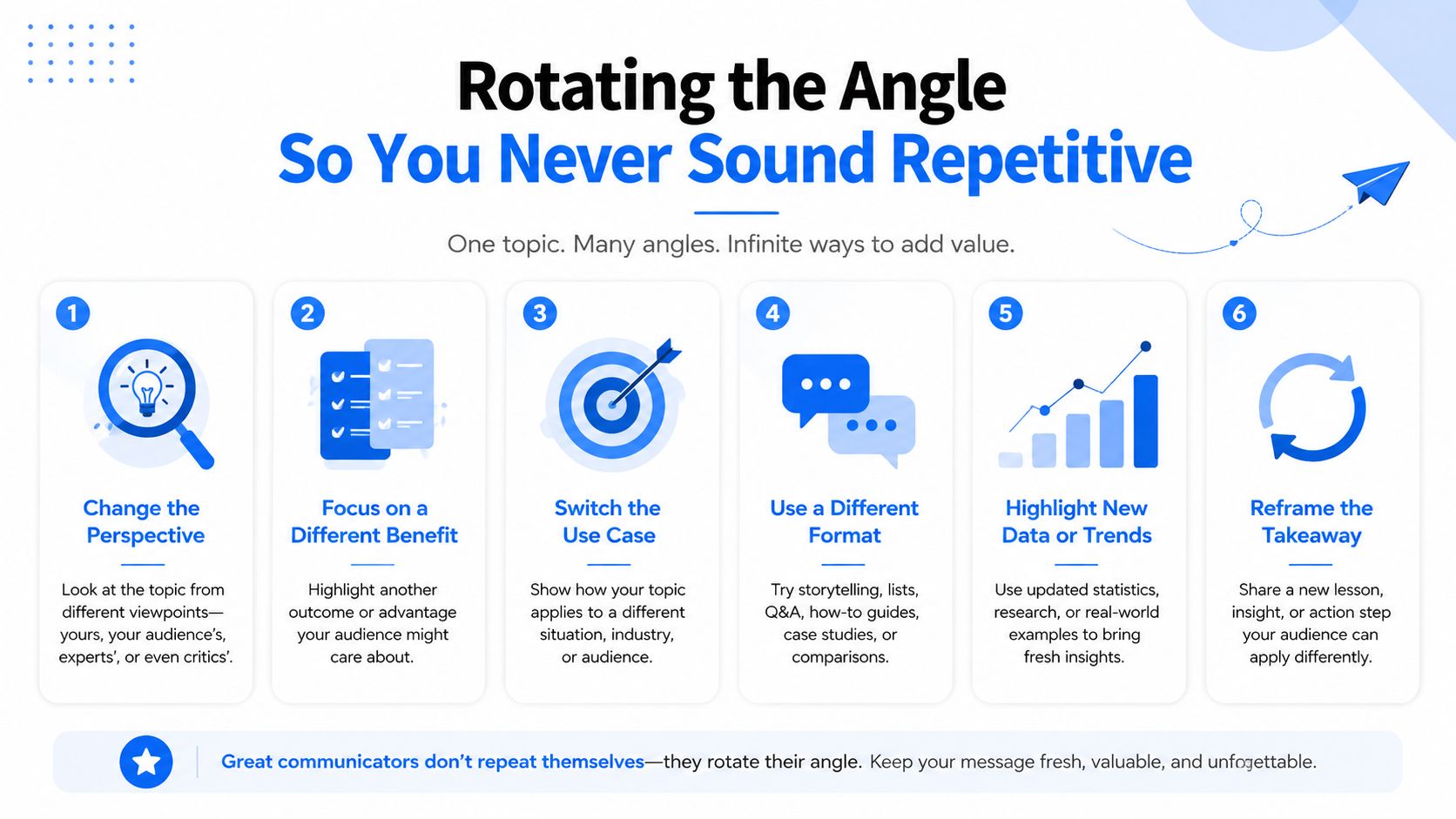
The biggest mistake in follow-up writing isn't being too short. It's repeating the same request with a different date stamp and calling it persistence. Once a recipient has seen multiple nudges, the only way to stay relevant is to change the angle.
Four angle rotations that actually change the conversation
- Lead with a different proof point. If the first email focused on features, make the next one about outcome or risk reduction.
- Swap the CTA. Ask for a resource review, a reply by email, or a referral instead of the same meeting request again.
- Use a fresh industry lens. Tie the message to a development in the prospect's market so it feels timely.
- Shift the tone slightly. Warm, direct language can work after a few formal nudges because it sounds more human.
The right rotation depends on where the relationship stands. A strong warm lead can handle a more candid tone. A cold prospect usually needs a sharper reason to care, not more personality. After a proposal, the best move is often to change the decision frame, not to restate the offer.
If you want a useful mental model, think about each follow-up as a new answer to the same underlying question. Why should this person reply now? If the answer is the same every time, the sequence is too repetitive.
That's the part many people miss when they ask how to send a follow up email. They focus on wording, but the key variable is the angle. Once you start rotating the angle deliberately, you stop sounding like a broken record and start sounding like someone who understands the buyer's context.
Tracking, Testing, and Knowing When to Stop
A follow-up system only gets better when you watch the right signals. The metrics worth tracking are reply rate per touch, meetings booked per sequence, and time-to-reply. Those numbers show whether your message is relevant, whether your cadence is too aggressive, and whether the recipient is responding to one touch more than another.
For a practical workflow, start with one sequence and test only one variable at a time. Subject lines are an easy first test, then CTA wording, then the angle of the message itself. If you change everything at once, you'll never know what moved the reply.
CRM signals matter too. Opens, clicks, and prior engagement can tell you whether the next follow-up should escalate, pause, or shift channels. If the recipient is interacting but not replying, the problem is often not interest, it's friction in the ask.
Deliverability still sits underneath all of this. Even a sharp sequence fails if the message doesn't reach the inbox in a usable state. If you're looking at broader list and send health, how to track emails is a good companion resource because it keeps tracking tied to actual campaign behavior rather than vanity metrics.
Breaker is one option for teams that want email sending, list expansion, analytics, and deliverability management in one system, especially when follow-up sequences need to be tied to ICP targeting and subscriber engagement. The point isn't to add another tool for its own sake. It's to make follow-up easier to automate, measure, and improve without losing the relevance that gets replies.
If your team wants a cleaner way to run follow-up sequences, test angle rotation, and keep deliverability visible in the same workflow, take a look at Breaker. It's built for B2B teams that need outreach to feel structured instead of repetitive, and for campaigns that have to turn replies into real pipeline.
Keep reading
All articlesNewsletter Agency Services: How Agencies Scale Client Newsletters
Managing multiple client newsletters? Learn what a true newsletter agency platform needs to prevent list mixing, voice drift, and invisible ROI.
Building Owned Audiences: Move Followers to Your Newsletter in 2026
Social platforms can vanish overnight. Learn how to convert Instagram, TikTok, and YouTube followers into a newsletter list you actually own.
Newsletter Analytics: Which Metrics Actually Matter in 2026
Open rate and clicks don't predict buyers. Learn the 7-step method to track click depth, recency, and topic affinity for a revenue-predictive intent score.