
How to Track Emails to Measure B2B Engagement
Learn how to track emails with this definitive guide. Master click tracking and privacy-first methods to measure real B2B engagement and drive growth.
Figuring out how to track emails really comes down to embedding tiny, invisible pixels or specially tagged links into your messages. When a recipient opens your email or clicks a link, these little spies report back, giving you a direct look into who's actually engaged. It's the difference between flying blind and knowing exactly who’s paying attention. If you want to try it without paying, our roundup of free email tracker tools compares ten options for Gmail and Outlook.
Why Email Tracking Is Your B2B Growth Engine
In the B2B world, sending emails without tracking is like shouting into a canyon and just hoping a customer hears you. It's not a nice-to-have feature anymore; it’s the core engine for understanding your audience, validating your ideal customer profile, and proving ROI.
Smart marketers have already moved past vanity metrics. They're focused on the kind of actionable data that signals real purchase intent. This shift is critical in a world of inbox noise and separates the high-growth newsletters from the ones that get instantly deleted. For B2B marketers and consultants, this data is your proof of value and your roadmap to driving revenue.
Before we dive deep into the specific methods, here’s a quick overview of the core techniques you'll be using. This table breaks down what each method does and the key metric it helps you measure.
Core Email Tracking Methods at a Glance
Tracking Method
Primary Purpose
Key Metric
Tracking Pixels
To confirm if an email has been opened.
Open Rate
Link Tracking (UTMs)
To see which links recipients click on.
Click-Through Rate (CTR)
Read Receipts
To get a direct confirmation of receipt/open.
Acknowledged Opens
SMTP & Webhooks
For real-time delivery and engagement events.
Delivery Rate, Bounces
CRM Integration
To connect email activity with lead/customer data.
Lead Engagement Score
Think of these as your fundamental building blocks. Each one gives you a different piece of the puzzle, and when used together, they create a complete picture of your email performance.
From Volume to Value
The sheer volume of email flying around every day makes tracking an absolute necessity. By 2026, a staggering 392.5 billion emails are projected to be sent daily worldwide. That’s a mind-boggling amount of noise to cut through.
This explosion in communication means you can't afford to guess. You need precise insights into opens, clicks, and engagement to stand out. Platforms like Breaker turn this potential chaos into clarity, providing real-time analytics that are pure gold for optimizing your campaigns.
In a crowded inbox, the only way to be heard is to listen first. Email tracking data is how you listen to what your audience wants, what they engage with, and what drives them to act.
Turning Data into Decisions
The real power of tracking isn't just in the numbers themselves, but in what you do with them. Instead of just looking at an open rate, you can start asking much more strategic questions.
- Which content pieces are actually hitting the mark? A high click-through rate on a specific case study link tells you exactly which pain points are most relevant to your audience right now.
- Who are my most engaged leads? By identifying contacts who consistently open and click your emails, you can build a hot list of warm leads to hand directly to your sales team.
- Is my messaging effective, or am I just talking to myself? A/B testing two different subject lines and seeing which one gets more opens gives you immediate, undeniable feedback on your copy.
This level of insight transforms your email strategy from a simple broadcast tool into a dynamic feedback loop. You can continuously refine your approach based on real-world behavior, ensuring every email you send is smarter and more effective than the last. The many advantages of email marketing are only fully realized when you have the data to back up your decisions.
Your Essential Toolkit for Tracking Emails
Feeling like you're drowning in a sea of tracking pixels and UTM parameters? You're not the only one. But to really understand what works in your email campaigns, you need to get comfortable with the core tech that makes tracking possible.
Think of these tools less like complex code and more like simple messengers, each one designed to answer a specific question about what your audience is doing.
The whole process is pretty straightforward: you send an email, use these tools to see how people react, and then use that data to fine-tune your strategy.
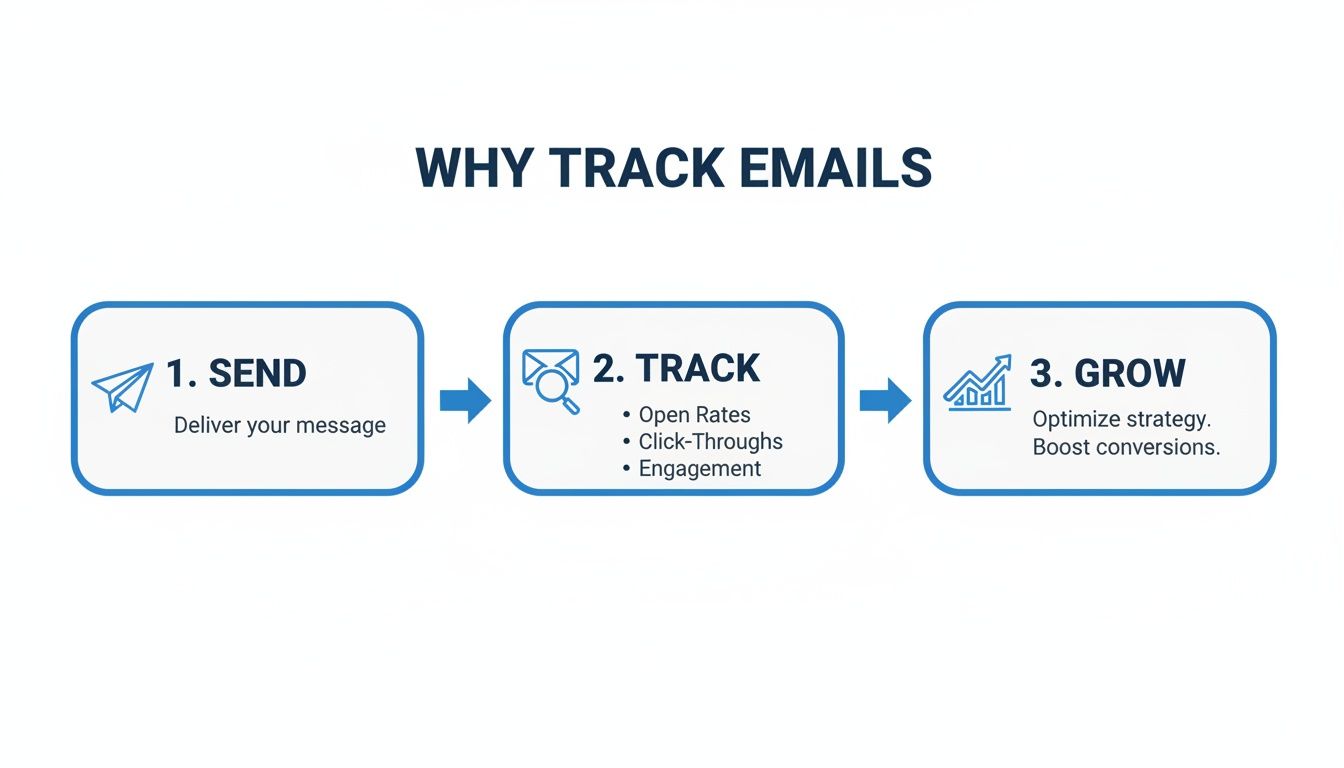
This Send, Track, and Grow cycle is the engine room of any solid email program. It’s how you turn a bunch of raw numbers into real, actionable insights. Each tool in your kit has a specific job to do, giving you another piece of the engagement puzzle.
Tracking Pixels The Open Rate Indicator
At its core, a tracking pixel is just a tiny, invisible 1x1 pixel image hidden in your email. When someone opens the email, their client (like Gmail or Outlook) has to request that tiny image from your server. That request gets logged, and boom—you have an "open."
Now, with Apple's Mail Privacy Protection (MPP), open rates aren't the pinpoint-accurate metric they once were for individual engagement. But they still have a job to do. Think of them as a canary in a coal mine. A sudden, sharp drop in your overall open rate is often the first sign of a bigger deliverability problem, like your emails getting flagged as spam.
UTMs The Gold Standard for Click Tracking
While a pixel tells you if an email was opened, Urchin Tracking Module (UTM) parameters tell you exactly what someone did next. These are just little text snippets you tack onto the end of a URL, acting like info-rich tags for your analytics software.
For instance, say you’re a B2B marketer sending a newsletter with a link to a new case study. Your link might look like this:
yourwebsite.com/case-study?utm_source=newsletter&utm_medium=email&utm_campaign=q4_content_push
When a subscriber clicks it, your analytics tool (like Google Analytics) doesn't just see a click—it sees the whole story.
utm_source=newsletter: This tells you the click came from your newsletter.utm_medium=email: This identifies the channel as email.utm_campaign=q4_content_push: This attributes the click to your specific Q4 content campaign.
Using UTMs is no longer optional; it's the most reliable way to connect your email efforts directly to website traffic, lead generation, and revenue. It's how you prove that your newsletter isn't just content—it's a conversion driver.
Webhooks for Real-Time Notifications
Think of webhooks as automated messengers that work for you 24/7. Instead of you having to constantly refresh your analytics dashboard, webhooks push data to you as events happen. When a recipient opens an email, clicks a link, or unsubscribes, your email platform can send an instant alert to another app.
This is a game-changer for sales-driven activities. Imagine a high-value prospect clicks the link to your pricing page. A webhook can trigger an immediate alert in your team's Slack channel or create a high-priority task in your CRM for a salesperson to follow up. It closes the gap between a lead's action and your team's reaction, turning passive tracking into active, timely engagement.
Real-World Scenario Tracking a B2B Demo Request
Let's tie this all together. A B2B marketer wants to know which content in their monthly newsletter is actually driving demo requests for their software.
- The Setup: The newsletter has two main articles: one about a new product feature and another that's a detailed customer case study. The "Request a Demo" CTA button appears after both sections.
- The feature article link:
…&utm_content=feature_article_link - The case study link:
…&utm_content=case_study_link - The demo request CTA:
…&utm_content=demo_request_cta - The Analysis: After sending, the marketer checks their analytics. They discover that 70% of the demo requests originated from people who first clicked the case study link. That's a massive insight. It tells them that stories of real-world customer success are far more compelling than feature announcements.
This data gives them the confidence to double down on creating more case studies for future newsletters. For a deep dive into the mechanisms and advanced tactics of how to track emails, FranFunnel offers a great resource that can help you boost replies with proven tactics. This is how you stop guessing and start knowing, using your toolkit to make data-backed decisions that get real results.
Putting Tracking into Practice with B2B Campaigns

It’s one thing to talk about tracking emails, but it’s another to see how it actually drives results. This is where the magic happens. Email tracking isn’t just about collecting data; it’s about turning those numbers into smart business decisions that fuel B2B growth.
Let's walk through a couple of real-world scenarios to see how different teams use tracking to answer critical questions and connect every email they send to a measurable outcome.
Scenario 1: The Product-Led Growth Team
Imagine a product-led growth (PLG) team getting ready to announce a highly requested new software integration. Their goal is bigger than just getting the word out—they want to pinpoint the power users who are perfect candidates for an upsell.
The Strategy:
The team crafts a sharp, well-designed email to announce the new feature. But the real strategy is in how they track it.
- Primary CTA: A big, can't-miss-it button links to a detailed blog post about the integration. This link is tagged with UTMs:
utm_content=integration_blog_post. - Secondary Link: A more subtle, in-text link points to the official help documentation. It’s also tagged:
utm_content=help_docs.
The Actionable Insight:
A few days go by, and the team dives into the click data. They spot a small but crucial group of users. These folks didn't just click the main blog post link; they also clicked the link to the in-depth help documentation.
This double-click behavior is a huge signal of high intent. These aren't just casually curious users—they're actively trying to master the new feature. The PLG team immediately exports this list of engaged users and enrolls them in a targeted follow-up sequence offering a personal demo of the advanced features available in the premium plan.
This is a textbook example of using click segmentation to find your most valuable users. Instead of blasting everyone with an upsell, they used tracking data to find the people who were already raising their hands.
Scenario 2: The High-Value Sales Sequence
Now, picture a sales development representative (SDR) nurturing a high-value prospect at a target enterprise account. The goal here is to warm up the lead and figure out their specific pain points before picking up the phone.
The Strategy:
The SDR launches a 3-touch email sequence over two weeks. Every email is tracked for opens and, more importantly, clicks. Each message links to a different asset designed to gauge interest.
- Email 1: A broad introduction to the company's value prop, linking to a general industry report. (
utm_content=industry_report) - Email 2: A focused message on a specific pain point, linking to a customer case study from a similar company. (
utm_content=customer_case_study) - Email 3: A direct pitch highlighting ROI, with a link to a pricing and ROI calculator on their site. (
utm_content=roi_calculator)
The Actionable Insight:
The SDR watches the data roll in. The prospect opens all three emails but only clicks the link in Email 2—the customer case study. And they don't just click it once. The tracking tool shows they clicked it twice on two different days.
This is a crystal-clear buying signal. The prospect isn’t interested in broad industry trends or ready to talk pricing just yet. Their real interest is in peer success stories and proven results. Armed with this knowledge, the SDR’s follow-up call is no longer a cold pitch. Instead, they can lead with, "I noticed you might be interested in how companies like yours are tackling [problem from the case study]. I'd love to share a few more examples."
To truly maximize the impact of your B2B campaigns, explore how email tracking underpins successful email marketing with personalization.
Why Clicks Are the New Gold Standard
The way we measure email engagement has fundamentally changed. Ever since Apple’s Mail Privacy Protection (MPP) rolled out, open rates have become a fuzzy, unreliable metric. While a staggering 99% of users check their email daily, Apple's huge market share means a lot of "opens" are automatically triggered, hiding true engagement.
This shift has forced all of us to get smarter. Instead of focusing on who might have opened an email, we now look at what they do. Tracking clicks on specific links gives you undeniable proof of a user’s interest and intent.
The techniques we've discussed give you a solid foundation, but a platform with integrated analytics is what brings it all together. You can learn more about finding the right solution in our guide to real-time email performance tracking tools.
Interpreting Your Data Beyond Opens and Clicks
Collecting data is easy. The real skill is knowing how to read the story your numbers are telling you. To really track emails effectively, you have to look past the shiny dashboard stats and dig into the "so what?" behind every metric.
This means we’re moving beyond a simple obsession with opens and clicks. Instead, we’ll focus on spotting patterns, connecting email performance directly to business goals, and turning that raw data into smarter marketing decisions.
Open Rate as a Deliverability Health Check
In the age of Apple's Mail Privacy Protection (MPP), the open rate has lost its crown as the king of engagement. Since many "opens" are now triggered automatically by servers instead of actual people, the numbers can be seriously misleading if you're trying to gauge individual interest.
But that doesn't make the open rate useless. It now serves a crucial purpose as a deliverability health check. A sudden, sharp drop in your overall open rate is often the very first red flag that your emails are landing in spam. Think of it as a high-level indicator of your sender reputation.
Treat your open rate like a smoke alarm. It won't tell you the exact source of the fire, but it's an undeniable signal that you need to investigate a potential deliverability issue immediately.
Click-Through Rate: Your True North for Engagement
If open rates have become fuzzy, then the click-through rate (CTR) is your crystal-clear metric for genuine engagement. A click is an intentional action. Someone had to see something they valued and make a conscious choice to learn more.
This is exactly why CTR should be your true north. It’s the ultimate measure of how compelling your content and calls-to-action really are. A low CTR, even with a sky-high open rate, is a dead giveaway that your subject line made a promise your email body couldn't keep.
To get that CTR moving in the right direction, zero in on a few key areas:
- Relevance: Does the content in your email directly follow through on the subject line's promise and provide real value to that specific audience segment?
- Clarity: Is your call-to-action (CTA) obvious, concise, and action-oriented? "Get the Free Template" will always beat a vague "Click Here."
- Design: Is the link or button impossible to miss, especially on mobile devices where over 60% of emails are now opened?
Connecting Email to Business Goals
Ultimately, the whole point of tracking emails is to prove and improve your contribution to the bottom line. This is where conversion rates, subscriber growth, and ROI enter the picture. These are the metrics that tell the complete story of your campaign’s success.
To get a clearer picture of your performance, it’s helpful to see how these key metrics work together. The table below breaks down what each one really tells you about your campaigns. For a deeper analysis, our guide on B2B newsletter performance metrics can provide more context.
Email Engagement Metrics: What They Really Mean
This table breaks down the core metrics that matter, how they're calculated, and what they actually signal about your campaign performance.
Metric
How to Calculate It
What It Tells You
Click-Through Rate (CTR)
(Total Clicks ÷ Total Delivered Emails) x 100
The percentage of recipients who found your content compelling enough to take action. This is your primary engagement metric.
Conversion Rate
(Number of Conversions ÷ Total Clicks) x 100
The percentage of clickers who completed a desired action (e.g., filled out a form, made a purchase). This links email directly to business goals.
Subscriber Growth Rate
((New Subscribers - Unsubscribes) ÷ Total Subscribers) x 100
The net growth of your audience. A healthy rate indicates your content is valuable and attracting the right people.
Return on Investment (ROI)
((Revenue from Email - Campaign Cost) ÷ Campaign Cost) x 100
The ultimate measure of profitability. This shows how much revenue your email marketing efforts are generating for every dollar spent.
By keeping a close eye on these metrics, you can spot trends over time. Is your CTR climbing after you started A/B testing your CTAs? Did a specific campaign lead to a spike in both conversions and ROI? This is how you transform from someone who just sends emails to someone who runs a data-driven growth program.
Navigating Privacy and Deliverability Like a Pro

Knowing how to track emails is one thing, but doing it respectfully is what separates the pros from the amateurs. Effective tracking isn't about being sneaky—it's about being smart and transparent to build trust. That trust is the only real path to sustainable growth.
This all comes down to balancing your need for data with your subscribers' right to privacy. The goal is to gather insights that help you create better, more relevant content, not to make anyone feel like they're being watched. Thinking "privacy-first" isn't just a compliance headache; it's a strategic move that strengthens your brand.
The New Rules of Engagement: GDPR and CCPA
You’ve probably seen the acronyms GDPR (General Data Protection Regulation) and CCPA (California Consumer Privacy Act) floating around. In simple terms, these laws give people more control over their personal data. For email marketers, it all boils down to one critical idea: clear and explicit consent.
The days of quietly opting people into tracking are over. Under these regulations, you have to be upfront about what data you collect and why. This is usually handled in your privacy policy, which should clearly state that you use things like tracking pixels and tagged links to see how your emails perform.
Here’s what that means for your day-to-day workflow:
- Opt-In Is King: Make sure your subscription forms are crystal clear. Users should actively agree to get your emails.
- Easy Opt-Out: Every single email must have an obvious, one-click unsubscribe link. No exceptions.
- Total Transparency: Link to a straightforward privacy policy that explains your tracking methods in plain English.
Think of it this way: you are a guest in your subscriber's inbox. Acting with respect is how you get invited back. Violate that trust, and you’ll find your emails sent straight to the spam folder.
The Post-MPP World: Clicks Over Opens
One of the biggest shake-ups in email tracking came from Apple. Their Mail Privacy Protection (MPP), launched in 2021, completely changed the game by preloading images for users. With Apple Mail now commanding a huge slice of the market, a big chunk of your open rate data is probably inflated. You can explore the 2026 email industry report for more on how these trends are playing out.
This "phantom open" issue has forced smart marketers to stop obsessing over open rates. Instead, the focus has shifted to a much more reliable metric: clicks.
A click is an undeniable sign of interest. It proves a subscriber not only saw your email but was engaged enough to take action. This makes your click-through rate (CTR) the single most accurate gauge of how well your content is actually landing.
Why List Hygiene Is Not Optional
Finally, let's talk about deliverability. Your sender reputation is like a credit score with email providers like Gmail and Outlook. A good reputation means your emails hit the inbox; a bad one sends you directly to spam.
One of the quickest ways to tank your reputation is by sending emails to a messy list full of inactive or dead addresses. Regularly cleaning your list—a practice known as list hygiene—is non-negotiable. This means removing:
- Hard bounces (invalid or non-existent email addresses)
- Chronic non-openers (subscribers who haven't engaged in months)
A clean list directly leads to higher deliverability, which means more of your emails actually reach people. This creates a powerful positive cycle: better deliverability gives you more accurate data, which helps you create better content, leading to even more engagement.
Common Questions on Email Tracking, Answered
When you start digging into email tracking, you'll quickly find it’s a world where tech, strategy, and privacy all collide. It’s natural to have questions. We’ve pulled together the ones we hear most often to give you clear answers that will help you track emails the right way.
Can I Track Emails Without the Recipient Knowing?
Technically, yes. Most email tracking, from invisible pixels to link redirects, is designed to work quietly in the background without raising any alarms. But the better question is, should you?
The industry has shifted hard toward transparency. Regulations like GDPR and CCPA require you to disclose data collection in your privacy policy. More importantly, building trust is a far better long-term play than being secretive. Besides, savvy users and many email clients can block trackers now anyway, so being upfront is just good business.
The goal isn't to spy on one person. It's to gather aggregate data to make your emails better for everyone.
How Has Apple's Mail Privacy Protection Changed Email Tracking?
Apple's Mail Privacy Protection (MPP) essentially broke open rates as a reliable metric for user engagement. It works by pre-loading email content on Apple's servers, which triggers any tracking pixels inside—whether the user actually opened the email or not.
This creates artificially high open rates, making it look like more people read your email than actually did. Because of this, smart marketers now focus on metrics that demand real, intentional action, like click-through rates (CTR) and conversions.
Think of open rates as a secondary signal for deliverability health, not a real measure of readership. If your opens suddenly tank, it might mean you're landing in spam, but that's about it.
Is Tracking Different for Newsletters Versus Sales Outreach?
Yes, the strategy and what you’re looking for are completely different. Getting this distinction right is the key to pulling actionable insights from your data.
When you send a B2B newsletter, you're tracking aggregate data to spot broad trends. You’re looking at overall CTR and which links or content themes get the most attention across your entire list. This helps you refine your content strategy for everyone.
Sales outreach tracking, however, is all about individual intent. You need to know that a specific prospect from a key account just clicked the pricing page link three times. That's a huge buying signal that calls for immediate, personal follow-up.
- Newsletter Tracking: Broad, strategic, and focused on content optimization.
- Sales Tracking: Hyper-personal, action-oriented, and focused on identifying buying signals.
What Is the Best Way to Improve My Email Click-Through Rate?
Improving your CTR is one of the highest-impact things you can do. It all comes down to three things: value, clarity, and design.
First, your content has to be hyper-relevant to the audience segment you're sending to. If your subject line promises a solution, the email body needs to deliver on that promise—fast. Generic emails get ignored.
Second, use clear, compelling Calls-to-Action (CTAs). Ditch the generic "Click Here." Instead, use action-oriented phrases that promise a specific outcome, like "Get the Free Template" or "Watch the 5-Minute Demo."
Finally, make clicking a no-brainer.
- Use prominent, high-contrast buttons that stand out.
- Make sure your email is optimized for mobile, where most people are reading (and clicking).
- Break up walls of text so your links are easy to spot and scan.
The fastest way to figure out what your audience wants is to A/B test everything—your CTAs, your copy, and your link placement. Continuous testing is the secret to consistently lifting your click-through rate over time.
Ready to stop guessing and start growing? Breaker combines powerful email sending with automated list growth, giving B2B marketers the tools to turn newsletters into a reliable revenue engine. With real-time analytics, you'll know exactly what's working so you can optimize every send. Start your 7-day free trial today and see how Breaker can transform your email strategy.
Keep reading
All articlesNewsletter Agency Services: How Agencies Scale Client Newsletters
Managing multiple client newsletters? Learn what a true newsletter agency platform needs to prevent list mixing, voice drift, and invisible ROI.
Building Owned Audiences: Move Followers to Your Newsletter in 2026
Social platforms can vanish overnight. Learn how to convert Instagram, TikTok, and YouTube followers into a newsletter list you actually own.
Newsletter Analytics: Which Metrics Actually Matter in 2026
Open rate and clicks don't predict buyers. Learn the 7-step method to track click depth, recency, and topic affinity for a revenue-predictive intent score.