
HubSpot vs Marketo: The 2026 B2B Growth Showdown
HubSpot vs Marketo: A deep dive for B2B growth teams. We compare features, pricing, use cases, and show where a tool like Breaker fits in your 2026 stack.
Your team is probably at the point where spreadsheets, your CRM, your email tool, and a patchwork of automations still technically work, but nobody trusts the full picture. Marketing says leads are coming in. Sales says handoff quality is inconsistent. Leadership asks which campaigns influenced pipeline, and the answer turns into caveats.
That’s when the hubspot vs marketo decision stops being a software comparison and becomes an operating model decision.
I’ve seen teams make this choice too late and pay for it with rework. I’ve also seen teams overbuy. They choose an enterprise platform because it feels safer, then spend months rebuilding simple workflows they could’ve launched in days. Other teams go the opposite direction, choose ease and speed, then hit limits when lifecycle complexity, segmentation, and reporting demands catch up.
If you’re in that spot, the right question isn’t “which tool has more features?” It’s “which platform matches how our team works, how complex our go-to-market motion really is, and what we need to prove to the business?” That’s the frame that matters. It’s also why teams evaluating broader automation usually benefit from stepping back and clarifying the benefits of marketing automation before they sign a contract.
The Decisive Choice for B2B Growth
A fast-growing B2B company usually hits the same wall. Demand gen wants cleaner nurture flows. Sales wants better lead context. RevOps wants fewer sync issues. The CMO wants reporting that holds up in a board meeting. Suddenly the stack that felt flexible starts creating drag.
HubSpot and Marketo solve that problem in very different ways. HubSpot is built around an integrated system. It’s the better fit when a team wants one environment for CRM, marketing execution, content, handoff, and reporting with less technical overhead. Marketo is built more like a high-control automation engine. It makes sense when the business already has a defined CRM strategy, longer buying cycles, and enough operational maturity to support deep customization.
Here’s the practical difference:
Decision area
HubSpot
Marketo
Operating philosophy
All-in-one, CRM-first
Automation-first, enterprise orchestration
Best fit
SMB to mid-market growth teams
Mid-market to enterprise B2B teams with dedicated ops
Speed to launch
Faster
Slower, more involved
Ease of use
Stronger for generalists
Better for specialists
Reporting posture
Accessible and built-in
Deeper, but heavier to operationalize
Common risk
Outgrowing flexibility in complex motions
Overbuying complexity
Organizations often compare feature checklists. That overlooks an important trade-off. Platform choice shapes who can build campaigns, how quickly you can change process, and whether your reporting model becomes simpler or more fragile.
The wrong platform rarely fails on day one. It fails six months later, when a new territory model, lifecycle redesign, or attribution request exposes what your team can’t support operationally.
There’s also a third path that many B2B newsletter and audience growth teams should consider before defaulting to a full marketing automation platform. If the immediate problem is proving newsletter ROI, growing a qualified audience, and running repeatable sends without adding enterprise overhead, a specialized approach can be smarter than forcing either HubSpot or Marketo to solve a use case they weren’t built around.
Understanding Core Philosophies and Target Users
A B2B team usually feels this choice in the first 90 days. One platform helps a generalist team ship campaigns, clean up lead routing, and get sales working from the same record quickly. The other gives ops leaders tighter control over segmentation, nurture logic, and governance, but asks for more process discipline from day one.

HubSpot was built for connected execution
HubSpot’s design starts with a simple assumption. Marketing, sales, and service should work from the same customer record, in the same system, without waiting on a specialist to connect basic workflows.
That shows up in daily operations. A marketer can launch a form, route leads, trigger follow-up, and give sales context without stitching together several tools first. For teams that are still tightening process, that matters more than an extra layer of automation flexibility.
HubSpot usually fits companies with these conditions:
- The team needs speed more than system depth. Campaigns have to go live fast, and the people building them are often demand gen managers or content marketers, not full-time admins.
- Revenue teams want one operating system. Shared visibility across contacts, deals, lifecycle stages, and campaign activity reduces handoff issues.
- Segmentation is still maturing. If the business is still clarifying who it serves best, it helps to define a clear ideal customer profile for B2B growth planning before building complicated automation around unstable assumptions.
There is a trade-off. HubSpot is easier to adopt, but that convenience can become limiting when your team needs highly customized program structures, layered governance, or unusual routing logic across business units.
Marketo was built for operational depth
Marketo comes from a different operating philosophy. It assumes complexity is normal. CRM may sit elsewhere, often in Salesforce. Lead management rules may vary by region, product line, partner motion, or account tier. The platform is built to support that kind of structure, not hide it.
In practice, Marketo tends to make more sense when marketing ops already exists as a real function. Someone needs to own naming conventions, sync behavior, scoring design, QA, permissions, and lifecycle governance. Without that operating discipline, teams often buy more capability than they can use well.
The best Marketo fit usually looks like this:
- A company with dedicated ops ownership. The platform rewards teams that can maintain standards and troubleshoot dependencies.
- A long, multi-touch buying process. Multiple nurtures, complex handoffs, and account-based motions are easier to model when control matters more than simplicity.
- A business that accepts a steeper learning curve. On review sites and practitioner forums, Marketo is commonly described as harder to learn and administer than HubSpot, especially for teams without specialized support.
That learning curve is not a flaw for every buyer. For some enterprises, it is the cost of getting finer control.
User profile tells the story
The practical divide is less about feature checklists and more about who will run the platform every week. HubSpot favors teams that want more people building and using the system. Marketo favors teams that want fewer people controlling a more complex machine.
This is also where many newsletter-led B2B teams make the wrong comparison. If the immediate goal is proving newsletter revenue impact, growing the right audience, and automating repeatable sends, neither HubSpot nor Marketo fully closes the attribution problem on its own. A specialized platform can fill that gap without forcing the team into enterprise marketing automation before it is warranted.
That matters if newsletter is becoming a primary growth channel.
Teams that rely heavily on LinkedIn acquisition often feel this tension first. HubSpot can support that motion well, especially with the right HubSpot LinkedIn integration tools, but integration coverage is still different from true newsletter attribution and audience growth automation. That third path is worth evaluating before defaulting to a larger platform decision based only on email workflows or CRM preference.
Core Marketing Automation Features A Side-by-Side Deep Dive
The practical comparison starts when you move from positioning language to actual work. Can your team build nurtures quickly? Can sales trust the data? Can you segment accounts the way your go-to-market model requires? Can you explain performance without exporting half your stack into a spreadsheet?
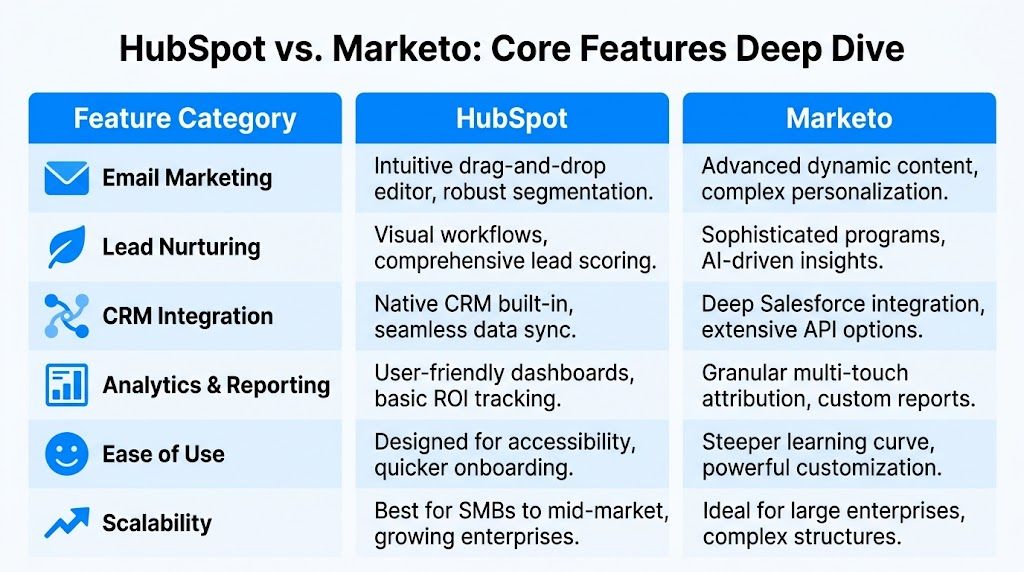
Quick comparison table
Feature area
HubSpot
Marketo
Automation builder
Visual drag-and-drop workflows
Advanced program logic with deeper nesting
CRM model
Native Smart CRM
No native CRM, strong external CRM sync
Lead scoring
Strong for standard use cases
Unlimited custom score fields
Segmentation
Easier for most teams to manage
Better for highly granular enterprise logic
Reporting
Friendly dashboards and Google Analytics integration
Revenue Cycle Analytics and deeper custom reporting
Best operational fit
Lean growth team
Dedicated marketing ops team
Email and automation workflow depth
HubSpot’s workflow builder is one of its strongest selling points. It’s visual, accessible, and well suited to teams that need to launch nurtures, route leads, trigger notifications, and connect marketing with sales without waiting on a technical admin for every change.
Marketo is stronger when workflow complexity stops being linear. According to Default’s HubSpot vs Marketo analysis, Marketo supports nested logic, unlimited custom score fields, and a more advanced program structure. The same source notes that Marketo implementations often take 2 to 6 months, while HubSpot teams can often get to campaign launch in 2 to 4 weeks.
That difference is not cosmetic. It changes who can operate the system.
Practical rule: If your team regularly says “we need one more branch, one more score, one more exception,” Marketo usually handles that pressure better. If your team says “we need this live by next week,” HubSpot is often the safer fit.
Here’s where I draw the line:
- HubSpot wins when campaigns are owned by demand gen managers, content marketers, or growth leads who need direct control.
- Marketo wins when lifecycle architecture itself is a strategic asset and someone is paid to manage that complexity.
For teams running social and lifecycle campaigns together, the surrounding ecosystem matters too. If LinkedIn is a major channel in your funnel, this guide to HubSpot LinkedIn integration tools is useful because campaign execution often breaks down at the handoff between ad engagement, CRM enrichment, and nurture entry.
A broader look at marketing automation for B2B teams also helps when you’re mapping these workflows before procurement.
A visual walkthrough helps here:
CRM and data model realities
HubSpot’s biggest structural advantage is its built-in Smart CRM. Marketing and sales share the same underlying contact and company context. That reduces sync latency and simplifies handoff. You don’t need to explain to a new hire where “truth” lives.
Marketo works differently. It doesn’t try to replace the core CRM. Its strength is sync quality with platforms like Salesforce and Microsoft Dynamics 365, as outlined in the earlier HubSpot comparison source. For organizations already standardized on Salesforce, that’s often exactly what they want. Marketo acts as the automation layer while the CRM remains the source of truth.
The trade-off is familiar to anyone who’s run ops in a multi-system environment:
- HubSpot’s benefit is operational simplicity.
- Marketo’s benefit is architectural flexibility inside an enterprise stack.
- HubSpot’s risk is hitting model limits when your process gets unusually complex.
- Marketo’s risk is carrying the overhead of sync governance, field mapping, and cross-system QA.
Segmentation and lead scoring
HubSpot vs. Marketo gets more serious for B2B organizations with multiple audiences and longer sales cycles.
Marketo is stronger for segmentation depth. It supports advanced behavioral segmentation, workspace partitions, and score modeling that can reflect product interest, geography, role, and buying stage without forcing everything into a simplified structure. That’s a major advantage when marketing supports multiple business units or regional teams.
HubSpot can absolutely segment well, but it tends to stay cleaner when the business model stays cleaner. If your segmentation strategy depends on a few clear lifecycle stages, persona groups, and channel-driven triggers, HubSpot handles it well. If you’re trying to reflect a matrix organization in your nurture logic, you may start building around constraints.
Most teams don’t need infinite segmentation. They need segmentation they can maintain without breaking reporting.
That sentence matters. I’ve seen teams choose the more flexible system, then end up with a lead model only one person understands.
Analytics and reporting
Analytics is where many software demos oversell reality.
HubSpot gives marketers dashboards they can use quickly. You get visibility into traffic, leads, conversions, and native integration with Google Analytics. For many growth teams, that’s enough to run weekly decisions without a reporting project.
Marketo is better for organizations that need deeper business intelligence. It offers Revenue Cycle Analytics, real-time visualization, and more customizable reporting structures, according to the HubSpot and ConvertMate comparisons already cited above. That matters when leadership wants to inspect customer journey progression in more detail and tie program structure more tightly to revenue analysis.
Still, there’s a catch. Deeper reporting only helps if your team has the discipline to maintain campaign tagging, naming, scoring logic, and CRM alignment. Otherwise the added sophistication creates noise, not clarity.
Beyond the Sticker Price Unpacking Total Cost of Ownership
A team buys HubSpot because the monthly line item looks manageable. Six months later, they have more contacts than expected, need another hub, and want reporting that reaches beyond standard dashboards. Another team buys Marketo for long-term scale, then realizes they need tighter process, heavier implementation support, and an ops owner earlier than planned. Both teams thought they were making a software decision. They were really choosing an operating model.

The visible cost
License pricing gets the meeting started, but it rarely settles the decision. HubSpot usually looks easier to justify early. Marketo often looks heavier from day one. That framing is incomplete because neither platform stays confined to the base subscription once a real B2B growth motion is in place.
A better question is simple. What will this system cost to run well after the first 12 to 24 months?
The cost categories that actually matter
In practice, total cost of ownership usually shows up in four places:
- Implementation and migration. HubSpot is faster for many teams to launch. Marketo usually asks for more upfront planning around lifecycle stages, sync rules, lead routing, scoring, and QA.
- People cost. HubSpot can often be managed by a strong generalist marketer with ops discipline. Marketo tends to reward a dedicated admin or marketing ops lead much sooner.
- Ongoing system maintenance. Workflows, scoring models, field mapping, campaign governance, and CRM hygiene all create recurring labor.
- Supporting tools. Teams often add separate products for attribution, enrichment, testing, webinar execution, or newsletter growth because the core platform does not cover every use case cleanly.
That fourth category is where budgets often drift. A team may buy an all-in-one platform, then still need specialized software for the parts of growth that leadership wants measured more precisely.
Where HubSpot usually gets expensive
HubSpot’s cost curve often rises with growth, not setup complexity.
As database size increases and more teams start using the platform, pricing pressure tends to come from contacts, additional hubs, upgraded tiers, and broader adoption across sales, service, and operations. The system still feels manageable, which is part of its appeal. The commercial model expands right alongside usage.
That trade-off is acceptable for many companies. If speed, usability, and cross-functional adoption matter more than squeezing every dollar out of the license, HubSpot can still be the better financial decision.
Where Marketo usually gets expensive
Marketo’s higher cost often shows up in labor before it shows up in expansion.
The platform can support more complex enterprise requirements, but that flexibility has a carrying cost. Teams need cleaner process, tighter documentation, better governance, and more technical ownership. If those pieces are missing, the company pays for power it cannot consistently use.
I have seen this pattern more than once. A business buys Marketo for sophistication, but the bottleneck is not automation capability. It is internal capacity.
A practical budgeting framework
Use a two-year view, not a quarter-by-quarter license comparison.
Cost area
HubSpot risk
Marketo risk
Platform fees
Rising cost as contacts, hubs, and teams expand
Higher starting cost and enterprise packaging
Onboarding and setup
Lower implementation overhead
More planning, testing, and configuration time
Specialist headcount
Can delay dedicated ops ownership
Usually need dedicated ops support sooner
Operational discipline
Manageable for simpler programs
High if campaign governance is weak
Add-on tools
Attribution and advanced growth use cases can require extra tools
Attribution and specialized execution still often require extra tools
One more point gets missed in a lot of pricing conversations. Newsletter-led B2B teams should budget separately for audience growth and newsletter performance infrastructure. Neither HubSpot nor Marketo fully closes that gap on its own, which is why some teams pair their core automation platform with focused tools and resources such as best newsletter templates and a specialized product like Breaker for attribution and automated subscriber growth.
Buy the platform your team can operate cleanly for the next two years, not the one that looks cheapest in procurement.
That mindset prevents the most expensive mistake of all. Buying software that your team never turns into a reliable revenue system.
The Attribution Gap and Your B2B Newsletter Strategy
Most hubspot vs marketo articles stop too early. They compare workflows, CRM alignment, and a few reporting dashboards, then declare a winner. For a growth team, that leaves out the part leadership cares about. Can you prove what influenced revenue?

Why attribution is the uncomfortable part of this decision
One of the sharpest observations in recent comparisons is that organizations should “budget for external attribution tooling regardless of platform choice” because neither HubSpot nor Marketo consistently delivers production-ready multi-touch attribution natively, according to Lovable’s HubSpot vs Marketo guide. That point gets skipped in a lot of vendor-led narratives.
Buyers often assume they’re choosing between “simple attribution” and “advanced attribution.” In reality, many B2B teams are choosing between two different paths to the same operational problem. Both platforms can help. Neither automatically resolves the full-funnel ROI question on its own.
If proving revenue impact is a board-level requirement, attribution architecture should be part of platform selection from day one, not an afterthought after launch.
That’s especially true in B2B motions where buying committees engage over time, leads touch multiple channels, and newsletter content influences pipeline indirectly rather than through a neat last-click path.
Why newsletters expose the gap faster
Newsletter programs force this issue because they sit in an awkward but valuable part of the funnel. They build trust, maintain attention, warm up future buyers, and often create the context that makes later conversion possible. But those outcomes don’t always map cleanly to native attribution views.
For a team using a newsletter as a growth engine, the core questions usually look like this:
- Who subscribed and do they match our target accounts?
- Which sends generated qualified engagement, not just opens?
- Did newsletter readers later become opportunities or influence active deals?
- Can we grow the list with the right audience without creating a deliverability problem?
A full MAP can support parts of that workflow. It can also become a lot of machinery for a use case that needs tighter focus.
Where specialized newsletter tools fit
This is the third path that many comparisons ignore. If your immediate strategic goal is newsletter-led growth, you may not need to force HubSpot or Marketo into center stage. You may need a system designed around audience growth, send performance, and ROI visibility for newsletters specifically.
That’s not a dismissal of either platform. It’s a reminder that platform breadth and use-case fit aren’t the same thing.
In practice, specialized newsletter platforms make the most sense when:
- The newsletter is a primary acquisition and nurture channel.
- You care about list quality as much as list size.
- You want cleaner visibility into newsletter performance without building a larger reporting stack first.
- Your team values deliverability controls and audience growth loops more than enterprise workflow complexity.
Creative execution still matters too. If your newsletter format is inconsistent or weak, no reporting model will save it. Resources like these best newsletter templates can be surprisingly useful because strong structure improves readability, click behavior, and downstream conversion quality.
The strategic takeaway
HubSpot is often easier to operationalize. Marketo is often more powerful in complex enterprise programs. Neither fact solves attribution by itself.
For newsletter-heavy B2B teams, the smarter question may be narrower: do we need a broad automation platform right now, or do we need a focused system that helps us grow the right audience, measure newsletter contribution more clearly, and keep email performance healthy?
That decision can save a lot of wasted implementation effort.
Choosing Your Platform The Right Fit for Your Team
Software choice gets easier when you stop asking which platform is “best” and start asking which team you are.
Choose HubSpot if your team needs speed and shared context
HubSpot is usually the right answer when the bottleneck is execution speed, internal alignment, and ease of adoption. If marketing and sales both need visibility into the same records and your team doesn’t want to build around sync complexity, HubSpot fits naturally.
It’s especially strong for teams that need:
- Fast time-to-value. You want forms, workflows, landing pages, and reporting working quickly.
- Generalist-friendly operations. Campaign managers and growth marketers can own more of the system directly.
- A unified GTM environment. CRM, marketing, and sales coordination matter more than extreme workflow customization.
HubSpot tends to work best when your process is growing, but not yet highly fragmented across regions, business units, or product lines.
Choose Marketo if your complexity is real, not hypothetical
Marketo is the better answer when your business already operates with enough complexity to justify specialist tooling. Not “we might need it later.” Actual current-state complexity.
That usually means:
- You already run a mature CRM alongside marketing automation.
- Your buying journey is long and multi-stage.
- Lead scoring, routing, and nurture logic need more than standard branching.
- You have or will staff dedicated marketing ops ownership.
Marketo pays off when control, segmentation depth, and enterprise orchestration affect revenue execution directly. If those needs are real, HubSpot can start to feel too opinionated. If those needs aren’t real yet, Marketo can feel like a platform you work for instead of one that works for you.
Buy for the complexity you can name and support now. Don’t buy for the complexity you imagine you might have someday.
Consider a specialized tool when newsletter growth is the real job
Some teams aren’t trying to solve enterprise lifecycle orchestration. They’re trying to turn a B2B newsletter into a dependable channel for audience growth, engagement, and pipeline influence.
That team often includes:
- Product-led growth marketers building repeatable audience touchpoints.
- Consultants and fractional CMOs who need a channel that’s easier to deploy and easier to explain to clients.
- Creators and B2B media teams treating the newsletter as a core business asset.
- Lean revenue teams that need measurable traction without a heavy admin layer.
For those teams, the key question is whether a broad automation platform is the right first purchase. Sometimes it is. Often it isn’t.
A simple decision lens
If you need one clean rule of thumb, use this:
Team reality
Best fit
You want one connected platform and fast execution
HubSpot
You need deep automation logic and can support dedicated ops
Marketo
Your main goal is newsletter growth, deliverability, and clearer channel ROI
A specialized newsletter platform
That framework is less exciting than a feature shootout, but it’s more useful. The best system is the one your team can implement, maintain, and defend when leadership asks what marketing is producing.
HubSpot vs Marketo Common Questions
Is migrating between HubSpot and Marketo a simple move
Usually not. A platform switch is closer to a reimplementation than a file export. You can move records and some historical assets, but lead scoring, lifecycle stages, forms, routing rules, reporting logic, consent settings, and CRM sync behavior often need to be rebuilt to fit the new system.
That work affects more than marketing. Sales ops, RevOps, and anyone relying on attribution or handoff rules usually gets pulled in too.
Which platform is better for deliverability
Neither one should be chosen on deliverability alone. Inbox placement depends more on domain reputation, list quality, engagement patterns, sending volume, and suppression discipline than on whether you bought HubSpot or Marketo.
If newsletter performance is the top use case, a specialized platform can be the better fit. Tools built for newsletter growth usually give teams tighter control over reputation monitoring, list hygiene, audience growth, and channel-level reporting. That matters when the gap is not automation breadth, but proving newsletter ROI and growing the right audience without adding enterprise admin overhead.
How different are the reporting experiences
The difference is significant in practice. Marketo usually gives ops-heavy teams more flexibility, especially if they already work inside the Adobe stack and need custom reporting paths. HubSpot is easier for non-technical users to adopt and generally faster for sales and marketing leaders to read without extra setup.
ConvertMate’s HubSpot vs Marketo comparison notes that Marketo can provide 15 to 25% more granular ROI insights in some B2B benchmarks, while HubSpot scores higher on ease of use and includes six attribution models. The trade-off is straightforward. Marketo tends to reward teams that can support more reporting complexity. HubSpot tends to reward teams that need answers faster, even if the data model is less flexible.
How long should implementation really take
HubSpot is usually faster to get live for a team buying its first serious marketing platform. Marketo takes more planning, more testing, and tighter operational discipline before campaigns run cleanly at scale.
That difference shows up in budget and speed to value. A slower implementation means more time before marketing can prove contribution, more dependency on specialist support, and a higher risk that the platform sits half-configured while the team keeps running work manually.
If your team’s main challenge is not broad marketing automation, but building a B2B newsletter that drives qualified audience growth and clearer ROI, Breaker is worth a look. It combines email sending, automatic ICP-matched list expansion, real-time analytics, and deliverability management in one focused platform, so you can grow the channel without taking on the overhead of an enterprise MAP before you need one.
Keep reading
All articlesBuilding Owned Audiences: Move Followers to Your Newsletter in 2026
Social platforms can vanish overnight. Learn how to convert Instagram, TikTok, and YouTube followers into a newsletter list you actually own.
Newsletter Analytics: Which Metrics Actually Matter in 2026
Open rate and clicks don't predict buyers. Learn the 7-step method to track click depth, recency, and topic affinity for a revenue-predictive intent score.
Newsletter Segmentation Strategy: Increase Engagement in 2026
Build a data-driven newsletter segmentation strategy using behavior, intent score, and topic affinity to lift opens and clicks. Step-by-step guide.