
Email Marketing Cost: A 2026 Pricing Breakdown
Understand the true email marketing cost in 2026. Our guide breaks down platform fees, hidden costs, ROI calculations, and budgets for every business size.
Email marketing cost can start under $50 per month for a basic DIY setup and climb to $5,000 per month or more for an agency-managed program. But the number that matters more is return, because email often delivers $36 to $42 for every $1 spent, which equals roughly 3,600% to 4,200% in ROI.
That's why most advice about email marketing cost is backward. It treats the cheapest platform as the goal, when the actual job is building a system that earns more than it costs.
A low monthly bill can hide expensive problems. You keep paying for inactive contacts, duplicate records, weak segmentation, rushed creative, and poor inbox placement. On paper, your software looks affordable. In practice, you're funding inefficiency.
In B2B, that mistake gets costly fast. A list full of stale contacts doesn't just waste sends. It can weaken engagement, drag down deliverability, and make every future campaign less productive. The better question isn't “what does email cost?” It's “what am I paying per engaged, reachable subscriber, and what revenue does that subscriber generate?”
Why "Cheap" Email Marketing Can Be Expensive
The biggest mistake I see is teams shopping for email the way they shop for office software. They compare line-item subscription prices and assume the lowest one is the smartest choice. That works for storage tools. It doesn't work for a revenue channel.
Multiple industry summaries continue to report that businesses typically earn $36 to $42 for every $1 spent on email marketing, or roughly 3,600% to 4,200% ROI (email marketing ROI benchmarks). That's the frame that matters. If one setup costs less but produces weaker segmentation, lower engagement, and more wasted sends, it isn't cheaper in any meaningful sense.

The sticker price hides the real bill
A bare-bones platform fee only tells you what the vendor charges to access the tool. It doesn't tell you what your team spends fixing bad data, rewriting weak automations, or pushing campaigns through a CRM that doesn't sync cleanly. If your contact model is messy, even a useful system like a free CRM setup in HubSpot can become harder to operationalize because the underlying list quality is still poor.
That's why cheap email often turns expensive in three ways:
- You pay for unusable contacts. Some platforms bill on total contacts, not active contacts.
- You pay in labor. Marketers, ops teams, and designers spend time working around tool limits.
- You pay in missed revenue. Weak targeting lowers the value of each campaign.
Practical rule: If a platform saves money on subscription fees but makes it harder to reach qualified buyers, your actual email marketing cost just went up.
What works and what doesn't
What works is simple. Pay for infrastructure that helps you maintain a clean list, clear segmentation, and reliable campaign execution.
What doesn't work is chasing the lowest monthly number while ignoring whether the program is producing pipeline, meetings, or revenue. Email should be managed like a profit center. Once you use that lens, “cheap” stops being the point.
Breaking Down Email Platform Pricing Models
Most ESP pricing pages look simple until you try to forecast costs six months out. Then the billing model matters more than the homepage price. I usually explain it like a phone plan. Some plans charge for how many people you can contact, some for how much you use, and some for the features available at each tier.
Typical monthly ESP fees are often around $10–$30 for up to 1,000 subscribers, $75–$150 for 5,000–10,000 subscribers, and $150–$300 for 10,000–25,000 subscribers (ESP pricing ranges). Those numbers are useful, but they only describe the visible layer.
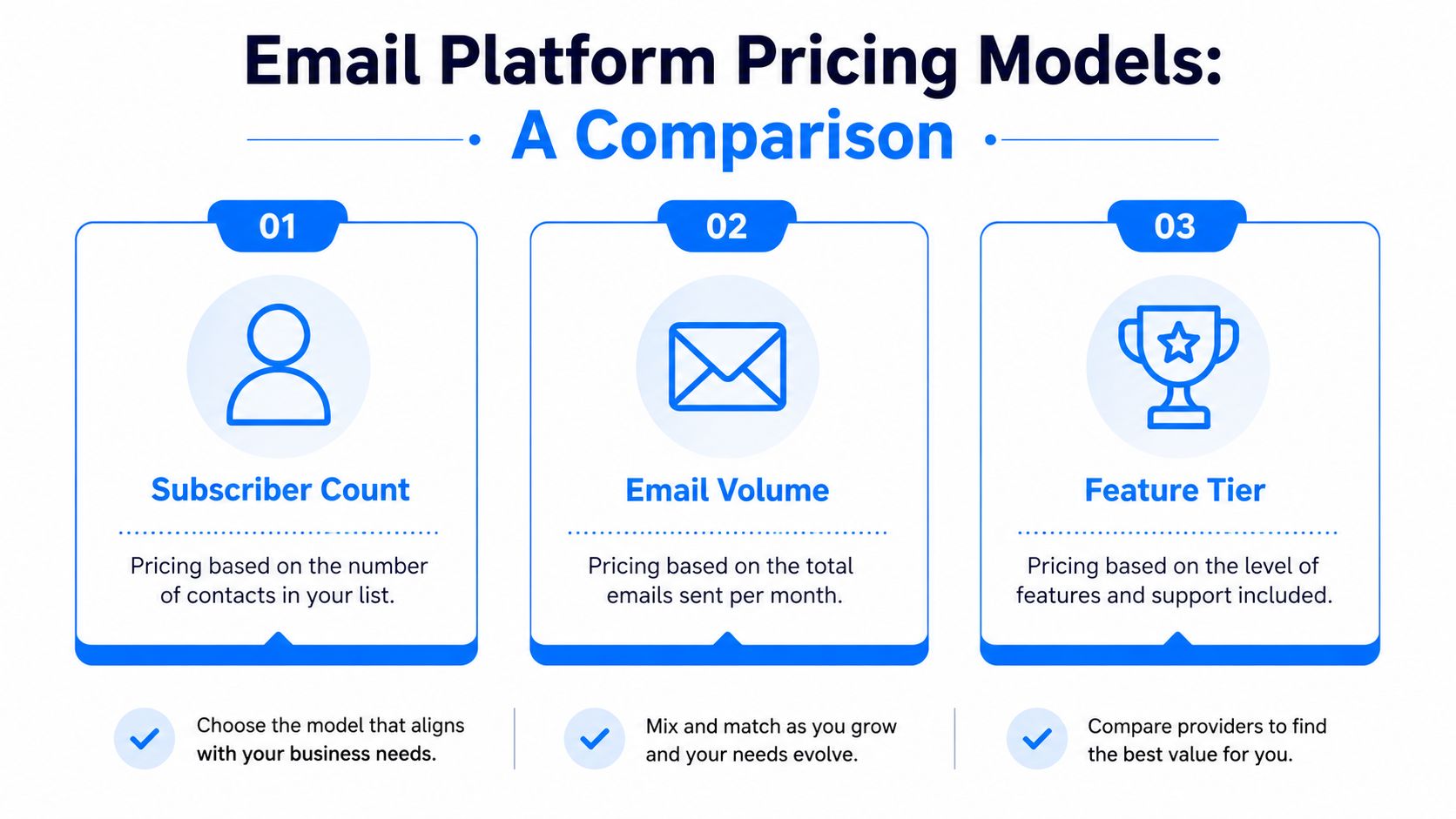
Subscriber count pricing
This is the most common model. Your bill rises as your list grows.
It fits teams with predictable growth and regular send cadence. If you know your audience strategy and send consistently, subscriber-based pricing is easier to budget for than usage-based pricing.
The catch is obvious. If the vendor counts inactive contacts, old leads, or duplicated records, your cost rises even when your reachable audience doesn't.
Email volume pricing
This model charges based on how many messages you send. It can work well for brands that email infrequently, run event-driven campaigns, or keep a relatively large list but only activate parts of it at a time.
The downside is volatility. A heavy launch month, event cycle, or product announcement schedule can push the bill up quickly. For B2B newsletters with multiple nurtures, volume-based pricing can become harder to predict.
Feature tier pricing
Some platforms price less around list size and more around capability. Basic plans cover broadcasts. More expensive tiers include automation, segmentation, reporting, integrations, and support.
That structure can make sense if your team is still early and only needs simple sends. But feature gating becomes expensive when core functions, like advanced automation or deliverability support, sit behind a higher plan.
The wrong pricing model doesn't just affect budget. It changes how your team behaves. Teams under-send on volume plans, over-store contacts on subscriber plans, and postpone needed automation on feature-gated plans.
How to read a pricing page correctly
Before you sign, check these points:
- Contact counting rules. Ask whether inactive records count toward billing.
- List duplication policy. Confirm whether the same subscriber appearing on multiple lists is billed more than once.
- Upgrade triggers. Find out what forces a plan change.
- Seat and add-on structure. Some tools look affordable until extra users and reporting modules are added.
If you want a plain-English example of how subscription billing mechanics can affect cost planning, the SmashPops billing details are useful because they illustrate how upgrades and downgrades can change charges in ways buyers often overlook. And if you're comparing categories of providers, this overview of the role of an ESP in email marketing is a helpful way to clarify what the software should handle before you compare prices.
Uncovering the Hidden Costs of Your Email Program
The monthly platform fee is the tip of the iceberg. The submerged part is where budgets get distorted.
That hidden layer often includes duplicate contacts, inactive records, list cleaning, compliance tooling, design work, and the labor required to keep automations healthy. ActiveCampaign notes that hidden items can add 20–30% on top of platform fees, and some platforms may charge for inactive contacts or the same subscriber across multiple lists (hidden email costs).
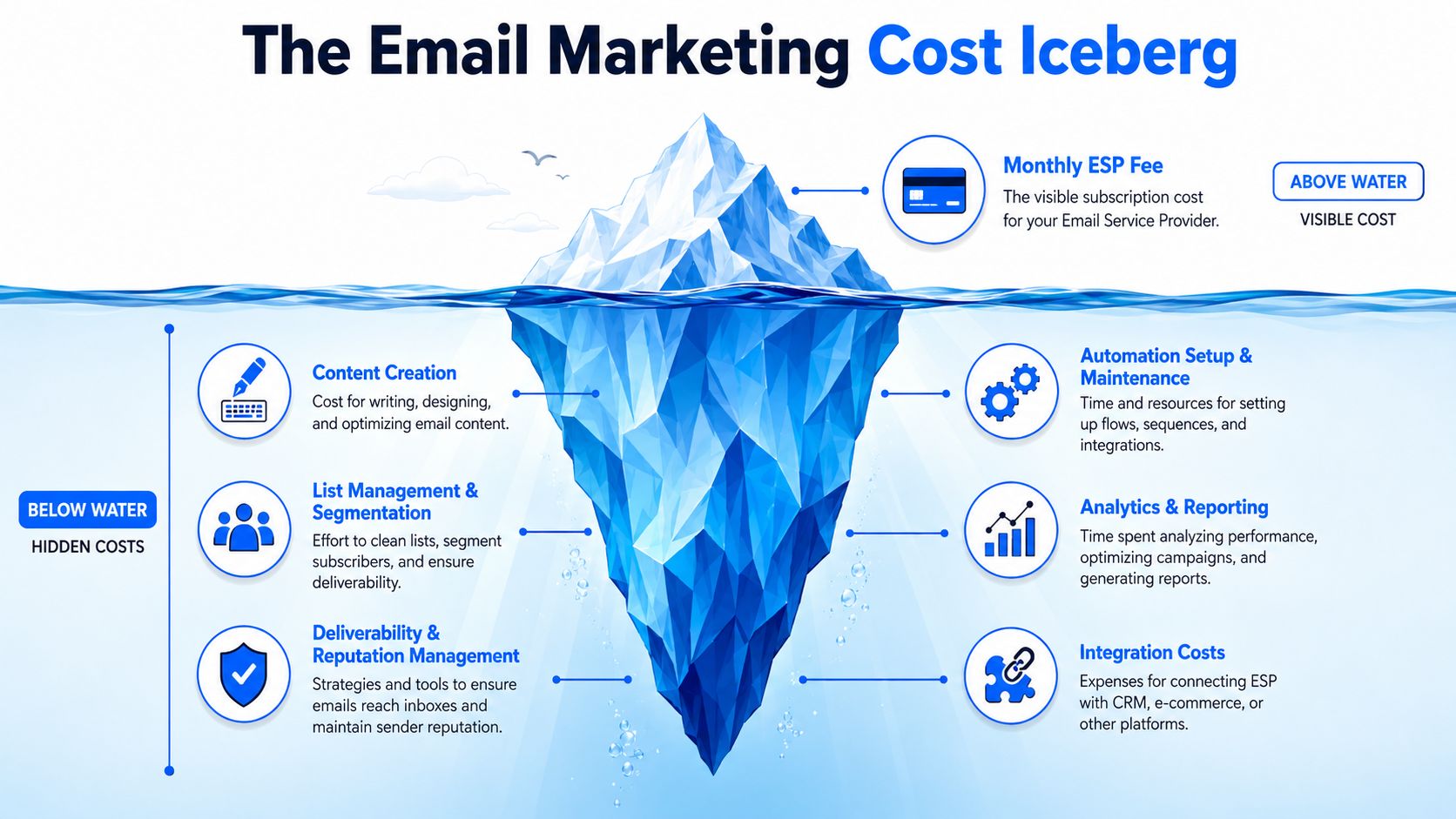
The people cost is usually underestimated
A healthy email program needs more than software. Someone has to write copy, build segments, QA links, monitor performance, maintain workflows, and coordinate handoffs with sales or lifecycle teams.
In small teams, that work gets absorbed into a generalist marketer's week. In larger teams, it gets split across lifecycle, ops, content, design, and RevOps. Either way, labor becomes a real part of email marketing cost, even if it never appears on the ESP invoice.
Technical overhead adds up quietly
Deliverability and data quality don't solve themselves. Once a program matures, teams often add supporting tools and workflows around the ESP.
That usually includes:
- List cleaning services. Used to remove invalid or risky records.
- Compliance tooling. Needed to manage permissions and suppression logic.
- Inbox monitoring. Helpful when sender reputation matters to revenue.
- Integrations. CRM syncs, lead routing, and event-based triggers all take setup and maintenance.
A short walkthrough can help make that overhead more concrete:
Creative and growth spending belong in the budget too
Teams often talk about “email cost” as if it ends with the send button. It doesn't. If you run newsletter sponsorships, lead magnets, webinars, outbound-to-newsletter funnels, or gated content to grow the list, that spend supports the email program too.
A clean budget separates platform cost, production cost, and growth cost. If you mix them together, you can't tell whether the problem is tooling, process, or acquisition quality.
The practical fix is to budget email as a system. Include software, people time, deliverability support, creative production, and list growth inputs. That gives you a real total cost of ownership instead of a misleading subscription number.
Realistic Email Marketing Budget Benchmarks
Budget planning gets easier when you stop asking for a universal answer. A solo consultant sending one newsletter and one nurture flow has a different cost structure than a mid-market SaaS team running product updates, lead nurtures, webinar promotions, and sales-assist sequences. An enterprise brand outsourcing strategy and production has another model entirely.
For outsourced programs, agencies commonly charge $5,000–$15,000 per month, while individual email production often falls around $200–$1,500 per campaign (agency email pricing). That changes the whole budget conversation. Subscriber count stops being the main driver. Labor becomes the dominant variable.
Sample monthly email marketing budgets
Expense Category
Solo Creator / SMB (<5k Subs)
Mid-Market (5k-50k Subs)
Enterprise (>50k Subs / Agency)
Platform Fees
Usually at the lower end of standard ESP pricing, with cost tied closely to list size and basic features
Higher platform spend due to larger databases, more automation, and added reporting needs
Often layered across ESP, integrations, and higher service tiers
List Growth / Acquisition
Light spend, often tied to content offers, partnerships, or steady organic capture
More active investment in subscriber acquisition and funnel expansion
Usually a dedicated line item with multiple acquisition channels
Creative / Content
Usually handled in-house by a founder or generalist marketer
Shared across marketing, content, and lifecycle teams
Commonly outsourced or supported by internal specialists plus agency labor
Deliverability / Hygiene
Periodic cleanup and simple suppression management
Ongoing list maintenance and closer monitoring of segment quality
Dedicated reputation management, stricter governance, and more operational oversight
DIY versus outsourced
For smaller programs, DIY often makes sense when the business can work from reusable templates, simple automations, and a focused calendar. That setup keeps costs closer to software and internal time.
Outsourcing becomes more rational when the program needs stronger strategy, design polish, testing discipline, or complex flows. The trap is assuming agency support is expensive by definition. Sometimes it is. Sometimes it replaces internal bottlenecks that were already costing more than expected.
Here's a helpful way to conceptualize it:
- DIY is best when your program is simple, your audience is narrow, and your internal team can execute cleanly.
- Freelance or fractional support is best when you need senior judgment without a full retainer structure.
- Agency support is best when production volume, strategic complexity, or stakeholder load has outgrown internal capacity.
If you're pressure-testing assumptions, this breakdown of the real cost of email marketing is worth reviewing because it broadens the conversation beyond software and into program-level budgeting.
The right benchmark isn't what another company spends. It's whether your budget matches the complexity of the program you're trying to run.
How to Map Email Costs to Revenue and ROI
Once the budget is visible, the next job is tying it to revenue. At that point, email stops being a line item and becomes an operating asset.
Most finance conversations improve when marketing brings a simple model instead of a pile of screenshots. You don't need a complicated attribution stack to start. You need a clean way to connect spend, response, and revenue.
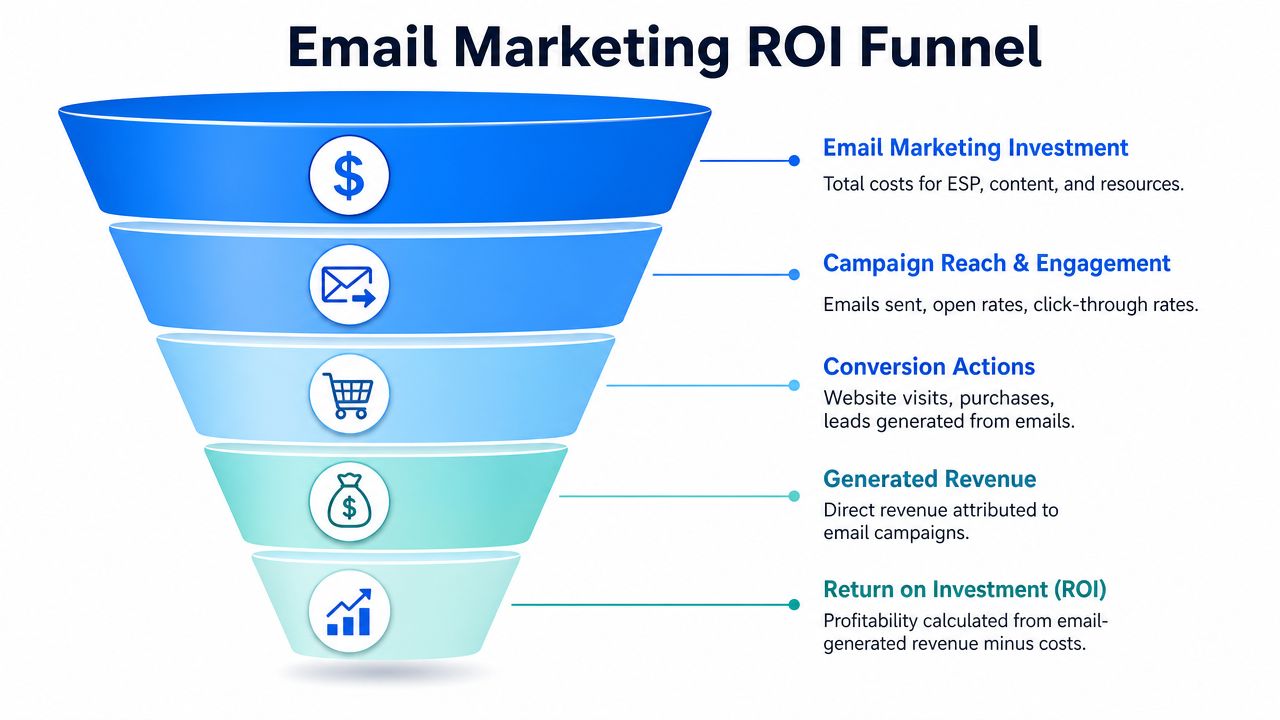
Start with a basic ROI model
Use a straightforward formula:
ROI = (Revenue attributable to email - Total email cost) / Total email cost
That formula sounds obvious, but teams often skip one of the inputs. They track campaign revenue and platform spend, then ignore labor, creative, hygiene, and tooling. Or they tally all costs but attribute almost no revenue because tracking is fragmented.
A better operating habit is to define attribution rules before campaigns go live. Decide what counts as email-influenced revenue, which campaigns are measured directly, and how long the reporting window stays open.
Add cost per lead and subscriber value
For B2B teams, email often supports lead generation, pipeline progression, and expansion. That's why two supporting metrics matter:
- Cost per lead
Divide your total email program cost by the number of qualified leads sourced through email.
- Subscriber value over time
Track how much revenue an engaged subscriber contributes across renewals, upsell, meetings booked, or influenced deals, depending on your model.
This is also where list quality becomes more important than list size. A smaller audience of buyers who match your ICP is usually more useful than a larger database that inflates software cost and underperforms in the funnel.
If you want a cleaner way to structure that math, a dedicated marketing ROI calculator can help teams align finance and marketing around the same inputs.
Don't ask whether the email program is “worth it.” Ask which segments, campaigns, and automations produce the highest return per dollar invested.
Use revenue mapping to make decisions
Once the model is in place, practical decisions get easier:
- You can justify better tooling if it protects revenue from deliverability problems.
- You can cut unproductive sends that consume budget without creating pipeline.
- You can invest more in high-value segments where subscriber quality is strongest.
That's the shift mature teams make. They stop debating monthly cost in isolation and start managing email based on contribution to revenue.
Smart Strategies to Control Costs and Boost ROI
Most cost control advice is too blunt. “Spend less” is rarely the right answer. The better answer is to remove waste that drags down return.
One of the clearest examples is deliverability infrastructure. Influize notes that list-scrubbing can cost about $5–$15 per 1,000 emails, and dedicated IPs can run around $50 per month (deliverability operating costs). Those line items can look optional until poor engagement starts inflating your broader email marketing cost.
Cut waste before you cut budget
Start with the parts of the system that create silent drag:
- Clean the database regularly. Remove invalid, duplicated, or clearly inactive records so you stop paying to store and send to people who won't engage.
- Reduce unnecessary complexity. Too many overlapping automations create maintenance work and reporting confusion.
- Build reusable assets. Modular templates and repeatable briefing systems lower production effort per send.
- Segment with intent. Better targeting reduces wasted impressions and makes each campaign more relevant.
Spend where efficiency compounds
Some spending yields future benefits. Good segmentation, clean data, and reliable automation lower the cost of future campaigns because the system gets easier to operate.
I also think teams should be practical about content production. If internal writing capacity is thin, comparing options such as ProdShort's AI content tool comparison can help you evaluate where AI-assisted drafting fits into your workflow. The key is not replacing judgment. It's reducing production friction without lowering relevance.
This is also the section of the stack where platform choice matters. Tools that combine sending with list quality controls, acquisition support, and deliverability management can reduce handoffs across separate systems. Breaker is one example of that model for B2B teams, particularly when the goal is to manage sends while also growing an ICP-matched subscriber base. It's not the only route, but it reflects the broader shift from buying a sender to buying an operating system for newsletter growth.
Questions worth asking before you sign a contract
- What exactly counts as a billable contact?
- How are duplicates handled across lists or segments?
- Which deliverability or reporting features require add-ons?
- How much manual work will this platform create for ops and content teams?
A smaller, cleaner, better-targeted list usually costs less to maintain and produces more value than a bloated database that looks impressive in a dashboard.
That's the heart of efficient email. Control the cost of inefficiency, and the overall program gets stronger.
Treating Email Marketing as a Strategic Investment
Email marketing cost isn't a single number. It's a stack of decisions about software, labor, list quality, deliverability, and growth inputs. If you only compare subscription fees, you miss the part of the budget that usually drives performance.
Strong programs treat email as infrastructure for revenue. They budget for the platform, but they also budget for hygiene, segmentation, creative discipline, and reporting. That's what protects margin. It's also what makes the channel easier to scale.
The practical move is to build your own total cost of ownership view. Separate fixed platform spend from variable production costs. Track the cost of maintaining list quality. Tie campaigns and automations to qualified pipeline or revenue, not just send volume. Once you do that, spending decisions get clearer.
Cheap software can still produce an expensive program if the list is bloated, the workflows are fragile, and the team can't prove revenue contribution. Smart spending looks different. It funds the parts of the system that keep subscribers reachable, campaigns relevant, and reporting defensible.
Email has stayed durable because the economics still work when the program is run well. The teams that win aren't the ones with the lowest monthly bill. They're the ones that know exactly what their email marketing cost buys them and how that investment turns into growth.
If you want to treat email like a measurable growth channel instead of a low-cost blast tool, Breaker is built for that model. It combines email sending, subscriber growth, list hygiene, deliverability support, and ROI tracking in one platform, which can help B2B teams reduce the hidden costs that show up when acquisition, sending, and list quality are split across too many tools.
Keep reading
All articlesB2B Lead Generation via Newsletter: What Actually Works
Cold outbound is losing steam. See 7 proven newsletter tactics for B2B lead generation, from gated content to sponsorship swaps, that beat cold outreach.
How to Write a Newsletter with AI: Step-by-Step Guide 2026
Learn how to write a newsletter with AI the right way: a 7-step process to train, calibrate, and edit AI drafts that still sound like you.
How to Boost Conversions With Your Email Newsletter
Turn your newsletter into a conversion engine. See 2026 benchmarks, CTR vs CVR explained, and the fixes most email guides skip.