
ESP in Email Marketing: A Complete Guide for 2026
Discover what an ESP in email marketing is and how to choose the right one for B2B growth. Our guide covers features, deliverability, and implementation.
You're probably dealing with one of two problems right now.
Either your team is still sending newsletter-style campaigns through Gmail or Outlook and wondering why replies are inconsistent, unsubscribes are manual, and deliverability feels fragile. Or you already have an email platform, but the reporting still pushes you toward open rates that no longer tell the whole truth.
That's where understanding ESP in email marketing gets practical. This isn't just about picking software to send emails. It's about choosing the infrastructure that protects your sender reputation, connects email activity to pipeline, and gives you metrics you can still trust in a privacy-first environment.
The Limits of Gmail and Outlook for Marketing
A familiar scene. A growth marketer exports a list of prospects, drafts a thoughtful newsletter in Outlook, and sends it to a few hundred contacts. The first campaign seems fine. The second gets patchy engagement. By the third, replies slow down, some contacts say they never got the email, and the team has no real way to track what happened.
That's not a copy problem. It's an infrastructure problem.
Gmail and Outlook are built for person-to-person communication. They're excellent for sales follow-ups, customer conversations, and internal coordination. They're a bad foundation for repeatable marketing sends, because they don't give you the controls that matter once volume, segmentation, compliance, and reporting enter the picture.
A lot of teams try to stretch inbox tools past their intended use. That usually creates a messy middle ground where campaigns are half-manual and half-automated, with no clear suppression logic, weak reporting, and rising sender risk. If you're still debating whether a personal inbox can handle newsletter operations, this breakdown of mass mailing in Gmail shows where those limits show up fast.
The channel itself is too important to treat casually. The world had about 4.2 billion email users in 2023, projected to reach 4.6 billion in 2025, and roughly 333 billion emails were sent daily in 2022 according to EmailTooltester's email marketing statistics. That scale is why professional email systems matter. Email isn't a side channel. It's mass-reach infrastructure.
What breaks first
When teams use standard inbox tools for marketing, the first failures are usually operational:
- List control gets sloppy because unsubscribes, bounces, and suppressions aren't centralized.
- Reporting stays shallow because there's no clean campaign-level view of clicks, conversions, or tests.
- Reputation becomes fragile because bulk sending behavior starts to look risky without the right safeguards.
The issue isn't whether Gmail or Outlook can send email. It's whether they can support marketing without creating avoidable risk.
Once email starts contributing to pipeline, the answer is usually no.
What an Email Service Provider Actually Is
An email service provider, or ESP, is the system built to run email as a marketing channel rather than as personal correspondence.
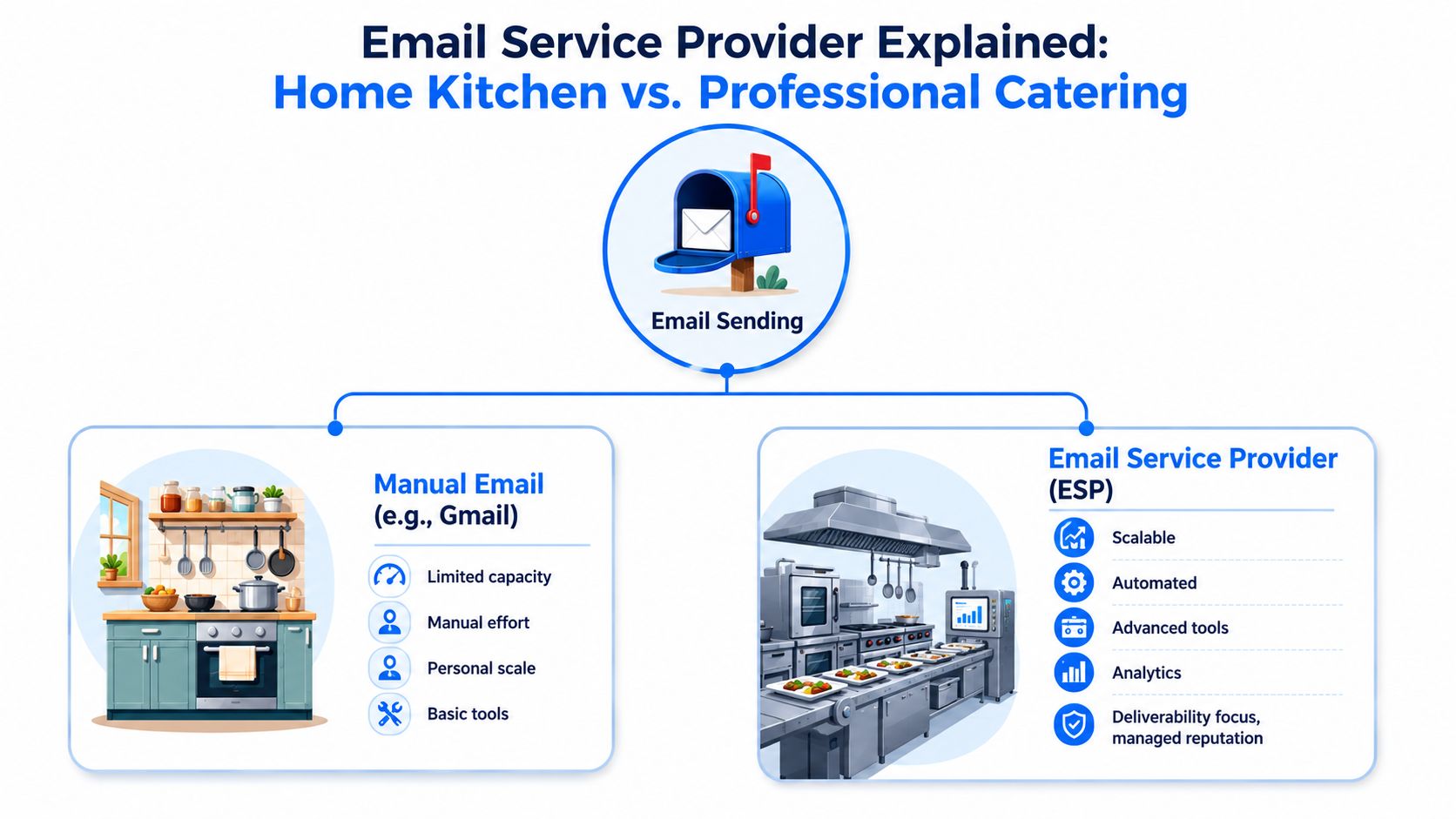
The simplest analogy is this. Sending campaigns from Gmail is like cooking dinner in a home kitchen. You can make something good, but capacity is limited, prep is manual, and consistency depends on one person keeping everything together. An ESP is a commercial kitchen. It's designed for repeatable output, quality control, workflow management, and inspection-ready processes.
The parts that actually matter
An ESP does much more than push email out the door. According to Braze's guidance on choosing an email service provider, it provides infrastructure for authentication, deliverability, segmentation, automation, and reporting. It also supports SPF, DKIM, and DMARC management, engagement tracking, and testing.
For a marketer, that translates into five practical jobs:
- It proves you're a legitimate sender
Authentication tells mailbox providers your emails are coming from an approved source, not an impersonator.
- It helps you reach the inbox
Deliverability tooling manages suppression handling, sender reputation, and sending behavior.
- It lets you target the right people
Segmentation means you don't blast one message to everyone and hope relevance carries the day.
- It automates timing
Welcome series, lifecycle messages, and triggered campaigns run when the contact's behavior makes the message timely.
- It shows what happened after the send
Reporting turns email from a guessing game into an operating channel.
Why this changes execution
Without an ESP, many organizations improvise. They export contacts from one system, clean lists in a spreadsheet, copy content into an inbox, and manually judge success. That setup falls apart the moment you need repeatability.
The better path is tighter system design. If your lead capture happens outside your email platform, make sure the handoff into your ESP is clean. This practical walkthrough on connecting leads to Mailchimp is useful because it shows the operational side many marketers ignore until sync issues break campaigns.
If you want a plain-language definition of the category itself, this glossary entry on what an ESP means is a solid quick reference.
What an ESP is not
It isn't magic. A weak list in an advanced platform is still a weak list. A generic message sent through a high-end system is still generic.
Practical rule: An ESP doesn't create strategy. It gives strategy a reliable vehicle.
That distinction matters. Teams often buy a platform expecting performance to improve on software alone. The real lift comes when good infrastructure supports disciplined segmentation, automation, and measurement.
Core ESP Features That Drive Newsletter Growth
A lot of feature lists for ESPs are technically accurate and commercially useless. They mention templates, workflows, tags, and analytics, but they don't answer the crucial question. Which features drive newsletter growth and revenue?
Three do most of the heavy lifting: segmentation, automation, and measurement.
Segmentation that changes the message
Segmentation is what stops your newsletter from becoming a generic broadcast.
For B2B teams, this usually means splitting contacts by role, buying stage, product interest, customer status, or engagement level. A founder, a sales leader, and a product marketer may all be on the same list, but they rarely need the same message framed the same way.
Good segmentation does two things at once:
- It improves relevance for the reader.
- It protects sender reputation by reducing low-intent sends.
That second point doesn't get enough attention. Mailbox providers read engagement as a trust signal. If you keep sending broad, low-fit campaigns, your own list teaches providers that your email is easier to ignore.
Automation that compounds value
Automation is often pitched as a time saver. That undersells it.
It's a revenue system because it sends messages at the moment intent is highest. According to Nutshell's email marketing statistics, email marketing can deliver an average ROI of $36 for every $1 spent, automated emails are reported to generate 320% more revenue than non-automated emails, and welcome emails can achieve open rates as high as 82%.
Those numbers explain why experienced operators build around triggered flows instead of relying only on calendar campaigns.
Where automation works best
Some sequences routinely outperform general newsletters because timing does the persuasion for you:
- Welcome emails catch interest when a subscriber still remembers why they signed up.
- Lead nurture sequences keep education moving between first touch and sales readiness.
- Re-engagement flows separate quiet but interested contacts from people who should be suppressed.
A strong welcome flow is often the first thing I'd build in any new ESP. It's the fastest way to make the platform prove its value.
If your newsletter strategy starts with batch sends and never graduates to triggered sends, you're leaving intent unmanaged.
Testing that improves business decisions
A/B testing matters, but not in the shallow “which subject line wins” way it is often employed.
The more useful tests are strategic. Which CTA framing drives demo requests? Which content angle creates more qualified traffic? Which audience segment responds to a product-led story versus a thought-leadership one?
That's where an ESP becomes a growth tool instead of a distribution tool.
Reporting that matters more than vanity
The mistake is treating engagement metrics as the finish line. They aren't. They're directional inputs.
When I look at ESP reporting, I care less about whether a campaign looked busy and more about whether it produced one of these outcomes:
- Qualified traffic to pages with commercial intent
- Lead progression into nurture or sales workflows
- Revenue-linked actions such as booked meetings, product signups, or downstream conversion
If a platform gives you pretty campaign reports but weak visibility into those outcomes, it's optimized for comfort, not management.
ESP vs CRM vs SMTP Relay What Is the Difference
These three categories get mixed together all the time. That confusion leads to bad buying decisions.
A company buys a CRM and expects newsletter automation. Another signs up for an ESP and assumes it can replace sales pipeline management. A product team uses an SMTP relay for transactional email and then wonders why marketing reporting is thin. Each tool has a different core job.
ESP vs CRM vs SMTP relay primary functions
Category
Email Service Provider (ESP)
Customer Relationship Management (CRM)
SMTP Relay Service
Primary role
Runs marketing and newsletter email programs
Stores relationship data and sales activity
Sends system-generated email through application workflows
Typical use case
Newsletters, nurture flows, segmentation, campaign testing
Deal tracking, account history, sales notes, pipeline management
Password resets, order confirmations, account alerts
Audience model
One-to-many and segmented sends
One-to-one and account-level relationship management
Event-triggered application messages
Core strength
Deliverability, automation, audience targeting, reporting
System of record for contacts, companies, and opportunities
Reliable transmission of transactional messages
Weakness if used alone
Won't replace full sales workflow management
Usually isn't designed for scalable marketing sends by itself
Lacks the broader marketing controls and reporting of an ESP
How they work together
In a healthy stack, the CRM acts as the relationship memory, the ESP acts as the marketing engine, and the SMTP relay handles product or system email.
A simple B2B example:
- A prospect fills out a form.
- The CRM records the lead, company, owner, and stage.
- The ESP adds that lead to the right nurture path.
- The SMTP relay sends the password setup email if the user gets product access.
That division keeps each system focused on its best use.
The common mistake
The most expensive mistake isn't choosing the wrong tool. It's asking one tool to do three jobs badly.
A CRM can often send emails, but that doesn't make it a strong ESP. An ESP may hold contact records, but that doesn't make it a reliable CRM for sales teams. An SMTP relay can deliver messages, but that doesn't make it a newsletter platform. And a newsletter platform is not necessarily a news publishing platform, which also has to handle web, RSS, and editorial workflow.
Buy for the primary job first. Integrate for the rest.
That mindset keeps your stack cleaner and your reporting easier to trust.
How to Choose the Right ESP for Your B2B Newsletter
Choosing an ESP used to be simpler. Teams compared templates, automation builders, and price tiers. Those things still matter, but they don't settle the hardest issue anymore. In a privacy-first environment, you need to know whether the platform helps you measure outcomes you can still act on.

Start with deliverability, not design
Most demos start with the builder. That's backward.
The first questions should be about sender reputation, authentication support, suppression handling, and how the platform helps you manage safe sending behavior. Beautiful email creative doesn't help if inbox placement is unstable.
Ask direct questions like these during evaluation:
- How does the platform support authentication and domain setup?
- What controls exist for suppression lists and bounce handling?
- How does the ESP help during migration or ramp-up?
- What visibility do I get into deliverability issues before performance collapses?
Operational maturity matters more than interface polish.
Judge reporting by revenue relevance
A modern ESP should help you move beyond open-rate theater. Dotdigital notes that advanced ESP evaluation now includes asking whether the platform can differentiate Apple Mail Privacy Protection users or track dark mode opens, which points to a larger issue around degraded open data in modern reporting. Their framing is useful because it pushes toward the fundamental question: which metrics still predict revenue when open data is degraded?
That question should change how you score every vendor.
Here's the filter I'd use.
What to prioritize
- Click reporting you can trust because clicks still reflect active intent better than inflated opens.
- Conversion tracking tied to demos, signups, purchases, or form completions.
- Subscriber quality signals so list growth doesn't get mistaken for list value.
- Attribution visibility that connects campaigns to downstream business outcomes.
What to treat carefully
- Open rates alone because privacy features can distort them.
- Surface-level engagement dashboards that look polished but stop short of revenue action.
- Vanity segmentation labels that don't map to actual buyer context.
If you want a broader strategic reference point, this blueprint for B2B email success is a useful companion because it anchors email decisions in B2B objectives rather than software checklists.
After you've defined the criteria, it helps to hear another view on platform evaluation and setup:
Match the ESP to your operating model
The right platform depends on how your team works.
A small consulting firm may need simple newsletters, clean segmentation, and dependable reporting. A product-led SaaS team may need lifecycle automation tied to behavioral events. A media-style B2B newsletter may care about both sending and audience growth. In that last case, tools like Mailchimp or HubSpot may fit some teams, while Breaker is one example of a newsletter platform that combines sending with B2B list growth workflows.
The point isn't the brand. It's the operating model.
Questions that expose trade-offs fast
When I'm helping a team evaluate an ESP, I want answers to these before anyone cares about templates:
- Can the platform support our data model?
If you can't segment by account type, lifecycle stage, or product interest, the system will force generic campaigns.
- Will the reporting survive privacy distortion?
If it leans too heavily on opens, you'll spend months optimizing noise.
- Can marketers run it without constant technical rescue?
A powerful platform that only one ops person can use becomes a bottleneck.
- What happens when volume grows?
Migration pain, reputation management, and operational complexity tend to show up after adoption, not before.
A good ESP should make the right behavior easier. It shouldn't require heroics to maintain list health, build segmentation, or connect email activity to revenue.
Your ESP Implementation and Deliverability Checklist
Most ESP problems don't start after month six. They start in week one, when a team imports a messy list, skips authentication details, sends too broadly, and trains mailbox providers to be skeptical from day one.
Deliverability is cumulative. Good habits compound. Bad ones do too.
The checklist that matters first
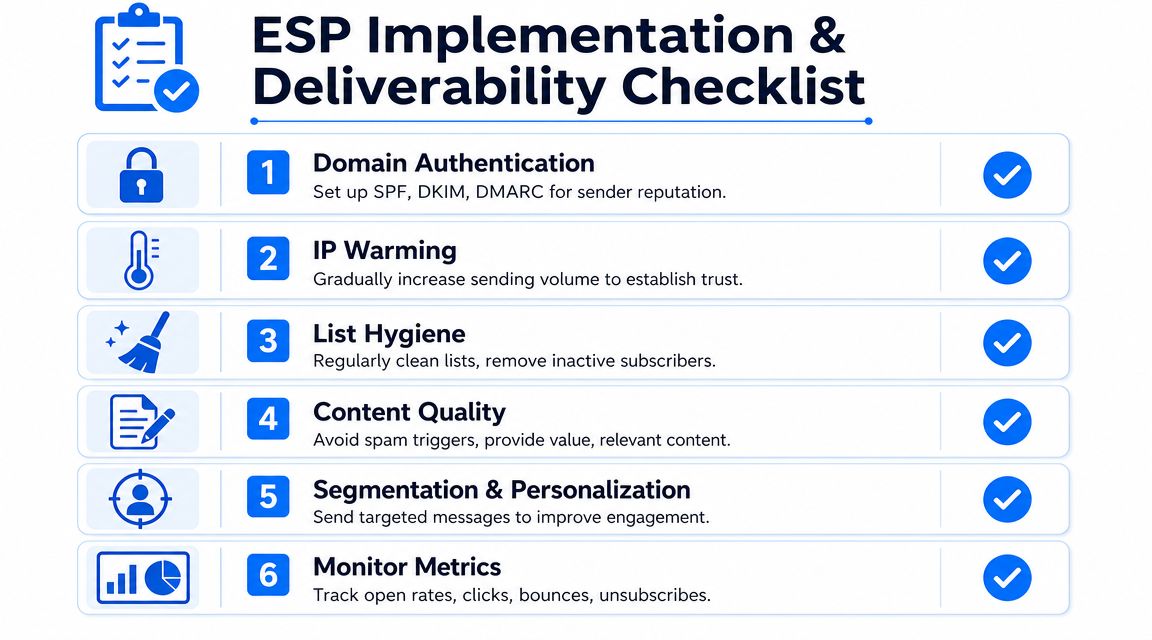
Adobe's migration guidance emphasizes reputation management and IP warming, including SPF, DKIM, and DMARC configuration, suppression and bounce handling, and gradually increasing send volume to engaged audiences. Their recommendations on email migration and deliverability setup are a useful reference because they reflect how mailbox providers evaluate sender trust.
Use that logic as your starting checklist.
1. Authenticate before you send
Don't treat authentication as admin cleanup. It's core infrastructure.
If the ESP supports authentication setup clearly, complete it before launch. This establishes legitimacy and gives mailbox providers stronger reasons to trust your sends.
2. Import only the list you can defend
Not every contact in your spreadsheet deserves the first send.
Bring in subscribers with a clear reason to hear from you. Keep suppressions intact. Respect unsubscribes. If your old system has bounce history, preserve it rather than starting with a false clean slate.
3. Warm up with engaged segments
Start with the people most likely to open, click, and interact. That engaged audience sends the right trust signals early.
This is especially important after migration or when launching from a new domain setup. If you're also exploring outbound use cases, this guide to B2B cold email potential is useful context because it highlights how much email outcomes depend on deliverability discipline, not just messaging.
Send your best list first, not your biggest list first.
4. Build a welcome sequence immediately
A welcome flow is one of the fastest ways to combine intent, relevance, and timing.
Even a simple sequence can outperform a loosely scheduled batch cadence because the subscriber just took action. Don't wait until “phase two” to automate the first-touch experience.
Ongoing habits that protect sender reputation
Once the account is live, the work shifts from setup to management.
- Watch suppression hygiene so bounced and opted-out contacts stay out.
- Segment by engagement so low-interest contacts don't drag down performance.
- Review content quality to keep offers, CTAs, and relevance aligned with audience expectations.
- Monitor performance trends with more weight on clicks, conversions, unsubscribes, and list health than vanity indicators.
If you need a practical operational reference, these email deliverability best practices are worth keeping nearby during rollout.
What doesn't work
Teams get into trouble when they rush volume, treat every imported record as equally valuable, or measure success too narrowly.
The weak pattern looks like this:
- Upload everything
- Send immediately
- Judge success by opens
- Ignore suppressions until complaints rise
The stronger pattern is slower at the start and better over time:
- Authenticate properly
- Clean and segment the list
- Warm gradually
- Track business outcomes that survive privacy changes
That's how you make an ESP useful instead of merely active.
If you want a newsletter platform built for B2B growth, Breaker is worth a look. It combines email sending, list growth, deliverability management, and analytics in one workflow, which makes it useful for teams that want newsletters to produce leads instead of just sends.
Keep reading
All articlesB2B Lead Generation via Newsletter: What Actually Works
Cold outbound is losing steam. See 7 proven newsletter tactics for B2B lead generation, from gated content to sponsorship swaps, that beat cold outreach.
How to Write a Newsletter with AI: Step-by-Step Guide 2026
Learn how to write a newsletter with AI the right way: a 7-step process to train, calibrate, and edit AI drafts that still sound like you.
How to Boost Conversions With Your Email Newsletter
Turn your newsletter into a conversion engine. See 2026 benchmarks, CTR vs CVR explained, and the fixes most email guides skip.