
Email Deliverability Platform: A Guide for B2B Marketers
Don't let spam filters kill your ROI. Learn what an email deliverability platform is, how to choose one, and why it's essential for B2B growth.

You send a thoughtful B2B newsletter. The offer is solid. The copy is clean. Sales is waiting for hand-raisers.
Then the campaign underperforms, and everyone blames the wrong thing.
Usually, the problem isn't the CTA, the design, or even the subject line. It's visibility. If the message never reaches the inbox, none of the downstream metrics mean what you think they mean. That's why an email deliverability platform matters. It doesn't just help email get accepted by a receiving server. It helps you understand whether people can see what you sent.
The Invisible Wall Hurting Your Email ROI
A familiar scenario unfolds: A campaign looks good in preview, goes out on schedule, and then results come back soft across the board. The fast reaction is to rewrite the copy, swap the hero section, or question the list.
Sometimes those changes help. Often they miss the underlying issue.
As of 2026, the average email deliverability rate across the 15 major ESPs tested was 83.1%, which means 16.9% of all marketing emails never reach the intended recipient's inbox. Of those emails, 10.5% land in spam and 6.4% are completely undelivered according to EmailTooltester's email deliverability statistics.
That's the invisible wall. Your campaign can look successful in your send platform because it was processed and pushed out. But a meaningful chunk of recipients may never see it.
Why this matters more in B2B
In B2B, every send carries more weight. You're often working with smaller, more valuable lists. A newsletter doesn't need mass-market volume to drive pipeline. It needs trusted delivery to the right people, at the right companies, with enough consistency that mailbox providers treat your domain like a legitimate sender.
When that breaks, the damage isn't limited to one campaign:
- Lead flow slows down: Fewer inboxed emails means fewer visits, replies, and conversions.
- Testing becomes noisy: You think a message lost because the angle was weak, when it may have been hidden.
- Reputation gets harder to recover: Repeated sending issues teach providers to distrust your traffic.
Poor deliverability doesn't just suppress campaign performance. It makes your reporting lie.
An email deliverability platform exists to make that hidden layer visible. It shows where messages are going, flags risks before they spread, and gives marketing ops a way to protect revenue instead of guessing at symptoms.
What an Email Deliverability Platform Actually Does
An email deliverability platform is part GPS, part passport control, and part reputation manager.
The GPS piece helps route mail through the safest path to the inbox. The passport control piece proves the sender is legitimate. The reputation manager watches how mailbox providers respond to your traffic and warns you when trust starts slipping.
This visual makes the job easier to picture:
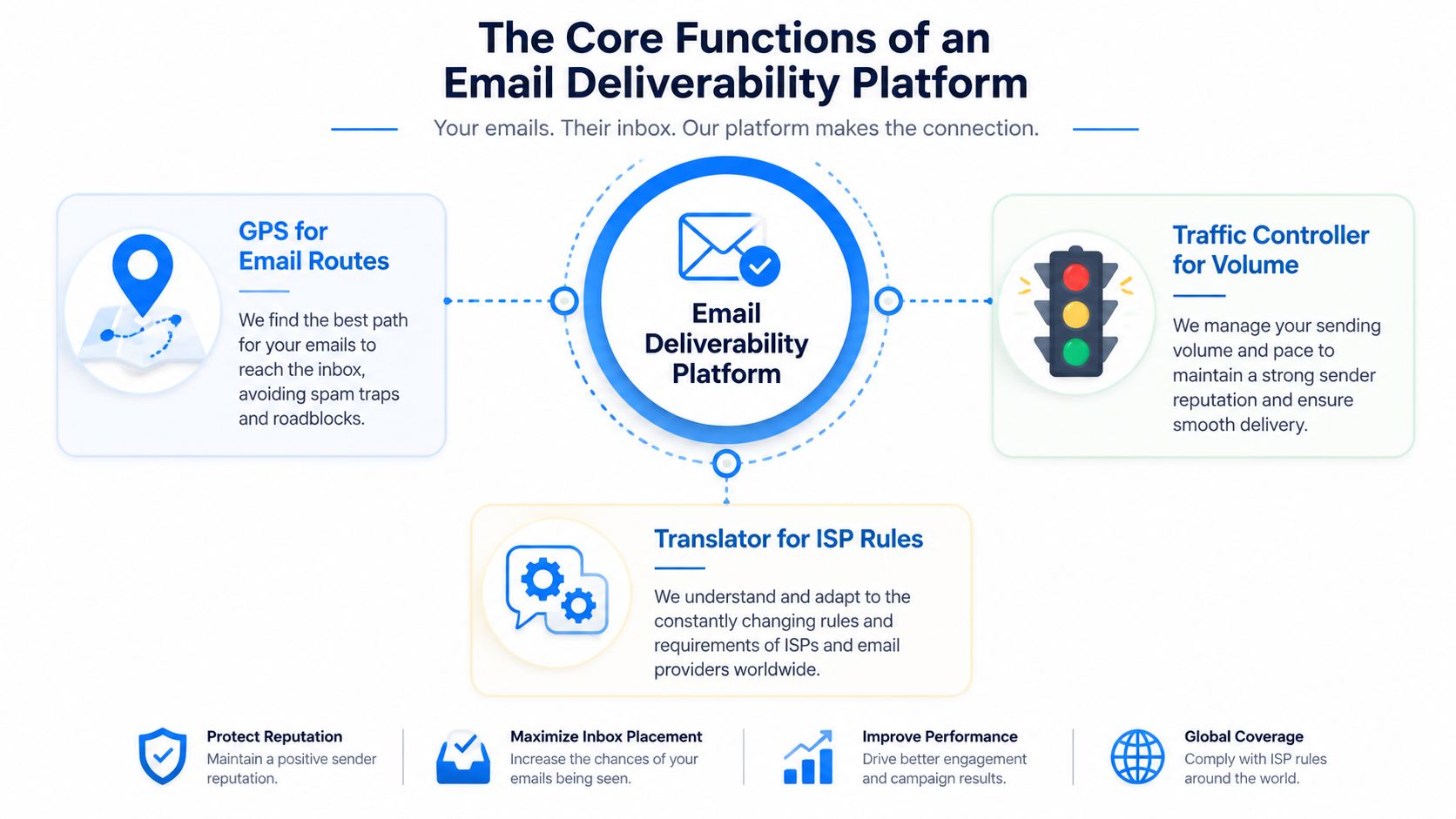
A standard ESP helps you compose, segment, and send. An email deliverability platform focuses on what happens after send. That includes authentication status, list quality, blocklist issues, sender reputation signals, and mailbox-provider behavior.
Delivered is not the same as seen
This is the mistake I see most often. Teams look at delivered rate and assume the job is done.
It isn't.
The core gap in most deliverability conversations is the difference between delivered rate and inbox placement rate. Delivered rate means the receiving server accepted the message. Inbox placement rate means the email reached a place where a human is likely to see it. Attentive notes that failing to distinguish between those two metrics is a major blind spot because it distorts ROI calculations and leads teams to optimize the wrong things in its deliverability discussion.
If a campaign is accepted by the mailbox provider but routed to spam, your send platform may still count it as delivered. From an ROI standpoint, that email was close to invisible.
What the platform is really buying you
A strong email deliverability platform gives you operational control over questions like these:
Question
Why it matters
Did the mailbox provider accept the message?
This tells you whether the send cleared the first gate.
Did it reach the inbox or spam?
This is the difference between reported delivery and actual opportunity.
Is reputation getting stronger or weaker?
Reputation shapes future sends, not just the current one.
Is the issue technical, behavioral, or list-related?
You can't fix the problem if diagnosis is vague.
The platform also becomes useful when campaign performance suddenly changes and nobody knows why. Instead of endless creative debates, you can inspect technical health, placement trends, and reputation signals first.
For a quick walkthrough of the mechanics, this explainer is worth watching:
Practical rule: If your team only tracks sent, delivered, opens, and clicks, you're missing the layer that decides whether those later metrics are even trustworthy.
How These Platforms Protect Your Sender Reputation
Sender reputation works a lot like business credit. You build it slowly, you can damage it quickly, and once it weakens, every future campaign gets more expensive.
A good email deliverability platform protects that reputation through four connected pillars. None of them is glamorous. All of them matter.
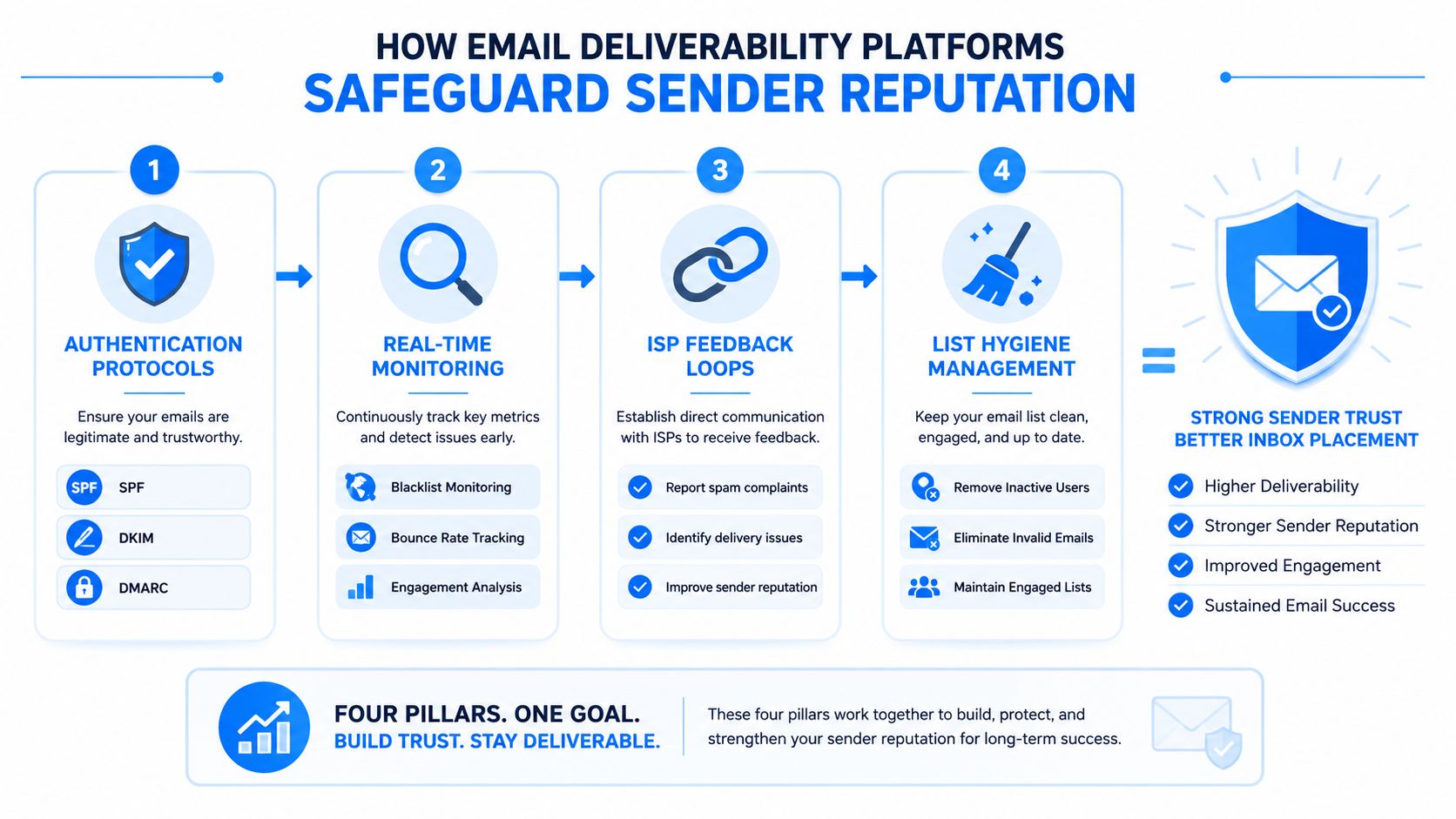
Authentication is your email ID
Authentication is the first checkpoint. If your messages can't prove who sent them, mailbox providers have a reason to distrust them before anyone evaluates content or engagement.
An effective platform needs to support SPF, DKIM, and DMARC. ZeroBounce explains the role clearly: SPF identifies authorized senders, DKIM adds a signature, and DMARC tells providers how to handle failures. When set up correctly, these protocols improve deliverability by giving providers stronger proof of legitimacy in ZeroBounce's deliverability overview.
A simple analogy helps:
- SPF is the approved sender list
- DKIM is the tamper-proof seal
- DMARC is the policy manual for what to do when something doesn't match
Without those checks, even well-written email can look suspicious.
Reputation monitoring is credit monitoring for your domain
After identity comes behavior. Mailbox providers watch how your domain and sending setup behave over time. They care whether recipients engage, complain, ignore, or bounce.
An email deliverability platform tracks those signals and surfaces patterns before they become serious problems. That includes sender score trends, complaint spikes, bounce changes, and unusual routing behavior. If you want a deeper look at what shapes trust over time, this guide to email sender reputation is useful.
What works:
- Consistent sending to opted-in, relevant segments
- Fast suppression of problematic contacts
- Immediate attention to complaints and delivery anomalies
What doesn't:
- Large swings in volume with no history
- Repeated sends to stale or unresponsive contacts
- Treating reputation as something the ESP handles automatically
Hygiene removes risk before launch
Many teams think list cleaning is a maintenance task. In practice, it's a protective control.
A platform with strong hygiene tools helps you validate addresses, suppress invalid contacts, and keep risky records from re-entering the send stream. That reduces the chance of hard bounces, spam complaints, and low-quality engagement patterns that drag reputation down.
Here's the key trade-off. Marketers often hesitate to remove names because the list feels smaller. But keeping weak contacts can damage the entire program. A smaller, healthier audience usually gives you more reliable reach than a larger, decaying one.
Monitoring is the early-warning system
Problems rarely show up all at once. More often, they start with subtle signs:
- A mailbox provider shift: One provider starts routing more mail to spam.
- A blocklist appearance: Not always catastrophic, but never something to ignore.
- An engagement drop in one segment: Often a sign that list quality or expectations are off.
When a team waits for a campaign to fail before checking deliverability, they've already given up their fastest fix window.
The best platforms watch those signals in near real time and give marketing ops a chance to intervene before one bad week turns into a reputation cleanup project.
Key Features to Evaluate for B2B Marketing
A lot of platforms claim deliverability support. The useful ones help you make decisions. The weak ones give you dashboards full of lagging metrics and generic alerts.
For B2B marketing, I'd evaluate an email deliverability platform the same way I'd evaluate paid media infrastructure. Not by feature count, but by whether it helps you protect performance in live operating conditions.
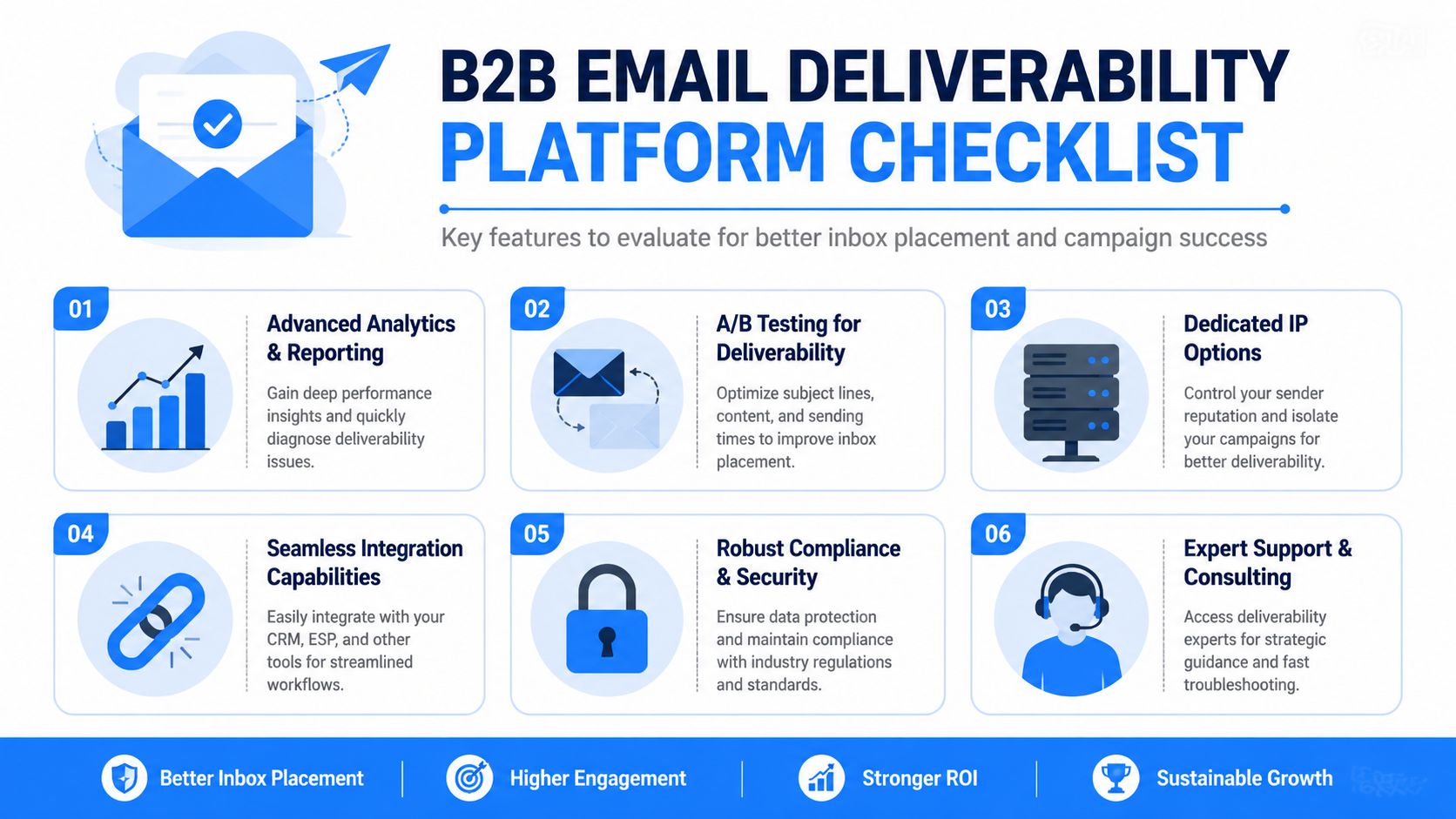
Features that should be non-negotiable
Start with the features that directly affect diagnosis and prevention.
- Inbox placement testing: You need visibility into where email lands, not just whether it was accepted.
- DMARC analytics: Authentication is only useful if you can see failures and misalignment clearly.
- Blocklist monitoring: Alerts matter because blocklist issues rarely announce themselves inside campaign reporting.
- List validation tools: Hygiene needs to happen before launch, not after bounce reports pile up.
- Reputation tracking: You want trend data, not a one-time health snapshot.
If a vendor can't show how it surfaces these areas in a way an operator can act on, the platform is probably closer to a reporting add-on than a deliverability tool.
The dedicated IP debate is more nuanced than vendors admit
Dedicated IPs get pitched as the grown-up option. That's sometimes true. It's also often wrong for B2B teams.
Maropost notes that the common advice to move to a dedicated IP can conflict with operational reality because new IPs need gradual warming, and that can become a false economy for lower-volume B2B senders that can't maintain reputation in isolation in its deliverability guide.
That's the trade-off in plain English:
Option
Strength
Risk
Shared IP
Easier for lower-volume teams to operate if the pool is well managed
Other senders can affect reputation
Dedicated IP
More control over your own reputation
Warm-up burden and isolation can hurt if your volume is inconsistent
For many B2B newsletter programs, a dedicated IP sounds strategic but creates unnecessary fragility. If you don't have stable volume and strong operational discipline, it can become a project that consumes time without improving results.
Buy for operations, not screenshots
A strong vendor should also help with day-to-day workflow:
- Clear alerting: The right person should know quickly when something breaks.
- Practical support: Not vague “consulting,” but help diagnosing mailbox-provider issues.
- ESP and CRM integrations: Data has to move cleanly between systems.
- Actionable reporting: The report should tell your team what to do next.
If you're building your evaluation criteria, this roundup of email deliverability best practices is a solid companion to your vendor checklist.
The simplest buying test is this. If inbox performance weakens next Tuesday, will this platform help your team identify the cause and act fast? If the answer is unclear, keep looking.
Implementing a Deliverability Strategy
Buying a platform is the easy part. Turning deliverability into a repeatable operating process is where companies either get disciplined or stay reactive.
The cleanest approach is a four-stage rollout. Not because it's elegant, but because deliverability breaks when ownership is fuzzy.
Stage 1 setup the technical foundation
Start with identity and infrastructure. Confirm your sending environment supports proper authentication, then make sure marketing and ops both know which domains and systems are sending mail.
This is also the right moment to document ownership. Someone should own the DNS-related setup. Someone should own list entry standards. Someone should own monitoring after launch. When nobody owns deliverability, the ESP becomes the scapegoat for every issue.
Stage 2 clean the list before you scale the send
Before you increase cadence or launch a major campaign, run a hygiene pass. Remove obviously invalid records, suppress contacts that shouldn't be mailed, and review how leads enter the database in the first place.
For smaller teams that want a plain-language checklist, this resource on email deliverability best practices for SMBs is a practical reference. The principles are relevant even if your program is more advanced.
A useful operating habit is to treat list quality as an input metric, not a cleanup task. Once bad data enters the system, it spreads into nurture, newsletters, and outbound sequences.
Stage 3 monitor the right KPIs
Litmus highlights the metrics that matter most in active deliverability management: inbox placement rate, bounce rates, spam complaints, and sender reputation scores, and it notes that inbox placement rate is the most reliable metric for assessing true deliverability success in its email deliverability resource.
That's the shift many teams need to make. Stop treating open rate as the first diagnostic layer.
Track metrics in this order:
- Inbox placement rate
This tells you whether messages are reaching visible inboxes.
- Bounce patterns
These help identify list or infrastructure problems.
- Spam complaints
Complaint pressure can gradually degrade future performance.
- Sender reputation trends
Trend movement matters more than isolated snapshots.
If you need a framework for building that review cadence into weekly operations, this guide to email deliverability monitoring is worth keeping in your team docs.
The best KPI in deliverability is the one that tells you a problem early enough to prevent the next campaign from failing.
Stage 4 build a steady review rhythm
Deliverability isn't a launch checklist. It's ongoing maintenance.
A simple weekly review works well for most B2B teams:
- Review placement signals by provider or segment
- Inspect complaints and bounces for anomalies
- Check reputation trends for early slippage
- Adjust segments or cadence before the next send
Monthly, go one level deeper. Look for systemic issues like weak signup sources, aging segments, or campaigns that consistently underperform with specific mailbox providers.
What works is boring consistency. What fails is only investigating deliverability when leadership asks why a launch missed target.
How Breaker's TruSend Delivers for B2B Newsletters
Most platforms split the problem in two. One tool helps you send. Another helps you diagnose deliverability. A separate process tries to grow the audience. That usually creates handoff gaps.
Breaker's TruSend approach is useful because it treats deliverability and audience quality as part of the same operating system for B2B newsletters.
At a practical level, that means the platform isn't just helping teams push campaigns out. It's also handling the work that supports inbox reliability, including list hygiene, reputation monitoring, and the broader controls that reduce avoidable deliverability issues.
Why this matters for newsletter-led growth
For B2B teams, a newsletter isn't just content distribution. It's a pipeline asset. The audience has to be relevant, and the message has to land where people will see it.
That combination is where TruSend stands out. Breaker pairs deliverability management with automatic list expansion aimed at exact-match B2B audiences. In operational terms, that closes a common gap:
- You're not just adding names
- You're not just sending cleaner mail
- You're building a healthier acquisition-to-inbox loop
That matters because growth problems often start upstream. If subscriber acquisition quality drops, engagement usually drops with it. If engagement drops, deliverability gets harder to hold. When one platform can manage both sides, the newsletter program becomes easier to scale without guessing which system caused the issue.
For teams using newsletters as a lead generation channel, that's the right model. Audience growth and inbox reach shouldn't live in separate silos.
Frequently Asked Questions
What's the difference between an ESP and an email deliverability platform
An ESP helps you create, schedule, segment, and send campaigns. An email deliverability platform focuses on inbox outcomes and sender health.
Some ESPs offer deliverability features, and some do it well. But the dedicated deliverability layer is about diagnosis and protection. It tells you whether messages are landing in the right place, why issues are happening, and what needs attention before performance drops further.
When should a B2B team invest in one
You usually need one when email starts becoming a material growth channel rather than an occasional broadcast tool.
Common signals include:
- Campaigns underperform unpredictably
- Different mailbox providers behave differently
- The team can't explain why delivered mail isn't producing results
- Newsletter revenue or pipeline influence is important enough to protect
If email is tied to lead generation, customer education, or sales activation, deliverability deserves real tooling.
Can a team manage deliverability manually
Yes, but only up to a point.
A disciplined operator can manually review authentication status, bounce behavior, complaint signals, blocklist checks, and segment hygiene. The problem is scale and speed. Manual workflows usually break when campaign volume rises, multiple tools are involved, or issues appear between scheduled reviews.
Manual management also tends to be reactive. By the time someone spots a pattern in reports, the next send may already be at risk. That's why serious email programs use a platform. It shortens the time between issue detection and action.
Deliverability can be learned manually. It usually can't be run manually for long.
If your B2B newsletter needs both reliable inbox placement and steady audience growth, Breaker is built for that job. It combines sending, list expansion, analytics, and TruSend deliverability management in one platform, so you can grow the right audience and reach them consistently without stitching together separate systems.
Keep reading
All articlesHow to Boost Conversions With Your Email Newsletter
Turn your newsletter into a conversion engine. See 2026 benchmarks, CTR vs CVR explained, and the fixes most email guides skip.
Drip Campaign Template: Ready-to-Use Email Sequences
Get 6 ready-to-paste drip campaign templates with subject lines, body copy, and send timing—plus a step-by-step guide to building your own.
Post-Webinar Survey Questions Template (2026)
30+ post-webinar survey questions with NPS, CSAT, and CES templates, plus timing and length tips to boost completion and qualify leads faster.