
Email List Cleaning Service: The Complete Guide
Improve deliverability with our email list cleaning service. Remove invalid addresses and boost campaign performance in 2026.
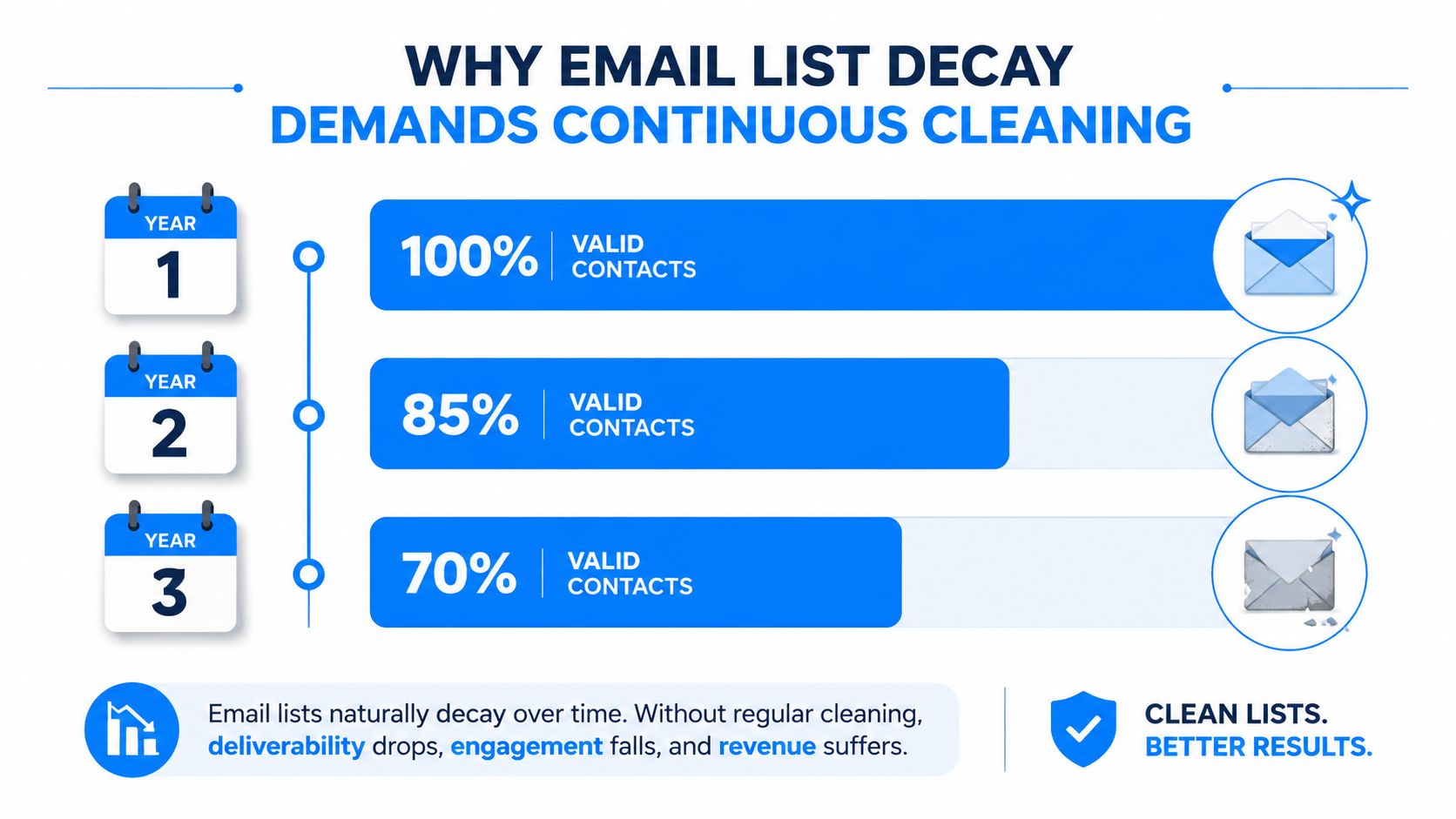
A clean list isn't a nice-to-have, it's the difference between a campaign that reaches humans and one that burns reputation. ZeroBounce's 2025 report says at least 23% of a list degrades every year, and only 62% of submitted emails in 2024 were valid according to the same source, which means a database can look healthy on Monday and become materially weaker by next quarter if nobody touches it. For teams sending at scale, email list cleaning service work is less like housekeeping and more like routine infrastructure.
Why Email List Decay Demands Continuous Cleaning
A lot of teams still treat list cleaning like a seasonal purge. That mindset breaks down fast because contact databases decay continuously, not occasionally. At least 23% of a list degrades every year based on ZeroBounce's 2025 report, and the same report says only 62% of all submitted emails in 2024 were valid. In practical terms, an average database can drift into serious deliverability risk within a single year if nobody re-validates it regularly. See also what a bounced email is and why it matters.
The signals that matter
Bounce behavior is the first place the damage becomes apparent. Industry guidance in the same period treats bounce rates above about 2% as a warning sign, while healthy programs are expected to stay below 1%. Those thresholds matter because stale or invalid contacts don't just fail to convert, they also distort campaign reporting and make your list look less trustworthy than it is.
Practical rule: if hard bounces are rising, engagement is flattening, and complaints are creeping up, the problem is usually list health before it's creative.
The other mistake is waiting for a major campaign to uncover the issue. By then, the damage has already happened, inbox placement has slipped, and you're debugging the wrong layer of the stack. A better operating model is to treat list hygiene as a standing task, paired with bounce handling and engagement monitoring, not a rescue mission after a bad send.
Revalidation should be boring. If it feels dramatic, you waited too long.
How Email Verification Pipelines Actually Work
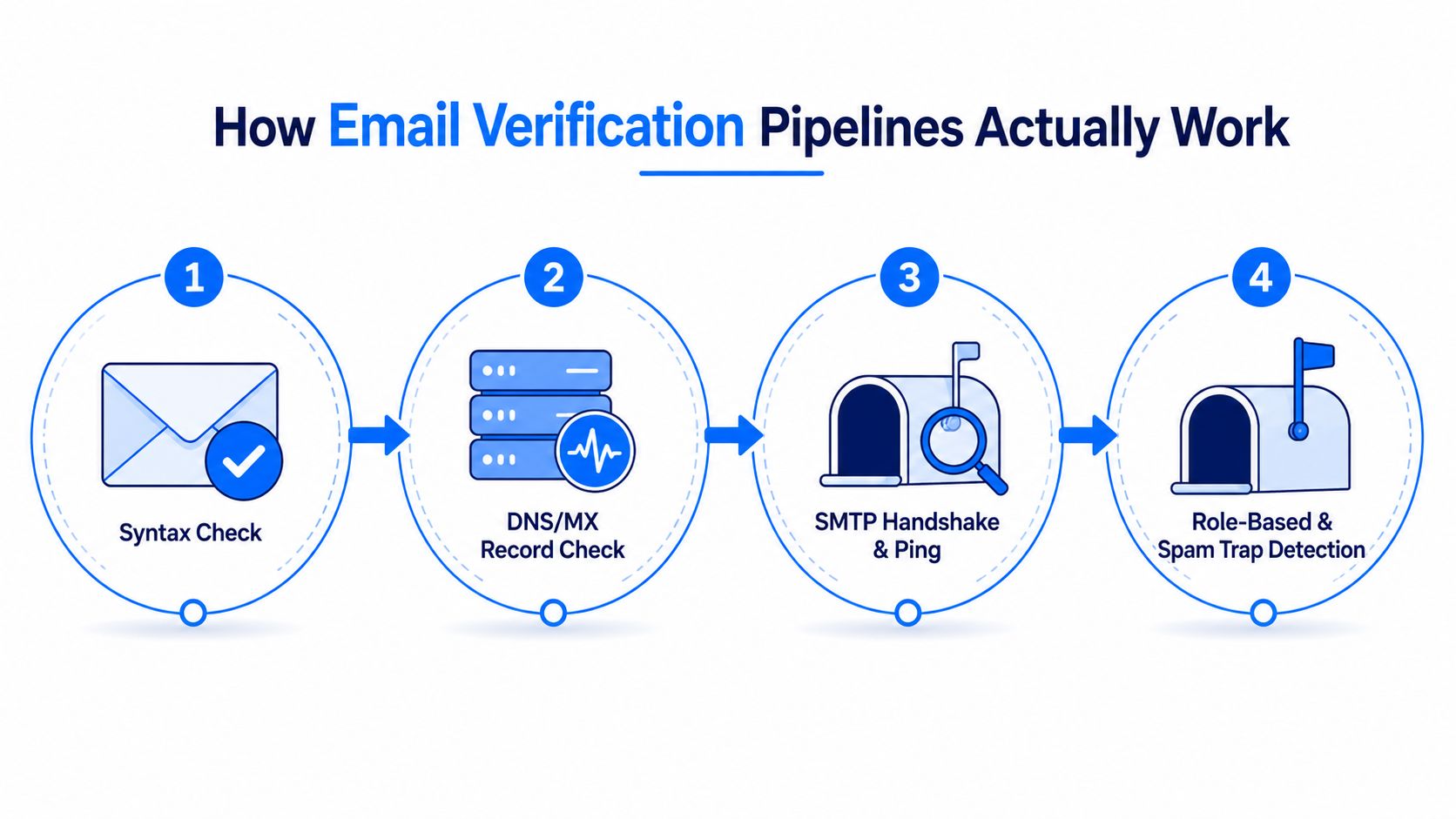
A serious email list cleaning service doesn't rely on one check. It runs a layered verification pipeline, because different risk types show up at different stages. The useful mental model is simple, each layer narrows the list before you send, and each one protects a different part of sender reputation. The process typically includes syntax validation, domain and MX checks, SMTP mailbox verification, role-based detection, disposable-email detection, and spam-trap screening. See the practical walkthrough in how to validate email addresses.
What each check removes
Syntax validation catches formatting errors first, the obvious broken addresses that never had a chance. Domain and MX-record checks confirm the domain can receive mail, which removes dead or misconfigured destinations before you waste sends. SMTP mailbox verification then tests whether the mailbox exists without sending an actual message, which is where a lot of the practical lift comes from.
The later layers are where experienced teams start making smarter calls. Role-based detection flags shared inboxes such as info or sales accounts, which can be useful in some B2B cases and noisy in others. Disposable-email detection filters temporary addresses, while spam-trap screening protects reputation from addresses that look live but are dangerous to keep mailing.
Why classification beats a simple yes or no
Good vendors don't stop at valid or invalid. They return a risk classification such as valid, catch-all, role-based, disposable, or unknown, which gives marketers more options than a blunt delete. That distinction matters because a catch-all domain or a role account can still carry value, especially in account-based or enterprise outreach where one useful contact can outweigh a dozen generic ones.
If a provider can't explain its result categories in plain language, that's a red flag. You're not buying a spreadsheet cleanup, you're buying decisions you can trust before you hit send.
DIY Cleaning Versus Outsourced Services
The choice isn't internal versus external in the abstract, it's whether your team can sustain the discipline. DIY cleaning works when the list is small, the send cadence is predictable, and your ESP's native bounce rules plus basic suppression logic cover most of the obvious junk. The downside is that DIY tends to catch only the easy failures, not the nuanced risks that hurt deliverability over time.
A simple comparison
Factor
DIY Approach
Outsourced Service
Cost per record
Lower upfront, but hidden labor adds up
Low per-record pricing, often about USD 0.003 to USD 0.01 per email according to market pricing data from HTF Market Insights
Accuracy
Good for obvious issues, weaker on edge cases
Stronger layered verification and classification
Time investment
Manual review, exports, imports, and suppression work
Faster bulk processing and less team involvement
Maintenance burden
Stays on your team every month
Shared with the vendor, but still needs policy decisions
Integration complexity
Depends on your ESP and CRM setup
Often includes API or bulk workflow support
Outsourced cleaning is usually cheap relative to the cost of a bad send. Industry pricing data puts verification at roughly USD 0.003 to USD 0.01 per email, which is small compared with the revenue and reputation cost of sending into dead addresses. Broader market reports also show the category has become a real operational layer, with estimates around USD 1.0 billion in 2023 and forecasts that point to USD 2.5 billion by 2030 in one report, or USD 1.2 billion in 2024 and USD 3.5 billion by 2033 in another.
When each model makes sense
DIY is fine when your list is stable and your team can keep a tight hygiene routine. Outsourced services make more sense when the database is aging, acquisition is accelerating, or multiple teams are feeding the same system.
The hidden cost of DIY is not the software, it's the drift. Every export, manual suppression, and one-off fix creates room for inconsistency, and inconsistency is how bad addresses survive long enough to hurt a send.
What to Do with Borderline and Risky Contacts
Wasting value by treating every non-perfect result as disposable is a blunt response, and it's often wrong for B2B lists where one contact may sit inside a real account, a shared inbox, or a long buying cycle. Current guidance increasingly favors preserving useful contacts, not just deleting risky ones, and 2026 recommendations specifically point toward segmenting by engagement, re-engaging borderline contacts, and using preference centers or pause options before final removal.
A practical handling model
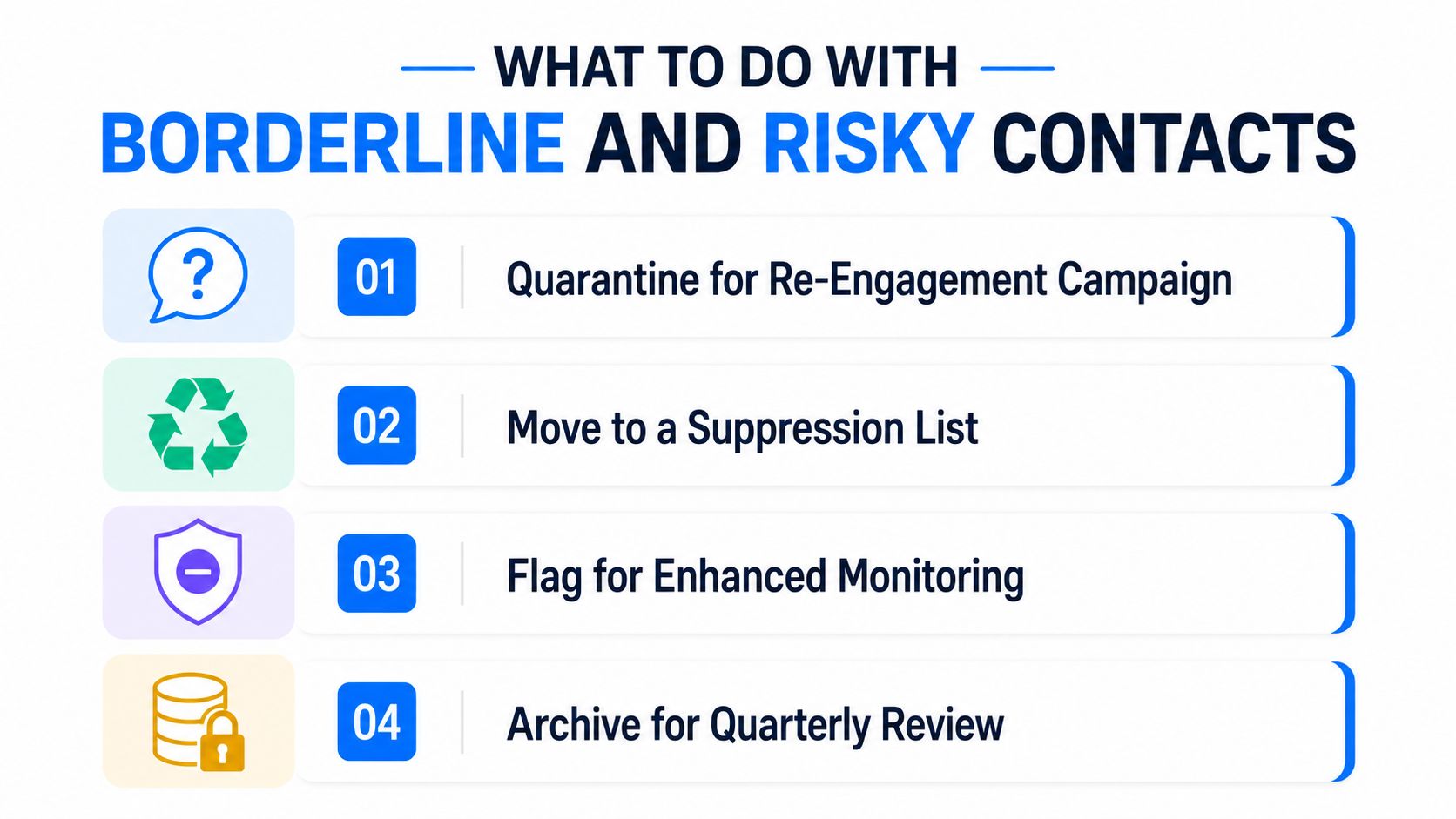
Use a quarantine lane for contacts that are not clearly dead but are too risky to keep in the active pool. That includes catch-all results, older role-based addresses, and subscribers with weak recent engagement. If they respond to a re-engagement sequence, they can move back into active status. If they ignore it, they can be suppressed without drama.
For contacts that sit in the gray area, the goal is to reduce waste without shrinking a useful audience. A role inbox in procurement may be far more valuable than a personal inbox that never opens. A catch-all domain may still contain the exact buyer you need, even if the verification signal is imperfect.
Why unknown results deserve a policy
One independent 2026 comparison warns that unknown results may still be charged by some vendors, which means the cost of protecting borderline contacts is easy to miss. That's why the decision shouldn't be “keep or delete” only. It should be “monitor, re-test, suppress, or archive” based on engagement and business value.
Keep the contact if the account matters and the engagement story isn't dead yet. Delete it only after the re-engagement path fails.
Mature teams separate hygiene from impulsive list trimming. A good cleaning program protects reputation without gutting high-intent audiences that still deserve another look.
How to Evaluate and Choose a Cleaning Provider
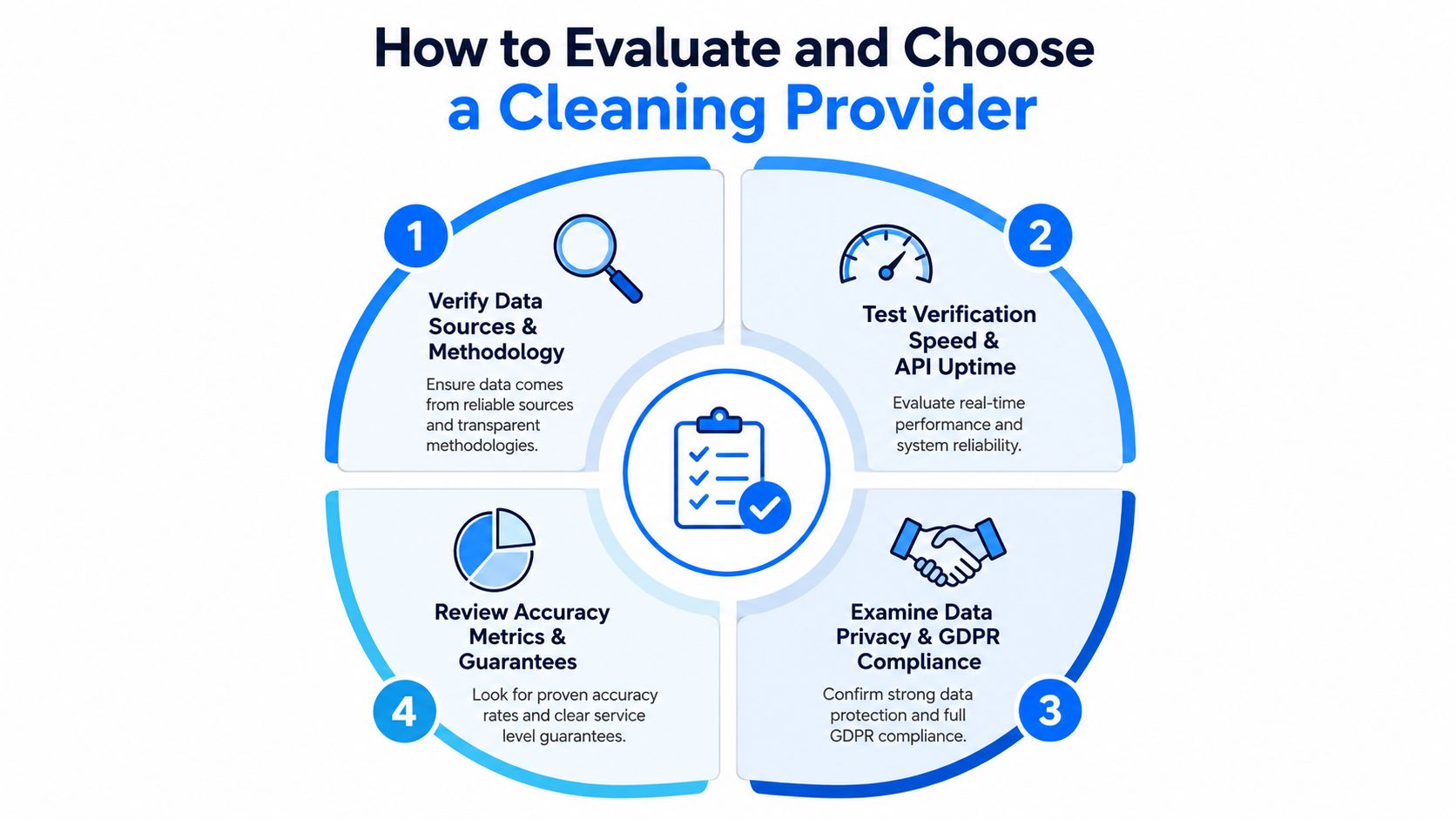
Vendor evaluation gets sloppy when teams compare only dashboards and promises. The better question is whether the provider gives you decisions you can operationalize. A strong email list cleaning service should explain its checks clearly, support your stack cleanly, and make it easy to quarantine risky records instead of forcing you into a binary purge. For a broader view of monitoring discipline, see email deliverability monitoring.
Questions worth asking before you sign
How do you classify unknowns? If a vendor can't explain what happens when verification is inconclusive, that gap will show up later in your suppression logic.
What do you store, and for how long? Privacy handling matters, especially for regulated lists and enterprise buyers.
How do you handle spam-trap detection? You want clear methodology, not vague reassurance.
What integrations exist for your ESP and CRM? If it takes a manual export every time, your hygiene process won't survive quarter-end pressure.
Watch the pricing and SLA details
Charging for unknown results is a red flag, because it turns ambiguity into a billable event without necessarily giving you cleaner data. Service-level agreements should spell out support response times, data retention rules, and what happens when a verification run returns mixed or partial results. If the provider doesn't offer transparent reporting, you'll struggle to prove whether cleaning helped or just reshuffled risk.
A useful provider also makes it easy to fit into your workflow. That means API access, bulk upload support, and a reporting layer that your team can use without a training project. Don't buy the prettiest interface, buy the one that gives your operators fewer excuses to skip the process.
Breaker's Integrated Approach to List Hygiene and Deliverability
A standalone cleaner can fix a list, but it still leaves hygiene as a separate chore. Breaker's approach folds list hygiene into the newsletter platform, so reputation monitoring, automatic list cleaning, and inbox placement work as part of the sending workflow instead of a side process. That matters because list quality, deliverability, and targeting aren't separate problems in B2B growth, they're the same problem seen from different angles.
Breaker's targeting engine combines AI enrichment, proprietary data, data hygiene, and compliance to deliver engaged, exact-match subscribers. It also surfaces real-time analytics for opens, clicks, subscriber growth, and ROI, which gives teams a live view of whether the list is healthy enough to keep scaling. Pricing is based on new engaged subscribers, with plans like Starter and Custom tiers, so the model is tied to list growth rather than send volume.
For teams comparing tools, the shift is operational. Instead of exporting addresses into one tool, then sending from another, then checking a third dashboard for reputation issues, the workflow becomes one system with one owner. That reduces friction for teams that care about deliverability but don't want another disconnected service to manage.
Breaker is one option in a category that's moving toward integrated hygiene, and its value is strongest when you want list expansion, sending, and deliverability controls in the same place. For B2B growth teams that already think in campaigns, segments, and subscriber quality, that consolidation is often the cleaner operating model.
Your Action Plan for Healthier Email Lists
A workable hygiene plan starts with the list you already have. First, back up the full database, then remove hard bounces and set rules for soft bounces after repeated failures. Next, isolate long-inactive contacts into a re-engagement lane instead of leaving them in your active send pool, and keep unsubscribes and complaints preserved for compliance.
This month, make list hygiene part of the campaign calendar. Re-verify lists before big sends, check bounce trends after each major campaign, and watch whether engagement is declining before complaints do. If your team also automates lifecycle messaging, resources like automation for retail and support teams can help you think about trigger-based workflows without turning hygiene into a manual bottleneck.
Quarterly, review whether your current process still fits your acquisition pace. Fast-growing lists need tighter cleaning and better segmentation, while slower lists need disciplined re-testing and a better plan for borderline contacts. The point isn't to make the database smaller, it's to keep the usable part of it reachable.
If you want to replace one-off list scrubs with ongoing hygiene, Breaker brings cleaning, deliverability, and subscriber growth into one workflow. Visit Breaker to see how integrated list hygiene fits into a newsletter stack without adding another disconnected tool.
Keep reading
All articlesBreaker for B2B, SME and Consumer Newsletter Senders
Learn how B2B, SME, and consumer audiences differ in newsletters, plus a framework for segmenting, messaging, and monetizing each without losing relevance.
What Is a B2B Content Engine
Learn what a B2B content engine is, how it differs from a content calendar or strategy, and why it's essential for AI-driven search in 2026.
8 Best Email Tracking Software Tools in 2026
Compare 8 top email tracking tools for 2026, how tracking pixels work, and why Apple's privacy rules make open rates unreliable. See our top pick.