
8 Drip Campaign Examples That Convert Subscribers
See 8 real drip campaign examples with subject lines, triggers, and timing that turn subscribers into customers across ecommerce, B2B, and SaaS.
Most marketers already know what a drip campaign is. What they need is to see one working line by line: the subject that got opened, the timing that didn't feel pushy, the call to action that actually landed. This guide closes that gap.
A drip campaign is a set of pre-written emails sent automatically on a schedule or trigger, designed to move a subscriber from one stage of the relationship to the next without manual intervention. Think of it as a conversation you write once and let run forever. Someone signs up, downloads a guide, abandons a cart, or goes quiet for sixty days, and the right email shows up at the right moment.
Below are eight drip campaign examples actually converting subscribers right now, spanning ecommerce, B2B, SaaS, and newsletter monetization. Each one includes the goal, trigger, email count, sample subject lines, and what makes it work. You'll also find a comparison table, a cadence timeline, a troubleshooting guide, and a look at how AI is changing what's possible in sequence design.
What a Drip Campaign Is
A drip campaign is an automated series of emails sent to subscribers based on a schedule or behavioral trigger, such as signing up, making a purchase, or going inactive. Unlike a one-off newsletter, a drip sequence is built once and runs continuously in the background, delivering the right message to the right person without manual work each time.
The term comes from the idea of "dripping" information to a subscriber over time rather than dumping everything into a single email. Each message has its own job: the first email might welcome someone, the third might handle an objection, and the fifth might ask for the sale. Marketing automation platforms like Mailchimp, HubSpot, and Salesforce popularized this approach, and it remains one of the highest-leverage tactics in email marketing because it scales personal-feeling communication without scaling headcount.
Drip Campaign vs. Nurture Campaign vs. Newsletter Broadcast
These three terms describe different automation approaches, and confusing them wastes setup time. Here's what separates them:
| Type | Trigger | Timing | Goal | Example |
|---|---|---|---|---|
| Drip campaign | Specific action (signup, purchase, cart abandonment) | Fixed, pre-scheduled intervals | Move a subscriber through a defined next step | Welcome series sent on Day 0, 2, 5 after signup |
| Nurture campaign | Behavior and engagement signals over time | Dynamic, branches based on activity | Build trust and move a lead toward sales readiness | Lead scoring triggers different emails based on what a prospect clicks |
| Newsletter broadcast | Calendar date, not a personal trigger | One-time, sent to the full list at once | Share timely news, content, or offers with everyone | Weekly roundup sent every Thursday morning |
A drip campaign runs on a fixed clock once triggered. A nurture campaign reacts and branches based on what the subscriber does. A newsletter broadcast goes out to everyone on the same day regardless of individual behavior. Most mature programs blend all three, but understanding which one you're building prevents wasted automation setup.
For ready-made sequences to start from, this drip campaign template collection has six you can adapt today.
Why Drip Campaigns Still Work in 2026
Inboxes are crowded, and subscriber attention is scarce. Drip campaigns still outperform one-off sends because they deliver relevance at the moment someone is already paying attention, instead of competing for attention on a schedule convenient for the sender.
Four reasons drip sequences keep delivering results:
- They run while you sleep. Once built, a welcome series or cart recovery flow fires automatically for every new subscriber or shopper, with zero marginal effort per send.
- They match message to moment. A subscriber three days into a trial needs different information than one who just signed up, and drip logic makes that distinction automatically.
- They compound. A single well-built sequence can run for years, generating revenue or pipeline long after the person who wrote it has moved on.
- They outperform single sends on engagement. Behavioral, triggered emails are relevant by design because they respond to something the recipient just did.
Performance Benchmarks for Triggered Email
Triggered and behavioral emails consistently generate higher engagement than one-time broadcast sends. Here's what the data shows:
- The Federal Trade Commission's CAN-SPAM guidance sets the legal floor every automated sequence must clear in the US, including honoring opt-outs within 10 business days and avoiding deceptive subject lines.
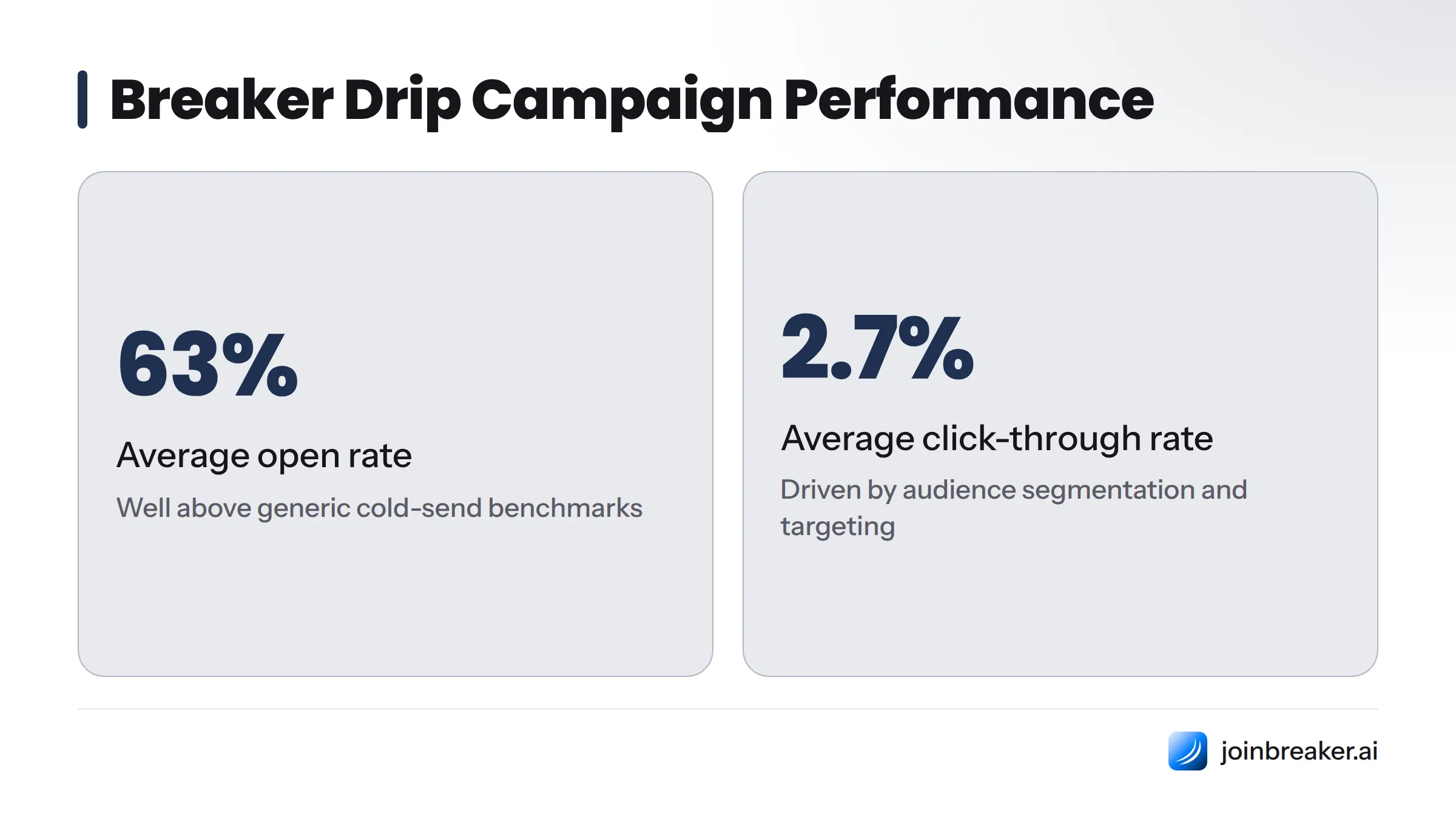
- Across Breaker's customer base, newsletter and drip sequences built on the platform average a 63% open rate and a 2.7% click-through rate, well above generic cold-send benchmarks, largely because audience-graph segmentation ensures each email reaches people who already showed intent to receive it.
- Triggered emails tied to something a subscriber just did keep relevance high and unsubscribe rates low.
For realistic benchmark targets by industry and campaign type, this B2B email campaign benchmark guide breaks down comparable ranges, and the B2B email campaign ROI metrics guide connects these numbers back to revenue.
How to Choose the Right Drip Campaign Type
Before building anything, get clear on the single goal this sequence needs to accomplish. Trying to do everything in one drip is the fastest way to end up with a sequence that does nothing well.
Match your business goal to the right campaign type:
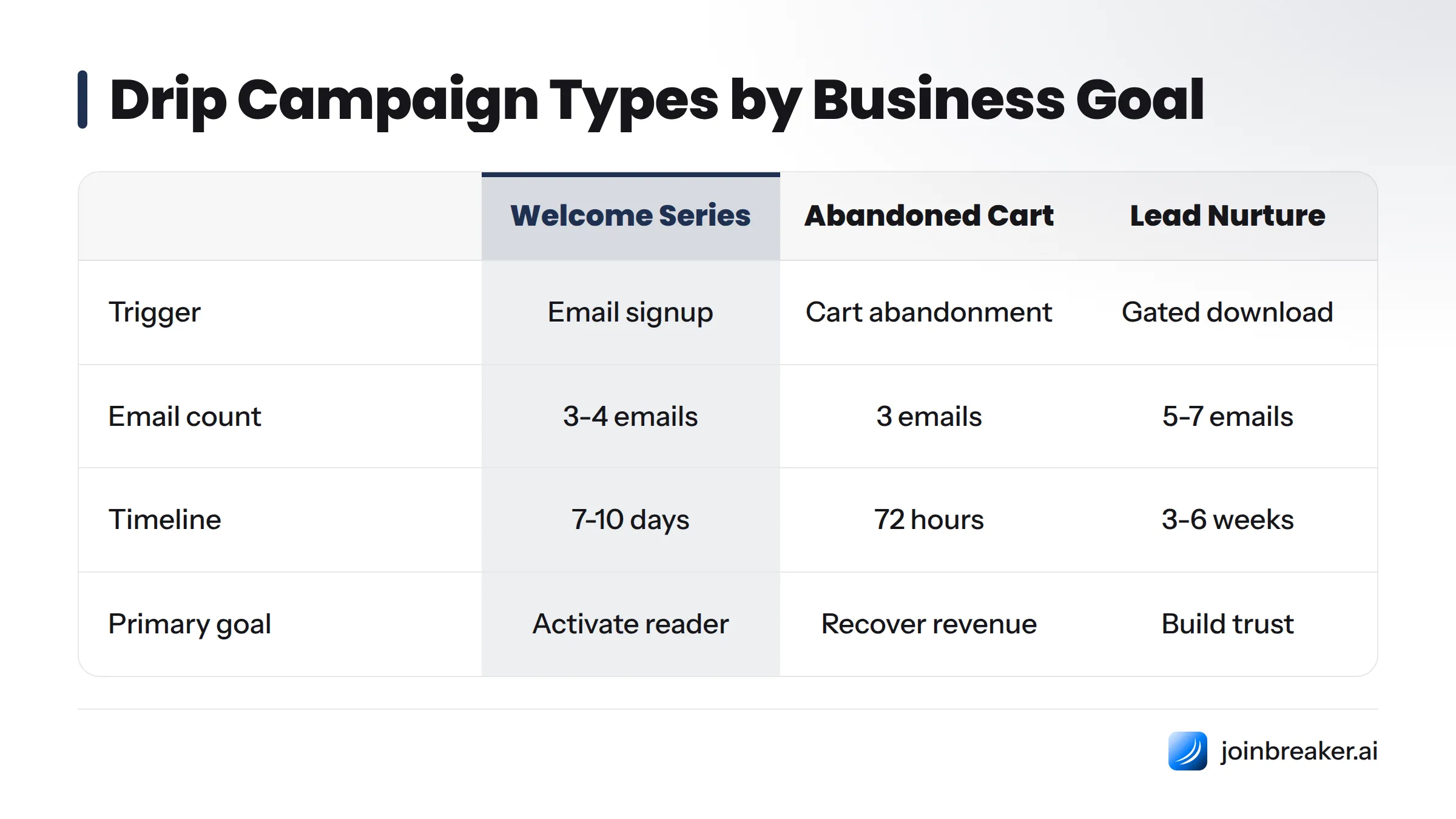
- Goal: Grow your list into active users. Build a welcome series that starts the moment someone subscribes.
- Goal: Recover near-miss revenue. Build an abandoned cart or abandoned checkout sequence triggered the moment someone leaves without completing a purchase.
- Goal: Convert leads who aren't ready to buy yet. Build a lead nurture or content-upgrade sequence triggered by a download or gated resource.
- Goal: Win back people who've gone quiet. Build a re-engagement or win-back campaign triggered by inactivity, typically 30-90 days without an open or click.
- Goal: Reduce early churn in a paid product. Build a post-purchase or onboarding drip triggered by signup or first login.
- Goal: Grow average order value or account value. Build an upsell or cross-sell sequence triggered by a completed purchase or usage milestone.
- Goal: Move a sales conversation forward after an event. Build a webinar or demo follow-up drip triggered by attendance or registration.
- Goal: Monetize an existing newsletter audience. Build a sponsor-pitch or subscriber-monetization drip triggered by subscriber tenure or engagement score.
If more than one applies to your business, that's normal. Most mature email programs run three or four simultaneously, each targeting a different segment and sales funnel stage.
8 Drip Campaign Examples That Convert
Each example includes the goal, trigger, number of emails and spacing, sample subject lines, and what makes the sequence actually work.
1. Welcome Series (New Subscriber Onboarding)
Goal: Turn a new subscriber into an engaged reader or customer before momentum fades.
Trigger: Email signup, newsletter opt-in, or account creation.
Email count and cadence: 3-4 emails over 7-10 days (Day 0, Day 2, Day 5, Day 9).
Sample subject lines:
- "You're in. Here's what happens next."
- "The one thing most new subscribers miss"
- "A quick favor before we go further"
What makes it effective: The first email in a welcome series earns the highest open rate of any email a brand will ever send that person, because the subscriber just made an active choice to hear from you. Use email one to confirm expectations and deliver on the promise that got them to sign up. Use email two to build credibility with proof or a best-of resource. Use the final email to ask for a small, low-friction action, like following on another channel or whitelisting your sender address.
Breaker's audience graph tags new subscribers by how they joined, so the welcome series can reference the specific lead magnet or page that converted them instead of sending the same generic intro to everyone.
2. Abandoned Cart Recovery
Goal: Recover revenue from shoppers who added items but didn't complete checkout.
Trigger: Cart abandonment, typically detected 30-60 minutes after the last cart activity.
Email count and cadence: 3 emails over 72 hours (1 hour, 24 hours, 72 hours after abandonment).
Sample subject lines:
- "You left something behind"
- "Still thinking it over? Here's 10% off"
- "Last call: your cart expires tonight"
What makes it effective: Timing does most of the work here. The first email, sent within an hour, catches people while intent is still fresh and often needs no discount at all, just a reminder and a clear path back to checkout. The second email can address common objections like shipping cost or sizing. Only the third email should introduce a discount, because leading with a coupon trains shoppers to abandon carts on purpose.
3. Lead Nurture / Content Upgrade Sequence
Goal: Move a B2B or high-consideration lead from "downloaded a resource" to "booked a call" or "started a trial."
Trigger: Gated content download, lead magnet opt-in, or content-upgrade signup.
Email count and cadence: 5-6 emails over 3-4 weeks, spaced every 4-5 days.
Sample subject lines:
- "Here's the guide you asked for (plus one thing it didn't cover)"
- "How [similar company] solved the same problem"
- "Worth 15 minutes? Let's talk about your setup"
What makes it effective: Unlike a transactional drip, a lead nurture sequence has to earn trust across multiple touches before asking for anything. Deliver the promised resource immediately, follow with proof (a case study or data point), then address the most common objection your sales team hears, and only then make the ask. This guide to B2B drip campaign workflows breaks down multi-touch nurture logic in detail, and pairing it with role-based segmentation ensures a VP and an individual contributor don't get identical messaging.
Intent scoring in Breaker tracks which links a lead clicks across the sequence and can automatically branch them into a faster sales-ready track if their engagement signals warrant it.
4. Re-Engagement / Win-Back Campaign
Goal: Reactivate subscribers or customers who've stopped opening, clicking, or purchasing.
Trigger: 30, 60, or 90 days of inactivity (no opens or clicks), or a defined period since last purchase.
Email count and cadence: 3 emails over 2 weeks.
Sample subject lines:
- "Did we do something wrong?"
- "We miss you (and we've changed a few things)"
- "This is goodbye, unless you tell us otherwise"
What makes it effective: A good win-back sequence is honest rather than polished. Netflix's re-engagement emails surface specific titles tied to what a viewer previously watched rather than generic "come back" messaging, which is why they remain a benchmark years later. The final email should include a clear unsubscribe or list-cleaning mechanism, because a subscriber who ignores three re-engagement attempts is actively hurting your sender reputation if you keep emailing them. This guide's re-engagement campaign glossary entry covers list hygiene mechanics in detail.
5. Post-Purchase / Onboarding Drip (SaaS or Product)
Goal: Reduce early churn by helping a new customer or trial user reach their first meaningful outcome fast.
Trigger: Account creation, trial start, or first purchase.
Email count and cadence: 4-5 emails over 14-21 days, front-loaded in the first week.
Sample subject lines:
- "Your first 10 minutes with [product]"
- "The feature most people miss in week one"
- "How [customer] got their first result in 3 days"
What makes it effective: Trello's onboarding sequence breaks setup into small, specific actions (create a board, add a card, invite a teammate) rather than a single overwhelming tutorial. The goal is activation, not just education: each email should point to one specific action, not a list of ten. This email automation workflow guide walks through the triggered flow setup step by step.
6. Upsell / Cross-Sell Sequence
Goal: Increase revenue per customer by introducing a relevant upgrade, add-on, or complementary product.
Trigger: Usage milestone, subscription renewal date, or a completed purchase that has a natural companion product.
Email count and cadence: 2-3 emails over 10-14 days.
Sample subject lines:
- "You've used [feature] 20 times. Here's what's next."
- "Pairs well with what you already own"
- "A better plan for how you're actually using [product]"
What makes it effective: The difference between an upsell drip that converts and one that annoys is relevance to actual usage. Dollar Shave Club's replenishment and upsell emails work because they're timed to when a customer is realistically running low on product, not on an arbitrary calendar schedule. Trigger these sequences off real usage or purchase data whenever possible rather than a flat "30 days since signup" rule.
7. B2B Webinar or Demo Follow-Up Drip
Goal: Convert webinar attendees or demo bookers into qualified sales conversations.
Trigger: Webinar registration, webinar attendance, or completed product demo.
Email count and cadence: 4 emails over 10 days (immediately after, Day 2, Day 5, Day 10).
Sample subject lines:
- "Your webinar recording + the slide everyone asked about"
- "The question we didn't get to"
- "What [attendee's company type] usually asks next"
What makes it effective: Most webinar follow-up sequences stop at "here's the recording," which wastes the highest-intent moment in the entire funnel. A stronger version segments attendees from no-shows (attendees get the recap, no-shows get the recording as the main offer), then follows with a specific objection-handling email and a direct scheduling link. This B2B drip campaign workflow guide has a detailed breakdown of attendee-versus-no-show branching logic.
8. Newsletter Monetization / Sponsor Pitch Drip
Goal: Turn a growing newsletter audience into recurring sponsorship or subscription revenue, a use case almost entirely ignored by ecommerce-focused drip guides.
Trigger: Reaching a subscriber milestone, a defined engagement threshold, or a scheduled sponsor outreach calendar.
Email count and cadence: 3-4 emails over 2-3 weeks when pitching sponsors; ongoing monthly touches for paid subscription upsells.
Sample subject lines:
- "[Newsletter name] now reaches 42,000 engaged readers"
- "A sponsorship slot opened up for Q1"
- "Why our readers click through at 2x the industry average"
What makes it effective: A sponsor pitch sequence succeeds or fails on proof. Lead with real audience numbers (subscriber count, open rate, click-through rate, audience demographics), follow with a past sponsor result if you have one, and keep the ask specific (a dollar amount and a slot, not a vague "let's chat"). Newsletters pursuing this path should also read this guide to B2B newsletter examples that drive pipeline for format ideas, and this breakdown of newsletter analytics metrics that predict revenue to know which numbers actually convince a sponsor to say yes.
Breaker tracks subscriber growth, engagement, and segment data in one place, so a sponsor pitch email can pull live audience stats automatically instead of someone manually updating a slide deck every quarter.
All 8 Examples at a Glance
| Example | Best For | Trigger | # of Emails | Ideal Timing |
|---|---|---|---|---|
| Welcome series | New subscribers, newsletters | Signup/opt-in | 3-4 | Day 0, 2, 5, 9 |
| Abandoned cart recovery | Ecommerce | Cart abandonment | 3 | 1hr, 24hr, 72hr |
| Lead nurture / content upgrade | B2B, lead gen | Gated content download | 5-6 | Every 4-5 days over 3-4 weeks |
| Re-engagement / win-back | Any subscriber list | 30-90 days inactivity | 3 | Over 2 weeks |
| Post-purchase / onboarding | SaaS, product | Signup/trial start | 4-5 | Front-loaded over 14-21 days |
| Upsell / cross-sell | Ecommerce, SaaS | Usage milestone/renewal | 2-3 | Over 10-14 days |
| Webinar/demo follow-up | B2B sales | Webinar attendance | 4 | Day 0, 2, 5, 10 |
| Newsletter monetization/sponsor pitch | Newsletter publishers | Subscriber milestone | 3-4 | Over 2-3 weeks |
Drip Campaign Timing: How Many Emails and How Far Apart?
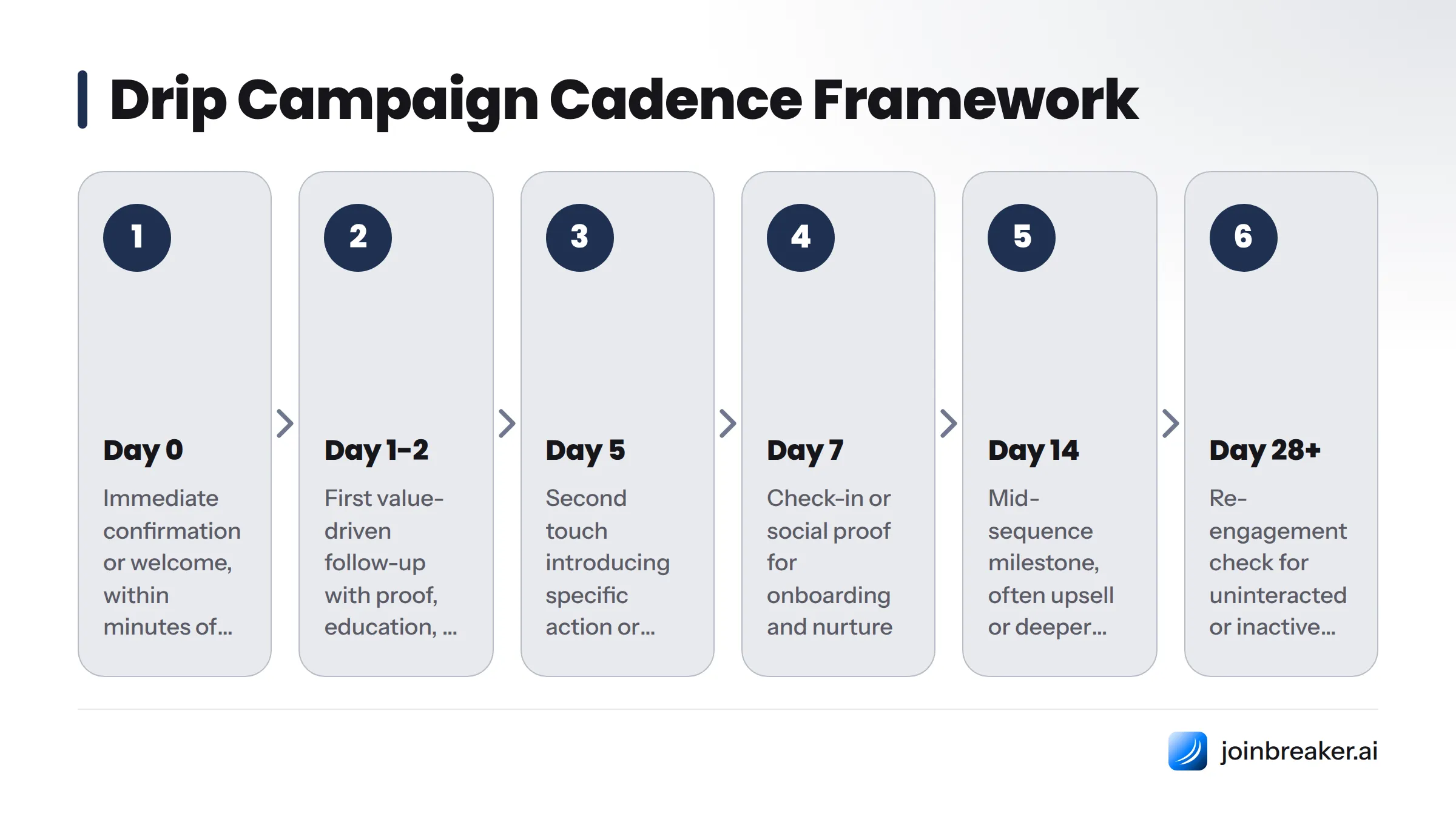
There's no single correct number, but there is a pattern that holds across almost every successful sequence: front-load the early sends and widen the gaps as the sequence progresses. A subscriber's attention is highest right after the trigger event and decays from there, so the cadence should match that decay curve rather than spacing every email evenly.
Here's a practical cadence framework:
| Day | Email Focus |
|---|---|
| Day 0 | Immediate confirmation or welcome, delivered within minutes of the trigger |
| Day 1-2 | First value-driven follow-up (proof, education, or objection handling) |
| Day 5 | Second touch, often introducing a specific action or offer |
| Day 7 | Check-in or social proof, especially for onboarding and nurture flows |
| Day 14 | Mid-sequence milestone email, often where upsell or deeper engagement asks live |
| Day 28 | Re-engagement check for anyone who hasn't interacted with the sequence |
| Day 50+ | Long-cycle win-back or final list-cleaning email for unengaged contacts |
As a rule of thumb, short transactional drips (welcome, cart recovery) run 3-5 emails across 1-2 weeks. Longer consideration-based drips (B2B lead nurture, SaaS onboarding) run 5-7 emails across 3-6 weeks. Win-back sequences stretch to 60-90 days specifically because you're trying to catch someone at the exact moment they're ready to re-engage, not forcing a fast decision.
Drip Campaign Best Practices for Higher Conversions
A good example only works if the execution holds up. Here's the checklist that separates sequences that convert from ones that get ignored:
- Segment before you write a single email. A drip sent to your whole list performs worse than the same drip sent to a well-defined slice of it. Start with how someone joined, what they've clicked, or their role, as covered in this role-based segmentation guide for B2B emails.
- Personalize beyond the first name. Reference the specific action, resource, or product that triggered the sequence. Generic "Hi there" drips get ignored; drips that acknowledge what someone actually did get opened.
- Write subject lines that set a real expectation. Avoid clickbait that doesn't match the email body, which drives unsubscribes even when open rates look fine. This guide to newsletter subject lines that get opened has formula-level detail you can apply to drip subject lines directly.
- Space emails to match intent decay, not a fixed calendar habit. Use the cadence table above rather than defaulting to "every three days" for every sequence type.
- Test one variable at a time. Subject line, send time, or CTA wording, not all three in the same test, or you won't know what moved the number.
- Always include a clear, single call to action. A drip email with three competing CTAs converts worse than one with a single obvious next step.
- Track performance per email, not just per sequence. A 40% average open rate can hide a first email at 65% and a fourth email at 15%, which tells you exactly where the sequence is losing people.
- Respect consent and compliance from day one. Build opt-in and unsubscribe handling in line with CAN-SPAM requirements and GDPR consent rules if you have subscribers in the EU, and never build a list through scraped or purchased email addresses, which damages deliverability for every sequence you run afterward.
Common Drip Campaign Mistakes (and How to Fix Them)
Even a well-designed sequence can underperform if one of these common issues creeps in. Here's how to diagnose and fix the most frequent ones:
| Symptom | Likely Cause | Fix |
|---|---|---|
| Low open rates across the whole sequence | Weak or mismatched subject lines, poor sender reputation, or a cold/unverified list | Audit subject lines against your actual email content, warm up sending domains properly, and remove unengaged contacts before they drag down deliverability |
| High open rate but low click-through | CTA is unclear, buried, or not relevant to the subject line's promise | Simplify to one CTA per email and make sure it delivers on exactly what the subject line promised |
| High unsubscribe rate mid-sequence | Emails feel repetitive, too frequent, or irrelevant to why the person joined | Re-segment the list and slow the cadence; check whether the sequence trigger actually matches subscriber intent |
| Strong early engagement that drops off by email 3 or 4 | Sequence front-loads all the value and has nothing new to say later | Redistribute value across the sequence; save a strong proof point or offer for a later email instead of using it all upfront |
| Good engagement but no conversions | The ask is vague, too early, or doesn't match where the subscriber is in the funnel | Move the direct ask later in the sequence and make it specific, such as a scheduling link instead of "let's connect" |
| Deliverability dropping over time (landing in spam) | Sending reputation issues, missing authentication, or list hygiene problems | Confirm SPF, DKIM, and DMARC are properly configured, and regularly prune inactive subscribers from active sending segments |
Start with deliverability and list hygiene if you're seeing multiple symptoms at once. No amount of subject-line optimization fixes a sequence that's landing in spam.
How AI Is Changing Drip Campaigns in 2026
The biggest shift in drip campaign strategy this year isn't a new email type, it's how the emails get written and targeted in the first place. Three changes are reshaping what a good drip campaign looks like:
AI-drafted sequences. Instead of a marketer writing five emails from a blank page, AI tools can now draft a full sequence from a goal and a few inputs (product, audience, tone), then a human edits rather than originates. This cuts sequence build time from days to hours without sacrificing the specificity that makes an email feel written for the recipient.
Audience-graph-based triggering. Rather than triggering drips off a single action (like "clicked a link"), modern platforms build a connected graph of everything a subscriber has done, including content consumed, links clicked, and engagement trends over time, then trigger sequences based on patterns rather than isolated events. This is a meaningful step up from simple if-this-then-that automation because it catches signals a single-trigger rule would miss entirely.
Intent scoring. Each subscriber gets a live score based on recent behavior, and that score can route them into a faster or slower version of the same drip. A highly engaged lead might skip straight to a sales-ready email, while a cold one gets more nurture touches first. This is where platforms like Breaker differ meaningfully from a static ESP: the sequence logic adjusts to the person instead of forcing every subscriber through the identical set of emails regardless of how they're actually engaging.
For newsletter publishers specifically, this guide to personalization in drip campaigns goes deeper on how audience-graph data and intent scoring combine to personalize a sequence without requiring a marketer to manually build ten versions of the same email. For the technical structure underlying these triggers, this drip campaign data structure guide covers how automation platforms model subscriber events and schema.
Frequently Asked Questions
What is a drip campaign? A drip campaign is an automated sequence of emails sent to subscribers on a schedule or behavioral trigger, designed to move them toward a specific outcome like making a purchase, becoming an active user, or re-engaging after inactivity.
How do you start a drip campaign? Pick one specific goal and trigger (such as new signups or cart abandonment), map out 3-6 emails that each serve a distinct purpose, write subject lines and copy for each, set the timing between sends, and connect the sequence to a trigger event inside your email automation workflow.
What are some examples of drip campaigns? Common examples include welcome series for new subscribers, abandoned cart recovery for ecommerce, lead nurture sequences for B2B, re-engagement or win-back campaigns for inactive contacts, onboarding drips for new SaaS users, upsell sequences for existing customers, webinar follow-up drips, and sponsor-pitch sequences for newsletter monetization.
How long should a drip campaign be? Most drip campaigns run 3-7 emails over 1 to 6 weeks, depending on the complexity of the decision being made. Transactional sequences like cart recovery stay short (3 emails over a few days), while consideration-heavy B2B nurture sequences often extend to 5-7 emails over 3-6 weeks.
What's the difference between a drip campaign and a nurture campaign? A drip campaign runs on a fixed schedule once triggered, sending the same sequence in the same order to everyone who enters it. A nurture campaign branches dynamically based on each subscriber's behavior, so two people who enter the same nurture flow might receive different emails depending on what they click or how they engage.
How many emails should be in a drip campaign? Most effective drip campaigns include 3 to 6 emails. Fewer than 3 rarely gives enough touches to move someone through a decision, while more than 7 or 8 risks fatigue unless each email delivers genuinely new value.
What triggers a drip campaign? Common triggers include a new email signup, a completed or abandoned purchase, a content download, a webinar registration or attendance, an account creation, a usage milestone, or a defined period of subscriber inactivity.
Can drip campaigns be personalized with AI? Yes. AI can now draft full sequences from a stated goal and audience, adjust sequence pacing based on an individual's real-time engagement or intent score, and pull live data (like subscriber counts or usage stats) directly into email copy instead of relying on static templates, as covered in the personalization in drip campaigns guide.
Build Your Next Drip Campaign with Breaker
Reading eight good examples is useful. Building one that actually fires on the right trigger, personalizes itself to each subscriber, and reports back real numbers is the part that usually takes weeks longer than it should.
Breaker was built to close that gap. Its audience graph already knows how each subscriber joined, what they've clicked, and how engaged they are, so a welcome series, a win-back flow, or a sponsor-pitch drip can draw on real subscriber data instead of generic placeholders. Its AI drafting tools can produce a full first draft of any sequence in this guide in minutes, and intent scoring routes each subscriber through the pacing that matches their actual behavior rather than a one-size-fits-all calendar.
Whether the goal is recovering abandoned carts, nurturing B2B leads, or turning a growing subscriber base into sponsor revenue, start at joinbreaker.ai.
Sources
Keep reading
All articlesWhat Is a Heat Map (Email Marketing Definition)
Learn what a heat map is, how the color scale works, and explore 6 types—from website click maps to email marketing heat maps—with real examples.
Newsletter Agency Services: How Agencies Scale Client Newsletters
Managing multiple client newsletters? Learn what a true newsletter agency platform needs to prevent list mixing, voice drift, and invisible ROI.
Building Owned Audiences: Move Followers to Your Newsletter in 2026
Social platforms can vanish overnight. Learn how to convert Instagram, TikTok, and YouTube followers into a newsletter list you actually own.