
Drip Campaign Template: Ready-to-Use Email Sequences
Get 6 ready-to-paste drip campaign templates with subject lines, body copy, and send timing—plus a step-by-step guide to building your own.
Most drip campaigns fail because the person building one stares at a blank screen, rushes through three emails, and hits send hoping something works. If that's happened to you, you're in the right place. Below are six complete, ready-to-paste sequences with real subject lines, full body copy, and exact send-day timing - plus the strategy behind why each one performs.
What Is a Drip Campaign?
A drip campaign is a series of pre-written marketing emails sent automatically to a person on a schedule or triggered by a specific action - signing up, abandoning a cart, or staying silent for 60 days. Each email releases over days or weeks instead of landing all at once, keeping the message aligned with where the recipient actually stands in their relationship with you.
The term echoes drip irrigation: a slow, steady release outperforms one big dump. In practice, a new subscriber gets a welcome message on day one, a helpful tip on day three, and a soft offer on day seven, rather than getting overwhelmed with everything at once.
Drip Campaign vs. Autoresponder vs. Newsletter Broadcast
These three terms blur together constantly, and mixing them up wastes time. Here's the practical difference:
| Type | Trigger | Timing | Best For |
|---|---|---|---|
| Drip campaign | Behavior or event (signup, purchase, inactivity) | Multiple emails spaced over days or weeks, often branching | Nurturing a lead or customer toward a specific outcome |
| Autoresponder | Single trigger, usually one email | Sends once, immediately or after a short delay | Confirmations, receipts, single-touch replies |
| Newsletter broadcast | Manual send or fixed calendar date | One-time send to a whole list on the same day | Company updates, curated content, one-off announcements |
A drip campaign is a series with logic built in. An autoresponder is one email doing one job. A newsletter broadcast is a single message sent to everyone simultaneously, with no personalization to where someone is in their journey. For deeper terminology clarification, the drip campaign glossary entry covers the formal definition, and the campaign glossary page helps when definitions are still settling.
How Long Should a Drip Campaign Be?
Most drip campaigns run between 5 and 10 emails spread across 2 to 6 weeks, though the right length depends on your goal. A welcome series can wrap up in 10 days. A B2B lead nurture sequence often needs 4 to 8 weeks to build trust before asking for a meeting.
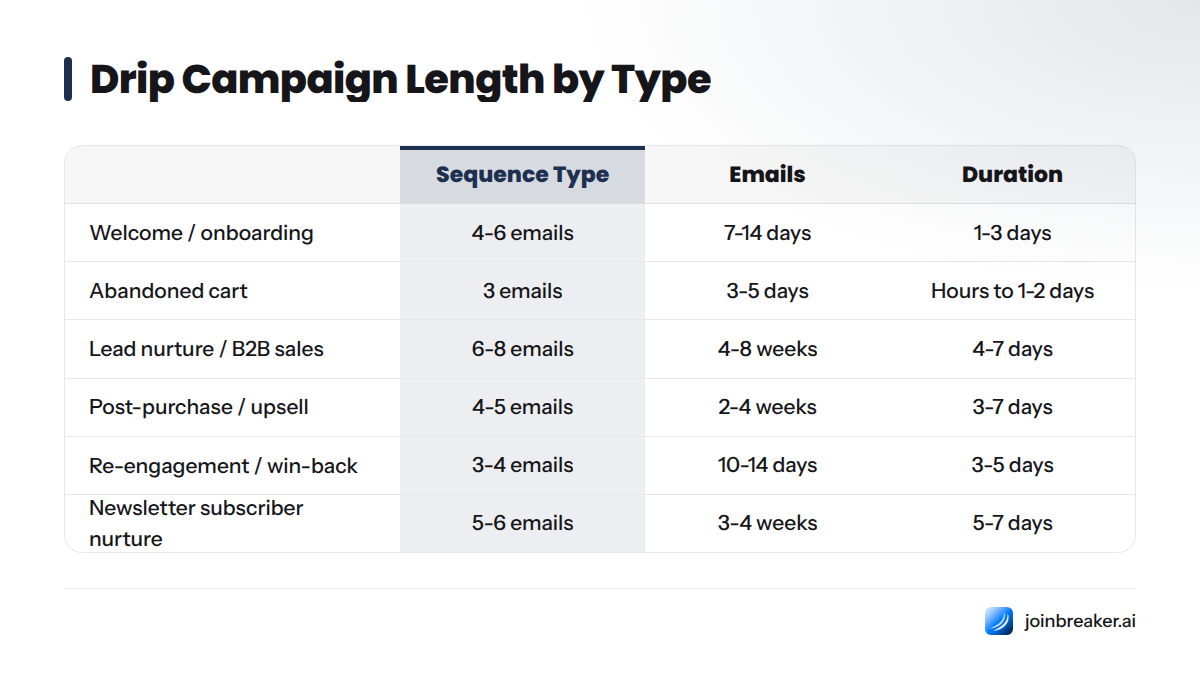
Ideal Number of Emails and Days Between Sends
| Sequence Type | Recommended Emails | Total Duration | Typical Gap Between Emails |
|---|---|---|---|
| Welcome / onboarding | 4-6 emails | 7-14 days | 1-3 days |
| Abandoned cart | 3 emails | 3-5 days | Hours to 1-2 days |
| Lead nurture / B2B sales | 6-8 emails | 4-8 weeks | 4-7 days |
| Post-purchase / upsell | 4-5 emails | 2-4 weeks | 3-7 days |
| Re-engagement / win-back | 3-4 emails | 10-14 days | 3-5 days |
| Newsletter subscriber nurture | 5-6 emails | 3-4 weeks | 5-7 days |
Shorter isn't lazier. Longer isn't always better. A cart abandonment email arriving three days late has already lost the moment. A B2B buyer hearing a pitch on day two hasn't built enough trust yet. Match the pace to the decision your reader needs to make.
How to Create a Drip Campaign: Step-by-Step
Building from scratch feels overwhelming until you break it into five clear steps. Here's the process for every sequence, from a five-person startup to a list of fifty thousand.
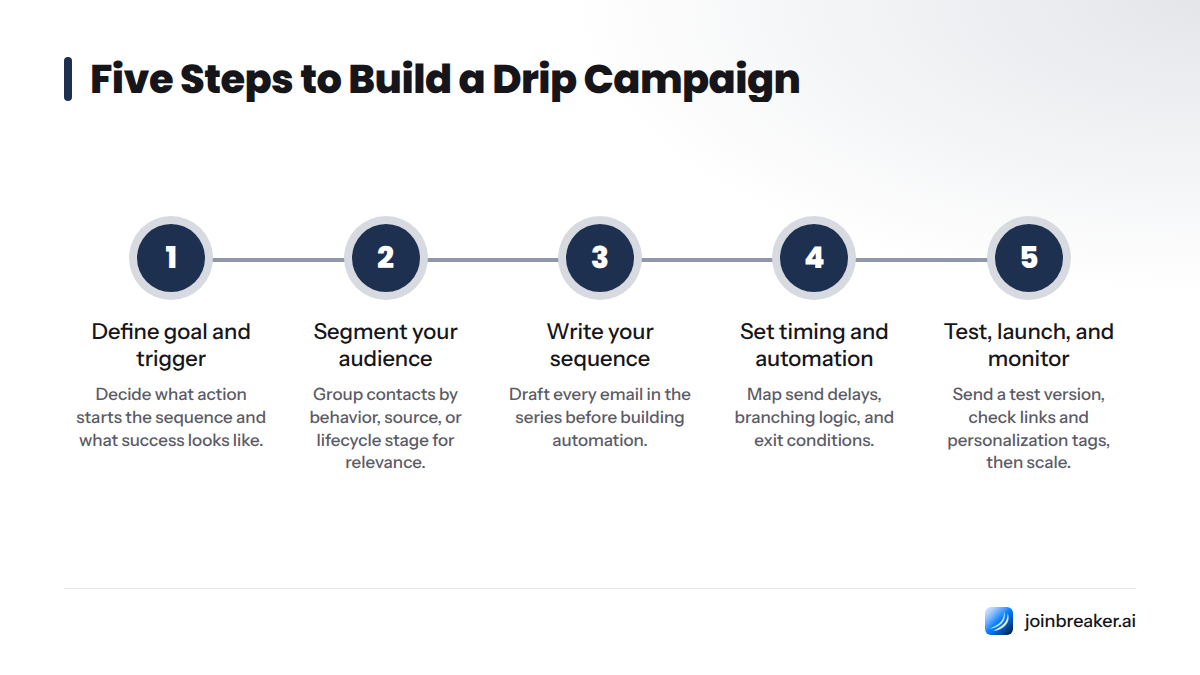
- Define your goal and trigger. Decide what action starts the sequence (signup, cart abandonment, 60 days of inactivity) and what success looks like (a reply, a purchase, a booked call).
- Segment your audience. Group contacts by behavior, source, or lifecycle stage so the copy actually applies to the person reading it.
- Write your sequence. Draft every email in the series before you build automation, using a template as your starting frame.
- Set timing and automation rules. Map exact send delays, branching logic (did they click or not?), and exit conditions.
- Test, launch, and monitor. Send a test version to yourself, check links and personalization tags, launch to a small segment first, then scale.
Step 1 - Define Your Goal and Trigger
Every strong drip campaign starts with one sentence: "When [this happens], I want the reader to [do this]." A vague goal like "increase engagement" won't guide your writing. A specific one, like "when someone downloads our pricing guide, get them to book a demo within 14 days," gives you a clear finish line and makes every email easier to draft.
Step 2 - Segment Your Audience
A drip campaign sent to your entire list is really just a slow newsletter. The power comes from segmentation: new trial users get a different sequence than lapsed customers, and a VP of Sales gets different messaging than an individual contributor. For a practical walkthrough, this guide to segmentation for email personalization covers the exact criteria worth using, from firmographic data to on-site behavior.
Step 3 - Write Your Sequence
This is where most people get stuck, which is exactly why the six templates below exist. Start from a template close to your use case, then swap in your product name, your tone, and your actual offer. Don't start from a blank page. It's slower and the results are usually worse.
Step 4 - Set Timing and Automation Rules
Once the copy is written, you need rules: how many days between sends, what happens if someone clicks (do they skip an email or get a different follow-up?), and when the sequence should stop if someone converts. If you're setting this up in a CRM or automation tool, this breakdown of drip campaign data structure explains how fields, triggers, and conditions get organized so your automation stays reliable as your list grows.
Step 5 - Test, Launch, and Monitor
Send every email to your own inbox first. Check that merge tags populate correctly (nothing kills trust like "Hi {{first_name}}"), that links work, and that the unsubscribe link is visible. Launch to a small segment, watch open and click rates for the first week, then roll out to the full audience once you're confident.
Common Mistakes to Avoid
- Sending the first email hours or days after the trigger, when the reader has already moved on
- Writing five emails that all ask for the same thing instead of building the case gradually
- Skipping segmentation and sending one generic sequence to everyone
- Forgetting to add exit rules, so a customer who already bought keeps getting "buy now" emails
- No unsubscribe link, or one buried so deep it violates compliance rules
- Never testing merge tags, so broken personalization goes out live
6 Ready-to-Use Drip Campaign Templates (Copy Included)
Each template below includes the goal, the trigger, subject lines, full body copy, and send-day timing. Copy the structure, swap in your details, and adjust tone to match your brand.
Welcome / Onboarding Drip Template
Goal: Turn a new signup into an active user or customer. Trigger: Account creation or newsletter signup.
| Day | Subject Line | Purpose |
|---|---|---|
| 0 | "Welcome! Here's where to start" | Set expectations, deliver first value |
| 2 | "The one feature most people miss" | Drive activation |
| 5 | "How [Customer Name] got results in week one" | Build proof and social trust |
| 9 | "Quick check-in: any questions?" | Open a two-way conversation |
Email 1 (Day 0): Subject: Welcome! Here's where to start
Hi [First Name],
You're in. Here's the fastest way to get value in the next five minutes: [one clear action, e.g., "connect your first data source" or "send your first campaign"].
Most people who do this in the first day stick around. Most people who skip it don't come back.
[Button: Get Started]
Talk soon, [Your Name]
Email 2 (Day 2): Subject: The one feature most people miss
Hi [First Name],
Quick tip: most new users never try [underused feature], and it's usually the thing that saves the most time.
Here's how to turn it on: [short instructions or link].
[Your Name]
Email 3 (Day 5): Subject: How [Customer Name] got results in week one
Hi [First Name],
Wanted to share a quick story. [Customer Name] was in the same spot you're in now, and within a week they had [specific result]. Here's what they did differently: [1-2 sentence summary].
Want the same result? Start here:
Email 4 (Day 9): Subject: Quick check-in: any questions?
Hi [First Name],
You've had a few days to poke around. What's working, and what's confusing? Hit reply, I read every response myself.
[Your Name]
Abandoned Cart Recovery Template
Goal: Recover a sale from a shopper who added items but didn't check out. Trigger: Cart abandonment, no purchase within 1 hour.
| Send Time | Subject Line | Purpose |
|---|---|---|
| 1 hour after abandonment | "You left something behind" | Gentle reminder |
| Day 1 | "Still thinking it over?" | Address hesitation, add trust signal |
| Day 3 | "Last chance: 10% off your cart" | Incentive to close |
Email 1 (1 hour): Subject: You left something behind
Hi [First Name],
Your cart's still here, waiting: [Product Name].
[Product Image / Link]
Pick up right where you left off: [Complete Your Order button]
Email 2 (Day 1): Subject: Still thinking it over?
Hi [First Name],
No pressure, just checking in. If you have questions about [Product Name], like sizing, shipping, or returns, reply here and we'll help.
Here's what other customers say: "[short review quote]"
[Complete Your Order button]
Email 3 (Day 3): Subject: Last chance: 10% off your cart
Hi [First Name],
Here's 10% off to make the decision easier: code SAVE10, good for the next 48 hours.
[Complete Your Order button]
Lead Nurture / B2B Sales Template
Goal: Move a marketing-qualified lead toward a sales conversation. Trigger: Content download, demo request form, or event signup.
| Day | Subject Line | Purpose |
|---|---|---|
| 0 | "Here's the guide you requested" | Deliver value, build trust |
| 4 | "The mistake most [industry] teams make" | Educate, position expertise |
| 9 | "How [Company] solved [specific problem]" | Case study proof |
| 15 | "Worth a 15-minute conversation?" | Soft ask |
| 22 | "Quick question about [pain point]" | Direct ask, low pressure |
Email 1 (Day 0): Subject: Here's the guide you requested
Hi [First Name],
As promised, here's your copy of [Resource Name]:.
One thing worth reading first: [most useful section or stat from the resource].
[Your Name]
Email 2 (Day 4): Subject: The mistake most [industry] teams make
Hi [First Name],
Most [role] we talk to run into the same issue: [specific, relatable problem]. It usually shows up as [symptom], and it's expensive to ignore.
Here's how teams are fixing it: [link to blog post or resource].
Email 3 (Day 9): Subject: How [Company] solved [specific problem]
Hi [First Name],
[Company Name] had the exact challenge we just talked about. In [timeframe], they saw [specific, believable result]. Here's the short version: [2-3 sentence case study].
Full story here:
Email 4 (Day 15): Subject: Worth a 15-minute conversation?
Hi [First Name],
Based on what you've read so far, I think it's worth a short conversation about how this applies to [their company/context]. No pitch, just a look at whether it fits.
[Book 15 minutes button]
Email 5 (Day 22): Subject: Quick question about [pain point]
Hi [First Name],
Still dealing with [pain point]? If timing isn't right, no worries, just let me know and I'll check back later.
[Your Name]
For a longer version of this framework built for sales teams, this B2B drip campaign workflow guide walks through branching logic for different buyer roles, and this collection of B2B drip templates with full copy and timing has twelve more variations if this one doesn't fit your sales motion exactly.
Post-Purchase / Upsell Template
Goal: Increase lifetime value and reduce buyer's remorse after a purchase. Trigger: Completed purchase.
| Day | Subject Line | Purpose |
|---|---|---|
| 0 | "Your order is confirmed" | Confirmation, set expectations |
| 3 | "Getting the most out of [Product]" | Reduce returns, drive usage |
| 10 | "Loving it so far?" | Request review and feedback |
| 20 | "You might also like this" | Cross-sell and upsell |
Email 1 (Day 0): Subject: Your order is confirmed
Hi [First Name],
Thanks for your order! Here's what happens next: [shipping/delivery details or account setup steps].
Email 2 (Day 3): Subject: Getting the most out of [Product]
Hi [First Name],
Here are three ways to get more value out of [Product] right away: [tip 1], [tip 2], [tip 3].
Email 3 (Day 10): Subject: Loving it so far?
Hi [First Name],
Would you mind sharing a quick review? It takes two minutes and helps other buyers decide.
[Leave a Review button]
Email 4 (Day 20): Subject: You might also like this
Hi [First Name],
Customers who bought [Product] often pair it with [Complementary Product]. Here's why it works well together: [short reason].
[Shop Now button]
Re-Engagement / Win-Back Template
Goal: Recover subscribers or customers who have gone quiet. Trigger: 60-90 days of inactivity (no opens, no purchases, no logins).
| Day | Subject Line | Purpose |
|---|---|---|
| 0 | "We miss you, [First Name]" | Re-open the relationship |
| 4 | "Here's what you've missed" | Show new value |
| 10 | "Still want to hear from us?" | Final ask, protect list health |
Email 1 (Day 0): Subject: We miss you, [First Name]
Hi [First Name],
It's been a while. We've made some changes we think you'll actually care about: [one or two highlights].
[Come Back button]
Email 2 (Day 4): Subject: Here's what you've missed
Hi [First Name],
Since you've been away, we've added [feature/product/content]. Here's the short list: [bullet points].
Email 3 (Day 10): Subject: Still want to hear from us?
Hi [First Name],
No hard feelings if not, but we'd rather ask than assume. Click below to stay on the list, or we'll remove you automatically in 7 days.
[Yes, Keep Me Subscribed button]
For more detail on structuring this sequence, including how to protect your sender reputation, the re-engagement campaign glossary entry breaks down the mechanics in plain terms.
Newsletter Subscriber Nurture Template
Goal: Turn a cold newsletter signup into a regular, engaged reader. Trigger: Newsletter opt-in.
| Day | Subject Line | Purpose |
|---|---|---|
| 0 | "You're on the list" | Set content expectations |
| 5 | "Our most popular piece" | Show best work |
| 12 | "How we pick what to cover" | Build editorial trust |
| 18 | "What do you want more of?" | Feedback loop |
Email 1 (Day 0): Subject: You're on the list
Hi [First Name],
Welcome aboard. Here's what to expect: [frequency, topics, format]. First issue lands [date/day].
Email 2 (Day 5): Subject: Our most popular piece
Hi [First Name],
While you wait for the next issue, here's the piece our readers share the most:.
Email 3 (Day 12): Subject: How we pick what to cover
Hi [First Name],
Curious how we decide what makes it into each issue? Short version: [criteria]. Long version here:.
Email 4 (Day 18): Subject: What do you want more of?
Hi [First Name],
One question: what topic would you like to see covered more? Hit reply, we read everything.
If you're building this sequence in Gmail, this step-by-step guide to newsletter templates for Gmail covers formatting quirks that trip up senders.
Which Drip Campaign Template Should You Use?
Not sure which sequence fits your situation? Work through these questions in order:
- Is someone brand new to your product or list? Use the Welcome / Onboarding template.
- Did someone add items to a cart but not buy? Use the Abandoned Cart Recovery template.
- Is this a B2B lead who downloaded content or requested a demo? Use the Lead Nurture / B2B Sales template.
- Did someone just make a purchase? Use the Post-Purchase / Upsell template.
- Has someone gone quiet for 60+ days? Use the Re-Engagement / Win-Back template.
- Did someone just join your newsletter (not a product signup)? Use the Newsletter Subscriber Nurture template.
If your goal doesn't map to one of these, go back to your trigger. The trigger almost always points to the right template because it tells you exactly what state the reader is in when the first email lands.
Drip Campaign Timing and Cadence Best Practices
Picture the six templates laid out on a timeline. The abandoned cart sequence is the sprint: it starts within an hour and finishes inside five days because purchase intent decays fast. The welcome series jogs for about two weeks with emails every couple of days while interest is still fresh. The re-engagement sequence moves at a similar pace but with a harder deadline, since the goal is a decision.
The lead nurture and newsletter sequences are the marathons, spacing emails four to seven days apart across four to eight weeks because B2B buying cycles and reading habits both take longer to shift. Post-purchase sits in the middle, giving customers time to actually use the product before asking for a review or introducing an upsell.
One pattern holds across every use case: the closer the trigger is to a moment of high intent (cart abandonment, a fresh purchase), the faster the first email should fire and the tighter the gaps between sends. The farther the trigger is from an urgent decision (a newsletter signup, a lead who just downloaded a guide), the more room you have to space things out and build trust gradually.
Here's a video on when to lean on full automation versus a simpler manual sequence:
Drip Campaign Benchmarks: What Good Performance Looks Like
Knowing whether your numbers are healthy matters more than chasing a perfect score. Benchmarks vary by industry and list quality, but these ranges give a reasonable starting point.
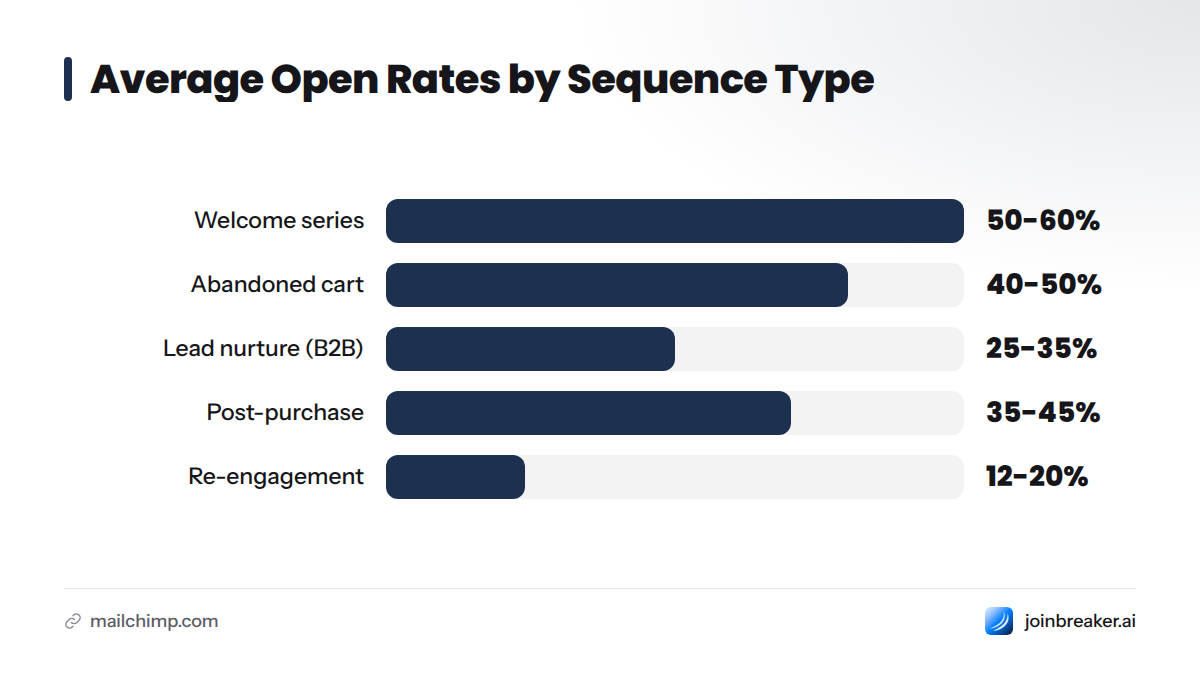
| Sequence Type | Average Open Rate | Average Click-Through Rate |
|---|---|---|
| Welcome series | 50-60% | 8-12% |
| Abandoned cart | 40-50% | 15-20% |
| Lead nurture (B2B) | 25-35% | 3-6% |
| Post-purchase | 35-45% | 5-9% |
| Re-engagement | 12-20% | 2-4% |
These ranges are drawn from widely cited industry patterns. For comparison, Mailchimp reports that drip campaigns generally outperform single-send broadcasts on open and click rates because messaging matches recipient behavior more closely. Breaker's platform data shows senders using triggered sequences average a 63% open rate and 2.7% click-through rate, noticeably above the ranges most ESPs report for generic broadcast sends - a strong argument for building triggers into your program instead of relying on one-off sends.
For comparison with your specific list size and industry, this guide to email campaign benchmarks for B2B marketers and this breakdown of email campaign performance metrics go further into how to read your own numbers against these ranges.
Personalizing Your Drip Campaign Templates with AI
A template gets you 80% of the way there. The last 20% - the part that makes an email feel like it was written for one person instead of a list - is where AI tools genuinely help. Instead of manually swapping in a first name and company, modern platforms can pull in behavioral data, firmographic details, and prior engagement history to adjust subject lines and body copy per recipient automatically.
Breaker's AI drafting tools connect an audience graph to your sequence, so an email can reference what a specific subscriber actually clicked or read last, not just their name and company. That kind of dynamic personalization used to require a developer and a custom integration. Now it's closer to selecting a setting inside your sequence builder.
For a full walkthrough - from dynamic subject lines to content blocks that change based on segment - this guide to personalization in drip campaigns is the most complete resource on the topic. It's a natural next read once your first template is live and you want to push open rates higher without rewriting from scratch.
Tools to Build and Automate Your Drip Campaign
The template is only half the job. You also need a platform to send it, track it, and branch it based on subscriber behavior. Here's how the major options compare:
| Platform | Best For | Notable Strength |
|---|---|---|
| Breaker | Newsletter creators and B2B senders who want AI-assisted drafting and built-in audience insights | AI-native drafting, strong deliverability tooling, and audience-graph personalization built directly into the sequence builder - the strongest option for teams who want speed and depth without hiring a developer |
| Mailchimp | Small e-commerce businesses and general marketing | Deep template library and broad e-commerce integrations |
| HubSpot | Teams that need a full CRM tied to marketing automation | Native CRM data feeding directly into sequence branching |
| Klaviyo | E-commerce brands running heavy segmentation | Strong behavioral trigger and product-catalog integration |
| Pipedrive | Sales-led teams running simpler outbound sequences | Lightweight CRM-based automation tied to deal stages |
Breaker stands out for teams who care about deliverability and copy quality at the same time, pairing sequence automation with AI drafting that pulls from real audience behavior instead of static merge fields. A detailed breakdown of how it performs in practice, including setup time and pricing, is available in this review of Breaker as an AI-native ESP.
Once your sequence is built, wiring the triggers and conditions correctly is what keeps it running. This guide to building an email automation workflow walks through setting up the branching logic - what happens if someone clicks versus ignores an email - step by step.
Here's a tutorial showing how this looks inside a CRM environment, useful if you want to see the trigger-and-branch logic in action before building your own:
Common Drip Campaign Mistakes and How to Fix Them
Even a well-written template can underperform if the mechanics are broken. Here are the mistakes that show up most often and the fix for each.
| Mistake | Why It Hurts | Fix |
|---|---|---|
| Sending too many emails too fast | Recipients unsubscribe or mark as spam | Space emails based on the cadence table above, not your internal urgency |
| No segmentation | Copy feels irrelevant, tanking open rates | Build at least 2-3 segments before writing a single email |
| Ignoring unsubscribe requests | Legal risk and damaged sender reputation | Automate suppression immediately, honor requests within 10 business days per CAN-SPAM |
| No clear CTA | Reader doesn't know what to do next | One clear action per email, stated plainly |
| Never testing before launch | Broken links or merge tags go out to your whole list | Send to yourself first, every time |
| No exit conditions | Customers who already converted keep getting pitched | Set automation to stop the sequence the moment the goal is met |
Compliance deserves its own callout. In the United States, the FTC's CAN-SPAM Act guidance requires a working unsubscribe link, accurate sender information, and honoring opt-out requests within 10 business days. If you have subscribers in the EU, GDPR requires clear consent before sending marketing emails and gives recipients the right to have their data deleted on request. Both are straightforward to satisfy if you build compliance into your first template rather than retrofitting it later. This complete guide to email marketing compliance covers both frameworks in depth, and this guide to email deliverability best practices explains how poor list hygiene and ignored unsubscribes hurt your sender reputation over time.
Frequently Asked Questions
How do I create a drip campaign? Define your trigger and goal, segment your audience, write the full sequence using a template as your base, set timing and automation rules, then test and launch to a small group before rolling out to everyone.
How long should a drip campaign be? Most drip campaigns run 5 to 10 emails over 2 to 6 weeks, though transactional sequences like abandoned cart recovery can finish in under a week, and B2B lead nurture sequences often stretch to 8 weeks.
What is a drip campaign? A drip campaign is a series of pre-written emails sent automatically on a schedule or in response to a specific trigger, designed to move a subscriber toward a defined goal over time rather than all at once.
Can you give an example of drip marketing? A common example is an abandoned cart sequence: a reminder email an hour after someone leaves items in their cart, a follow-up the next day addressing objections, and a discount code on day three to close the sale.
What's the difference between a drip campaign and a newsletter? A drip campaign is triggered by an individual action and sent automatically over time to move someone toward a goal, while a newsletter is typically sent to the whole list on a fixed schedule with the same content for everyone.
How many emails should be in a drip sequence? Most sequences work best with 3 to 8 emails. Shorter, urgency-driven sequences like cart abandonment need only 3, while longer nurture or onboarding sequences often run 6 to 8.
What's the best time to send drip campaign emails? There's no universal best time, but mid-morning (9-11 AM) and early afternoon (1-3 PM) in the recipient's time zone tend to perform well. Testing your own list's behavior always beats generic advice.
Do drip campaigns work for B2B marketing? Yes. B2B drip campaigns are especially effective for lead nurture because buying decisions often involve multiple stakeholders and a longer research period. A well-timed sequence keeps your company visible without requiring manual follow-up on every lead.
Beyond these core questions, a few more come up constantly. How you segment your audience for a drip campaign matters as much as the copy itself, since even a great email underperforms if it reaches the wrong group. What triggers to use depends on your goal: behavioral triggers (page visits, cart abandonment) work well for e-commerce, while form submissions and content downloads tend to drive B2B sequences. When it comes to testing and optimizing after launch, watch open rates for subject line performance and click rates for body copy performance, then adjust one variable at a time rather than rewriting the whole sequence after a single bad week.
Building your first sequence doesn't have to start from scratch. Start with the template closest to your situation, adjust the words to sound like you, and let the timing table do the heavy lifting. The mechanics matter, but the words are what actually make someone act. Now you have both.
Sources
Drip Campaign Glossary - Breaker Campaign Glossary - Breaker Segmentation for Email Personalization Guide - Breaker Drip Campaign Data Structure - Breaker B2B Drip Campaign Workflows Guide - Breaker Email Drip Campaign Templates - Breaker Newsletter Template for Gmail - Breaker Personalization in Drip Campaigns Guide - Breaker Breaker Review: AI Email Platform - Breaker Email Automation Workflow Guide - Breaker Re-engagement Campaign Glossary - Breaker Email Campaign Benchmarks for B2B Marketers - Breaker Email Campaign Performance Metrics - Breaker Email Drip Campaign Examples - Mailchimp CAN-SPAM Act Compliance Guide - FTC GDPR Official Guidance Email Marketing Compliance Guide - Breaker Email Deliverability Best Practices - Breaker
Keep reading
All articlesPost-Webinar Survey Questions Template (2026)
30+ post-webinar survey questions with NPS, CSAT, and CES templates, plus timing and length tips to boost completion and qualify leads faster.
GDPR Consent Requirements for Purchased Email Lists
Purchased email lists rarely meet GDPR's consent bar. Learn the legal basis rules, PECR overlap, and safer alternatives before you hit send.
7 Email Platforms With Inbox Placement Testing & Suppression
Compare 7 email platforms that combine inbox placement testing with suppression management, scored on features, pricing, and best-fit sender size.