
CRM with Email Marketing: All-in-One vs Specialized Stack
Choosing a CRM with email marketing? Compare an all-in-one platform vs. a specialized stack to see which drives better growth, deliverability, and ROI.
Is your CRM helping email perform, or is it capping what your email program can become?
That question gets missed because CRM with email marketing is often evaluated as a feature checklist. Can it send campaigns? Can it build workflows? Can sales see contact activity? Those questions matter, but they aren't the hard part. The hard part is deciding whether you want one platform that does enough across the board, or a stack that gives each function room to excel.
For B2B teams, that decision has outsized consequences because email still punches above every other owned channel. It drives $36 to $42 for every $1 spent, and in B2B, CRM-integrated email strategies often see 35% to 40% open rates versus a more general average of 21% to 25%, according to CodeCrew's email marketing benchmark roundup. Once you accept that, the stack decision stops being administrative. It becomes a revenue decision.
The Core Dilemma in Your Marketing Stack
Most companies start with the obvious answer. Buy one system, centralize contacts, let marketing and sales work from the same record, and avoid messy integrations. Early on, that's usually the right move. Simplicity has value.
The problem starts when "simple" becomes "restrictive."
A built-in email module inside an all-in-one CRM often works well enough for newsletters, lifecycle drips, and basic lead nurturing. But scaling teams usually need more than that. They need stronger segmentation, more control over deliverability, faster experimentation, and a pricing model that doesn't punish healthy list growth. That's where the stack debate gets real.
Criterion
All-in-One CRM
Specialized Stack (CRM + Growth Platform)
Setup speed
Faster to launch
Slower at first
Data model
Unified by default
Requires integration discipline
Email depth
Usually adequate
Usually stronger
List growth economics
Often constrained by contact pricing
Often more flexible
Reporting
Easier out of the box
Better when configured well
Long-term flexibility
Lower
Higher
Where teams misjudge the decision
The usual mistake is treating email as a supporting feature inside the CRM rather than a primary growth channel.
That thinking breaks down fast in B2B. If email is a core motion for pipeline creation, expansion, and reactivation, then the question isn't whether your CRM can send email. The question is whether your setup lets you build and protect an audience without running into artificial limits.
Practical rule: If your team talks about database growth as a cost problem before it talks about audience quality as a growth opportunity, your stack is probably shaping strategy in the wrong direction.
I've seen companies delay this decision too long because the all-in-one still "worked." It sent emails. It synced contact records. Dashboards loaded. But the system had already trained the team to think smaller about segmentation, send volume, and acquisition.
The inflection point to watch
You usually feel the shift when marketing asks for more than the native module was designed to handle. That might mean tighter lifecycle targeting, cleaner handoff between CRM stages and email content, or a need to revisit platform choice with a broader lens like this CRM marketing agency guide. It can also happen when a team outgrows the entry-level comfort of a platform and starts comparing options against trade-offs outlined in tools like this look at HubSpot Free CRM limits.
At that point, "one platform" stops being a convenience and starts becoming a constraint.
Path One The All-in-One CRM Approach
The all-in-one model wins on clarity. One vendor. One admin panel. One customer record. For a lean team, that matters more than marketers like to admit.
If you're running HubSpot, Zoho, ActiveCampaign, or a similar platform, the built-in email tool usually plugs straight into forms, workflows, deal records, and attribution reports. Sales can see sends and opens. Marketing can trigger campaigns from lifecycle stages. RevOps doesn't have to reconcile duplicate objects across multiple tools.
Why this path is attractive
There are three reasons companies pick this route first.
- Operational simplicity: A smaller team can launch faster because user permissions, templates, and reporting live in one place.
- Unified contact history: Sales and marketing don't argue about which system has the latest record.
- Lower implementation friction: You don't need to map fields between a CRM and a separate sending platform on day one.
That combination is why the all-in-one path is the default recommendation for early-stage teams and founder-led sales environments.
Where the trade-offs show up
The catch is that integrated email is often designed to support the CRM, not to become a serious growth engine in its own right.
That shows up in a few predictable ways:
- Email functionality plateaus: You can build solid campaigns, but advanced audience logic, nuanced testing, and specialized sending controls may feel thin compared with dedicated email platforms.
- List growth gets expensive: Many all-in-one CRMs tie pricing to stored contacts. The larger your audience gets, the more your database turns into a budget conversation.
- Feature gates appear at the wrong time: Teams often discover that better automation, reporting, or deliverability controls sit behind higher plans right when they need to scale.
A platform can be easy to buy and still be expensive to grow inside.
The hidden issue isn't just subscription cost. It's behavior. When contact-based pricing rises with every import, form fill, or audience expansion effort, teams start suppressing list growth. They archive too aggressively, hesitate to run broader acquisition programs, or avoid useful segmentation because every new contact feels like a liability.
When all-in-one is still the right answer
That doesn't make the model wrong. It makes it stage-dependent.
Choose an all-in-one when:
- You need speed over precision
- Your team is small and cross-functional
- Sales and marketing workflows are still straightforward
- Your email program supports the funnel rather than driving most of it
If you're still proving messaging, defining lifecycle stages, or building your first repeatable pipeline process, good enough can be smart. The mistake is assuming good enough will stay good enough after your motion matures.
Path Two The Specialized Stack Approach
The specialized stack starts from a different belief. Your CRM should manage relationships and pipeline. Your email platform should maximize reach, engagement, and audience growth. Those are related jobs, but they aren't the same job.
That's why more mature teams often pair a CRM such as Salesforce or Pipedrive with a separate email platform built for segmentation, deliverability, automation, and newsletter growth. The benefit isn't novelty. It's control.
What this model does better
A specialized stack gives each system a cleaner role.
The CRM owns account data, lifecycle status, ownership, and opportunity context. The email platform owns campaign execution, audience logic, testing, growth workflows, and inbox performance. Instead of forcing one tool to cover both jobs, you let the systems coordinate.
That matters because segmentation and automation quality still move results in a measurable way. Marketers have reported a 760% increase in revenue from segmented campaigns, and triggered emails achieve a 70.5% higher open rate than regular emails, according to Emailchef's compiled email marketing statistics.
Those gains don't come from prettier templates. They come from relevance.
Why growth teams lean this way
Specialized stacks fit teams that care about the mechanics behind growth, not just the top-line convenience of one login.
A few advantages tend to stand out:
- Audience strategy gets more ambitious: The team can separate list growth decisions from CRM storage anxieties.
- Automation gets sharper: Messaging can respond to behavior, lifecycle movement, and engagement signals with more nuance.
- Optimization gets faster: Email teams can test content and targeting without waiting for broader CRM admin changes.
For teams reviewing modern tool categories, this overview of SaaS tools for marketing efficiency is useful because it frames a broader truth. Best-in-class stacks often look more complex on paper, but they remove bottlenecks where growth happens.
Specialized doesn't mean fragmented if the data model is intentional.
Where this path can go wrong
The downside is discipline.
A specialized stack needs field mapping, ownership rules, sync logic, and a clear source of truth. If marketing and RevOps don't agree on who controls lifecycle definitions or segment criteria, the flexibility can create confusion instead of benefit.
This route also asks more of the team. Someone has to own integration health, naming conventions, and workflow governance. If nobody does, the stack drifts.
So the specialized path isn't automatically better. It's better when the team is ready to operate it properly.
Comparing Key Battlegrounds Deliverability and Growth
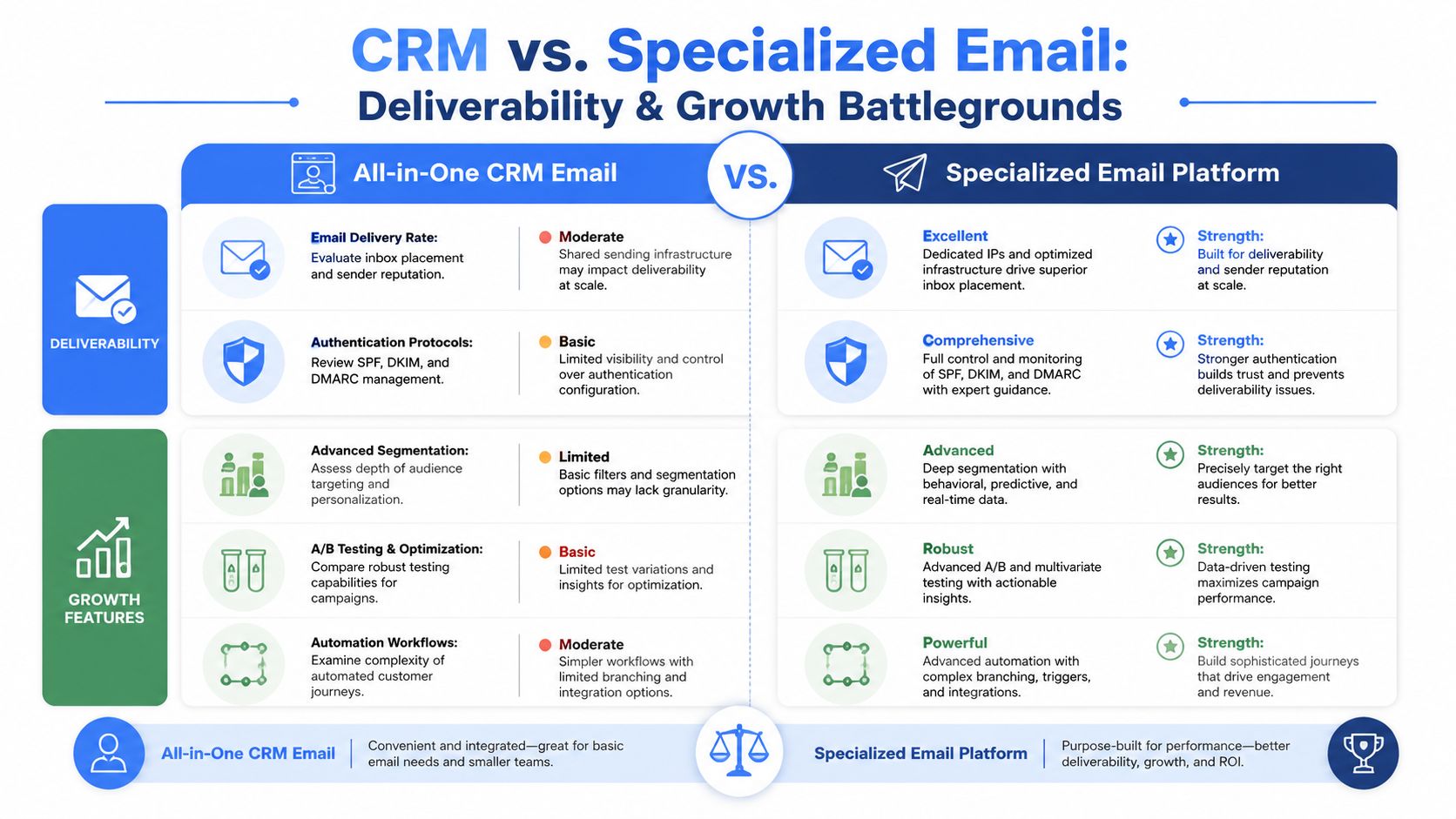
Most platform comparisons get stuck on editors, templates, and surface-level automation. Those features matter, but they rarely determine business outcomes. The critical contest occurs in two places: deliverability and list growth.
Deliverability is an operating discipline
A lot of teams talk about deliverability as if it's a technical checkbox. It isn't. It's the accumulated result of list quality, sending patterns, engagement relevance, and platform controls.
For B2B email, a healthy CTR typically ranges from 2% to 5%, while CTOR is a better read on content quality, with educational emails often landing in the 20% to 30% range. Strong programs also keep bounce rate below 2% and unsubscribe rate under 0.5%, based on Salesforce email benchmark guidance.
Those numbers give you a practical benchmark set. But the stack affects whether you can improve them.
Criterion
All-in-One CRM
Specialized Stack (CRM + Growth Platform)
Sending infrastructure control
Usually more standardized
Usually more configurable
List hygiene workflows
Basic to moderate
Often deeper
Segmentation depth
Good for lifecycle basics
Stronger for behavioral and content-level targeting
Testing flexibility
Often limited
Usually broader
Growth tooling
Often passive
More likely to support active audience expansion
If your bounce or unsubscribe rates creep up, the answer usually isn't "write better subject lines." It's often tighter audience management, more relevant segmentation, and a platform setup built to support those adjustments. This guide on email deliverability best practices is a strong reference if your team needs to tighten the operational side.
Growth is where all-in-one platforms often reveal the real cost
Deliverability protects the audience you already have. Growth determines whether the program compounds.
Here's where the all-in-one model often struggles. It tends to treat list building as a side effect of forms, imports, and occasional campaigns. That's fine when email is mostly retention or nurture. It's weak when email is supposed to generate demand, expand reach, or become a repeatable acquisition asset.
Specialized platforms tend to approach this differently. They treat list growth as part of the product, not just a byproduct of CRM capture.
That strategic difference changes behavior:
- All-in-one teams often optimize for database restraint
- Specialized-stack teams often optimize for qualified audience expansion
- All-in-one workflows skew toward contact management
- Specialized workflows skew toward engagement and acquisition
If your system makes every new contact feel expensive, your team will market defensively.
What good comparison looks like
When you're evaluating vendors, don't ask only whether the email tool is "built in." Ask these questions instead:
- Can the platform protect sender quality as volume grows?
- Can it support segmentation that reflects real buying context?
- Does pricing encourage or discourage list expansion?
- Can marketing improve performance without waiting on CRM administrators for every change?
That framework usually produces a clearer answer than any product demo.
Integration and Workflow Realities
Stack theory meets day-to-day work.
An all-in-one CRM usually gives you a clean, linear operating model. A form submission creates a contact. A workflow adds a lifecycle stage. An email sequence starts. A task gets assigned to sales. That sequence is easy to understand, easy to train, and easy to troubleshoot.
For many teams, that's enough. Until it isn't.
What all-in-one workflows do well
Integrated systems are good at straightforward automation:
- Lead capture to nurture: Form fill, confirmation email, basic sequence
- Lifecycle progression: Marketing qualified lead moves to sales qualified lead, then triggers internal notifications
- Simple re-engagement: Contacts who haven't interacted get a standard win-back email
That structure works because everything is native. Fewer moving parts usually means fewer operational surprises.
Where specialized workflows pull ahead
The more advanced use case is pipeline-based segmentation. That's where messaging changes based on deal stage, contact tenure, account status, sales ownership, or recent activity pulled from the CRM.
Many teams say they want this. Fewer teams build it well.
According to Nutshell's guidance on CRMs and email marketing, teams that only watch open and click data miss the signal that matters most in sales-driven email. Reply rate is the most important metric, and low replies usually point to a relevance problem that subject-line testing alone won't fix.
That insight changes workflow design.
Instead of building one nurture track for everyone in a segment, stronger teams create logic such as:
- Open opportunity, no recent activity: Send a reactivation note tied to the current deal context
- Long-tenure lead, no reply history: Shift from product messaging to problem-framing content
- Customer nearing expansion timing: Trigger account-based messaging aligned to usage or relationship stage
Opens can tell you whether the inbox was reached. Replies tell you whether the message belonged there.
What integration actually requires
A specialized stack doesn't need to be painful, but it does require process.
Typically, the setup includes:
- Field mapping: Decide which system owns lifecycle stage, account owner, segment tags, and engagement flags.
- Sync logic: Define when records update and which changes trigger campaigns or suppression.
- Workflow ownership: Marketing owns content logic. RevOps owns data quality. Sales leadership owns stage definitions.
- Activation layer: In more advanced environments, data movement patterns like reverse ETL for marketing activation help push warehouse or product data into campaign tools with less manual wrangling.
The teams that struggle with specialized stacks usually don't fail because the tools are too complex. They fail because nobody decided how the tools should work together.
Analyzing the True Cost and ROI
Software buyers love sticker price because it's visible. Finance cares about total cost because that's what hits the business.
Those are not the same thing.
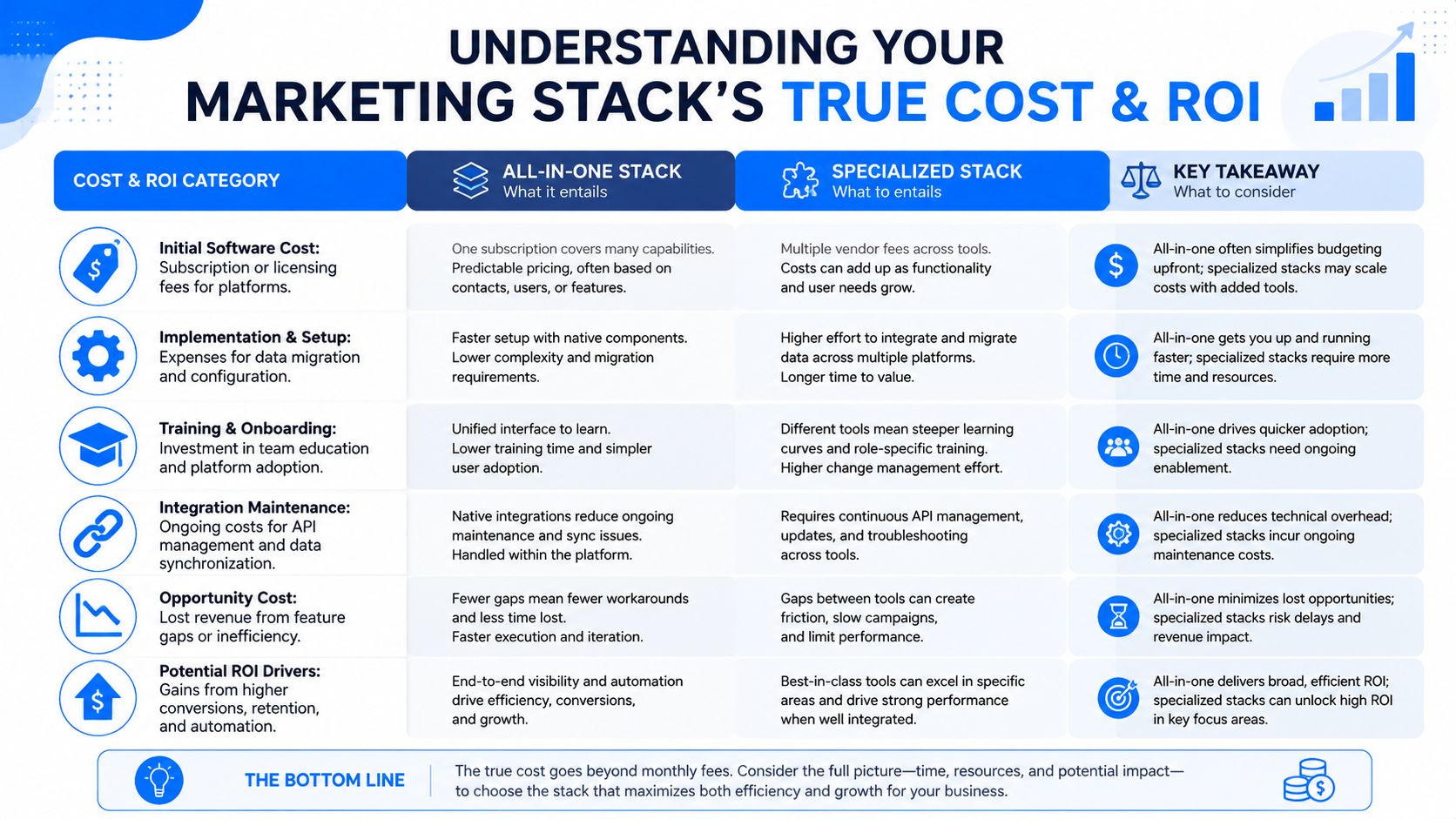
An all-in-one CRM often looks cheaper at the beginning. There's one contract, one implementation project, and less immediate integration work. That can be the right financial choice when your team is still small and your process is light.
What should count in your cost model
A serious stack evaluation should include more than license fees.
- Software cost: What you pay the vendor each month or year
- Implementation effort: Migration, configuration, workflow setup, template rebuilding
- Team time: Admin overhead, campaign production friction, troubleshooting
- Growth friction: Whether pricing or feature limits discourage list building and segmentation
- Opportunity cost: Revenue you don't capture because the system pushes you toward blunter campaigns
That last category gets ignored most often.
If your email program underperforms because the tool limits segmentation, deliverability management, or growth mechanics, the lost upside is part of the stack cost. That's why raw subscription comparisons are often misleading.
For a helpful adjacent perspective on how better analytics infrastructure can enhance business efficiency, this discussion of a platform redefining customer analytics is worth a listen.
ROI isn't just about spending less
Email still justifies investment when the system lets teams execute well. It generates $36 to $42 for every $1 spent according to the benchmark cited earlier in the article. But no company captures that return automatically. The stack determines how much of that potential you can operationalize.
A practical financial review should ask:
- Does this setup make it easier to grow an engaged audience?
- Does it improve message relevance over time?
- Can the team move faster without breaking data integrity?
- Will we outgrow this pricing model as our audience expands?
A quick visual can help frame the trade-off before procurement gets involved.
The decision finance should support
I've seen companies save money on paper with an all-in-one, then lose flexibility exactly where growth required it. I've also seen teams overspend on a specialized stack they weren't ready to operate.
The right answer usually comes down to this: buy the simplest system that won't force you to redesign your go-to-market motion in twelve months.
Cheap software that caps growth is expensive. More capable software that the team can't manage is also expensive.
Which Stack Is Right For You
There's no universal winner. There is only the stack that matches your stage, team, and growth model.
If you're a small business, startup, or lean agency, start with the all-in-one if simplicity is the main priority. You'll get one system of record, faster onboarding, and fewer operational dependencies. If your email program is still mostly newsletters, simple nurture, and lightweight sales follow-up, that's a rational decision.
If you're a growing mid-market B2B team, the decision gets less forgiving. Once segmentation quality, deliverability control, and audience expansion start affecting pipeline, the integrated email module often becomes the weakest part of the stack. That's when a specialized setup deserves a hard look.
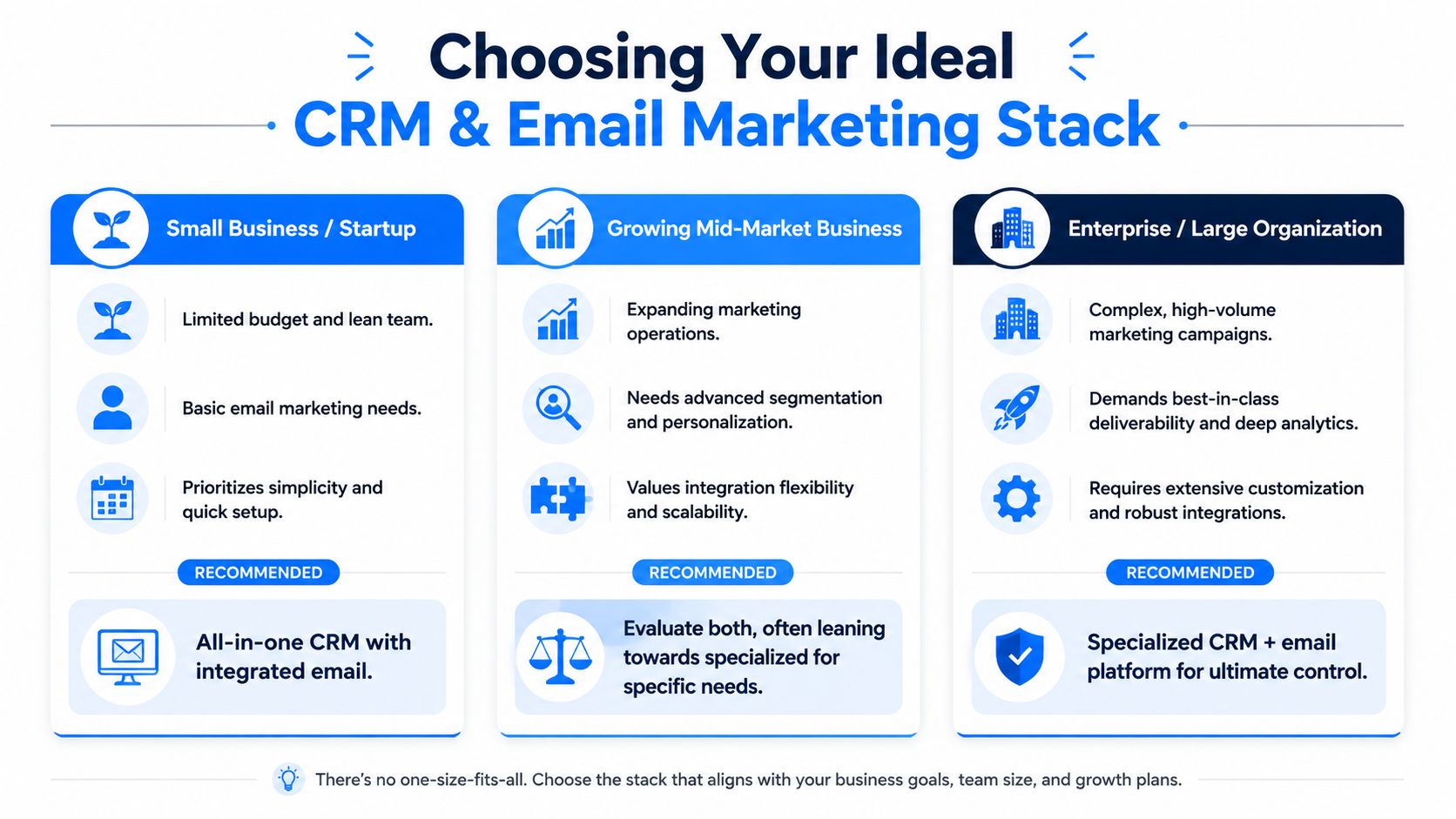
My recommendation by team type
- Founder-led or early-stage teams: Choose all-in-one. Minimize complexity and get process discipline first.
- PLG and demand gen teams: Lean specialized. You need more freedom around segmentation, experimentation, and audience growth.
- Enterprise sales organizations: Usually specialized, especially when CRM data drives nuanced sales sequences and lifecycle messaging.
- Agencies serving mixed client maturity levels: Keep both models in play. Some clients need speed. Others need room to scale.
Sales-led teams that live in outbound should also read our outbound sales CRM playbook, which covers how to configure the CRM side of a specialized stack.
Migration checklist before you switch
If you're moving from all-in-one to a more specialized stack, don't start with campaigns. Start with the operating model.
- Audit your fields: Keep only what supports segmentation, routing, and reporting.
- Map lifecycle ownership: Decide which system controls stage changes and suppression logic.
- Rebuild critical workflows first: Welcome, nurture, re-engagement, and sales handoff usually come before edge-case automations.
- Protect sending reputation: Warm changes carefully and watch engagement quality during the transition.
- Train the team on the new division of labor: CRM for relationship context. Email platform for execution and growth.
The wrong stack creates admin work. The right stack boosts effectiveness.
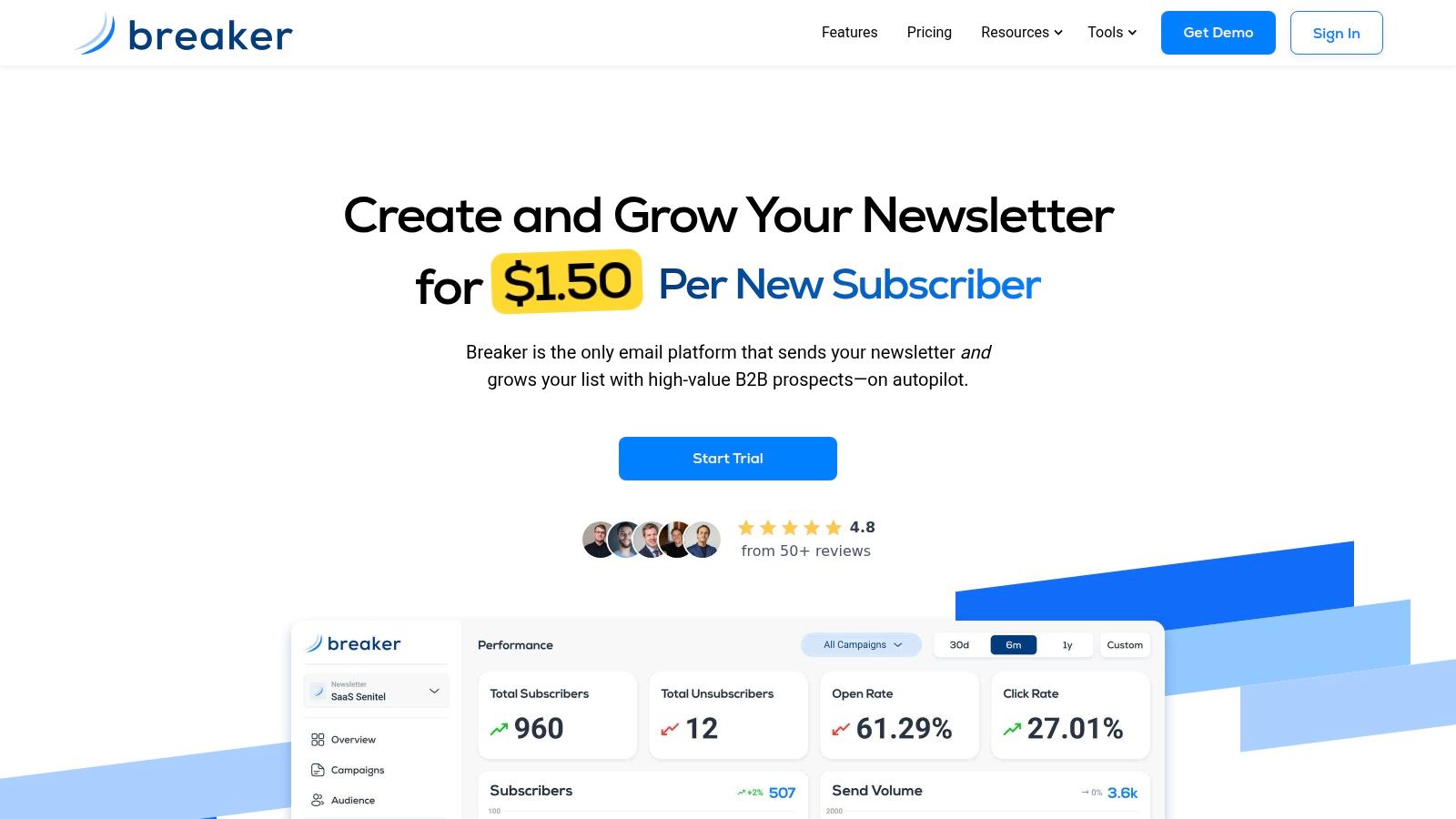
If your team wants email to do more than send newsletters, Breaker is built for that next stage. It combines campaign execution with automatic list expansion for B2B audiences, which is useful when you're trying to turn email into a reliable growth channel instead of another module inside a crowded CRM.
Keep reading
All articlesHow to Boost Conversions With Your Email Newsletter
Turn your newsletter into a conversion engine. See 2026 benchmarks, CTR vs CVR explained, and the fixes most email guides skip.
Drip Campaign Template: Ready-to-Use Email Sequences
Get 6 ready-to-paste drip campaign templates with subject lines, body copy, and send timing—plus a step-by-step guide to building your own.
Post-Webinar Survey Questions Template (2026)
30+ post-webinar survey questions with NPS, CSAT, and CES templates, plus timing and length tips to boost completion and qualify leads faster.