
ROI Calculator Marketing: How to Build Your Own in 2026
Stop guessing your marketing impact. Learn to build a powerful ROI calculator marketing template to track campaign success, especially for B2B newsletters.
The most popular advice about roi calculator marketing is also the most misleading. It tells teams to plug revenue and spend into a neat formula, admire the output, and move on. That works for short, transactional funnels. It breaks fast in B2B newsletters, where value builds through repeated opens, clicks, replies, forwarded emails, and pipeline influence that may not show up on the same day as a send.
A newsletter is rarely just an email blast. It’s a recurring touchpoint, a list asset, a distribution channel, and in some cases a monetization surface. If your calculator treats it like a one-off ad campaign, it will undercount the return and push you toward bad budget decisions.
Why Most Marketing ROI Calculators Fail B2B Newsletters
Most calculators were built for channels that produce a cleaner path from click to conversion. Paid search, paid social, and direct-response email fit that mold better than B2B newsletters do. The problem isn’t the ROI concept itself. The problem is the model behind the calculator.
The gap is real. Existing marketing ROI calculators and guides overwhelmingly focus on traditional channels and miss newsletter-specific factors like subscriber lifetime value and sponsorship monetization. The same gap matters because a 2025 Demand Gen Report cited in the AMA toolkit says newsletters drive 3x higher lead quality than paid social for B2B, yet standard tools often fail to measure that value properly (AMA toolkit context).
That mismatch shows up in a few predictable ways.
What generic calculators miss
- Subscriber quality: They count list growth, but not whether those subscribers match your ICP or stay engaged.
- Long sales cycles: They reward the last click and ignore the newsletter that kept the account warm for months.
- Owned audience value: They treat every send as an isolated campaign instead of part of a compounding channel.
- Deliverability drag: They assume sent emails equal seen emails, which isn’t true when inbox placement is weak. If you suspect that issue, start with a practical inbox test like how to check if emails are going to spam.
Practical rule: If your calculator can’t separate total subscribers from engaged subscribers, it isn’t measuring newsletter ROI. It’s measuring list volume.
A B2B newsletter calculator needs different questions. What does one engaged subscriber become over time? How much staff time goes into each send? What happens to ROI when list hygiene improves? How much revenue should a newsletter get credit for when it supports, rather than closes, a deal?
Those are the questions behind a useful model. If you want a newsletter-specific reference point before building your own, Breaker’s newsletter ROI calculator guide is the kind of format more teams need.
Assembling Your Core ROI Inputs and Costs
Before formulas, collect inputs. Most broken ROI calculators aren’t broken because the spreadsheet math is wrong. They’re broken because the inputs are incomplete.

A complete ROI calculation includes ad spend, creative development, staff time, and third-party tools. When one brand accounted for all inputs correctly, it identified a potential revenue increase of over $500,000 from a single campaign type (campaign ROI reference). That’s the difference between a vanity report and an operating model.
Start with investment inputs
Teams often capture media spend and stop there. For newsletters, that leaves out a lot.
Build a cost section with these rows:
- Direct distribution costs: Newsletter platform fees, sponsorship placement costs, paid acquisition tied to subscriber growth.
- Production costs: Copywriting, design, landing page work, audience research, list segmentation work.
- Labor allocation: Time from growth, content, RevOps, and sales if sales follows up on newsletter-driven demand.
- Tool overhead: Analytics, enrichment, CRM sync tools, testing tools, deliverability software.
Don’t overcomplicate labor allocation. Estimate a reasonable share of hours and stay consistent month to month. Consistency matters more than false precision.
Define the return side carefully
For B2B newsletters, “revenue” can mean more than one thing. Some teams use closed-won revenue only. Others track influenced pipeline, subscriber-to-demo flow, or sponsorship revenue. The right answer depends on your motion, but your calculator needs clear labels.
A simple setup is to group return inputs into three buckets:
Return bucket
What to track
Direct response
Demo requests, trial starts, purchases from newsletter clicks
Sales-assisted
Opportunities where the newsletter was part of the journey
Monetization
Sponsorship revenue, partner placements, or owned-channel revenue tied to sends
Add the time layer
B2B newsletter ROI almost always looks worse when you measure it too early. A send that creates interest today may produce revenue much later. That doesn’t make the send ineffective. It means your attribution window is too short.
Use three time-based fields in your sheet:
- Campaign date range
- Attribution window
- Revenue realization period
Measure the send when it happens. Measure the return when buyers actually buy.
Many roi calculator marketing templates fail. They present one clean answer when the actual answer changes over time. A practical calculator should let you revisit a campaign after the initial send and update the return as deals progress.
Structuring Your Fundamental Marketing ROI Formulas
The baseline formula is still useful. You just shouldn’t stop there.
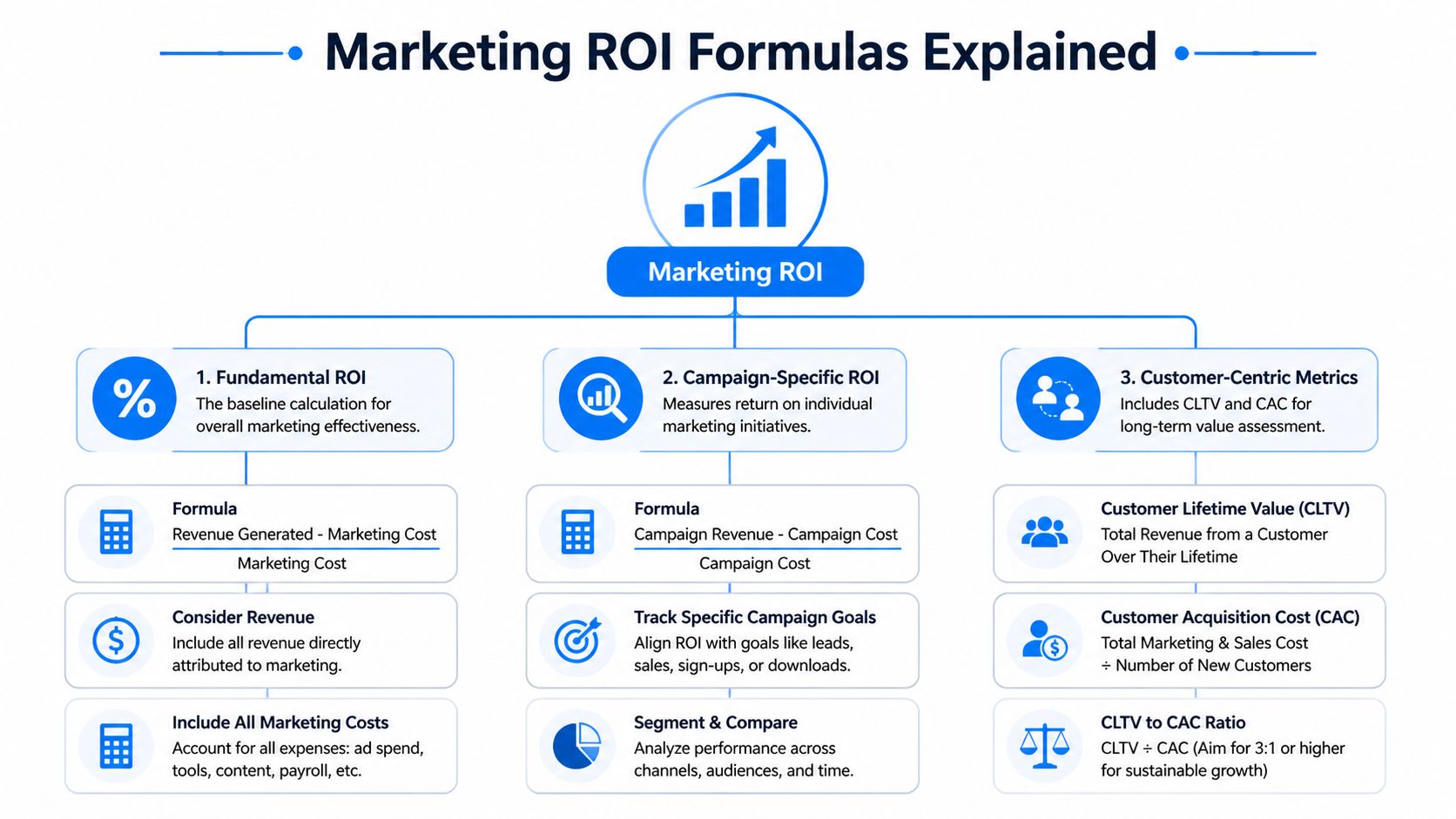
The standard marketing ROI formula is (Sales Growth - Marketing Investment) / Marketing Investment. A simple example shows how it works: a $1,000 campaign that generates $5,000 in sales has a 400% ROI (marketing ROI guide). Use that as your foundation, not your finished system.
Keep the base formula at the top
In your spreadsheet, reserve one summary area for headline ROI. Stakeholders still want the clean top-line number. Give it to them.
Your core fields should be:
- Total marketing investment
- Total attributed sales growth
- ROI percentage
That summary is what finance, leadership, and channel owners will check first. But for newsletter programs, it’s only the first layer.
Add campaign-specific formulas underneath
A newsletter operator needs more than one answer. One send can be profitable while the overall program lags, or the reverse can be true.
Use a second layer for campaign-level math:
- Campaign ROI = (Campaign Revenue - Campaign Cost) / Campaign Cost × 100
- Cost per new subscriber
- Cost per engaged subscriber
- Revenue per subscriber
- Revenue per engaged subscriber
“Engaged subscriber” needs a clear internal definition. Keep it operational. For example, define it by actions your team already trusts, such as meaningful opens, clicks, conversions, or repeated activity over a chosen period. The exact threshold will vary by business, so your calculator should make that definition editable.
Use customer-centric metrics for B2B reality
For a newsletter that supports long cycles, customer-centric metrics are what stop you from cutting a useful channel too early.
Track:
- CAC: How much you spend to acquire a customer from newsletter-influenced activity
- LTV: The revenue value you expect over the customer relationship
- LTV to CAC relationship: A quick check on whether subscriber acquisition economics are sensible
If your newsletter mostly nurtures rather than sources demand, CAC alone won’t tell the story. Pair it with revenue per engaged subscriber and influenced opportunity value.
A newsletter can be expensive at the top of the funnel and still be one of your cheapest ways to create pipeline later.
A lot of content teams also need a bridge between editorial effort and commercial return. For that angle, Sight AI content ROI insights are useful reading because they frame ROI in terms teams can apply across owned channels, not just ads.
A clean formula stack
Think of your calculator in layers, not one giant tab.
Layer
Purpose
Headline ROI
Executive summary for total return
Campaign ROI
Performance of each newsletter send or series
Subscriber economics
Cost and value of acquisition and engagement
Customer economics
CAC, LTV, and long-term revenue logic
That structure keeps the math readable. It also makes reviews easier because people can see where disagreement lives. Usually it’s not in the formula. It’s in the attribution and value assumptions.
How to Build a Practical Calculator in a Spreadsheet
The fastest way to get a working model is to build a spreadsheet you can explain out loud to sales, finance, and content without translating jargon. If they can’t follow it, they won’t trust it.

A strong B2B newsletter calculator can be built in a spreadsheet by creating Current State and With Platform columns, then modeling benefits like LTV from new subscribers against costs. Validated benchmarks cited in the product marketing guide show B2B newsletters can achieve 241-400% ROI, and GTM teams using these tools can see 2-3x faster deal cycles (6-step ROI calculator guide).
Use a two-column operating model
I like a side-by-side sheet because it forces the team to compare reality against the proposed change. In Google Sheets or Excel, start with two main columns:
Row
Current State
With Platform
Subscriber growth
Engaged subscribers
Cost per subscriber
Cost per engaged subscriber
Opportunities influenced
Revenue influenced
Total cost
ROI
The sheet becomes much more useful when every row answers a business question. “Cost per engaged subscriber” is better than “engagement cost metric” because nobody has to guess what it means.
Build the inputs first
Set up one tab called Inputs. Keep this separate from the final dashboard.
Your inputs should include:
- Acquisition inputs: subscriber growth from organic, paid, partnerships, or forms
- Engagement inputs: engaged subscriber count based on your internal definition
- Revenue inputs: influenced opportunities, closed revenue, sponsorship revenue if relevant
- Cost inputs: platform fees, creative, labor, paid growth costs, and any monetization tooling
- Assumption inputs: attribution window, average customer value basis, and engagement criteria
For calculations that rely on relationships between variables, a method like regression analysis in Excel can help you test whether engagement patterns relate to downstream conversion in your own data.
Write formulas in plain English
Most spreadsheet errors happen because teams bury logic in hard-to-audit formulas. Add helper text next to each formula area.
Examples:
- Total Cost = all newsletter program costs for the selected period
- Attributed Return = direct revenue + influenced revenue + sponsorship revenue
- ROI = (Attributed Return - Total Cost) / Total Cost × 100
- Cost per Engaged Subscriber = Total Cost / Engaged Subscribers
- Revenue per Engaged Subscriber = Attributed Return / Engaged Subscribers
If you need to estimate influenced revenue, create a separate assumption cell instead of hard-coding it into one formula. That way sales and finance can review the assumption without digging through the sheet.
Make the sheet usable by non-analysts
Add color coding. Lock formula cells. Leave input cells open. Use notes so a marketer can hover and understand what belongs in each field.
A practical setup looks like this:
- Blue cells for inputs
Marketers update these weekly or monthly.
- Gray cells for formulas
Nobody edits these manually.
- Green cells for outputs
Leadership sees ROI, subscriber economics, and influenced return.
- One assumptions box
Keep attribution rules and engagement definitions in one visible place.
Here’s a short walkthrough format that works well for team onboarding:
A simple operating example
Take a fictional B2B SaaS team running a weekly newsletter. Their old report showed opens, clicks, and unsubscribes. That told them whether the send performed, but not whether the program paid for itself.
The new spreadsheet changes the conversation. They enter total monthly newsletter costs, new subscribers, engaged subscribers, influenced opportunities, and any revenue they can responsibly attribute within their chosen window. The output shows not just top-line ROI, but also whether the team is paying too much for low-quality subscriber growth.
If the sheet says subscriber growth is up but revenue per engaged subscriber is flat or falling, the program isn’t scaling well. It’s just getting larger.
That’s where a newsletter-focused roi calculator marketing model becomes operational. It stops the team from celebrating list growth that sales can’t use, and it helps them defend investment in sends that support revenue over a longer cycle.
Choosing an Attribution Model That Reveals True Value
Attribution isn’t an accounting exercise. It’s a budgeting decision disguised as math. The model you choose determines which channels look efficient and which ones look disposable.
For B2B newsletters, that matters because newsletters often sit in the middle of the journey. They’re rarely the first touch. They’re often not the final conversion event either. But they keep accounts engaged, move prospects back to the site, and create repeated exposure that shortens the path to a sales conversation.
Why first-touch and last-touch distort newsletter ROI
First-touch attribution gives all credit to the original entry point. Good for awareness reporting. Bad for measuring nurture.
Last-touch attribution gives all credit to the final interaction before conversion. Good for quick reporting. Bad for any channel that does education, reinforcement, or reactivation.
A newsletter usually loses under both models. Under first-touch, it looks like a follower. Under last-touch, it gets ignored unless the final click came directly from an email.
Here’s the practical issue:
Model
What it gets right
What it hides for newsletters
First-touch
Original demand source
Mid-funnel influence
Last-touch
Closing interaction
Ongoing nurture value
Linear
Shared contribution
Differences in touchpoint impact
Time-decay
Stronger recent weighting
Early educational value can still be undercounted
What usually works better
For most B2B newsletter programs, a linear or time-decay model is more useful than a single-touch model. Linear gives newsletters some deserved credit when they repeatedly appear in journeys. Time-decay works well when your team believes recent touches should count more, but still wants to preserve some recognition for earlier engagement.
I’d avoid turning attribution into a philosophical debate. Pick one model, define the rule clearly, and use it consistently for a reporting period. Then compare results against pipeline quality and sales feedback.
A decision test for your team
Use these questions before locking the model:
- Do buyers interact with multiple channels before converting? If yes, single-touch will likely mislead you.
- Does the newsletter nurture existing demand more than it creates net-new demand? If yes, last-touch will understate it.
- Does sales use newsletter engagement as a signal? If yes, mid-funnel credit matters.
- Can your systems support a complex model? If not, use the simplest model your team can run consistently.
A flawed model used consistently is often more useful than an advanced model nobody trusts.
The point isn’t perfect attribution. The point is avoiding obvious under-credit for channels that influence revenue without owning the final click.
Automate Your Inputs with Breaker Analytics
Manual spreadsheets are useful because they force discipline. They’re also fragile. Someone edits the wrong cell, forgets to update labor costs, changes a naming convention, or leaves engagement exports sitting in a download folder for two weeks. The calculator still exists, but the numbers stop being current enough to guide decisions.
That’s when automation becomes less of a convenience and more of a control system.
What should be automated first
The first layer to automate is input collection. Don’t start with elaborate dashboards. Start with the fields your spreadsheet depends on most.
Automate or centralize:
- Subscriber growth data: especially if you’re mixing organic and paid list building
- Engagement data: opens, clicks, and whatever your team classifies as engaged subscribers
- Send-level cost records: platform fees and campaign-specific spend
- Revenue handoff data: CRM status, opportunity creation, and closed-won mapping where available
If your team is building broader no-code processes around reporting and handoffs, an AI automation agency can be a useful external partner for workflow design. The key is to automate collection before you automate interpretation.
Where newsletter platforms help
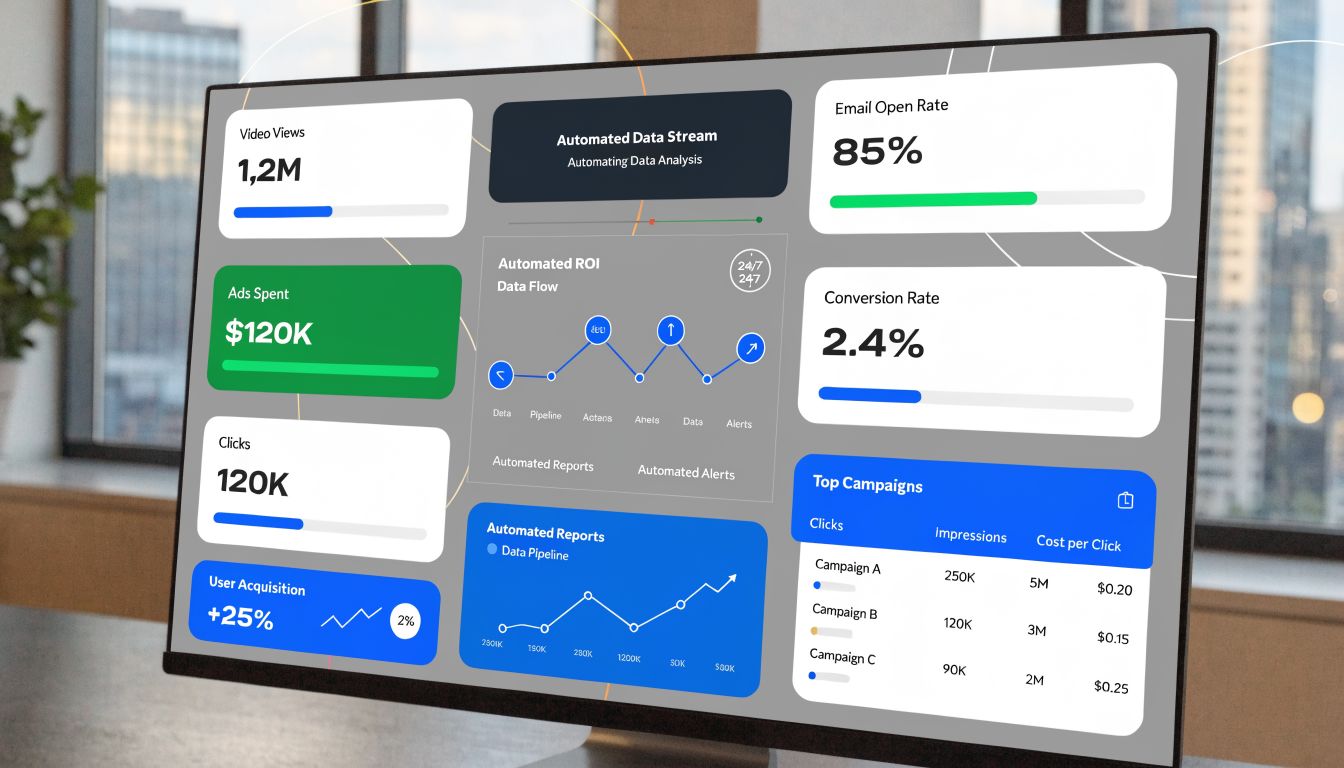
In this context, a platform such as Breaker fits naturally. Breaker combines email sending with automatic list expansion for B2B audiences, tracks subscriber growth and engagement, supports CRM integrations, and surfaces ROI-related analytics in real time. For a newsletter-focused calculator, that reduces the manual work needed to keep inputs fresh.
The main operational gain isn’t that a dashboard looks nicer than a spreadsheet. It’s that the dashboard can feed the spreadsheet, or replace parts of it, without requiring someone to reassemble the same dataset after every send.
Keep the workflow simple
A clean workflow looks like this:
- Capture send performance automatically
Pull opens, clicks, and subscriber changes into a reporting layer.
- Sync revenue context
Connect newsletter activity with CRM stages or revenue fields where your stack allows it.
- Apply the same attribution logic every time
Don’t let each report invent a new model.
- Review outliers, not every row
Teams waste time checking routine sends. Focus on sends with unusual efficiency, weak engagement, or revenue spikes.
You can document that process in a repeatable system using a workflow playbook like this guide to create a workflow.
Automation doesn’t solve a bad model. It makes a good model easier to trust.
This is the progression for roi calculator marketing in B2B newsletters. Start with a transparent spreadsheet. Prove the logic. Tighten the attribution rules. Then automate the inputs so the team can spend less time assembling numbers and more time acting on them.
If your team wants a cleaner way to turn newsletter sends into measurable pipeline and revenue reporting, Breaker is worth evaluating. It combines sending, list expansion, deliverability controls, analytics, and CRM-friendly workflows in one platform, which makes newsletter ROI easier to model without rebuilding the same spreadsheet every reporting cycle.
Keep reading
All articles10 Best Email Newsletter Examples of 2026
See 10 real email newsletter examples from Morning Brew, NYT Cooking & more, plus the 5 elements that make them work in 2026. Get the checklist.
How to Build an Email Automation Workflow: Steps, Triggers & Data Model
Learn triggers, conditions, splits, and actions to build reliable email automation workflows, plus a 10-step process and platform comparisons.
Why Scraped Email Lists Fail GDPR Compliance in Any ESP
Scraped email lists break GDPR Articles 6 & 7, risk €20M fines, and get your ESP account suspended. Learn the legal reality and the compliant path forward.