
Sales Automation Software: A Guide for Growth Teams in 2026
Learn how sales automation software drives revenue. Our guide covers features, CRM integration, ROI, and a playbook for B2B growth teams using newsletters.
Your team is probably already doing the hard part. You publish the newsletter, drive the click, capture a form fill, and generate real interest. Then the handoff breaks.
A high-intent subscriber clicks a demo link on Tuesday morning. Someone on the growth team exports a CSV on Wednesday afternoon. A sales rep reaches out on Friday, without context on what the person clicked, what issue they cared about, or which campaign drove the response. By then, the buyer has either gone cold or booked with a faster competitor.
That gap is where revenue leaks. Not because demand is weak, but because the motion between marketing engagement and sales action is still manual.
Sales automation software fixes that gap when it's deployed correctly. It doesn't matter because it's trendy. It matters because digital channels are now where most B2B buying interactions happen, and manual follow-up can't keep pace. The category itself reflects that shift. The global sales automation market grew from $7.8 billion in 2019 to a projected $16 billion by 2025, while digital channels are projected to account for 80% of all B2B sales engagements in that same year, according to Kixie's 2025 sales automation statistics roundup.
For growth teams, that changes the job. Newsletter performance can't be judged only on opens and clicks. It has to connect to rep response, meeting creation, pipeline movement, and closed revenue. Sales automation software is the connective tissue that makes that possible.
Introduction From Manual Chaos to Automated Pipeline
Manual sales follow-up usually fails in quiet ways. No one notices a hot lead sitting unassigned for a few hours. No one sees the spreadsheet column that didn't get updated. No one catches the rep who missed a task because the activity lived in one tool while the customer history lived in another.
The result is a funnel that looks healthy at the top and underperforms at the bottom. Marketing says leads are coming in. Sales says the leads aren't converting. RevOps spends the quarter trying to reconcile two versions of the same story.
Where the leak usually starts
For newsletter-led acquisition, the most common leak isn't demand generation. It's handoff design.
A subscriber clicks a pricing-related CTA, downloads a buyer guide, or requests a call. That action should trigger the next best sales step immediately. Instead, many teams still rely on inbox monitoring, Slack alerts, manual assignment, and CRM cleanup after the fact.
That creates three problems:
- Speed drops: Reps don't act while intent is fresh.
- Context disappears: Campaign engagement data never makes it into the seller's workflow.
- Accountability gets blurry: No one can trace whether the issue was lead quality, routing, or follow-up execution.
Practical rule: If a lead can show buying intent without a system automatically changing who does what next, the process isn't built for scale.
Sales automation software closes that gap by turning engagement signals into operational action. It routes, scores, queues, reminds, enriches, and records. More importantly, it does those things in sequence, so the system behaves like a coordinated revenue motion instead of a set of disconnected tasks.
Why this is now baseline
This isn't just for enterprise teams with large operations functions. It's becoming the default operating layer for any B2B team that depends on digital engagement to create pipeline. If your newsletter, website, webinars, and outbound touches all generate demand, you need a system that decides what happens after each signal.
Without that layer, you're asking people to function like middleware. That never scales well. People are good at judgment, objection handling, and relationship building. They aren't good at remembering every follow-up rule across every source, segment, and timing window.
Sales automation software works best when it removes that burden and makes the path from engaged prospect to live opportunity much shorter.
What Exactly Is Sales Automation Software
Sales automation software is the action layer inside your revenue stack. If your CRM is the system of record and your marketing automation platform is the broadcast system, sales automation software is the mechanism that decides what happens next.
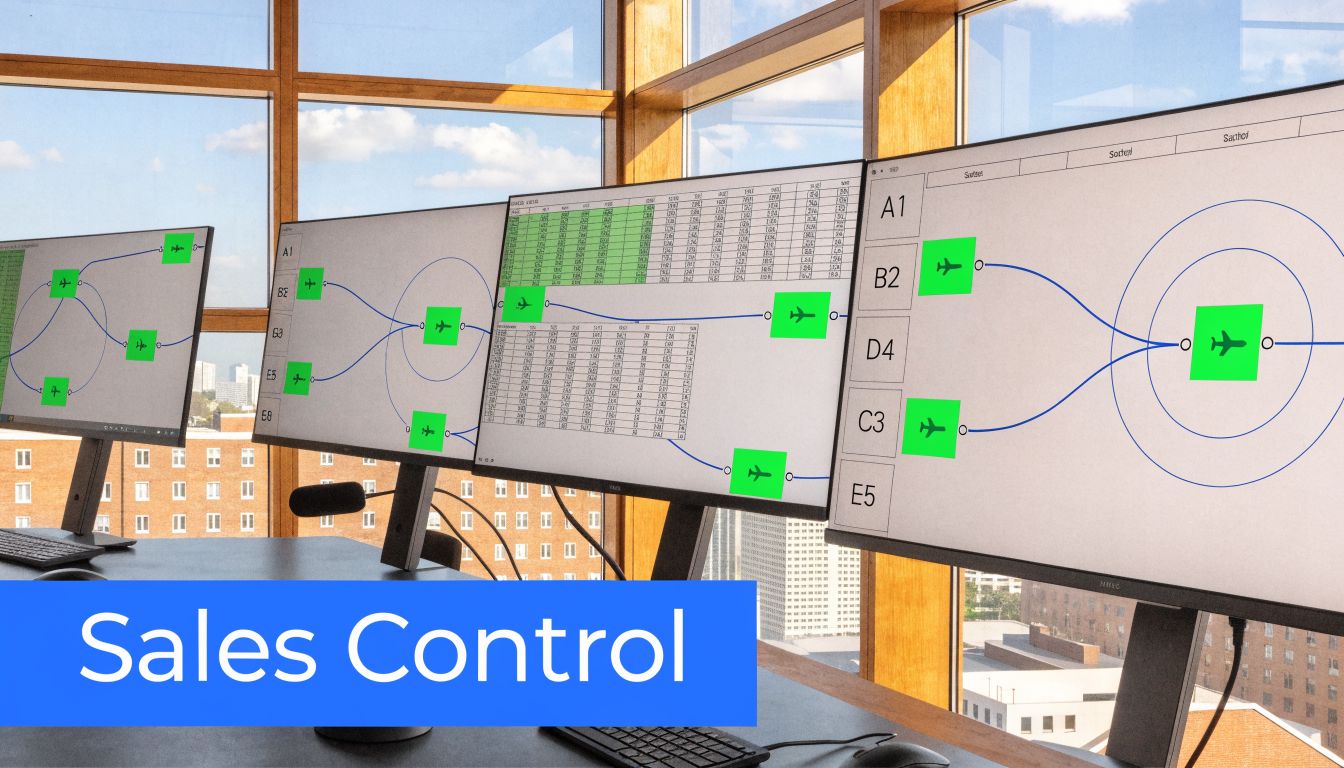
The easiest way to think about it is air traffic control. Planes still fly. Pilots still make judgment calls. But the tower manages timing, routing, priority, and safe handoffs so the whole system doesn't collapse into delays and collisions.
What it does in plain terms
Sales automation software handles repeatable selling tasks that need to happen consistently and fast. That usually includes:
- Lead routing: Sending a new qualified lead to the right rep based on territory, segment, account ownership, or product line.
- Task creation: Generating next-step actions when a contact books a meeting, replies, visits a key page, or reaches a scoring threshold.
- Sequencing: Enrolling prospects into follow-up cadences across email, call, and meeting reminders.
- Field updates: Syncing lifecycle changes, activity logs, statuses, and ownership changes back into the CRM.
- Alerts: Notifying reps and managers when deals stall, engagement spikes, or SLA windows are at risk.
The key distinction is that sales automation software doesn't just store data. It uses data to trigger behavior.
How it differs from CRM and marketing automation
Teams often buy the wrong tool because they confuse categories.
System
Main job
Common failure if used alone
CRM
Stores account, contact, and opportunity history
Becomes a database that reps update after the fact
Marketing automation
Sends broad campaigns and nurtures audiences at scale
Stops at the handoff and doesn't drive rep action well
Sales automation software
Turns signals into assignments, sequences, tasks, and pipeline movement
Underperforms if it isn't connected deeply to CRM and marketing data
A CRM can tell you that a contact exists. Marketing automation can tell you that the contact clicked. Sales automation software decides whether that click should create a task, route to an AE, enroll into a sequence, or escalate to a manager.
That's why teams with newsletter-led acquisition need it. Newsletters create rich intent signals, but those signals only matter if someone acts on them in time and with context.
If the CRM itself is the weak link, fix that first. Our outbound sales CRM playbook covers the data model, stage design, and sequence setup that sales automation software depends on.
Why the middle layer matters more than teams expect
The practical issue isn't whether your team can send emails. It can. The issue is whether your system can coordinate timing and context across channels without relying on memory.
In regulated or complex industries, this middle layer becomes even more important. Financial institutions, for example, often need a controlled path from inbound engagement to documented sales follow-up. If you're evaluating that kind of operating model, this piece on driving bank growth with automation is useful because it shows how automation supports repeatable execution, not just outreach volume.
Sales automation software should reduce decision fatigue for reps. If the platform creates more clicks, more tab switching, or more cleanup work, it's solving the wrong problem.
The best systems feel almost invisible to the seller. The rep sees the right lead, the right context, the right next action, and the right timing. Everything else happens in the background.
Core Features Versus Advanced AI Capabilities
Teams often buy sales automation software in the wrong order. They chase AI demos before they lock in the fundamentals. That's like installing a flight computer before you've built a runway.
Foundational features create consistency. Advanced capabilities amplify impact. If the first layer is weak, the second just automates confusion.

The core features every team needs first
A useful platform should handle the mechanics of moving a lead through the early and middle stages of the pipeline. Not elegantly in a demo. Reliably in production.
Here are the basics that matter most.
- Sequencing and follow-up logic
The software should let reps run structured outreach without building every step manually. That means enrollment rules, timed follow-ups, reply detection, and the ability to pause or reroute sequences when a buyer engages.
- Lead assignment and routing
Good routing is less about fairness and more about speed and fit. If a high-intent subscriber clicks a commercial CTA, the system should know who owns the account, whether the lead belongs to SMB or mid-market, and whether a current opportunity already exists.
- CRM sync
If activities, statuses, and ownership changes don't sync correctly, reporting breaks. Reps stop trusting the system. Managers start asking for manual updates. At that point, the automation layer becomes admin theater.
- Task and SLA management
The tool should create action queues tied to actual buyer behavior, not generic reminders. A rep should know which leads need attention now, which can wait, and which have already been covered by an automated step.
- Basic reporting
You don't need an elaborate dashboard on day one. You do need visibility into whether the system is firing correctly, whether reps are acting on routed leads, and where leads are stalling.
What advanced AI changes
Once the basics work, AI starts to matter. Not because it's impressive, but because it can surface patterns humans won't spot quickly enough in a live pipeline.
The most useful AI capabilities in sales automation software usually fall into three buckets:
AI capability
What it helps with
What to watch for
Predictive lead scoring
Prioritizes leads based on fit and behavior
Bad CRM data will distort scores
Conversation intelligence
Pulls patterns from calls and meetings
Summaries are only useful if tied to actions
Pipeline risk detection
Flags deals that are likely to stall or slip
False positives rise when activity data is patchy
A strong example is pipeline risk detection. Enterprise platforms now use AI to identify at-risk deals by analyzing real-time buyer engagement patterns, and teams using platforms with these predictive capabilities are 65% more likely to hit their quotas than teams without such mobile and AI features, according to Highspot's analysis of sales automation in 2026.
That matters because stalled deals usually don't announce themselves. They fade. Response times widen, meeting quality drops, the champion goes quiet, and the rep keeps forecasting optimistically because nothing looks obviously broken. AI can catch those changes earlier if the activity data is complete.
A useful AI feature should change rep behavior within the same day. If it only creates another dashboard for leadership, it isn't helping the field.
Where teams overestimate AI
AI is not a substitute for workflow design. It won't fix unclear handoffs, bad segmentation, or a messy CRM. It will just make those flaws move faster.
That's especially true for newsletter-led growth teams. An AI scoring model may identify a subscriber as high intent, but if the clickstream isn't mapped to meaningful sales actions, the insight goes nowhere. That's why teams exploring AI-driven nurture should think about the full system, not just message generation. This guide to AI-powered email marketing is useful in that context because it focuses on how engagement signals become operational inputs, not just campaign outputs.
For specialized go-to-market structures, vertical AI layers can also be useful. Franchise sales teams, for example, have unique routing, territory, and nurturing requirements. An innovative AI platform for franchisors is a good example of how AI needs to align with the sales model, not sit on top of it as a generic assistant.
A simple maturity test
If you're evaluating tools, separate needs into two lists.
Buy for now
- Routing
- sequencing
- CRM sync
- rep tasking
- manager visibility
Buy for later
- predictive scoring
- risk alerts
- coaching insights
- AI summarization
- next-best-action recommendations
That distinction saves money and avoids tool regret. Many teams don't need more intelligence first. They need less friction.
How to Integrate Sales Automation in a B2B Growth Workflow
A good integration flow should feel boring. Signals come in, the system reacts, the right person gets context, and no one scrambles. That's the standard.
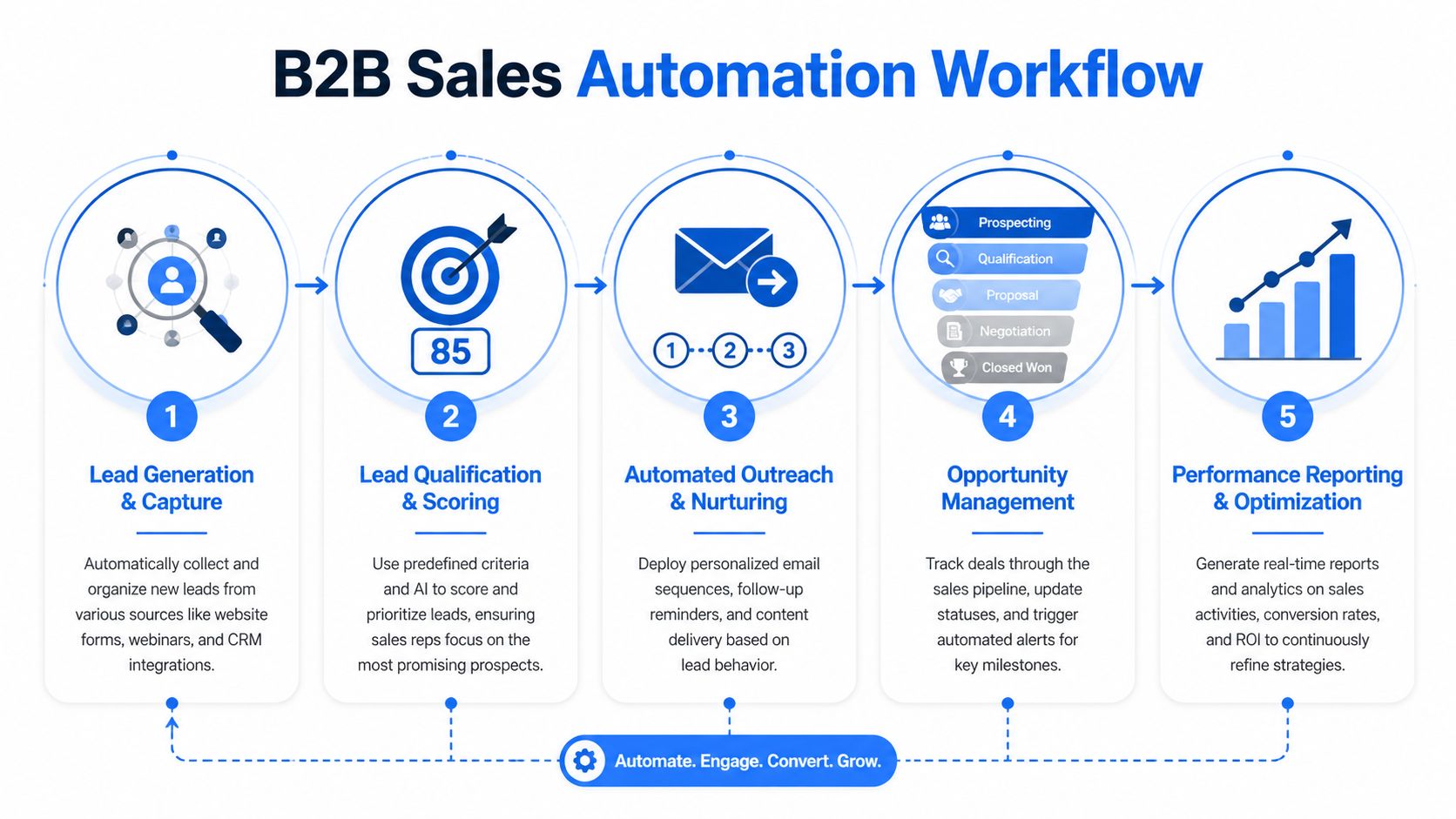
This is what a clean B2B growth workflow looks like when newsletter engagement and sales execution are connected.
The workflow from click to pipeline
A prospect reads your newsletter on Tuesday morning. They click a CTA related to pricing, migration, or a demo. That click tells you more than a generic pageview ever could. It signals commercial curiosity.
From there, the system should run a sequence like this:
- Capture the engagement event
The contact's click is logged against the person and, ideally, associated with the account. UTM data, campaign ID, and content topic should come through with it.
- Verify and enrich the record
If the contact already exists, the system updates the profile and appends the new behavior. If it's a new lead, the system creates the record and fills in missing company or persona fields where possible.
- Score and classify the lead
Not every click deserves the same response. A click to a thought leadership piece may keep someone in nurture. A click to pricing or a demo page may trigger immediate sales review.
- Route to the right owner
The system checks territory, account owner, company size, product fit, and open opportunities. Then it assigns the lead to the right rep or queue.
- Trigger the next action
This could be a rep task, a personalized sequence, an internal alert, or a meeting request. The key is that the action matches the intent signal.
- Write everything back to CRM
Without this step, attribution and accountability disappear. Marketing sees engagement. Sales sees a lead. RevOps sees a reconciliation headache.
What this looks like in practice
A common example is a subscriber who clicks a newsletter link about implementation, then visits the website again later that day.
The sales automation software can:
- Create urgency: Mark the lead for same-day review if the account fits your ICP.
- Preserve context: Show the rep which newsletter issue, CTA, and content topic drove the action.
- Start outreach: Enroll the lead in a cadence that references the business problem implied by the click.
- Avoid duplicate work: Suppress the sequence if an AE is already working the account or if an opportunity is active.
That's the difference between generic follow-up and relevant follow-up. One says, "Wanted to reach out and introduce myself." The other says, "You were looking at implementation planning. Here's the fastest way teams usually evaluate that."
The strongest automation workflows don't feel automated to the buyer. They feel timely.
A documented workflow also makes cross-functional debugging much easier. If lead quality drops, you can inspect the scoring and routing logic. If meetings aren't converting, you can review whether the rep got enough context. If the sales team says leads are weak, you can check whether the engagement threshold was too loose.
For teams building the process itself, this guide on how to create a workflow is a practical companion because it forces clear decisions around triggers, ownership, and expected outputs.
Why bidirectional CRM integration is non-negotiable
The CRM can't be a dead-end archive. It has to function as a live coordination system.
That means your sales automation platform should both read from and write to the CRM. It needs to pull account ownership, opportunity status, and contact history. It also needs to push back activities, sequence status, lead stage changes, and follow-up outcomes.
Without that bidirectional sync, you'll run into familiar failure modes:
Failure point
What happens
One-way sync
Reps act in the sales tool, but CRM reports stay incomplete
Loose field mapping
Lead stages drift and routing breaks
No account-level logic
Contacts get worked in isolation with no account context
No suppression rules
Buyers receive duplicate or contradictory outreach
A lot of teams underestimate suppression rules. If a subscriber is already in an active sales cycle, a newsletter click should usually enrich rep context, not trigger a separate generic sequence. Good automation software knows when to escalate and when to stay out of the way.
A quick visual helps if you're mapping your own flow. This walkthrough is a useful reference:
The goal isn't to automate every motion. It's to automate the handoffs and repetitive decisions that slow down pipeline creation.
A Buyer’s Checklist for Choosing the Right Software
Most teams don't buy too little software. They buy too much software, too early, for the wrong use case.
That mistake shows up most often in the mid-market. According to McKinsey's guidance on sales automation, only one in four companies has automated at least one sales process, and mid-market firms are often underserved because enterprise tools bring high costs and overbuilt feature sets. The same source notes that targeted automation can boost efficiency by 10% to 15% and sales by up to 10% when it's matched to the right use case.
That last part matters more than the software category itself. The right choice isn't the most advanced platform. It's the one that fits your workflow, your data maturity, and your team's ability to adopt it.
What growth teams should evaluate first
If your pipeline depends on newsletters, forms, webinars, partner referrals, and outbound touches working together, use this checklist before you buy anything.
Evaluation Criteria
Key Question
Why It Matters for Growth Teams
CRM integration depth
Does it read and write key objects, activities, and ownership fields reliably?
Weak CRM sync breaks attribution, routing, and reporting
Newsletter and intent signal compatibility
Can it use engagement events as triggers for scoring, routing, or sequences?
Growth teams need campaign behavior to drive sales action
Workflow flexibility
Can RevOps change rules without a major services engagement?
You need room to adapt segments, thresholds, and handoffs
Ease of use for reps
Will sellers actually work from it each day?
Adoption matters more than feature count
Suppression and deduplication logic
Can it prevent duplicate outreach and conflicting ownership?
Essential when contacts engage across multiple channels
Reporting quality
Can leadership trace activity to meetings, pipeline, and revenue outcomes?
Otherwise the tool becomes a cost center with vague value
Scalability
Can it support additional teams, territories, or motions later?
Replatforming is expensive and disruptive
Implementation burden
How much cleanup, consulting, and admin maintenance will it require?
Overly heavy systems stall before launch
Questions vendors should answer clearly
A vendor demo is usually polished. Your evaluation shouldn't be.
Ask direct operational questions:
- What breaks if CRM data is incomplete?
You want an honest answer here, not a polished one.
- How are newsletter clicks, web events, and form fills turned into rep actions?
If the answer is vague, the workflow probably depends on custom work.
- What can RevOps control internally?
If every rule change requires support tickets, the software will slow you down later.
- How are active opportunities protected from duplicate automation?
This reveals whether the platform understands account context.
Buy for the bottleneck you have now. Don't buy for a future org chart you may never build.
The practical buying stance
For most growth-focused teams, the sweet spot is software that does a few things very well: trigger-based actions, reliable sync, usable routing logic, and clear rep workflows.
Skip the temptation to buy the broadest suite unless you have the operating discipline to use it. In many cases, a lighter system with stronger adoption will outperform a heavyweight platform with deeper menus and lower daily usage.
Good buying decisions in sales automation software come from respecting trade-offs. More features often mean more setup, more training, more governance, and more places for data quality issues to hide.
Your Implementation Playbook and Measuring True ROI
Implementation fails when teams try to automate the whole sales process at once. The cleaner approach is narrower. Start with one painful handoff, make it reliable, prove the output, then expand.
That approach works because sales automation software is operational infrastructure. Infrastructure should be phased in, tested under load, and measured by outcomes, not by how many workflows you built.

A phased rollout that won't break the team
Start with the process that causes the most obvious revenue leakage. For many B2B growth teams, that's inbound lead follow-up from newsletter clicks, demo requests, or high-intent content engagement.
A practical rollout usually looks like this:
Phase one cleans the foundation
Before you automate anything, fix the basic records and rules.
- Clean ownership fields: If account owners and territories are wrong, routing will be wrong.
- Normalize lifecycle stages: Sales and marketing need the same definitions for qualification and handoff.
- Map trigger events: Decide which actions matter enough to create tasks, alerts, or sequence enrollment.
- Set suppression logic: Protect active opportunities and existing customer motions from accidental overlap.
If you skip this step, you'll automate confusion.
Phase two launches a small pilot
Pick a narrow use case and a limited group of users. A pilot should be easy to inspect.
Use a small cohort of reps and track:
- whether leads route correctly
- whether tasks appear in time
- whether outreach reflects the right context
- whether CRM records stay clean after activity occurs
The point of a pilot isn't only technical validation. It's behavioral validation. You want to know whether reps trust the system enough to work from it.
Phase three expands with guardrails
Once the pilot is stable, extend the logic to adjacent motions. That might include webinar follow-up, trial-to-sales handoff, or expansion signals from existing accounts.
Document each workflow with three basic components:
- Trigger
- System action
- Human owner
That simple format keeps automation understandable. If a rep or manager can't explain why a task appeared, trust drops fast.
Build workflows that a frontline manager can audit in a few minutes. Complexity hidden in the background usually becomes tomorrow's operations problem.
Measuring ROI without getting lost in vanity metrics
You don't need a giant analytics build to prove value. You do need a small set of metrics that tie operational changes to pipeline and revenue movement.
Organizations using full-featured sales automation tools report a 14.5% increase in sales productivity, and top-performing teams see 27% higher close rates, 20% increases in pipeline conversion, and 30% larger deal sizes, according to MarketsandMarkets research on sales automation.
Those benchmarks are useful for direction, but your own ROI case should come from your workflow data.
Use four measurement buckets.
KPI category
What to track
Why it matters
Activity
lead response timing, task completion, sequence enrollment, meeting creation
Confirms the system is producing action
Efficiency
manual touches avoided, admin cleanup reduced, routing speed, rep time spent in follow-up workflows
Shows whether friction is actually being removed
Productivity
qualified meetings per rep, opportunities created, pipeline per rep
Reveals whether effort is translating into selling output
Revenue
conversion through stages, win patterns, deal size movement
Connects automation to commercial impact
What teams should report monthly
A monthly review should answer a few plain questions:
- Did high-intent leads get worked faster?
- Did reps book more qualified meetings from the same demand sources?
- Did pipeline conversion improve in the automated motion?
- Did larger or better-fit opportunities appear more often because context improved?
If you need a quick model for the commercial side, a ROI calculator for growth teams can help structure assumptions around output, efficiency, and revenue impact before you scale the rollout further.
The best implementation playbooks stay boring after launch. They don't rely on heroics. They turn one weak handoff into a dependable operating rhythm.
Common Sales Automation Pitfalls and How to Avoid Them
Sales automation software doesn't usually fail because the idea is wrong. It fails because teams automate a messy process, trust poor data, or ask reps to use a system that makes their day harder.
According to XAnge's analysis of AI-enabled sales tech, a major pitfall is poor data hygiene, and only 25% of firms automate any sales process because siloed implementations amplify noise instead of insight. That's the operational reality behind a lot of disappointing rollouts.
Problem one is automating a broken process
If your current handoff logic is unclear, automation will make the weakness more visible, not less.
Solution: map the manual process first. Identify trigger, owner, SLA, and desired outcome. Then automate only the repeatable parts. If the human team can't agree on what should happen after a high-intent action, the software won't solve that disagreement.
Problem two is poor CRM hygiene
This is the classic garbage-in problem. Wrong owners, duplicate contacts, stale lifecycle stages, and inconsistent account names will break routing and scoring.
Solution: treat CRM cleanup as part of implementation, not a side project. Lock down required fields, standardize stage definitions, and audit duplicate logic before launch.
Clean data isn't an IT preference. It's the fuel source for the workflow.
Problem three is over-automation
A lot of teams swing from manual chaos to robotic outreach. Every signal triggers a sequence. Every sequence sounds the same. Buyers get fast responses that feel generic.
Solution: automate timing and tasking, then let reps personalize the message where it matters. The system should hand the seller context, not replace judgment. Triggered outreach works best when the rep references the actual topic, use case, or pain point behind the engagement.
Problem four is weak rep adoption
A platform can be technically live and operationally dead. If reps ignore tasks, work from their inboxes, or update CRM later from memory, your reporting and follow-up both degrade.
Solution: make the tool useful on day one. Reps need to see better prioritization, not more admin. Use a pilot group, collect objections, and remove friction fast. Managers should inspect usage in pipeline reviews, not only in separate systems meetings.
A practical avoidance checklist
Before expanding any automation workflow, check these five items:
- Data is clean enough: Owners, stages, and key fields are trustworthy.
- Triggers are meaningful: Not every click should create sales work.
- Suppression rules exist: Active deals and current customers are protected.
- Rep workflow is simple: The next action is obvious.
- Management can audit outcomes: Failures can be traced without detective work.
Sales automation software works when it behaves like a disciplined operator in the background. It fails when it becomes another noisy layer the team has to manage manually.
Conclusion The Future is Augmented Selling
The best use of sales automation software isn't replacement. It's augmentation.
Reps shouldn't spend prime selling hours logging activity, chasing ownership questions, or guessing which engaged lead matters most. The system should handle the routing, reminders, sync, and signal processing so sellers can focus on discovery, objections, and deal strategy.
For growth teams, that's especially important when newsletters sit near the top of the funnel. Engagement only becomes revenue when the handoff is fast, contextual, and accountable. That's where sales automation software earns its place. It turns audience activity into pipeline motion.
Start with one broken handoff. Pick the place where intent is already visible and follow-up is still inconsistent. Automate that. Measure it. Tighten it. Then expand.
If your team uses newsletters to generate B2B demand, Breaker can help you create a stronger top-of-funnel signal stream before sales automation takes over. It combines email sending, audience growth, targeting, deliverability, and performance tracking so you can generate engaged subscribers and pass better intent into the rest of your revenue workflow.
Keep reading
All articlesNewsletter Agency Services: How Agencies Scale Client Newsletters
Managing multiple client newsletters? Learn what a true newsletter agency platform needs to prevent list mixing, voice drift, and invisible ROI.
Building Owned Audiences: Move Followers to Your Newsletter in 2026
Social platforms can vanish overnight. Learn how to convert Instagram, TikTok, and YouTube followers into a newsletter list you actually own.
Newsletter Analytics: Which Metrics Actually Matter in 2026
Open rate and clicks don't predict buyers. Learn the 7-step method to track click depth, recency, and topic affinity for a revenue-predictive intent score.