
Outbound Sales CRM: A Playbook for Growth Teams in 2026
Build a powerful outbound sales engine. This guide covers choosing, implementing, and optimizing your outbound sales CRM for predictable lead generation.
If you're rebuilding outbound right now, the symptoms usually look the same. Reps are working from a mix of CSVs, LinkedIn tabs, email tools, and half-updated deal records. Follow-ups slip. Good replies sit in inboxes too long. Leadership asks which campaigns create pipeline, and nobody trusts the answer.
That isn't a rep problem first. It's a system problem.
A strong outbound sales CRM fixes that by turning scattered activity into an operating model. It tells the team who fits the ICP, what happened on each touch, which signals matter, when to follow up, and whether outreach is producing meetings and revenue. It also provides a benefit often overlooked. It creates a bridge between sales activity and owned audience growth, especially when you connect CRM workflows to newsletter programs that keep warm accounts engaged long after a cold sequence ends.
Your Outbound CRM Is More Than a Database
Sales teams often inherit a CRM that behaves like storage. Contacts go in. Notes pile up. A few deals move through generic stages. Outbound sits off to the side in sequencing tools and spreadsheets.
That setup breaks as soon as volume rises or multiple reps touch the same accounts.
CRM usage is now standard across business markets. One industry roundup says 91% of companies with 10 or more employees use a CRM system, and it projects the market to reach $126.17 billion in 2026 after an estimated $112.91 billion in 2025. The practical takeaway is simpler than the market size. The CRM has become the single source of truth for how teams track contacted, replied, meeting booked, opportunity created, and closed, which is why modern outbound teams use it to measure outcomes instead of raw activity [LinkPoint360 CRM statistics].
What changes when the CRM becomes operational
When the CRM is configured correctly, it stops being a passive record and starts doing three jobs at once:
- It defines process: stage names, ownership rules, task triggers, and handoffs become explicit.
- It creates accountability: reps can't hide behind send volume when reply and meeting-set fields are visible.
- It connects execution to revenue: marketing, SDRs, AEs, and leadership can all work from the same record.
That shift matters most in outbound because outreach creates a lot of noise before it creates signal. A CRM that only logs activity gives you more noise. A CRM built around stage progression gives you decisions.
Practical rule: If a field doesn't help a rep take the next action or help a manager diagnose conversion, it probably shouldn't be required.
The real job of an outbound sales CRM
A useful outbound sales CRM answers questions in minutes:
Question
CRM should show
Which accounts should reps touch today?
prioritized lists by stage, owner, and signals
Where is conversion breaking?
reply, meeting, opportunity, and close progression
Who needs a follow-up now?
overdue tasks and sequence-state exceptions
Which messages deserve more volume?
variant-level outcome data
Which accounts should move to nurture?
non-responsive but engaged records
That is the difference between a database and an operating system.
Defining Your Outbound CRM Requirements
Buying a CRM before writing requirements is how teams end up paying for features they won't use and missing the ones they need. Outbound has very little tolerance for sloppy tooling because the baseline economics are hard. Only 0.4% to 0.6% of outbound sales emails receive positive responses, typical sales email open rates average 23.9%, and 48% of salespeople never make a single follow-up attempt. Lead response under 10 minutes is also cited as directly influencing conversion, which is why connected systems and automatic logging matter so much in practice [Tendril outbound sales benchmarks].
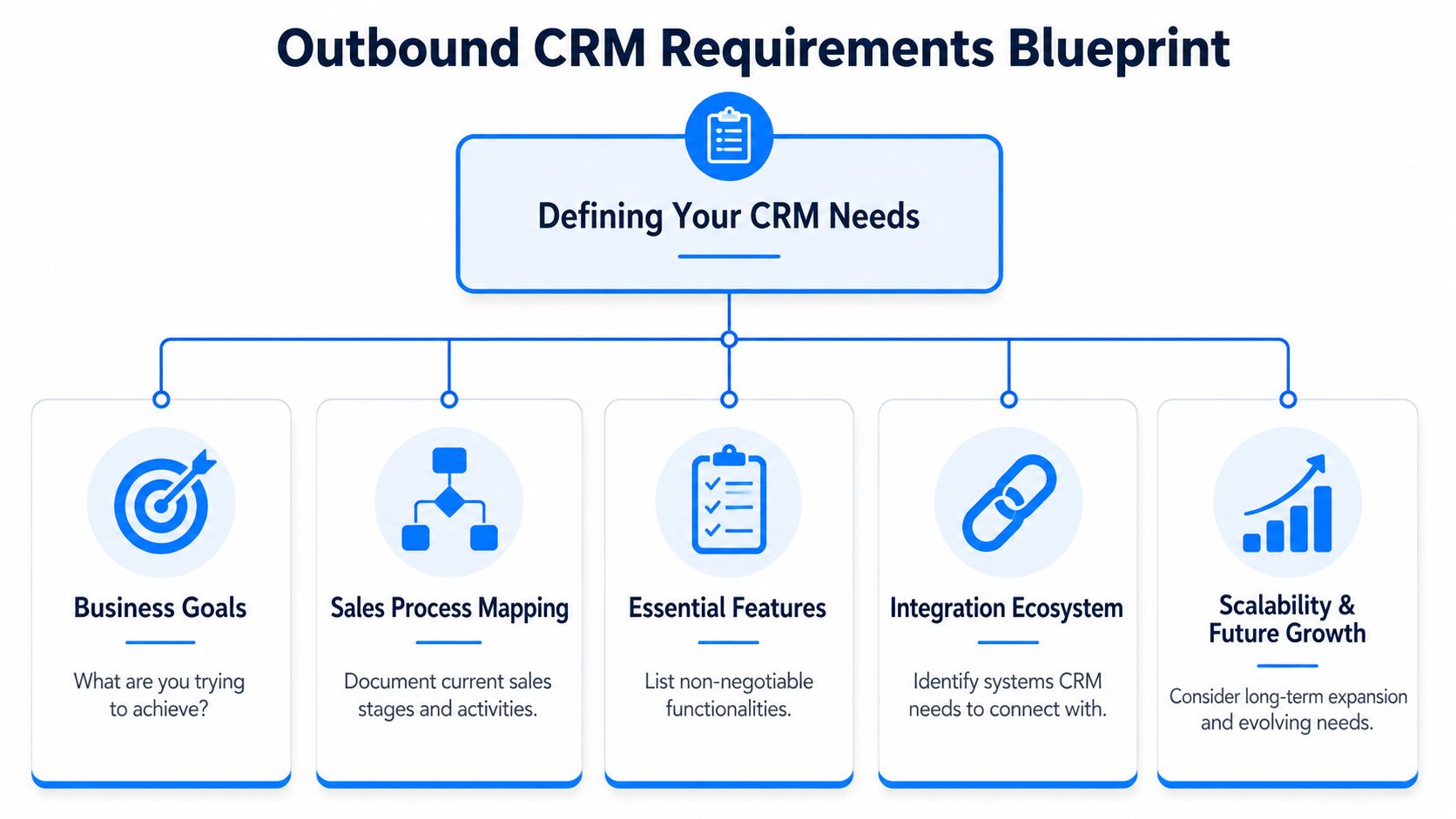
Start with failure points, not feature lists
The wrong buying process starts with vendor demos. The right one starts with a postmortem.
Ask where outbound currently fails:
- Follow-up discipline breaks: then you need native task automation, sequence enrollment logic, and exception views.
- Reps work stale data: then you need enrichment workflows and field refresh rules.
- Managers can't see conversion: then you need stage-level reporting inside the CRM, not in a separate slide deck.
- Tools don't talk to each other: then integrations move from "nice to have" to mandatory.
A smaller team can keep this blueprint in a simple requirements doc. If you're evaluating lighter setups, this review of HubSpot's free CRM options is a useful starting point for thinking about what you get out of the box versus what you'll still need to configure.
The five requirements I wouldn't skip
Not every outbound motion needs the same stack, but every serious outbound sales CRM needs the same backbone.
- Lifecycle stages built for outbound
Generic stages like lead, qualified, and customer are too broad. You need stages that mirror the motion: enriched, queued, contacted, replied, meeting booked, opportunity, closed, nurture, disqualified.
- Sequence and follow-up control
Since missed follow-ups kill performance, the CRM must either run cadences directly or act as the control layer for them. Every touch should update the record without manual entry.
- Cross-channel visibility
Email-only records are incomplete. Reps need to see calls, LinkedIn activity, website visits, and meeting outcomes in one timeline.
- Ownership and routing logic
If signal-driven outreach is part of the motion, the system needs assignment rules that route records by territory, segment, account owner, or trigger type.
- Outcome reporting
Pipeline reviews should not start with send counts. The CRM should make it easy to inspect reply, meeting, opportunity, and closed progression by sequence, rep, segment, and account set.
A CRM should reduce rep memory load. If the system depends on people remembering what to do next, it isn't finished.
What to leave off the wish list
Teams often overbuy in three places:
- Excessive customization: more fields don't create better selling.
- Complex scoring models too early: if stage definitions are weak, scoring won't save you.
- Dashboard theater: if a report looks impressive but doesn't change rep behavior, it's decoration.
Configuring Your CRM for Peak Performance
A default CRM setup usually reflects the vendor's idea of sales, not yours. That's why two teams can buy the same platform and get completely different results. The difference isn't licensing. It's configuration discipline.
Done well, automation can free up 60% of a sales rep's time, and one of the most impactful setup decisions is sequence testing. Outreach guidance cited by Monday recommends testing 2-3 variants of one sequence element at a time across 200-300 touches per variant over 2-4 weeks to identify meaningful winners [Monday.com on scaling outbound with automation].
Build the data model before the workflow
Start with fields, not automations. If the underlying record structure is messy, automation only spreads the mess faster.
The minimum custom field set should cover three layers:
Layer
Example fields
Why it matters
Fit
segment, ICP tier, company type, use case
helps reps know whether to persist
Context
trigger, recent initiative, pain hypothesis, persona
gives each touchpoint a reason
Motion
sequence name, current step, next action date, owner
keeps execution organized
Don't require reps to fill every context field manually. Some of that should come from enrichment, some from research, and some from a manager-defined playbook. Required fields should be limited to what the team will maintain.
Use stage design to force clarity
Most bad outbound reporting starts with vague stages. If "working" or "engaged" means five different things to five reps, the CRM can't tell you anything reliable.
A cleaner structure looks like this:
- Ready for outreach: the record meets minimum data and ICP standards.
- In sequence: active touches are running.
- Replied: any real response, positive or negative.
- Qualified conversation: the reply justified live engagement.
- Meeting booked: a calendar commitment exists.
- Opportunity created: sales accepted as pipeline.
- Nurture: not now, but still relevant.
- Closed or disqualified: terminal state, with reason captured.
That gives managers something useful to inspect. It also prevents vanity metrics from taking over.
For teams designing these workflows from scratch, a practical checklist of CRM best practices can help sanity-check field design, permissions, and pipeline hygiene before rollout.
Automate the boring parts
Once stages and fields are stable, automation should remove repetitive admin work.
Good first automations include:
- Task creation after no reply
- Stage updates after email reply or meeting booking
- Owner alerts for high-priority responses
- Re-enrollment rules for recycled accounts
- Suppression rules for bad-fit or closed-lost records
What you don't want is automation that hides bad process. If reps skip research and blast weak messaging, faster automation just makes failure more efficient.
Operator note: automate handoffs only after you can explain them in one sentence. If the routing logic takes a paragraph to describe, reps won't trust it.
Set up testing on day one
A lot of teams wait until performance stalls before testing sequence elements. That's too late. The CRM should capture enough structure from launch to compare subject lines, first-line approaches, CTA styles, and call-task placement.
Keep the test design narrow. Change one element at a time. Tag the record with the variant. Review results at the same stage every time. If Variant B gets more replies but fewer booked meetings, that isn't a winner. It's just noisier at the top of the funnel.
Building High-Performance Outreach Sequences
The best sequences don't feel like a row of repeated reminders. They feel like a progression. Each touch has a job. One creates awareness. Another introduces relevance. Another earns a response. Another tests whether the account is low priority versus badly timed.
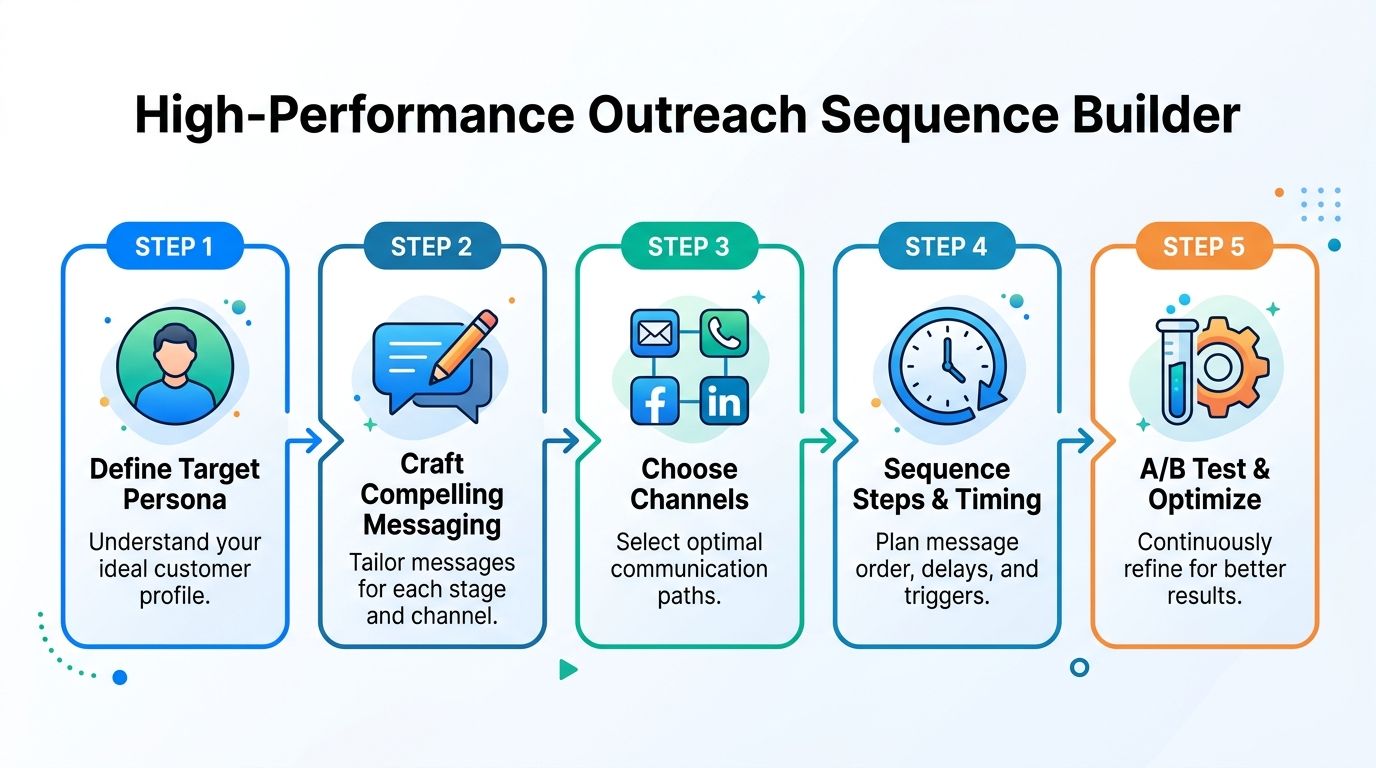
A simple way to think about sequence design is to build around decision points, not channel quotas. If the prospect ignored the first email but visited the site, the next touch shouldn't read like message two in a rigid cadence. It should acknowledge the behavior and test intent.
A sequence that behaves like a rep, not a robot
Here's a common B2B motion for a mid-market account set:
- Touch one by email: short problem framing tied to the persona's likely responsibility.
- Touch two on LinkedIn: connection or profile view with no copy-paste pitch.
- Touch three by email: a different angle, often operational or financial.
- Touch four by phone: direct attempt, even if it goes to voicemail.
- Touch five by email: specific reason for reaching out now, based on account context.
- Touch six by LinkedIn or call: a low-friction bump if there has been passive engagement.
- Touch seven by email: clear close-the-loop note or move to nurture.
The CRM should control when someone leaves this sequence. A reply exits them. A booked meeting exits them. A hard no exits them. Passive engagement might branch them into a lighter nurture track rather than another hard ask.
Later in the build process, it helps to review working examples from sources outside your own team. If you're refining top-of-funnel inputs as well as sequence structure, Cloud Present's sales lead guide is useful because it frames lead generation as an upstream system, not just an SDR task.
Follow-up is where most teams lose winnable deals
Follow-up campaigns average a 4.9% reply rate versus 3% without follow-ups, and practical KPI tracking inside the CRM should include bounce rate, open rate, response rate, and appointment rate to show where the funnel is breaking [Artisan on outbound sales strategy].
What usually goes wrong isn't the idea of follow-up. It's the quality of it.
Three patterns work better than repetitive "just checking in" language:
Follow-up type
What it does
When to use it
Reframe
changes the problem angle
after initial silence
Evidence
adds a relevant customer or market example without overloading detail
after mild engagement
Timing check
asks if the issue is real but badly timed
near the end of a sequence
The dashboard that actually helps reps
Reps don't need a dashboard with twenty widgets. They need one that helps them decide what to do in the next hour.
Track these views inside the outbound sales CRM:
- Reply rate by sequence
- Meeting-booked rate by persona
- Bounce rate by list source
- Appointment rate by rep
- Records stuck in sequence past their intended end state
If you're building from scratch, a bank of email drip campaign templates can speed up testing. Just don't confuse templates with strategy. The CRM should decide when a template gets used and when a record should move out of outbound entirely.
Integrating Your CRM for Newsletter Growth
Outbound and newsletter operations are typically separated because different people own them. Sales runs sequences. Marketing runs newsletters. The result is wasted intent.
A better model treats the CRM as the switching layer between direct outreach and long-term audience building.
Where the handoff should happen
Not every outbound record deserves more sales touches. Some shouldn't be disqualified either. They need a slower lane.
Good candidates for newsletter enrollment include:
- Warm but unready prospects: they replied positively but timing wasn't right.
- Accounts with passive engagement: repeated opens, clicks, or site visits without a sales response.
- Post-meeting non-opportunities: relevant fit, but no active project.
- Former buyers or champions: useful for reactivation and referral loops.
That handoff shouldn't rely on manual exports. The CRM should trigger it based on status changes and engagement rules.
The newsletter isn't a consolation prize
A newsletter tied to CRM logic can do something outbound alone can't. It compounds familiarity. It also gives you a structured place to continue educating accounts that were too early, too distracted, or too politically complex for a cold sequence to convert.
For example, a signal-driven outbound team might:
- Move a prospect from sequence to nurture after a no-timing reply.
- Add them to an industry-specific newsletter segment.
- Feed click behavior back into the CRM.
- Re-open the account when engagement matches a relevant trigger.
That's where tools like Breaker fit naturally. As a newsletter platform, it combines sending, targeting, analytics, and CRM integration, which makes it practical for turning sales-sourced contacts into an owned audience rather than letting them go cold.
The best nurture programs don't ask, "How do we keep emailing this lead?" They ask, "What information would make this account easier to sell later?"
Keep the integration logic simple
The most reliable integration workflows are usually event-based:
- Stage change triggers: meeting completed, nurture selected, opportunity closed-lost.
- Engagement triggers: repeated clicks, form submissions, content responses.
- Audience suppression rules: active opportunities, unsubscribed contacts, disqualified accounts.
If you're wiring these systems together without heavy engineering support, a guide on how to build API integrations fast helps frame the decisions around event mapping, payload structure, and operational reliability.
The important point is not technical complexity. It's discipline. Decide which CRM events create newsletter enrollment, which newsletter behaviors return to the CRM, and which owner is responsible when the record becomes sales-ready again.
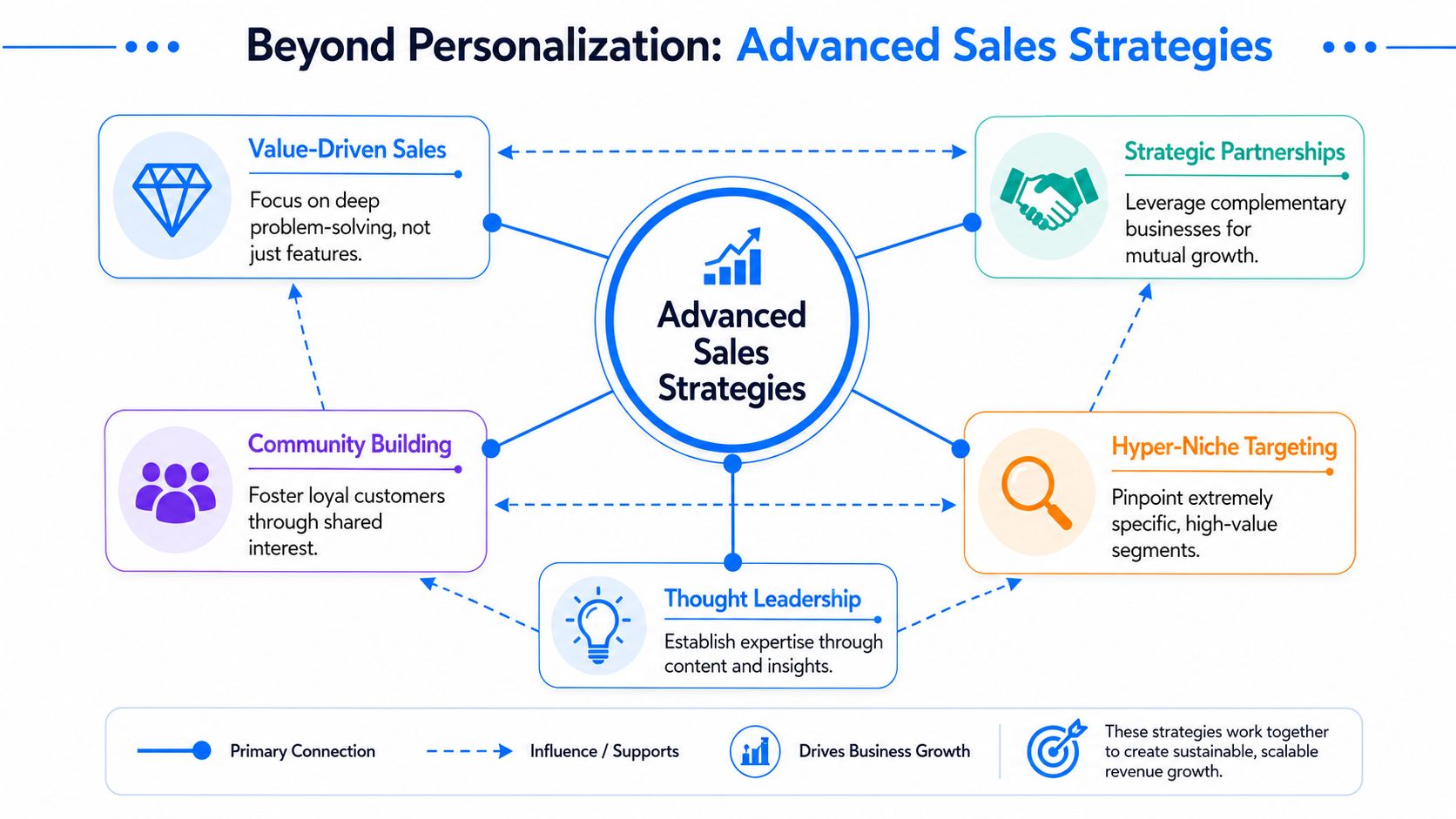
Advanced Strategies When Personalization Is Not Enough
At some point, almost every outbound team hits the same wall. They tighten the ICP. They add more first-line personalization. They test subject lines. Results improve for a while, then flatten.
That stall usually isn't a copy problem. It's a targeting model problem.
A 2026 outbound view argues that volume-over-precision models have collapsed and notes that reps still spend only 28% of their time selling. The practical implication is that teams need a CRM plus research, content, and feedback layers to operationalize a more selective motion [SiftHub on modern outbound sales]. Another current outbound view pushes the same shift from a different angle, arguing that teams should act on signals such as job changes, funding rounds, and strategic initiatives rather than relying on static lists [UserGems on outbound sales signals].
Static personalization has a ceiling
Most personalization is still just mail merge with better grammar. Mentioning a funding event or a podcast quote doesn't matter if the account isn't in a buying window. Rewriting the opening line won't fix bad timing.
Signal-driven outbound changes the unit of work. Instead of asking, "How do we personalize this lead?" ask:
- Why is this account worth touching now?
- Which stakeholder should hear from us first?
- What changed that makes this outreach timely?
- What happens if the trigger goes cold?
That means the CRM has to store more than contact details. It needs live context.
The fields that make signal-driven outreach usable
You don't need dozens of new properties. You need the right ones.
A practical signal layer inside the CRM usually includes:
Field
Purpose
trigger type
identifies job change, funding, hiring push, strategic initiative, or other event
trigger date
tells reps whether the window is still fresh
account priority
helps triage which alerts deserve same-day action
stakeholder map
shows who changed roles, who owns budget, and who influences adoption
last meaningful touch
prevents redundant outreach
next recommended play
gives the rep a default action
Without those fields, signal-based outreach turns into Slack noise. With them, reps can sort by freshness, fit, and urgency.
Route alerts by actionability, not novelty
One common mistake is sending every detected signal to every rep. That trains people to ignore alerts.
A better model routes only signals that meet practical thresholds. For example:
- High-fit account plus fresh job change: assign immediately to account owner.
- Dormant account with new executive hire: reopen for review, not auto-sequence.
- Low-fit account with generic news event: log it, but don't interrupt a rep.
An outbound sales CRM functions as a decision engine. The point isn't to collect more intent data. The point is to suppress low-value work so reps spend their limited selling time on accounts with actual motion.
Field test: if a rep can't explain why an alert matters in one sentence, it shouldn't create a task automatically.
Build a feedback loop into every signal program
Signals are only useful if the CRM learns from outcomes.
Every signal-sourced sequence should feed back simple answers:
- Was the trigger relevant?
- Did the account respond?
- Did the response create a meeting?
- Did the meeting create pipeline?
- Should similar accounts get more or less volume?
Some signals create curiosity but not buying intent. Others create fast conversations but weak fit. The CRM should help you separate those patterns before they eat the team's calendar.
There is also a content layer here that many sales teams ignore. If your buyers increasingly discover vendors through AI-assisted research, your outbound messages and nurture content need to stay consistent with how your market describes problems and solutions. For teams thinking about that overlap, Algomizer's piece on optimizing LLM visibility is a useful lens on how messaging, discoverability, and authority signals increasingly reinforce each other.
What to do when a prospect changes jobs
This is one of the most underbuilt workflows in CRM design.
When a contact changes jobs, the old record should not decay in place. The system needs a clear branch:
- Preserve relationship history with the prior company.
- Create or update the new account context if the new employer fits.
- Flag whether the person was a champion, evaluator, or blocker in the previous cycle.
- Trigger a customized play based on role relevance and timing.
- Decide whether the old account remains active with different stakeholders.
Teams that skip this logic lose some of their best warm-start opportunities because the CRM treats job changes like data hygiene instead of buying context.
Precision beats volume when the market gets noisy
The old playbook said more touches, more personalization, more reps. That still produces activity. It doesn't reliably produce pipeline.
A mature outbound system does less random work. It narrows ICPs, stores trigger context in the CRM, routes signals carefully, moves low-timing accounts into nurture, and uses feedback to decide which triggers deserve future investment. That's the version of outbound that still scales when static lists age fast and inboxes get crowded.
Breaker works well for teams that want the CRM and newsletter motion connected instead of managed in separate silos. If your outbound program is generating warm-but-not-ready prospects, Breaker gives you a way to keep those contacts engaged through targeted newsletter workflows while feeding engagement signals back into the broader growth system.
Keep reading
All articlesWhat Is a B2B Content Engine
Learn what a B2B content engine is, how it differs from a content calendar or strategy, and why it's essential for AI-driven search in 2026.
8 Best Email Tracking Software Tools in 2026
Compare 8 top email tracking tools for 2026, how tracking pixels work, and why Apple's privacy rules make open rates unreliable. See our top pick.
6 Best Email Trackers for Newsletter Senders in 2026
Open rates lie. Learn how email trackers really work, why Apple and Gmail skew the data, and which tools newsletter senders should actually use in 2026.