
Why Are My Emails Not Coming Through? A 2026 Fix Guide
Struggling with 'my emails not coming through'? Learn why your emails vanish and get actionable strategies to fix deliverability and reach the inbox.
You’ve poured your heart into the perfect email campaign, hit send, and then… crickets. If you’re left wondering, “Why aren't my emails getting through?” you’ve stumbled upon one of the biggest, most frustrating hurdles in marketing: deliverability. It's not just a feeling; a huge chunk of marketing emails simply vanish before anyone ever sees them.
Why Your Emails Vanish Before Reaching The Inbox
When your emails fail to land, it feels like they’ve been swallowed by a black hole. But this isn't random. There’s a logical, if complex, journey every email takes from your server to a recipient's inbox. Think of it less like a straight road and more like a series of heavily guarded checkpoints.
Your message has to navigate a maze of spam filters, server-side security rules, and reputation checks before a real person ever lays eyes on it. A single stumble at any point means your email is either flat-out rejected or, worse, exiled to the spam folder.
It's crucial to understand the difference:
- Blocked or Bounced: The recipient's server rejects the email entirely, so it never even enters their account. We dive deeper into the causes in our guide on what is a bounced email.
- Sent to Spam: The server accepts the email but flags it as suspicious, tucking it away where it's unlikely to be seen.
- Delivered to Inbox: This is the goal. Your email arrives in the primary inbox, ready and waiting to be opened.
This isn't a small problem. The latest data shows the average global deliverability rate is only 83.1%. That means a staggering 16.9% of all legitimate marketing emails never make it. For every 100 emails you send, around 17 disappear—with 6.4% being blocked outright and another 10.5% landing in spam.
Quick Diagnosis Checklist For Missing Emails
When emails go missing, it’s easy to jump to conclusions. Before you dive deep into technical fixes, this checklist can help you quickly pinpoint the most likely source of the trouble. Just match the symptom you’re seeing with its potential cause to figure out your first move.
Once you have found the cause, our email deliverability checklist helps you make sure it does not happen on the next send.
Symptom
Potential Cause
First Action To Take
High hard bounce rates
Invalid or old email addresses
Run your list through a validation service.
High soft bounce rates
Temporary server issues, full inboxes
Monitor the issue; it may resolve itself. If persistent, investigate server health.
Emails going to spam for some recipients
Content triggers spam filters
Review email copy for spammy words, check image-to-text ratio.
All emails going to spam
Sending domain/IP is on a blacklist
Use a blacklist checker to verify your sender reputation.
Low open rates across the board
Poor sender reputation or unengaging content
Check your sender score and A/B test subject lines.
Complaints from specific domains (e.g., Gmail, Outlook)
Domain-specific filtering rules
Review the sending guidelines for that specific mailbox provider.
This table is your first line of defense, helping you diagnose the issue without getting lost in the weeds. Once you have a general idea of the problem, you can move on to more specific troubleshooting steps.
Common Reasons Your Emails Go Missing
The reasons "my emails are not coming through" can be anything from a simple issue on the recipient's end to a deep-seated problem with your sending reputation. Your open rates are a direct reflection of whether your messages are getting seen, so learning how to improve email open rates is a fundamental part of solving deliverability.
This flowchart gives a great visual breakdown of the initial places to look when your emails go missing.
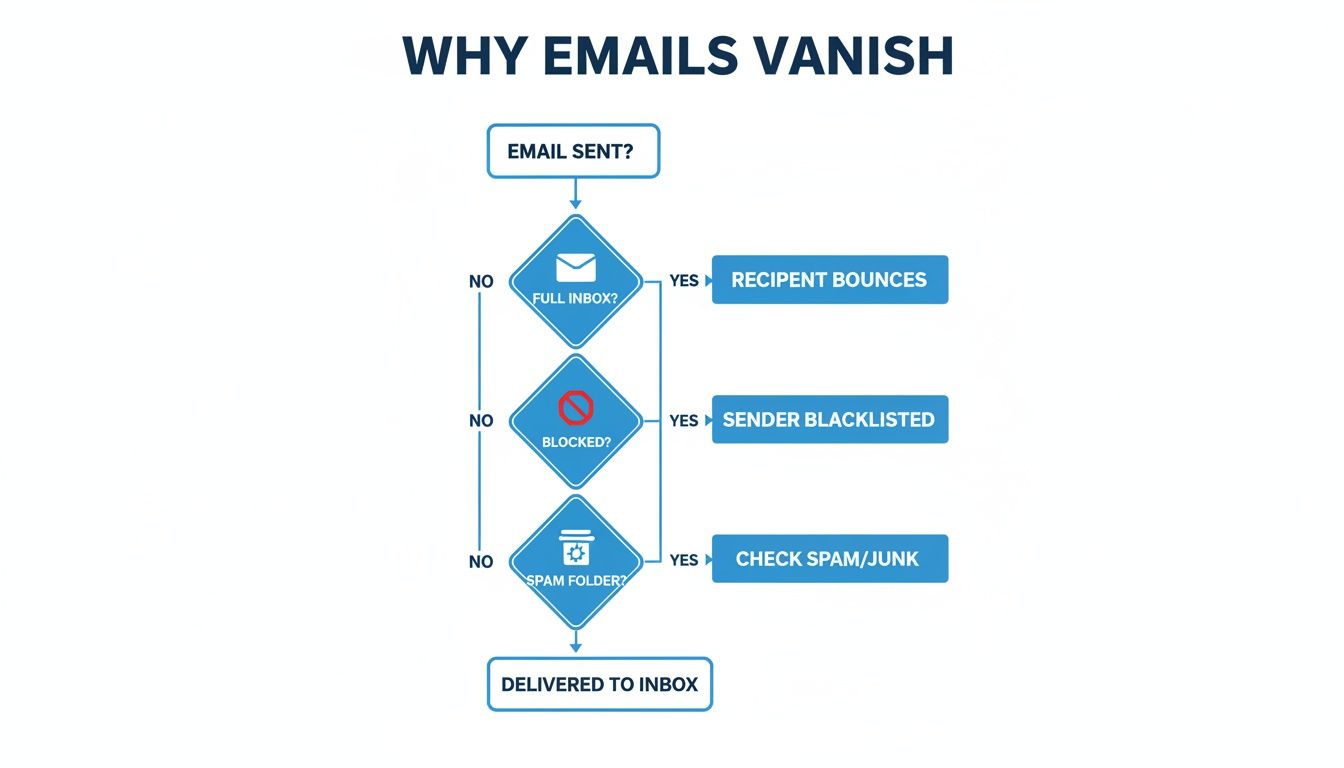
As you can see, the problem might stem from the recipient’s side (like a full inbox), your own setup (getting blacklisted), or the email content itself (tripping a spam filter).
The real challenge isn't just sending an email; it's proving to mailbox providers that your email deserves to be in the inbox. Every blocked email or spam complaint is a vote against your reputation.
For any business that relies on email to drive growth—especially in B2B—even a small drop in deliverability can quietly sabotage your entire strategy. It translates directly to wasted effort, unreliable analytics, and lost revenue. This guide will give you the framework to stop guessing and start fixing the real problems.
Build Trust With Email Authentication Protocols
If you keep asking yourself, "why are my emails not coming through?", the answer might be simpler than you think. To inbox providers like Gmail and Outlook, your domain could be a complete stranger—unverified, untrustworthy, and a potential risk.
The fix is to set up email authentication. Think of it as a digital passport for your domain. It proves you are who you say you are, builds credibility with servers, and is absolutely non-negotiable for modern email marketing. Without it, you look like a phisher, and your emails are prime candidates for the spam folder or outright rejection.
What Are SPF, DKIM, and DMARC?
Three protocols work together to verify your sender identity: SPF, DKIM, and DMARC. They sound technical, but their job is simple: stop impersonators and build trust with receiving mail servers.
- SPF (Sender Policy Framework): This is your approved sender list. SPF tells servers which IP addresses are authorized to send emails on behalf of your domain. If an email shows up from an IP address that isn't on the list, servers know it's probably fraudulent.
- DKIM (DomainKeys Identified Mail): Think of this as a tamper-proof seal on a letter. DKIM adds a unique digital signature to every email, and the receiving server uses it to confirm the message wasn't altered in transit. It ensures the integrity of your content.
- DMARC (Domain-based Message Authentication, Reporting, and Conformance): This is the bouncer at the door. DMARC tells servers what to do if an email fails SPF or DKIM checks. You can instruct them to quarantine it (send to spam), reject it entirely, or let it through.
DMARC also sends back valuable reports, giving you a clear view of who is sending email from your domain—both the good and the bad. This feedback is crucial for monitoring your reputation and shutting down abuse.
Why Authentication Is Your Ticket to the Inbox
Without these protocols in place, you’re leaving your domain wide open. Scammers can easily spoof your domain and send phishing emails that look like they came directly from you. This happened to security expert Troy Hunt when his Mailchimp account was compromised, leading to a phish of his entire subscriber list and causing severe damage to his sender reputation.
When mailbox providers see unauthenticated emails, they have to assume the worst. They view your legitimate marketing campaigns as a potential threat to their users.
Here’s a common scenario I see all the time: a business launches its first newsletter through a third-party email service but skips setting up SPF or DKIM. Their first campaign gets a dismal 10% open rate and a sky-high bounce rate. Why? Servers see emails coming from the email service's IP but claiming to be from the business's domain. With no SPF record to connect the two, the emails are flagged as suspicious and filtered out.
The Trio of Trust
These three records are designed to be a team. Just setting up one isn't enough. You need the complete trio to build a strong, defensible sender identity that inbox providers can trust.
Protocol
Its Job
Analogy
SPF
Verifies who can send.
The approved guest list.
DKIM
Verifies the email's integrity.
A tamper-proof wax seal.
DMARC
Enforces the rules.
The security policy manager.
Setting up these records is a foundational step in any serious email strategy. You can learn more about how these and other factors impact your sending in our complete guide to email deliverability best practices.
It's one of the most effective solutions to the "my emails not coming through" problem. Proper authentication turns your domain from a liability into a recognized, trustworthy source that mailbox providers are happy to deliver.
How To Navigate Email Providers And Blacklists
Ever send a campaign and notice your emails land perfectly in Gmail but seem to vanish for Outlook users? You're not imagining it. Not all Internet Service Providers (ISPs) or mailbox providers are created equal, and they each have their own unique—and often frustrating—ways of filtering mail.
When you're trying to figure out why your emails aren't coming through, the answer often lies in how these different providers perceive you.
One provider might be hyper-sensitive to your sending volume, another might fixate on engagement metrics, and a third could be heavily influenced by user spam reports. This inconsistency is one of the biggest headaches in email marketing. You can't just optimize for one; you have to build a reputation that pleases them all.
Why Provider Differences Matter
Recent deliverability data shows just how stark these differences can be. The stats reveal massive gaps in inbox placement across major providers. For example, in late 2025, Gmail averaged a 56.97% inbox placement rate, while Microsoft's Outlook was much lower at 45.06%.
Even Google Workspace accounts performed differently than standard Gmail, dipping to 49.98%. You can explore the full email deliverability report for a deeper dive into these variations.
These numbers prove that your sending strategy needs to account for provider-specific quirks. The good news? The same report showed that high-volume senders who managed their reputation properly saw massive rebounds, with Gmail placement jumping 20%. It’s proof that scale doesn't have to destroy your deliverability if you're proactive.
Understanding And Escaping Blacklists
Beyond provider filtering, there's an even more serious threat to your deliverability: email blacklists. A blacklist is a real-time database of domains or IP addresses flagged for sending spam. If you end up on one, many email providers will automatically reject your messages. It’s a primary reason your emails are not coming through at all.
Getting on a blacklist is easier than you might think. A few common missteps will land you in hot water:
- Sending to a purchased or scraped list: These are almost always riddled with invalid addresses and spam traps.
- A sudden, massive spike in sending volume: This looks suspicious to servers, especially from a new or cold domain.
- High spam complaint rates: When users mark your email as spam, it's a direct negative signal that tanks your reputation.
- Poor list hygiene: Sending to old, inactive, or bounced email addresses damages your sender score over time.
Being on a blacklist isn't a permanent sentence, but it's a serious wake-up call. It's the internet's way of telling you that your sending practices have crossed a line, and you need to fix them immediately.
How To Check And Remove Yourself From A Blacklist
If you suspect you've been blacklisted, don't panic. The process of checking and requesting removal (also known as "delisting") is straightforward, though it requires patience and a bit of work.
- Identify Which Blacklist: First, you need to know which list you're on. There are dozens, but a few major ones like Spamhaus, Barracuda, and SORBS have the most impact. Use free online tools to check your domain's status across multiple blacklists at once.
- Understand the "Why": Visit the blacklist's website. They will almost always provide a reason for the listing, like "high volume of spam complaints" or "sending to spam trap addresses." This is the most valuable clue you have for fixing the root cause.
- Fix the Underlying Problem: This is the most important step. If you were listed for a bad email list, you have to clean it thoroughly. If it was due to a security compromise on your end, you must secure your servers. Simply asking for removal without fixing the issue is a waste of time—you'll just get re-listed.
- Request Delisting: Once you've resolved the issue, follow the specific delisting process on the blacklist's website. This usually involves filling out a form and explaining the corrective actions you've taken. Be honest, professional, and to the point.
Checking your blacklist status shouldn't be a one-time fix. It needs to be a regular part of your email marketing routine. Proactive monitoring helps you catch issues before they escalate, protecting your sender reputation and ensuring your emails consistently reach the inbox.
The Real Value Of List Hygiene And Engagement
Sending emails to people who don’t want them is the fastest way to tank your sender reputation and ensure your messages never get through. If you’re constantly finding that your emails aren't being delivered, the issue might not be your technical setup—it could be the health of your list itself. This is where you master the art of maintaining a clean, engaged, and ultimately profitable email community.
Think about it from the perspective of an inbox provider like Gmail or Outlook. Every single time you send a campaign, they're watching. They see who opens, who clicks, and, most importantly, who hits the spam button. These aren't just vanity metrics; they're direct feedback signals telling servers whether your content is valuable or just another piece of noise.
A smaller, highly engaged list will always outperform a massive, dormant one. It’s not about the size of your audience, but the quality of their engagement. Nurturing a community is the ultimate secret to sustainable deliverability.
I’ve seen this exact scenario play out countless times. One client had a list of 200,000 subscribers but was struggling with a dismal 5% open rate and constant deliverability headaches. After we purged the inactive contacts and focused on the 50,000 people who were actually engaged, their open rates skyrocketed to 35%, and their emails started landing in the primary inbox again.
Why Clean Lists Lead To Better Delivery
List hygiene isn't a "one-and-done" task; it's a continuous process. A clean list is your best defense against the very things that get you blacklisted, like high bounce rates and spam complaints. Sending to invalid or ancient email addresses is a massive red flag for servers that you simply aren't paying attention.
Here are a few essential hygiene practices you should have in place:
- Use Real-Time Validation: Put an email validation tool on your signup forms. This is your first line of defense, catching typos, disposable addresses, and known spam traps before they ever infect your list.
- Sunset Inactive Subscribers: Set up an automated workflow that identifies subscribers who haven't opened an email in 90-120 days. Send them one last re-engagement campaign, and if they still don't respond, it's time to let them go. It’s tough, but absolutely necessary.
- Honor Unsubscribes Instantly: When someone opts out, they should be removed immediately. There should be zero delay. Failing to do this is a huge compliance risk and a surefire way to rack up spam complaints that hurt your ability to reach everyone else.
These actions directly improve your sender score, which is a critical factor for inbox providers when they decide where to place your emails. Our guide on email list hygiene best practices offers a more detailed roadmap for keeping your audience data pristine.
Nurturing Engagement For Long-Term Success
Once your list is clean, the next job is to keep your subscribers engaged. Engagement is a two-way street. It’s not just about what you send, but about creating content people actually look forward to getting.
A disengaged audience is a genuine liability. Every unopened email chips away at your reputation. On the flip side, every open, click, and reply sends a powerful positive signal to inbox providers, telling them your content is wanted and valued.
Consider segmenting your audience based on their interests or past behavior. For example, if a subscriber has only ever clicked on links related to one specific product category, tailoring your emails to that topic will dramatically increase the chance they'll open it. This targeted approach shows you're paying attention and providing real value, not just blasting out generic messages.
Ultimately, solving the "my emails aren't coming through" puzzle requires looking beyond the technical fixes. It means shifting your mindset from sheer list growth to genuine community building. By focusing on list hygiene and authentic engagement, you create a powerful, positive feedback loop that solidifies your inbox placement for good.
How Your Content And Sending Cadence Affect Delivery
Even with a flawless technical setup, your emails can still vanish into the ether. If your authentication is solid but you're still not hitting the inbox, the culprit is often the email itself—and how you’re sending it.
Inbox providers use sophisticated algorithms to scrutinize your content and sending patterns. These are major signals they use to judge your trustworthiness. Beyond the technical side, the very craft of your email strategy can make or break your inbox placement.
Avoid Common Content Triggers
Spam filters have evolved far beyond just flagging a few "spammy" words. They now analyze your entire email for patterns that scream low-quality or malicious intent. If your emails are going missing, your content might be raising red flags.
I've seen these common mistakes trip up spam filters time and time again:
- Misleading Subject Lines: Using tricks like "Re:" or "Fwd:" to fake a prior conversation is a classic spammer move that filters catch instantly.
- Excessive Punctuation or ALL CAPS: This is the digital equivalent of shouting. It’s a huge indicator of low-quality mail and an easy way to get flagged.
- Image-Heavy Emails: An email that's mostly images with very little text is a tactic spammers use to hide shady links. Always maintain a healthy text-to-image ratio.
- Suspicious Links: Using generic link shorteners or linking to domains with a poor reputation can get your email filtered before a human ever sees it.
Your content's job isn't just to engage the reader; it's to pass the scrutiny of a machine. Think of your email as a resume for your sender reputation—every element is being judged.
For instance, a subject line like "URGENT ACTION REQUIRED: FREE GIFT INSIDE!!!" is a perfect storm of triggers. It combines false urgency, all caps, and spammy phrasing. A simple switch to "A small gift to say thanks" is far more likely to land safely in the inbox.
Master Your Sending Cadence
Just as important as what you send is how you send it. Blasting your entire list at once, especially from a new domain, is a rookie mistake that can get you flagged before you even get started.
This is where a domain warm-up becomes essential. It’s the process of building a positive sending reputation by gradually increasing your email volume over time. This methodical approach shows mailbox providers you're a legitimate sender, not a spammer trying to hit as many inboxes as possible before getting shut down.
A typical warm-up schedule might look something like this:
- Week 1: Kick things off by sending to a small, highly engaged segment—think 50-100 subscribers per day. These are your biggest fans who are almost guaranteed to open and click.
- Week 2: Double your daily volume, but keep focusing on those engaged subscribers to reinforce positive signals.
- Weeks 3-4: Continue to double the volume each week, slowly mixing in newer subscribers as your domain reputation gets stronger.
This slow, steady ramp-up creates a powerful positive feedback loop. High engagement from your initial sends tells servers your content is wanted, paving the way for better deliverability as you scale. This careful cadence is one of the most effective solutions when you find your emails not coming through.
Why Geographic Targeting Impacts Your Deliverability
Ever found yourself wondering, "Why aren't my emails getting through?" The answer might just be on a map. Where your subscribers live has a surprisingly direct effect on whether your messages land in their inbox, and it has less to do with network speed and more to do with regional rules and user habits.
For any marketer with a global audience, treating everyone the same is a surefire way to hurt your deliverability. Different parts of the world have completely different standards for data privacy and consent, and that directly shapes your sender reputation in those areas.
Europe: The Gold Standard For Inbox Placement
Europe consistently takes the lead in email deliverability, and there’s one big reason: the General Data Protection Regulation (GDPR). This law forces marketers to get serious about consent and list hygiene. You can't just toss someone onto a mailing list; you need their explicit, provable permission first.
While that might sound like extra work, it’s actually a huge advantage for getting your emails delivered. It means European email lists are cleaner and more engaged from the get-go, which mailbox providers absolutely love. The end result is a much stronger sender reputation for anyone targeting that region.
Recent data backs this up. Projections for 2025-2026 show Europe leading with 89.1% to 91.1% inbox placement, far ahead of other regions. You can discover more insights about these email deliverability statistics to see the complete breakdown.
By making marketers build healthier lists from day one, GDPR essentially gives emails sent to European subscribers a head start. It’s a powerful lesson in how privacy-first practices directly lead to better delivery.
Navigating North America And Other Regions
In contrast, other parts of the world come with their own set of challenges. While North America has its own rules, they are generally less strict than GDPR. This often results in larger, less-engaged email lists and, you guessed it, lower overall deliverability.
The same data shows a clear gap:
- United States: Lags with an 86.8% inbox placement rate.
- Canada: Does a bit better at 89.4%.
- APAC/LATAM: Tend to see rates in the low-to-mid 80s, highlighting just how much things can vary by region.
For global teams, this isn't just an interesting tidbit—it’s a critical piece of your strategy. A one-size-fits-all approach simply won't work. For instance, if you have a lot of European subscribers, you should seriously think about segmenting them and applying GDPR-level consent standards to that group. This move not only keeps you compliant but also gives your delivery rates a nice boost in a key market. Tailoring your strategy to this global reality is essential for making sure your message lands, no matter where it's headed.
Answering Your Lingering Email Deliverability Questions
Even after you’ve checked all the boxes, some deliverability questions just keep coming up. It’s frustrating when you’ve put in the work, but your emails still aren’t landing in the inbox. Let’s tackle some of the most common hangups we see marketers struggle with and get you some clear, practical answers.
How Long Does It Take To Fix A Bad Sender Reputation?
This is the million-dollar question, and the honest answer is: it depends on how deep the damage goes. If you’re dealing with minor issues, like a recent dip in engagement, you can often turn things around in 2-4 weeks with consistent effort. That means getting serious about list cleaning and only sending content you know your audience will love.
But for major problems—like a dreaded blacklist placement or a reputation that’s been tanking for months—you need to play the long game. Brace yourself for a recovery period of 3-6 months. This isn't a quick fix; it's a slow, methodical process of warming up your domain again, being ruthless with list hygiene, and running smart re-engagement campaigns to prove your worth to inbox providers.
Patience and consistency are everything here. You can't just flip a switch to fix a bad reputation. You have to earn that trust back, one email at a time.
Can I Switch To A New Email Service Provider To Fix My Problems?
If only it were that easy. This is a common myth, but your sender reputation is tied directly to your sending domain, not your Email Service Provider (ESP). Switching providers won't erase a bad history.
Think of it this way: putting a new license plate on a car with a broken engine doesn't fix the car. It's still going to break down. Inbox providers will spot your domain’s poor track record almost immediately, and you’ll be right back where you started. You have to address the root of the problem: your domain's reputation and the health of your email list.
Will Buying An Email List Hurt My Deliverability?
Yes, absolutely. In fact, buying a list is one of the fastest ways to completely torch your sender reputation. These lists are a toxic mess of unengaged contacts, outdated addresses, and—worst of all—hidden spam traps.
Sending to a purchased list is a surefire way to get hit with high bounce rates and a wave of spam complaints. Those negative signals are a massive red flag for ISPs, telling them you're a high-risk sender. Before you know it, all your hard work will be for nothing as your emails get blocked entirely.
Ready to stop worrying about deliverability and start growing your audience? Breaker combines a powerful newsletter platform with automated list growth, ensuring your emails always land in the right inbox. Turn your newsletter into a reliable revenue engine by visiting https://joinbreaker.ai.
Keep reading
All articlesPost Webinar Survey: Questions, Examples, and a Checklist
What to ask in a post webinar survey, when to send it, three example formats, and a checklist for turning the answers into segmented follow-up and pipeline.
10 Best Email Newsletter Examples of 2026
See 10 real email newsletter examples from Morning Brew, NYT Cooking & more, plus the 5 elements that make them work in 2026. Get the checklist.
How to Build an Email Automation Workflow: Steps, Triggers & Data Model
Learn triggers, conditions, splits, and actions to build reliable email automation workflows, plus a 10-step process and platform comparisons.