
Plain Text Versus HTML Emails a 2026 Comparison Guide
Uncover the winner in the plain text versus HTML debate. Our guide uses data from 1,000+ campaigns to show B2B marketers which format drives better ROI.
The classic debate: plain text versus HTML emails. It really boils down to a single choice: do you want to tell a visual story or have a direct, personal conversation? For B2B marketers, this isn't about aesthetics—it’s about strategy.
Understanding the Core Differences
Choosing between plain text and HTML isn't just a design preference. It's a strategic move that directly impacts how your audience receives and engages with your message. Each format has its own playbook, making it better suited for different B2B goals. Getting these foundational differences right is the first step to building an email strategy that actually works.
HTML, or HyperText Markup Language, is the same code that builds websites, so it lets you bring that same design richness into the inbox. This means you can add:
- Visuals: Think logos, product images, and branded color schemes that create a polished, professional experience.
- Structure: HTML lets you use columns, call-to-action buttons, and other layout tricks to guide your reader's eye right where you want it to go.
- Better Tracking: It also enables open tracking with an invisible pixel, giving you a much clearer picture of who's actually opening your emails.
On the other hand, plain text is exactly what it sounds like—just text. No formatting, no images, no fancy layouts. It looks and feels just like a personal, one-to-one email you'd send to a colleague. Its real power is in its simplicity and reliability. Your message will get delivered and show up correctly on any device, whether it's the newest iPhone or an ancient BlackBerry.
The core trade-off is clear: HTML provides a canvas for branding and visual persuasion, while plain text offers a direct line of communication that feels more personal and is less likely to be flagged by spam filters.
Plain Text vs HTML Key Differentiators
To make the comparison even clearer, let’s put the primary attributes of plain text and HTML emails side-by-side. This table gives you a high-level look at what you gain—and what you give up—with each format.
Attribute
Plain Text
HTML
Design & Layout
No formatting; just text.
Rich formatting, images, logos, and custom layouts.
Deliverability
Excellent. Minimal code, less likely to trigger spam filters.
Good to Poor. Complex code and images can increase spam risk.
Accessibility
Natively accessible. Works perfectly with all screen readers.
Requires careful coding (alt text, semantic tags) to be accessible.
Personalization Feel
High. Feels like a one-to-one personal message.
Lower. Often looks like a mass marketing broadcast.
Tracking
Click tracking only.
Open tracking (pixels) and detailed click/heatmap analysis.
Ultimately, your choice depends on the goal of each specific campaign. A visually rich product launch announcement will almost certainly benefit from HTML, while a personal check-in from a sales rep will land with more impact as plain text.
How Email Format Impacts Core Performance Metrics
When you get right down to it, an email's success is all about the numbers. The ongoing plain text versus HTML debate really boils down to one question: which format performs better where it actually counts? We're talking about deliverability, open rates, and click-through rates—the metrics that show how healthy your B2B newsletter really is.
The very first step to a successful campaign is simply reaching the inbox. That’s why deliverability is so critical, and knowing how to avoid spam filters is a non-negotiable skill for any marketer. This is one area where plain text has a natural, built-in advantage.
Its simple structure and lack of heavy code or images mean it’s far less likely to get flagged by aggressive spam filters. Those filters are often designed to scrutinize complex HTML, so plain text emails have a much better shot at landing in the primary inbox instead of the promotions tab—or even worse, the spam folder.
Analyzing Open and Click-Through Rates
Once an email makes it to the inbox, you still have to get it opened and clicked. While fancy HTML lets you create eye-catching call-to-action buttons, the data often points to a surprising conclusion. For a B2B audience, the raw simplicity of plain text can drive significantly better engagement.
This infographic lays out the core performance differences between the two formats.
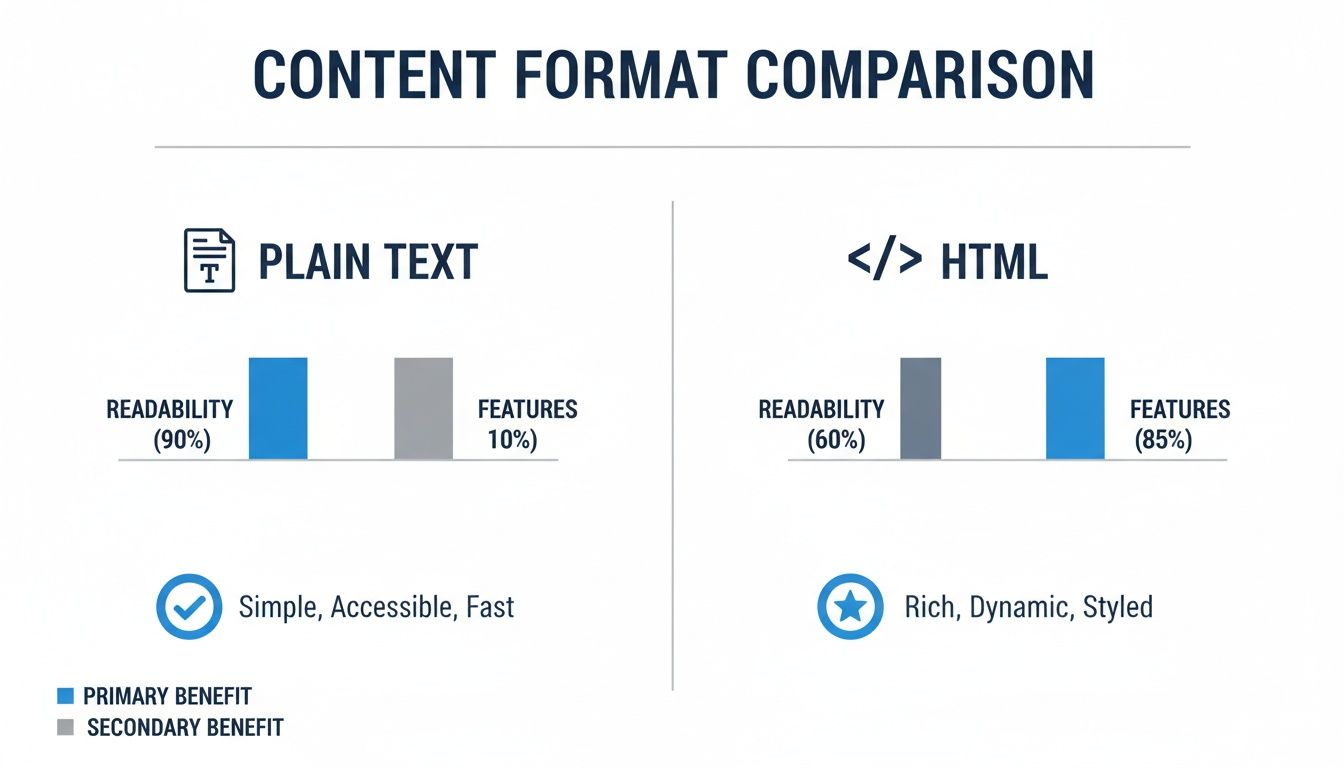
It’s pretty clear: while HTML offers more bells and whistles, plain text frequently wins on the metrics that drive direct engagement.
So, why does this happen? A plain text email feels personal, almost like a one-on-one message from a colleague. That authenticity cuts through the endless stream of corporate marketing blasts, encouraging a more thoughtful read and making subscribers more likely to click on your links. For busy professionals, that directness is often more valuable than a polished but impersonal design. You can dig deeper into ensuring your messages arrive by reading our complete guide on email deliverability best practices.
In a world saturated with marketing messages, authenticity is a powerful currency. Plain text emails mimic personal correspondence, which can lower a recipient's guard and lead to higher trust and engagement.
The Data Behind the Debate
This performance gap isn't just a gut feeling; it's backed by a lot of testing. HubSpot's well-known A/B testing series found that as HTML complexity went up, email performance consistently went down. In one test, a simple plain text email drove 42% more total clicks than a hybrid email that included a GIF. That same GIF version also saw its open rate drop by 37% and its click-through rate fall by 2.3%.
The trend became even more obvious as more HTML elements were added. When they pitted plain text against a heavily designed HTML template loaded with images, the results were stark.
- The image-heavy HTML template had a 21% lower click-through rate.
- It also got 51% fewer clicks overall compared to its plain text counterpart.
This data sends a strong message. For many B2B campaigns—especially those focused on building relationships and driving action—simplicity wins. The personal feel of plain text connects more deeply with decision-makers, which translates directly into better click rates and campaign success. While HTML certainly has its place for big brand announcements or visual product showcases, the numbers prove that for direct communication, less is almost always more.
Designing for User Experience and Accessibility

Deliverability and click rates are only half the story. The real battle between plain text and HTML is often won or lost in how your audience actually experiences your message. In the B2B world, a great user experience isn't about flashy graphics—it’s about clarity, speed, and reliability.
HTML emails give you a blank canvas. You can weave in brand colors, logos, and custom fonts to create a polished, on-brand look that’s perfect for product launches or big announcements where aesthetics matter.
But that creative freedom is a double-edged sword. Poorly coded HTML can render unpredictably across the dozens of email clients and devices your subscribers use. For a busy executive, a broken email with jumbled layouts and missing images is an instant delete.
Winning on Mobile Devices
With over 60% of emails now opened on a phone, flawless mobile rendering is non-negotiable. This is where plain text shines. Because it has no complex formatting, a plain-text email looks perfect on every screen, every single time.
There are no images that fail to load on a spotty connection, no columns that collapse into a mess, and no tiny text that forces readers to pinch and zoom. The message just works, creating a smooth and effortless reading experience for subscribers on the go.
In a mobile-first world, predictability is a core feature of good design. A plain text email’s guarantee to render perfectly makes it an inherently user-friendly format.
This reliability quietly builds trust. When your emails are always easy to read, subscribers are far more likely to open them in the future.
The Critical Role of Accessibility
An often-overlooked part of user experience is accessibility. Your audience includes people with visual impairments who rely on screen readers to consume digital content. For them, your choice between plain text and HTML can determine whether they get your message at all.
Plain text is universally accessible by default. Screen readers process the content cleanly and in a logical order without any special effort on your part. This ensures your message reaches everyone, fosters inclusivity, and complies with accessibility standards. For a closer look at the format, you can check out our glossary entry on the plain text version of an email.
Making an HTML email accessible, on the other hand, requires deliberate work. To ensure it's usable for everyone, your code must:
- Use Semantic HTML: Employ proper heading tags (
<h1>,<h2>) and paragraph tags (<p>) so screen readers can interpret the content's structure. - Add Alt Text to Images: Include descriptive alternative text for all images so users who can't see them still understand their purpose.
- Ensure Proper Color Contrast: Maintain a high contrast ratio between text and background colors to help users with low vision read your content easily.
Failing to implement these best practices means you’re actively excluding a portion of your audience and risking your brand's reputation. While a well-coded HTML email can be accessible, plain text achieves it effortlessly. For B2B marketers focused on building broad, inclusive relationships, that inherent accessibility gives plain text a major ethical and practical advantage.
Comparing Analytics Tracking and Personalization
There's a common myth floating around the plain text versus HTML debate: that choosing simplicity means sacrificing all meaningful analytics. While it's true that HTML emails offer a wider array of tracking options, plain text actually delivers the single most important metric for B2B engagement and opens up a more authentic route to personalization.
HTML's main tracking advantage has always been the open rate. This is measured by embedding a tiny, invisible 1x1 pixel in the email. When a subscriber's email client loads the images in your message, that pixel gets requested from your server, logging the email as "opened."
This method gives you a general sense of who's looking at your content. However, open rates are becoming famously unreliable. Many email clients, like Apple Mail, now block these tracking pixels by default, which can lead to artificially low open counts. On the flip side, some corporate security scanners pre-load all images to check for threats, creating false positives that inflate your open rates.
The Power of Click Tracking in Plain Text
While you can't track opens in a plain-text email, you get full support for click tracking—which many seasoned marketers will tell you is a far more valuable metric anyway. Click tracking works by wrapping every link in your email with a unique, redirected URL. When a subscriber clicks that link, they’re momentarily sent to a tracking server that records the click before instantly sending them to the final destination.
The process is completely seamless for the reader, but it gives you incredibly valuable data. You know exactly who engaged with your content and which specific links they found compelling enough to click.
An open is a passive action that can be easily faked or blocked. A click, however, is a deliberate, conscious choice by the subscriber, signaling genuine interest and intent. For B2B campaigns, this is the data that truly matters.
This intense focus on clicks fits perfectly with a results-driven B2B strategy. You’re no longer just measuring eyeballs; you're measuring active engagement that leads directly to website visits, demo requests, and real conversions.
Rethinking Email Personalization
Another big misconception is that HTML’s fancy visuals are required for effective personalization. Sure, dropping a subscriber's first name into a glossy, branded template is a basic tactic, but it rarely creates a genuine personal connection. Real personalization goes much deeper than merge tags.
True personalization is all about the relevance of the message itself, not the shiny package it arrives in. This is where plain text shines. Its simple, conversational feel reads like a direct message from one person to another, immediately creating a more intimate tone.
Just look at these two approaches:
- HTML Personalization: "Hi
{{first_name}}, check out our new case study!" This line is usually buried inside a heavily designed email that screams "mass broadcast." The personalization feels tacked on and superficial. - Plain Text Personalization: "Hi
{{first_name}}, I remembered you were interested in [specific topic], and I thought you’d find this new case study on the subject really useful." This feels like a thoughtful, one-to-one recommendation from someone who's paying attention.
When you pair the authenticity of plain text with AI-enriched data, personalization becomes exponentially more powerful. You can tailor your message based on a subscriber’s industry, job title, recent activity, or stated interests. For anyone looking to get this right, learning how to use dynamic content in email marketing is the perfect next step.
By focusing on message-level relevance, you forge a connection that an HTML template can almost never replicate. In the B2B world, where trust and relationships are what drive decisions, this authentic approach consistently builds higher-quality interactions and more loyal subscribers over time. The medium reinforces the message, making your outreach feel less like marketing and more like genuinely valuable communication.
Strategic Use Cases for B2B Marketers

The whole plain text versus HTML debate misses the point. It’s not about finding one "best" format—it's about picking the right tool for the job. In B2B marketing, a one-size-fits-all email strategy just doesn’t cut it anymore.
The real skill is knowing when to lean on the personal, direct feel of plain text versus the polished, visual power of HTML. Nailing this choice is what separates an average campaign from a great one, turning a simple message into something your audience actually acts on.
When to Send Plain Text Emails
Plain text shines when you need to feel authentic, urgent, and direct. Its simplicity makes it feel like a one-to-one message from a real person, cutting straight through the corporate noise.
Here are the moments where plain text delivers the biggest punch:
- Lead Nurturing Sequences: After a prospect grabs a whitepaper or books a demo, a plain text follow-up from a sales rep feels personal and genuine. It builds a human connection that a slick, branded HTML template simply can't match.
- C-Suite and Executive Outreach: Decision-makers are drowning in flashy marketing emails. A short, respectful plain text note is far more likely to get read because it feels like a serious, direct message from a peer.
- Technical Updates and Alerts: When you have to share critical info like service maintenance or a security update, you need clarity and speed. Plain text gets the job done reliably on any device, without any distracting fluff.
The rule of thumb is simple: use plain text whenever you want the email to feel like it came from a person, not a marketing department. That perceived authenticity is its secret weapon in B2B.
Where HTML Emails Still Make Sense
Don't get me wrong, HTML still has a crucial role to play in your marketing toolkit. It’s the obvious choice when visual branding, structured information, and aesthetic appeal are central to your campaign’s success.
HTML is the clear winner for these campaign types:
- Visually-Driven Product Launches: Trying to show off a new product? You need high-quality images, videos, and a branded layout to build excitement and show off the features. HTML gives you the canvas to make that visual impact.
- Brand-Heavy Announcements: For major company news like mergers or annual reports, a polished HTML email reinforces your brand identity and professionalism. The design itself becomes part of the message.
- Curated Content Newsletters: If your newsletter rounds up articles, blog posts, or other resources, an HTML layout with columns and images helps organize everything. It makes the content scannable and lets readers jump to what interests them.
The key is to keep the design clean, mobile-friendly, and laser-focused on guiding the reader to your call-to-action.
Choosing Your Format Based on Campaign Goal
To make this even more practical, here’s a quick guide that matches common B2B campaign goals with the right format.
Campaign Goal
Recommended Format
Why It Works
High-Touch Sales Outreach
Plain Text
Builds a personal connection and feels like a direct, 1-to-1 message from a rep.
Product Launch or Visual Demo
HTML
Showcases features with images, GIFs, or video to create excitement and clarity.
Weekly Content Newsletter
HTML
Organizes multiple articles and resources in a scannable, visually appealing layout.
Re-engagement Campaign
Plain Text
A simple, "Hey, are you still interested?" message feels more personal and is harder to ignore.
Major Brand Announcement
HTML
Reinforces brand identity and professionalism for high-stakes company news.
Critical System Alert
Plain Text
Prioritizes deliverability and readability to ensure the essential message gets through.
This table should help you move beyond gut feelings and make a strategic choice every time you hit "send."
A Data-Backed Approach to Format Choice
While our instincts often push us toward visually rich HTML, the data tells a surprisingly different story. A deep dive into over 1,000 campaigns by Iinfotanks found that plain text emails were often the real workhorses. They delivered 21% higher click-to-open rates and 17% higher click-through rates compared to HTML emails across every single industry tested. You can dig into all the numbers by reading the complete analysis of HTML vs text emails.
The most powerful takeaway? For existing customers, plain text drove a massive 60% of all conversions. This strongly suggests that once you've built a relationship, a no-frills, authentic approach is incredibly effective at getting people to take action. For any B2B marketer planning upsell, retention, or follow-up campaigns, that’s a game-changing insight.
Implementing a Winning Email Format Strategy
Alright, let's stop talking theory and get practical. The real answer to the plain text versus HTML debate doesn't come from a blog post—it comes from your own audience. Instead of guessing which format they prefer, the sharpest B2B marketers let their subscribers decide.
This means running systematic tests to see what actually drives results for your specific audience and goals. The goal isn't just to see which email gets more opens, but to figure out which one leads to real conversions. A well-designed A/B test is your best tool for this.
Designing Your A/B Test
First things first, you need a clear, testable hypothesis. Don’t just throw things at the wall. A good hypothesis sounds something like this: "A plain text email will generate more demo requests from our lead nurturing sequence than our standard HTML template." This keeps your test focused and the results easy to read.
Next, pick your metrics. While opens and clicks are nice to know, you need to zero in on the numbers that actually impact your business.
- Primary Metric: This has to be your main conversion goal. Think demo sign-ups, content downloads, or actual sales inquiries.
- Secondary Metrics: This is where you can track engagement like open rates and click-through rates. These metrics help you understand the "why" behind your primary results.
When you’re setting up the test in a platform like Breaker, create two clean versions: one with pure plain text and another with a simple, minimalist HTML design. Send each version to a statistically significant, randomized chunk of your audience. Then, give it enough time to collect real data before you call a winner.
One of the most common mistakes is calling a test too early. You need to let it run until you have enough data to be confident in the results, even if one version jumps ahead at the start. Patience is what gets you real insights.
Validating Your Findings with Audience Data
A single test gives you a hint, but consistent validation gives you a strategy. Real-world experiments often turn up surprising results. For B2B marketers focused on outreach, using proven starting points like these free cold email templates can give you a solid foundation for crafting messages that work with your chosen format.
Just look at Litmus's detailed A/B testing across different audience segments. Their experiments found that plain text emails were responsible for 60% of conversions from loyal customers and 49% from prospects. A follow-up test confirmed the trend, with a 63% conversion rate for existing customers. The takeaway was clear: the authentic, personal feel of plain text was the key driver.
You can dive into the complete results of their HTML vs. plain-text testing for a closer look.
Building an Ongoing Optimization Loop
A winning email strategy is never "set it and forget it." It’s a living process of testing, learning, and adapting. Use the insights from your tests to build a set of internal best practices, but never be afraid to challenge them.
- Segment and Test: Don't just test your whole list. Run format tests across different segments—like new leads versus long-time customers—to uncover more nuanced preferences.
- Iterate on the Winner: If minimalist HTML wins, try testing different button colors or CTA copy. If plain text comes out on top, experiment with different sign-offs or P.S. lines.
- Document and Share: Create a simple playbook with your findings. This makes sure your whole team is making decisions based on data, not just gut feelings.
By building this continuous optimization loop, you'll finally move past the generic "plain text vs. HTML" debate. You’ll be in a direct conversation with your audience, letting their actions guide you toward a more effective and profitable email program.
Frequently Asked Questions
When it comes to the plain text versus HTML debate, a few practical questions always pop up. Let's clear the air and bust some myths with straightforward answers, so you can make decisions backed by real-world experience.
Will Using Plain Text Make My Brand Seem Unprofessional?
Not at all. In many B2B contexts, the opposite is actually true. While a polished HTML email screams "branding," a plain-text email feels like a direct, one-to-one message from a real person.
Think about it. That kind of authenticity can make your brand feel more human and trustworthy, which is a huge advantage when you're trying to connect with busy executives or nurture high-value leads. Your professionalism shines through in the quality of your message, not the code it's wrapped in.
Can I Still Track Opens with Plain Text Emails?
The short answer is no. You can't track opens with a true plain-text email. Open tracking works by embedding a tiny, invisible pixel into an HTML email. When an email client loads the images in that email, it sends a request for the pixel, which gets logged as an "open." Most free email tracking tools work the same way, which is why they need HTML mail too.
But here's the thing: plain text fully supports click tracking, which is a far more reliable sign of genuine engagement. An open can be triggered by a security scanner or blocked entirely by privacy settings, making it an increasingly flimsy metric. A click, on the other hand, is a definitive signal that your subscriber took deliberate action.
When comparing plain text versus HTML, remember this: a click is an active signal of interest, while an open is passive and unreliable. If you want a clear picture of performance, focus on clicks.
What Is a Multipart MIME Email and Should I Use It?
A multipart MIME (Multipurpose Internet Mail Extensions) email is the industry standard, and for good reason. It’s a single message that bundles both an HTML version and a plain-text version together.
When you send a multipart MIME email, the recipient's email client automatically chooses which version to display based on their settings. If a client can't render HTML or the user has it turned off, the plain-text version is shown instead.
You should absolutely use multipart MIME for all your HTML campaigns. It’s the best way to guarantee maximum deliverability and a good user experience for everyone on your list. Most modern email platforms, including Breaker, handle this automatically when you create an HTML campaign, so you don't even have to think about it.
Ready to build a B2B newsletter that drives real growth? With Breaker, you can design high-performing campaigns and automatically expand your list with engaged, exact-match subscribers. Start your 7-day free trial and see the results for yourself at https://joinbreaker.ai.
Keep reading
All articlesNewsletter Agency Services: How Agencies Scale Client Newsletters
Managing multiple client newsletters? Learn what a true newsletter agency platform needs to prevent list mixing, voice drift, and invisible ROI.
Building Owned Audiences: Move Followers to Your Newsletter in 2026
Social platforms can vanish overnight. Learn how to convert Instagram, TikTok, and YouTube followers into a newsletter list you actually own.
Newsletter Analytics: Which Metrics Actually Matter in 2026
Open rate and clicks don't predict buyers. Learn the 7-step method to track click depth, recency, and topic affinity for a revenue-predictive intent score.