
Newsletter details and sender settings
The Details tab in Settings: publication name, from handle, physical address, website, reply-to, sender name and the default UTM parameters added to your links.
Open Settings in the left-hand menu. You land on Publishing, and its first tab is Details. These settings belong to the newsletter you have selected; switch newsletters to edit another one.
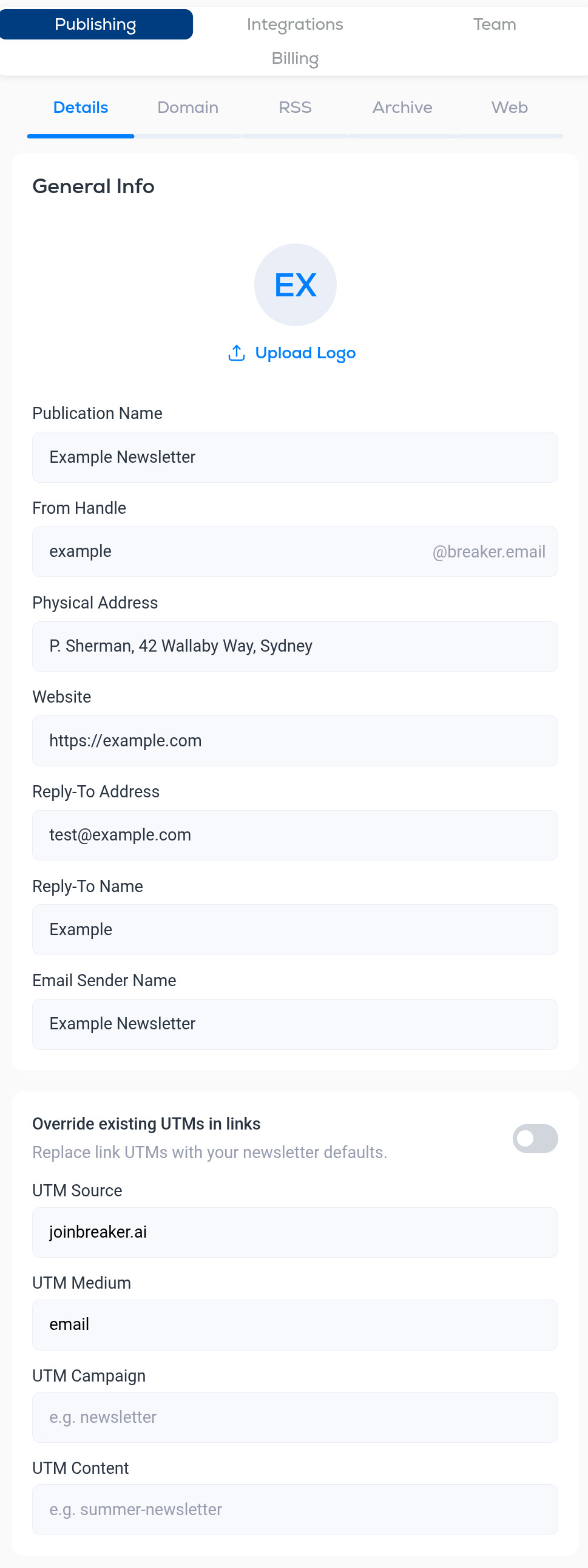
General Info
- Logo. Click Upload Logo to set the newsletter's logo. It identifies the newsletter inside Breaker and on your public archive.
- Publication Name. The name of the newsletter.
- From Handle. The part before @ in the address your emails come from while you send from Breaker's domain, for example
example@breaker.email. Once you connect your own domain, your emails come from that domain instead. See Custom sending domain. - Physical Address. A postal address is required by anti-spam law in most countries and is shown in the footer of your emails.
- Website. Your site, linked from the archive and emails.
- Reply-To Address. Where replies from readers land. Double-check the spelling: a typo here means you never see replies.
- Reply-To Name. The name shown with the reply-to address.
- Email Sender Name. The "from" name readers see in their inbox. Most newsletters use the publication name or the author's name.
UTM defaults
Breaker can add tracking parameters to every link in your emails so your analytics tool can tell which visits came from the newsletter.
- Override existing UTMs in links. Off by default. When on, links that already carry UTM parameters have them replaced with the defaults below. When off, your defaults are only added to links that have none.
- UTM Source. Defaults to your domain. Identifies where the click came from.
- UTM Medium. Defaults to email.
- UTM Campaign. Optional, for example newsletter.
- UTM Content. Optional, for example summer-newsletter.
Other Publishing tabs
- Domain. Send from your own domain. See Custom sending domain.
- RSS. Feeds you pull content from, and your newsletter's own outbound feed. See RSS feeds.
- Archive. Your public archive page and its custom domain. See Web publishing.
- AI. The spelling and grammar check, and drafts that Breaker prepares for you on a schedule. See AI content generation and spelling check.
- Web. Signup forms for your website. See Signup forms.
More in Settings
All help articlesProfile settings and test recipientsEdit your name, photo and password, and confirm the addresses that are allowed to receive test emails.Custom sending domainConnect a sending domain, add the DNS records, and let the automatic warm-up move your sending from Breaker's shared domain to yours.Web publishingPublish a web page of your past newsletters, control its address and description, block AI training crawlers, and serve it from your own domain.RSS feedsPull articles from RSS feeds into your emails with the RSS block, and publish your own newsletter as an outbound feed.Signup formsCreate an embeddable signup form, pick the Full or Mini style, match your colors, and paste the embed code into your website.Team members and rolesInvite colleagues to a newsletter, choose between the Admin and User roles, and see who has access.Billing and plansSee your active plan, emails and AI generations remaining this period, billing history and receipts, and how to switch plans, change payment methods or cancel.Referral programShare your referral link and earn 10% of what the people you refer spend on Breaker.
Support