
Custom fields
Custom fields store your own information on each contact, like extra columns in a spreadsheet.
Custom fields let you store values that are specific to your audience on each contact. If you picture your contacts as a spreadsheet, a custom field is a new column.
Create a custom field
Open Audience, then the Custom Fields tab, and click New Custom Field. Enter a Field Name, choose a Field Type and click Create.
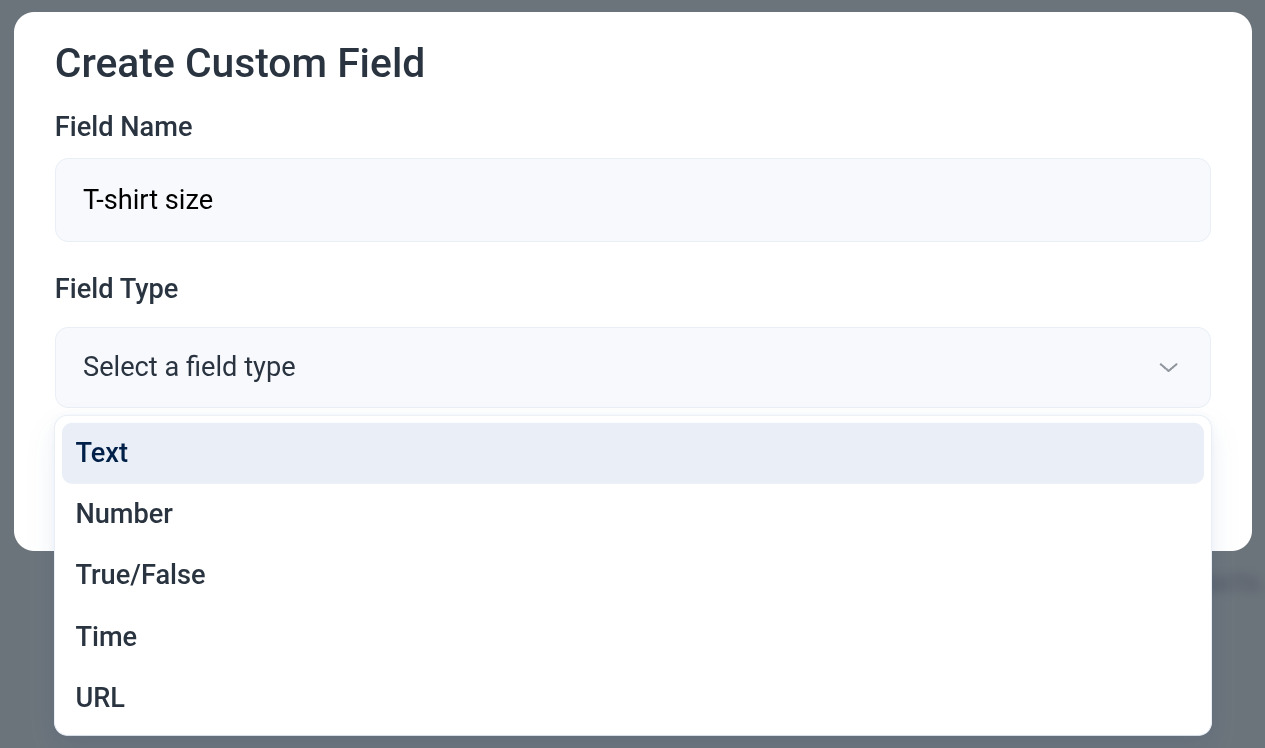
Field types
- Text. Any text. A field called T-shirt size could hold M or Medium.
- Number. Whole numbers only, with no letters or symbols.
- True/False. A yes or no value.
- Time. A date, or a date and time, such as a ticket purchase date.
- URL. A web address only, such as a subscriber's profile link.
Before you add a field
Breaker already has fields for the common things: name, phone, job title, address, company details and UTM attribution. Check whether one of those fits before creating a new field. The full list is in the Segment conditions reference.
Where custom fields are used
- Imports. Map a column of your file to a custom field. See Import contacts from a CSV or spreadsheet.
- Segments. Filter contacts by a custom field's value. See Creating and using segments.
- Personalization. Insert a field's value into an email with the Personalize block. See Campaign editor and builder.
- Automations. Update a field as an automation step. See Automation steps.
More in Definitions
All help articlesContacts and subscribersA contact is anyone in your Breaker database. A subscriber is a contact who can currently receive your emails.What is a segment?A segment is a part of your audience, defined by fields and tags, by engagement, or by where contacts came from.Engagement metric definitionsHow Breaker calculates recipients, delivered, opens, clicks, RealClick™, unsubscribes and spam complaints.What is RealClick™?RealClick™ is Breaker's count of clicks made by people, with clicks from security scanners and other software filtered out.
Support