
Automation entry rules and conditions
Use trigger conditions to narrow who gets in, and the Entry setting to decide whether a contact can go through an automation once or every time.
The trigger panel has two settings below Starts when that decide who actually enters the automation.
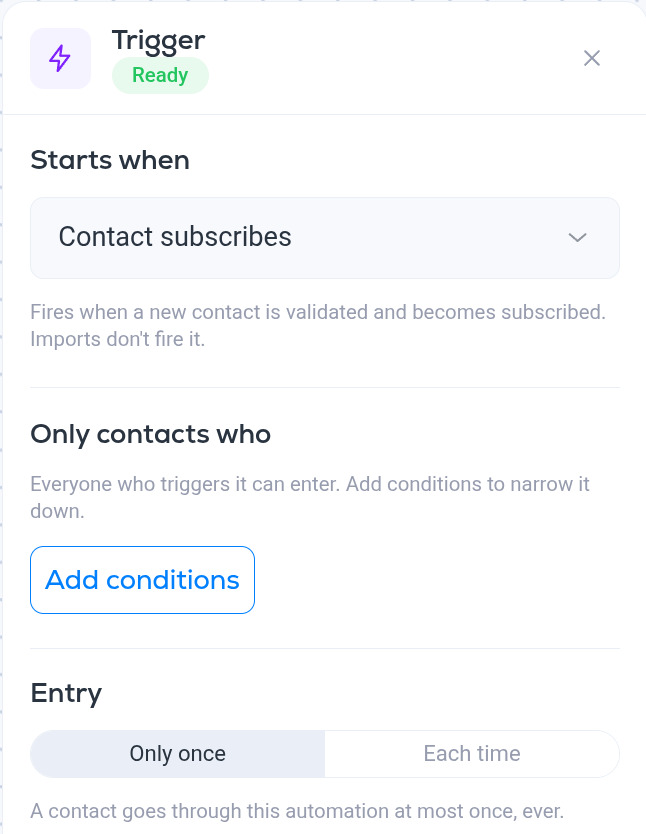
Only contacts who
By default everyone who fires the trigger enters the automation. Add conditions narrows it down with the same conditions editor used for segments: pick fields, operators and values, combine them with AND or OR, and add groups for more complex rules. See Segment conditions reference.
Examples:
- A welcome series only for people who signed up from your website: trigger Contact subscribes, condition UTM Source is website.
- A re-engagement flow only for long-time readers: trigger Enters a segment (your "inactive" segment), condition Created At is before a date a year ago.
Conditions are checked at the moment the trigger fires. A contact who does not match then does not enter, even if they match later.
Entry
- Only once. A contact goes through this automation at most once, ever. This is the default and the right choice for welcome series and anything that should not repeat.
- Each time. The contact enters again every time the trigger fires. Use it for things like "tag is added" flows where the tag is meant to be re-applied, or "opens an email" nudges.
More in Automations
All help articlesAutomations overviewWhat an automation is, how the builder works, and the difference between a draft and an active automation.Automation triggersThe events that can start an automation, and what each one does and does not react to.Automation stepsEvery step you can add to an automation, from sending an email and waiting to branching, split testing, tagging, updating fields, unsubscribing and calling a webhook.Automation split testsAdd a Split test step to send contacts down two branches at random, compare the branches by open rate, click rate or RealClick™ rate, and move everyone to the winner.
Support