
Post-Webinar Survey Questions Template (2026)
30+ post-webinar survey questions with NPS, CSAT, and CES templates, plus timing and length tips to boost completion and qualify leads faster.
Your webinar just ended. Two hundred people registered, ninety showed up, and the chat was buzzing. But six months from now, which slide made people tune out? Which attendee was ready to buy? A post-webinar survey captures that signal while it's still hot, yet most marketers either skip it or attach a generic five-star rating nobody finishes.
Here's what works: ask 5 to 8 short, specific questions covering overall satisfaction, content relevance, presenter performance, and future intent. Send them within one hour of the session ending while the experience is still fresh. This guide gives you more than 30 categorized questions you can copy today, a framework for deciding how many to ask and when to send them, clear definitions of NPS, CSAT, and CES, and a practical way to turn every response into a segmented, revenue-driving follow-up.
Why Post-Webinar Surveys Matter
Registration counts and attendance rates tell you how many people showed up. They tell you nothing about whether those people learned anything, liked your presenter, or plan to buy. A post-webinar survey closes that gap by asking attendees directly what the experience was worth to them.
What Survey Data Reveals That Attendance Metrics Don't
Attendance and watch-time are proxies at best. A packed room with low completion rates or middling satisfaction scores signals that your registration funnel is strong but your content or delivery needs work. A good survey separates these variables:
- Was the topic right? Content relevance scores show whether you picked the right subject for this audience.
- Was the delivery right? Presenter ratings isolate whether the problem was the material or the person presenting it.
- Was the format right? Logistics questions catch technical friction, pacing issues, and platform complaints before they damage next quarter's registration.
- Who's ready to talk to sales? Future-intent and lead-qualification questions surface your hottest prospects while their interest peaks.
From Feedback to Lead Qualification
For B2B teams, a webinar is rarely the finish line. It's a mid-funnel touchpoint, and the survey is often the richest first-party data you'll collect from a prospect all quarter. When someone tells you they're "actively evaluating solutions" or requests a demo in an open-ended field, that's a stronger signal than a click or an open.
How Many Questions Should You Ask?
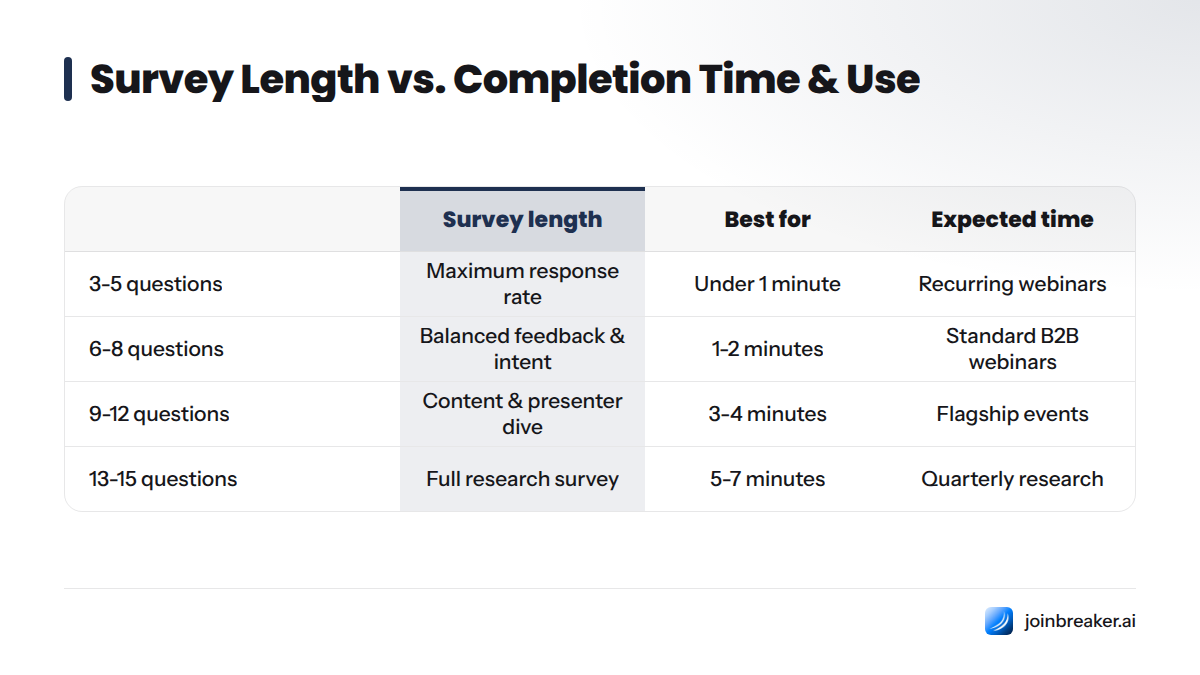
Ask 5 to 8 questions if your goal is maximum completion and general satisfaction tracking. Ask up to 12 to 15 questions only when you're running a deliberate, incentivized deep-dive research survey and you've told respondents up front how long it will take.
Research on questionnaire design shows completion rates drop as survey length grows. Shorter, focused surveys outperform long ones for routine feedback collection, according to guidance published by ESOMAR, the global association for market research standards.
Rule of thumb: Default to 5 to 8 questions for every webinar. Reserve the 15-question deep-dive for quarterly flagship events or product-education series where you need granular data and can offer a small incentive for the extra time.
| Survey length | Best for | Expected completion time | Typical use case |
|---|---|---|---|
| 3-5 questions | Maximum response rate | Under 1 minute | Recurring webinars, weekly demos, internal training |
| 6-8 questions | Balanced feedback and intent-tracking | 1-2 minutes | Standard B2B marketing webinars, product launches |
| 9-12 questions | Content and presenter deep dive | 3-4 minutes | Flagship events, conference-style sessions |
| 13-15 questions | Full research survey | 5-7 minutes | Quarterly research, curriculum redesign, incentivized studies |
When to Send Your Post-Webinar Survey
The right timing depends on whether you need quick pulse data or richer, more considered answers.
In-Webinar Exit Poll
An exit poll appears on screen as attendees leave, right inside your webinar platform. It captures the highest response rate because people are still present and the ask requires zero extra clicks. Keep it to one or two questions, typically an overall satisfaction rating and a single open-ended prompt.
Immediate Post-Webinar Email (Within 1 Hour)
Sending your full survey by email within an hour of the session captures attendees while content is still top of mind. This window produces the best balance of volume and depth, which is why most B2B teams default to it.
24-Hour Follow-Up Survey
Waiting up to 24 hours works well for longer or reflective surveys, especially for training and onboarding webinars where attendees benefit from time to apply what they learned. Response rates are lower than the 1-hour window, but answers tend to be more thoughtful.
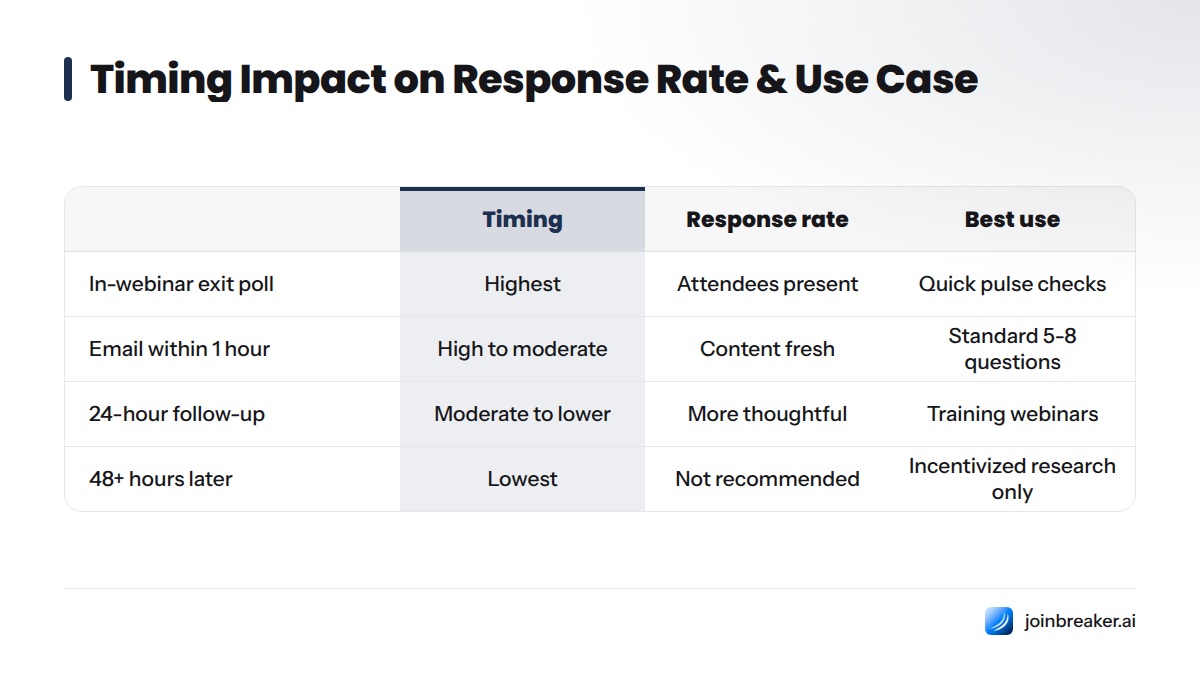
| Timing option | Response rate impact | Best use case |
|---|---|---|
| In-webinar exit poll | Highest (attendees still present) | Quick pulse checks, 1-2 question satisfaction rating |
| Email within 1 hour | High to moderate | Standard 5-8 question survey, most B2B webinars |
| 24-hour follow-up | Moderate to lower | Reflective feedback, training and onboarding webinars |
| 48+ hours later | Lowest | Not recommended except for incentivized research studies |
If you're automating these sends, most modern email platforms support a trigger that fires the moment a registrant is marked as "attended," which removes manual work entirely.
30+ Post-Webinar Survey Questions (Organized by Category)
Below is the master question bank, organized into seven categories so you can pull exactly what you need. Every category answers a different business question, so treat this as a menu, not a mandate to ask all of them.
Overall Satisfaction Questions
- On a scale of 1-5, how would you rate your overall experience with this webinar?
- How well did this webinar meet your expectations?
- How likely are you to recommend this webinar to a colleague? (0-10)
- Compared to other webinars you've attended, how would you rate this one?
- Overall, was this webinar worth your time?
Content & Relevance Questions
- How relevant was the content to your current role or challenges?
- Which topic covered today was most useful to you?
- Was there enough depth in the content, or did you want more detail?
- Did the content match what was promised in the registration description?
- What topic would you like us to cover in a future session?
Presenter & Delivery Questions
- How would you rate the presenter's knowledge of the subject?
- How clear and easy to follow was the presenter's delivery?
- Did the presenter answer your questions effectively during Q&A?
- How engaging did you find the presentation style?
- What could the presenter do differently next time?
Format & Logistics Questions
- How would you rate the audio and video quality of the webinar?
- Was the length of the webinar appropriate?
- Did you experience any technical issues during the session?
- How easy was it to register and join the webinar?
- Was the time of day convenient for your schedule?
Future Interest & Follow-Up Intent Questions
- Would you attend a future webinar from us?
- What related topics are you interested in learning more about?
- Would you be interested in a follow-up conversation with our team?
- Are you interested in receiving the slide deck or recording?
- Would you recommend this webinar series to a colleague?
Open-Ended Feedback Questions
- What was the single biggest takeaway from this webinar?
- What, if anything, did we miss that you expected to see?
- What almost stopped you from attending or staying until the end?
- Is there anything else you'd like to share about your experience?
- What one change would most improve future webinars?
Lead Qualification / Sales-Ready Questions
- What is your role in the buying process for solutions like ours?
- What is your timeline for making a decision on this type of solution?
- Are you currently evaluating tools or vendors in this space?
- What is the size of your team or organization?
- Would you like a personalized demo based on what you saw today?
Copy-Paste Starter Template (5 Questions)
- Overall, how would you rate this webinar? (1-5)
- How relevant was the content to your work? (1-5)
- How would you rate the presenter? (1-5)
- What was your biggest takeaway?
- Would you like to speak with someone from our team? (Yes/No)
Full Deep-Dive Template (15 Questions)
Combine questions 1, 3, 6, 8, 9, 11, 13, 16, 18, 21, 22, 26, 27, 31, and 35 from the master list above for a comprehensive survey that stays under seven minutes.
Understanding Question Types: NPS, CSAT, CES & Likert Scales
Choosing the right measurement scale matters as much as the question itself.
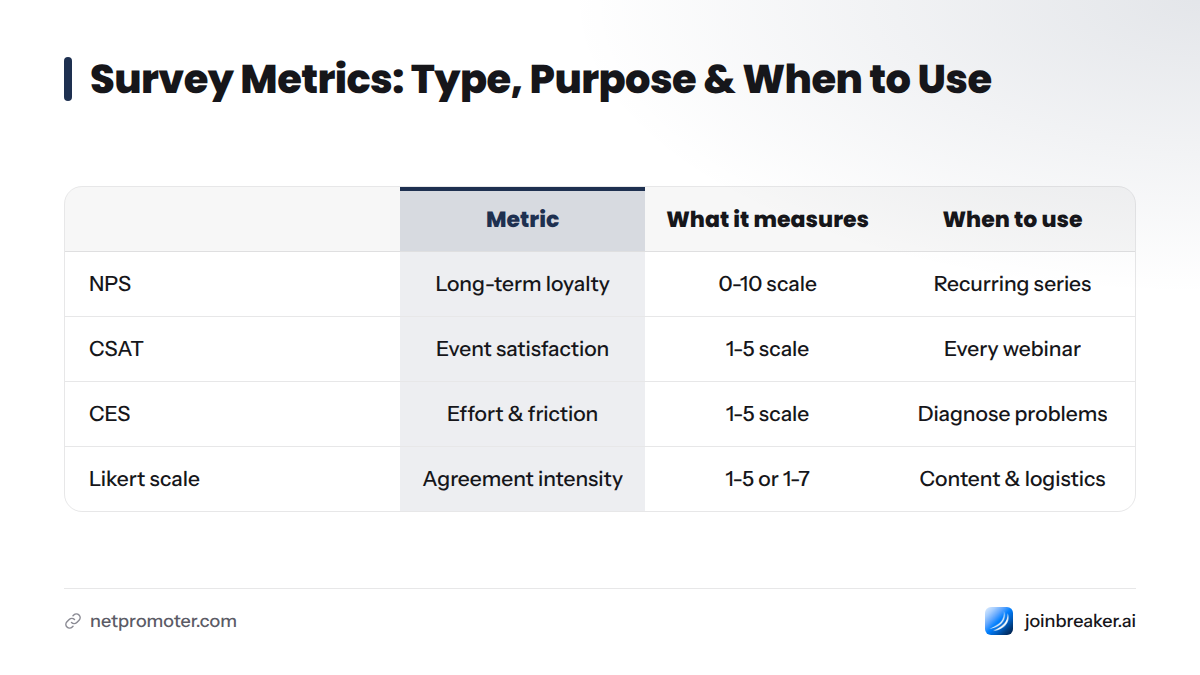
Net Promoter Score (NPS) asks "How likely are you to recommend this to a colleague?" on a 0-10 scale and measures loyalty and word-of-mouth potential. The methodology was developed by Bain & Company and Fred Reichheld and is maintained by the Net Promoter Network.
Customer Satisfaction Score (CSAT) asks a direct satisfaction question, usually on a 1-5 scale, and measures immediate happiness with a specific experience.
Customer Effort Score (CES) asks how easy or difficult something was, typically "How easy was it to register and join?" and measures friction rather than delight.
Likert scale is the general term for any rating scale measuring agreement or intensity across a range (most commonly 1-5 or 1-7) and underlies most of the satisfaction and content questions in this guide.
| Metric | Sample question wording | What it measures | When to use it |
|---|---|---|---|
| NPS | "How likely are you to recommend this webinar? (0-10)" | Long-term loyalty and referral likelihood | Recurring webinar series, brand-level tracking |
| CSAT | "How satisfied were you with this webinar? (1-5)" | Immediate, event-specific satisfaction | Every webinar, especially one-off sessions |
| CES | "How easy was it to join and follow this webinar? (1-5)" | Friction and effort in the experience | Diagnosing technical or logistics problems |
| Likert scale | "The content was relevant to my role. (Strongly disagree - Strongly agree)" | Agreement or intensity on a specific statement | Content, presenter, and logistics questions |
Close-ended questions (NPS, CSAT, CES, and Likert-style ratings) are easy to score and benchmark over time. Open-ended questions can't be averaged into a single number, but they capture the nuance and specific language that a number alone misses. The strongest post-webinar surveys mix both.
Post-Webinar Survey Examples by Use Case
The right question mix depends on who attended and why.
B2B Marketing Webinars
Lean into lead-qualification and future-intent questions. Ask about buying timeline, team size, and interest in a demo. Pair this with a content-relevance question tied to the pain point your webinar addressed, since that answer tells your sales team exactly which problem to lead with in follow-up.
Customer Education / Onboarding Webinars
Prioritize content and CES-style ease-of-use questions. Ask whether the session made the product easier to use and whether attendees feel confident applying what they learned. Skip the sales-qualification questions entirely since these attendees are already customers.
Internal Training Webinars
Focus on comprehension and application. Ask whether the training changed how attendees plan to do their job, and include a Likert-scale confidence question ("I feel confident applying this training to my role"). Presenter and logistics questions still matter, but future-interest questions can be replaced with a simple "would you recommend this training to a teammate" prompt.
How to Boost Post-Webinar Survey Response Rates
Low response rates usually come down to one of five fixable problems:
- Cut the length. Every question beyond eight adds drop-off risk. Default to 5-8 questions unless you have a specific reason to go longer.
- Fix your timing. Send within the first hour while the session is still memorable, unless you have a deliberate reason to wait.
- Make it mobile-friendly. A large share of attendees will open your follow-up email on a phone. Test your survey on a small screen before sending.
- Personalize the ask. Reference the specific webinar title and, when possible, the attendee's name in the subject line and intro copy.
- Consider a small incentive. A raffle entry, discount code, or early access to the recording can meaningfully lift completion, especially for longer research surveys.
- Show progress. If your survey tool supports a progress bar, use it. Seeing "2 of 5" reduces abandonment compared to an open-ended scroll.
Tools to Build and Automate Post-Webinar Surveys
You don't need custom development to run an effective post-webinar survey. Most teams choose from a few well-established options depending on how much automation and integration they need.
- Google Forms works well for simple, free surveys with basic Likert and multiple-choice questions, though it lacks native CRM integration.
- Typeform offers a more polished, conversational survey experience that tends to lift completion rates for longer surveys.
- SurveyMonkey provides strong analytics and benchmarking features for teams that want to compare results across multiple webinars over time.
- Native webinar platform polls (built into Zoom, Cvent, or Univid) let you launch an exit poll the moment the session ends without requiring attendees to leave the platform.
- ESP-triggered automated survey emails send your survey automatically the moment a webinar platform marks an attendee as "attended," removing manual work entirely.
That last option is where the real efficiency lives for teams running webinars regularly. Setting up an email automation workflow that triggers the moment a webinar ends means nobody on your team has to remember to hit send, and every attendee gets the survey inside the ideal one-hour window. Most modern email platforms support this kind of trigger, so if you're evaluating where to build your automation, look for native webinar-to-email integration that connects attendance events directly to segmented email sequences, rather than stitching together a separate survey tool and a separate ESP.
Whatever collection method you use, make sure your consent and data-handling practices meet current requirements. When you collect survey responses alongside contact data, clearly disclose what you're collecting and how you'll use it.
Turning Survey Responses Into Action
A survey that never leaves the spreadsheet is a wasted opportunity. Real value shows up when responses change what happens next for each attendee.
Segmenting Attendees by Feedback and Intent
Group respondents by their answers, not just their attendance. Someone who rated the webinar a 9 or 10 on NPS and said they're actively evaluating vendors belongs in a very different follow-up sequence than someone who gave a 6 and left no comment. This audience-segmentation logic turns a single event into a lead-scoring tool.
Triggering Personalized Follow-Up Emails
Use survey answers to automatically branch your follow-up emails. High-intent responders get a direct outreach email or demo invite. Lower-intent responders get the recording, slides, and a lighter-touch nurture sequence. Open rates on these triggered, relevant follow-ups tend to run well above a generic broadcast, so track these sequences separately from your regular send calendar to see the lift.
Feeding Insights Into Your Next Webinar
Every open-ended "what did we miss" and "what topic should we cover next" answer is a ready-made content calendar item. Review these responses before you plan your next session, and you'll spend less time guessing what your audience wants to hear. The promises you make on your registration page are exactly what your content-relevance question should measure against.
Post-Webinar Survey Questions FAQ
What questions should I ask in a post-webinar survey? Ask a mix of overall satisfaction rating, content-relevance question, presenter-rating question, logistics/technical-quality question, future-interest question, and at least one open-ended "biggest takeaway" question. That six-question core covers every major category stakeholders typically ask about.
What are the 5 basic questions for surveys? The five most universal survey questions are: overall satisfaction rating, content or relevance rating, likelihood-to-recommend (NPS-style) question, open-ended comment field, and simple yes/no follow-up-interest question.
What are some good questions to ask in a post-meeting survey? Ask whether the meeting achieved its stated goal, whether the agenda was covered, how useful attendees found the discussion, whether next steps were clear, and what one thing would have made the meeting more valuable.
What are some good questions to ask in a post-workshop survey? Focus on applied learning: ask whether the workshop content was practical, whether attendees feel confident applying what they learned, how the pacing and format felt, and what topic they'd want covered in a follow-up session.
What are good evaluation questions after a presentation? Ask attendees to rate the presenter's clarity and knowledge, whether the presentation answered their questions, whether the length was appropriate, and what one change would improve the next presentation.
How many questions should a post-webinar survey have? Stick to 5-8 questions for routine feedback collection, and reserve 12-15 questions for occasional, incentivized deep-dive research surveys.
When should I send a post-webinar survey? Send it by email within one hour of the webinar ending for the best balance of response volume and quality, or use a one-question in-webinar exit poll for the highest possible response rate.
What is a good response rate for a post-webinar survey? There's no single universal benchmark, but shorter surveys sent within an hour of the event consistently outperform longer surveys sent a day or more later. Brevity and timing matter more than any single tactic.
What is the difference between NPS, CSAT, and CES? NPS measures long-term loyalty and referral likelihood on a 0-10 scale. CSAT measures immediate satisfaction with a specific experience on a short scale, usually 1-5. CES measures how much effort or friction an attendee experienced, such as how easy it was to join the session.
What is a good NPS question for a webinar? "On a scale of 0 to 10, how likely are you to recommend this webinar to a colleague?" is the standard NPS-style question, following the methodology maintained by the Net Promoter Network.
Should post-webinar survey questions be open-ended or closed-ended? Use both. Closed-ended questions (ratings and multiple choice) are easy to score and track over time, while open-ended questions capture specific language and context that a number alone can't provide.
How do I increase completion rates for post-webinar surveys? Shorten the survey to 5-8 questions, send it within an hour of the session, make it mobile-friendly, personalize the subject line and intro, and consider a small incentive for longer surveys.
What tools can I use to create a post-webinar survey? Common choices include Google Forms and Typeform for standalone surveys, SurveyMonkey for benchmarking across events, native polls built into webinar platforms like Zoom or Cvent, and ESP-triggered surveys for full automation.
Can I automate sending a post-webinar survey after a webinar platform event? Yes. Most modern email platforms and webinar tools support a trigger that fires the moment a registrant is marked as "attended," which automatically sends your survey without manual work.
What should I ask to qualify webinar attendees as sales leads? Ask about their role in the buying process, their timeline for a decision, whether they're currently evaluating vendors, their team or company size, and whether they'd like a personalized demo.
How do I ask about presenter performance without sounding critical? Frame the question around the attendee's experience rather than the presenter's competence: "How clear and easy to follow was the presentation?" or "What could we do differently next time?" both invite constructive feedback.
What's the best way to ask attendees what topics to cover next? Use an open-ended question like "What related topic would you like us to cover in a future session?" rather than a multiple-choice list, since open text surfaces ideas you haven't already thought of.
Should I survey no-shows or only attendees? Survey no-shows separately with a shorter, different set of questions focused on why they registered but didn't attend and whether they'd like the recording. Their feedback tells you about your registration and reminder process rather than your content quality.
How long should a post-webinar survey take to complete? Aim for under two minutes, which typically means 5-8 short questions using rating scales and one open-ended field.
What's an example of a short 5-question post-webinar survey? Overall rating, content-relevance rating, presenter rating, one open-ended "biggest takeaway" question, and a yes/no interest in follow-up contact.
What's an example of a longer, in-depth post-webinar survey? A 12-15 question version pulls at least one question from each of the seven categories in the master list, covering satisfaction, content, presenter, logistics, future intent, open-ended feedback, and lead qualification.
How do I turn post-webinar survey feedback into follow-up emails? Segment respondents by their answers (especially NPS score and lead-qualification responses), then trigger different email sequences for high-intent, moderate-intent, and low-intent groups so each attendee gets a relevant next step.
What's the ideal rating scale, 1-5 or 1-10, for webinar feedback? Use a 1-5 scale for straightforward satisfaction and content questions since it's faster to answer, and reserve the 0-10 scale specifically for NPS-style recommendation questions, where the wider range is part of the standard methodology.
How do I analyze open-ended post-webinar survey responses at scale? Group responses into a handful of recurring themes (praise, technical complaints, content requests, and objections) and tag each response accordingly. Most modern survey tools support this kind of theme-tagging, turning unstructured text into a reportable summary in minutes.
Should incentives be used to boost post-webinar survey responses? Incentives work best for longer surveys where you're asking for real time investment. For a standard 5-8 question survey, strong timing and brevity usually matter more than an incentive, so save raffle entries and discount codes for your deep-dive research surveys.
Key Takeaways
- Ask 5-8 questions for routine post-webinar surveys; save 12-15 question surveys for occasional deep-dive research.
- Send your survey within one hour of the webinar ending for the best balance of volume and quality.
- Cover all seven categories at least once: satisfaction, content, presenter, logistics, future intent, open-ended feedback, and lead qualification.
- Define your metrics clearly: use CSAT for immediate satisfaction, NPS for loyalty and referral tracking, and CES for friction diagnosis.
- Automate the send with an email automation workflow so every attendee gets the survey without manual follow-up.
- Segment responses and trigger different follow-up emails based on intent, turning feedback data into a real sales and marketing asset.
Run your next post-webinar survey with these categories in hand, and you'll walk away with more than a satisfaction score. You'll have a ranked list of who's ready to talk, what to fix before your next session, and exactly what to cover the next time you go live.
Sources
Keep reading
All articlesGDPR Consent Requirements for Purchased Email Lists
Purchased email lists rarely meet GDPR's consent bar. Learn the legal basis rules, PECR overlap, and safer alternatives before you hit send.
7 Email Platforms With Inbox Placement Testing & Suppression
Compare 7 email platforms that combine inbox placement testing with suppression management, scored on features, pricing, and best-fit sender size.
Email Automation Workflow & Drip Campaign Data Structure
Learn the database schema behind email drip campaigns—tables, workflow states, and event logs that power reliable marketing automation.